Community listing page, reviews may not be monitored by the author.
Enchanted BookShelf

No reviews yet
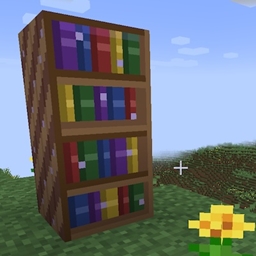
A magical bookshelf that can store up to 1000 enchanted books!

Community voices
Reviews
No reviews yet. Be the first to review this project!
Get it on
Available Platforms
About
Project Details
For authors
Embed Badge
If you're the author of this project, you can embed a live badge anywhere that supports HTML or Markdown. It updates automatically whenever ratings change.
Use HTML for any page that supports it, or Markdown for README files and Markdown-based descriptions.
Identifiers
Platform IDs
Resources
External Links
About
Description
Enchanted BookShelf
Store, search, and split your enchanted books with ease.
Enchanted BookShelf adds a single powerful block to Minecraft: a magical bookshelf capable of holding up to 1,000 enchanted books with a built-in search engine and an enchantment extraction system.
Features
Massive Enchanted Book Storage
The Enchanted Bookshelf is a tall, double-block structure that stores up to 1,000 enchanted books in a single place. No more chests full of unsorted books — place them all in one bookshelf and find exactly what you need.
Real-Time Localized Search
A search bar at the top of the GUI lets you filter your collection instantly as you type. Search by enchantment name (e.g. "Protection", "Sharpness") or by level using Roman numerals ("IV", "V"). The search uses your client's language, so it works in English, Spanish, or any language your resource pack supports.
Enchantment Index Panel
A side panel lists every unique enchantment stored in the bookshelf at a glance. Click any enchantment name to instantly filter the storage to only books containing that enchantment. Matching entries are highlighted in yellow.
Enchantment Extraction
Got a book with multiple enchantments and only need one? Right-click the book to open the extraction panel. Click the enchantment you want to separate, and it will be split into its own individual enchanted book.
Extraction requires three tools in the tool panel:
- Ink Bottle — 5 uses per bottle
- Writing Quill — 5 uses per quill
- Blank Book — 1 consumed per extraction
Each extraction consumes one use of Ink and Quill, one blank Book, and rewards the player with experience points (enchantment level × 3 XP).
Always-Visible Tool Panel
The tool panel sits below the enchantment index and is always accessible — you can insert your Ink Bottle, Writing Quill, and blank Books at any time, not just during extraction. Ghost silhouettes show which items go in each slot when empty.
Crafting Recipes
Enchanted Bookshelf
| Diamond | Bookshelf | Diamond |
| Bookshelf | Chest | Bookshelf |
| Diamond | Bookshelf | Diamond |
Ink Bottle (Shapeless)
Glass Bottle + Ink Sac + Lapis Lazuli
Writing Quill (Shapeless)
Feather + Stick + Gold Nugget
How It Works
- Craft the Enchanted Bookshelf and place it — it occupies two blocks vertically.
- Store enchanted books by placing them in the 54-slot grid (scrollable up to 1,000 books).
- Search for any enchantment using the search bar or click an entry in the side panel.
- Extract individual enchantments from multi-enchanted books:
- Insert an Ink Bottle, Writing Quill, and blank Books into the tool panel.
- Right-click a multi-enchanted book to open the extraction panel.
- Click the enchantment you want — a new single-enchantment book is created and added to your inventory.
Details
- Double block with horizontal rotation — faces the player when placed.
- Breaking either half drops the block and all stored books.
- Shift-click support for quickly moving books and tools in/out.
- Scrollbar with mouse wheel support and drag-to-scroll.
- Supports Minecraft 1.21 and 1.21.1 on NeoForge.
- Available in English and Spanish.
Requirements
- Minecraft 1.21 or 1.21.1
- NeoForge (21.0.167+ for 1.21, 21.1.84+ for 1.21.1)
- No other mod dependencies
Screenshots
Gallery
Versions
Files
Relations
Project Relations
More like this
Similar Mods
Suggestions use data such as tags, dependencies, dependents, descriptions, titles, and more to rank how much they overlap with this mod.
On ModDex
Community snapshot
By the numbers
Statistics

Get it on
Available Platforms
On ModDex
Community snapshot
By the numbers
Statistics
Resources