
Community listing page, reviews here may not be monitored by the author.
Fast Pot


No reviews yet
Fast Pots is a client-side Fabric mod that lets you quickly move splash and lingering potions into your hotbar with a simple key press. No more dragging – just hold shift and hover over the potions you want, and they'll automatically fill the hotbar slots
Community voices
Reviews
No reviews yet. Be the first to review this project!
Get it on
Available Platforms
Compatibility
Supported Environments
Runs entirely on the client. Works on vanilla servers.
About
Project Details
For authors
Embed Badge
If you're the author of this project, you can embed a live badge anywhere that supports HTML or Markdown. It updates automatically whenever ratings change.
Use HTML for any page that supports it, or Markdown for README files and Markdown-based descriptions.
Identifiers
Platform IDs
Resources
External Links
About
Description
✨ Fast Pots Features
Select which hotbar slots – Choose exactly which slots (1‑9) should receive potions. Customize it to your playstyle.
Filter by potion type – Pick between healing potions, buffs (Speed, Fire Resistance, Regeneration, Strength), or both. Only the potions you want will be moved.
Auto‑replace items – If a configured hotbar slot contains a non‑potion item, Fast Pots can automatically replace it with a potion from your inventory (optional, toggleable).
Simple activation – Just hold Shift and hover over any potion in your inventory. It will instantly move to the next available hotbar slot you've selected.
Adjustable delay – Set a delay between moves (10‑100 ms) to prevent accidental rapid transfers.
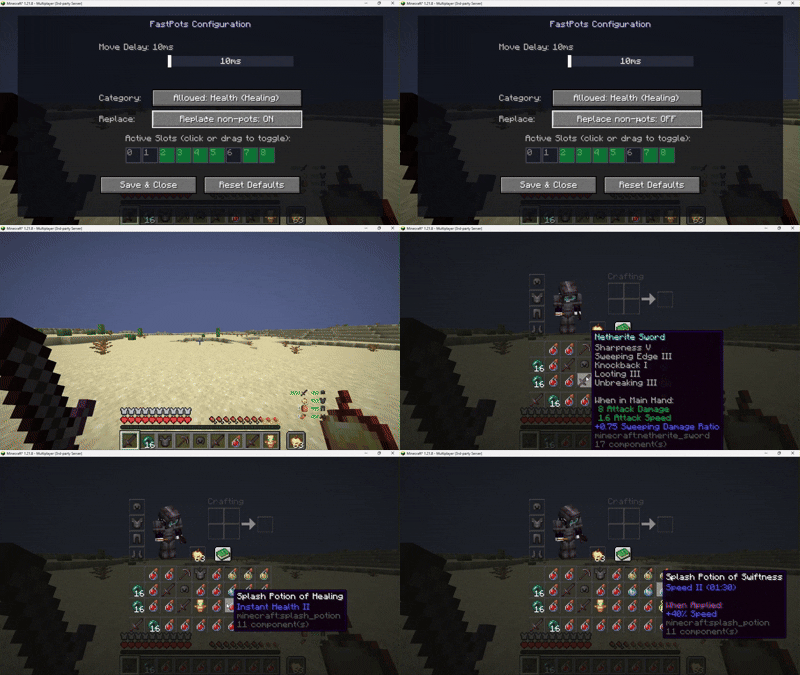
Visual configuration screen – Uses Minecraft's native textures to display a grid of your hotbar and inventory. Click or drag to select slots and tweak the delay – all with a clean, intuitive interface.
Persistent config – Your settings are saved in a JSON file and reloaded automatically.
📸 Screenshots
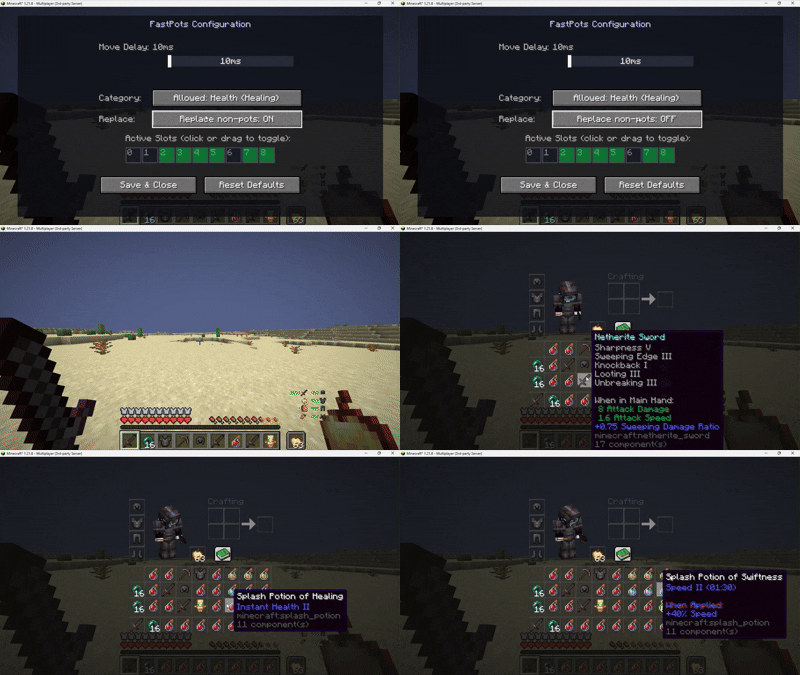
Config screen – Hotbar grid with green overlays for selected slots, delay slider, potion type toggles.
In‑game – Moving potions by shift‑hovering, with auto‑replace active.
🔧 Requirements
Fabric Loader ≥0.18.4
Fabric API
Java 21
🎮 How to use
Install the mod and launch Minecraft.
Open the config screen with F6 (default key, changeable in Controls).
Select the hotbar slots where you want potions to go (click or drag).
Choose the potion types you want to move: Healing, Buffs, or Both.
Optionally enable "Replace non‑potion items" to automatically overwrite unwanted items in your configured hotbar slots.
Adjust the delay if needed.
In‑game, hold Shift and hover over any eligible potion in your inventory – it will instantly move to the next free hotbar slot you've selected.
⚠️ Disclaimer
This mod is client-side only and does not modify game files or network packets. However, some servers may consider automated inventory management (such as quick potion moving) as an unfair advantage and therefore forbidden by their rules.
Use this mod at your own risk. I am not responsible for any bans or other sanctions applied by server administrators. Always check the rules of the servers you play on before using any client-side modifications.
🐛 Bug reports & suggestions
Send me dm discord:
marcellesa
✨ Fast Pots Features
Select which hotbar slots – Choose exactly which slots (1‑9) should receive potions. Customize it to your playstyle.
Filter by potion type – Pick between healing potions, buffs (Speed, Fire Resistance, Regeneration, Strength), or both. Only the potions you want will be moved.
Auto‑replace items – If a configured hotbar slot contains a non‑potion item, Fast Pots can automatically replace it with a potion from your inventory (optional, toggleable).
Simple activation – Just hold Shift and hover over any potion in your inventory. It will instantly move to the next available hotbar slot you've selected.
Adjustable delay – Set a delay between moves (10‑100 ms) to prevent accidental rapid transfers.
Visual configuration screen – Uses Minecraft's native textures to display a grid of your hotbar and inventory. Click or drag to select slots and tweak the delay – all with a clean, intuitive interface.
Persistent config – Your settings are saved in a JSON file and reloaded automatically.
📸 Screenshots
Config screen – Hotbar grid with green overlays for selected slots, delay slider, potion type toggles.
In‑game – Moving potions by shift‑hovering, with auto‑replace active.
🔧 Requirements
Minecraft
Fabric Loader ≥0.18.4
Fabric API
Java 21
🎮 How to use
Install the mod and launch Minecraft.
Open the config screen with F6 (default key, changeable in Controls).
Select the hotbar slots where you want potions to go (click or drag).
Choose the potion types you want to move: Healing, Buffs, or Both.
Optionally enable "Replace non‑potion items" to automatically overwrite unwanted items in your configured hotbar slots.
Adjust the delay if needed.
In‑game, hold Shift and hover over any eligible potion in your inventory – it will instantly move to the next free hotbar slot you've selected.
⚠️ Disclaimer
This mod is client-side only and does not modify game files or network packets. However, some servers may consider automated inventory management (such as quick potion moving) as an unfair advantage and therefore forbidden by their rules.
Use this mod at your own risk. I am not responsible for any bans or other sanctions applied by server administrators. Always check the rules of the servers you play on before using any client-side modifications.
🐛 Bug reports & suggestions
Send me dm discord:
marcellesa
Screenshots
Gallery
-
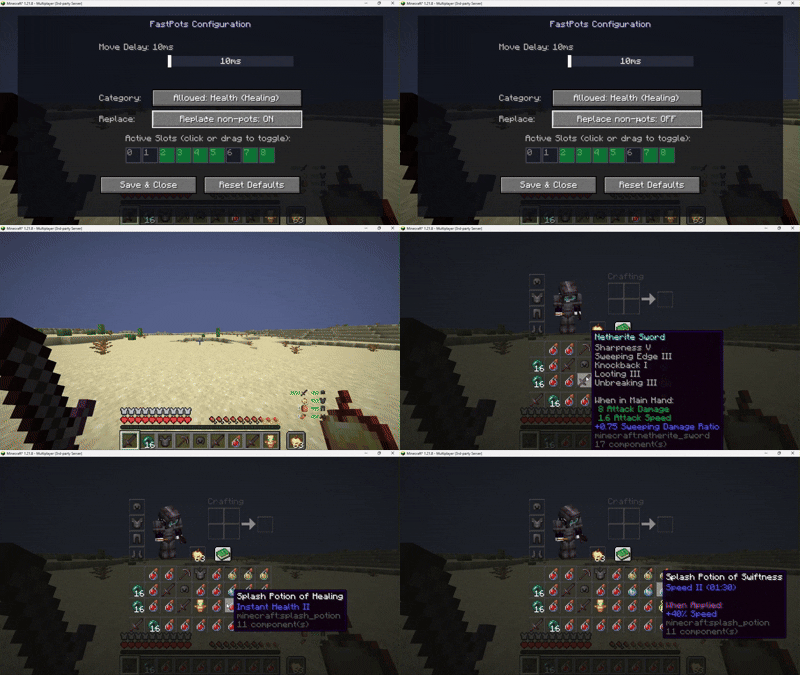 Demo Demo menu config.
Versions
Files
Relations
Project Relations
More like this
Similar Mods
Suggestions use data such as tags, dependencies, dependents, descriptions, titles, and more to rank how much they overlap with this mod.
On ModDex
Community snapshot
By the numbers
Statistics
Want to reach Minecraft players?
We're looking for a server hosting partner to feature here and other parts of the site. Interested? Send us a message!
Get in touchGet it on
Available Platforms
On ModDex
Community snapshot
By the numbers
Statistics
Resources