
Community listing page, reviews here may not be monitored by the author.
Findme:salvation


No reviews yet
Findme:salvation is a mod that customizes taming conditions and riding effects for mobs.
Community voices
Reviews
No reviews yet. Be the first to review this project!
Get it on
Available Platforms
Compatibility
Supported Environments
Must be installed on both the client and the server.
About
Project Details
For authors
Embed Badge
If you're the author of this project, you can embed a live badge anywhere that supports HTML or Markdown. It updates automatically whenever ratings change.
Use HTML for any page that supports it, or Markdown for README files and Markdown-based descriptions.
Identifiers
Platform IDs
Resources
External Links
About
Description
Introduction
Findme:salvation is a mod that customizes taming conditions and riding effects for mobs.
It mainly solves the following problems:
1. Unify and customize taming conditions for vanilla or other modded mobs.
2. Decide whether to keep the original mod's taming, use only this mod's taming, allow both to coexist, or completely disable taming.
3. Add riding capability to already tamed mobs that were originally unmountable.
4. Allow a single mob to have multiple movement states such as land, flight, and water.

Quick Start
When configuring a mob for the first time, modpack authors can follow these steps:
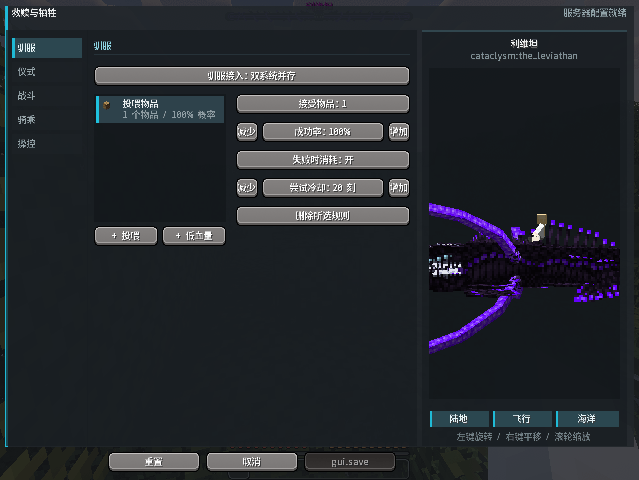
1. Enter the client command `/salvation editor`.
2. In the manager, search for the mob's name or registry ID, e.g., `minecraft:spider`.
3. Click the mob and then click "Open Details", or double-click the mob to enter the editor.
4. On the "Taming" page, select the taming method.
5. If you need Redemption/Sacrifice, enable the ritual on the "Ritual" page and set the life threshold that triggers the condition.
6. On the "Combat" page, choose the combat behavior after taming.
7. On the "Riding" page, select "Redemption Riding" and set the movement type, body size, seat, and posture.
8. On the "Control" page, choose specific handling for each enabled state (land, flight, water).
9. Click "Save". Changes in the editor are only local drafts until saved.
10. Enter the game and spawn a new, ownerless version of the mob to test.
Riding Controls
- Mount the mob: Right-click on the mob
- Forward/Backward: `W` / `S`
- Lateral control: `A` / `D`
- Jump/Ascend: Space
- Descend: `Shift`
- Sprint: `Ctrl`
- Dismount: `X`
Note: While riding, the vanilla `Shift` dismount is blocked because `Shift` is used for descending. Please use the dedicated dismount key.
Redemption and Sacrifice
When the Redemption and Sacrifice taming condition is enabled, the mob will be locked at a specific health threshold – it will be fixed in place, and its AI/gravity will be paused.
- Redemption (left-click hold): After charging, the mob will be tamed.
- Sacrifice (right-click hold): After charging, the mob dies immediately and drops loot normally.

Editor Features
You can add feeding rules:
- Normal feeding: Customize feed items and set the success probability.
- Low-health feeding: Customize the health range within which items can be fed, and set the probability.
AI logic for tamed mobs:
- Passive: Never actively attack mobs.
- Vigilant: Protect itself; attack attackers when the owner is attacked.
- Assist: Includes Vigilant behavior, and additionally, if the owner lands two hits on the same target within 50 ticks, the mob will actively attack that target.
- Original: Attempt to retain the original mod's target selection, but still protect the owner and allies.
Mobs tamed by this mod will not harm the owner, the owner's companions, or faction allies.

Introduction
Findme:salvation is a mod that customizes taming conditions and riding effects for mobs. It mainly solves the following problems:
- Unify and customize taming conditions for vanilla or other modded mobs.
- Decide whether to keep the original mod's taming, use only this mod's taming, allow both to coexist, or completely disable taming.
- Add riding capability to already tamed mobs that were originally unmountable.
- Allow a single mob to have multiple movement states such as land, flight, and water.
Quick Start
When configuring a mob for the first time, modpack authors can follow these steps:
- Enter the client command
/salvation editor. - In the manager, search for the mob's name or registry ID, e.g.,
minecraft:spider. - Click the mob and then click "Open Details", or double-click the mob to enter the editor.
- On the "Taming" page, select the taming method.
- If you need Redemption/Sacrifice, enable the ritual on the "Ritual" page and set the life threshold that triggers the condition.
- On the "Combat" page, choose the combat behavior after taming.
- On the "Riding" page, select "Redemption Riding" and set the movement type, body size, seat, and posture.
- On the "Control" page, choose specific handling for each enabled state (land, flight, water).
- Click "Save". Changes in the editor are only local drafts until saved.
- Enter the game and spawn a new, ownerless version of the mob to test.
Riding Controls
- Mount the mob: Right-click on the mob
- Forward/Backward:
W/S - Lateral control:
A/D - Jump/Ascend: Space
- Descend:
Shift - Sprint:
Ctrl - Dismount:
X
Note: While riding, the vanilla Shift dismount is blocked because Shift is used for descending. Please use the dedicated dismount key.
Redemption and Sacrifice
When the Redemption and Sacrifice taming condition is enabled, the mob will be locked at a specific health threshold – it will be fixed in place, and its AI/gravity will be paused.
- Redemption (left-click hold): After charging, the mob will be tamed.
- Sacrifice (right-click hold): After charging, the mob dies immediately and drops loot normally.
Editor Features
You can add feeding rules:
- Normal feeding: Customize feed items and set the success probability.
- Low-health feeding: Customize the health range within which items can be fed, and set the probability.
AI logic for tamed mobs:
- Passive: Never actively attack mobs.
- Vigilant: Protect itself; attack attackers when the owner is attacked.
- Assist: Includes Vigilant behavior, and additionally, if the owner lands two hits on the same target within 50 ticks, the mob will actively attack that target.
- Original: Attempt to retain the original mod's target selection, but still protect the owner and allies.
Mobs tamed by this mod will not harm the owner, the owner's companions, or faction allies.
Screenshots
Gallery
Versions
Files
Relations
Project Relations
More like this
Similar Mods
Suggestions use data such as tags, dependencies, dependents, descriptions, titles, and more to rank how much they overlap with this mod.
On ModDex
Community snapshot
By the numbers
Statistics
Want to reach Minecraft players?
We're looking for a server hosting partner to feature here and other parts of the site. Interested? Send us a message!
Get in touchGet it on
Available Platforms
On ModDex
Community snapshot
By the numbers
Statistics
Resources