
Community listing page, reviews here may not be monitored by the author.
FirstAid HUD Scale

No reviews yet
Mod that allows you to change the hud size of first aid mod
Community voices
Reviews
No reviews yet. Be the first to review this project!
Get it on
Available Platforms
About
Project Details
For authors
Embed Badge
If you're the author of this project, you can embed a live badge anywhere that supports HTML or Markdown. It updates automatically whenever ratings change.
Use HTML for any page that supports it, or Markdown for README files and Markdown-based descriptions.
Identifiers
Platform IDs
Resources
External Links
About
Description
# First Aid HUD Scale
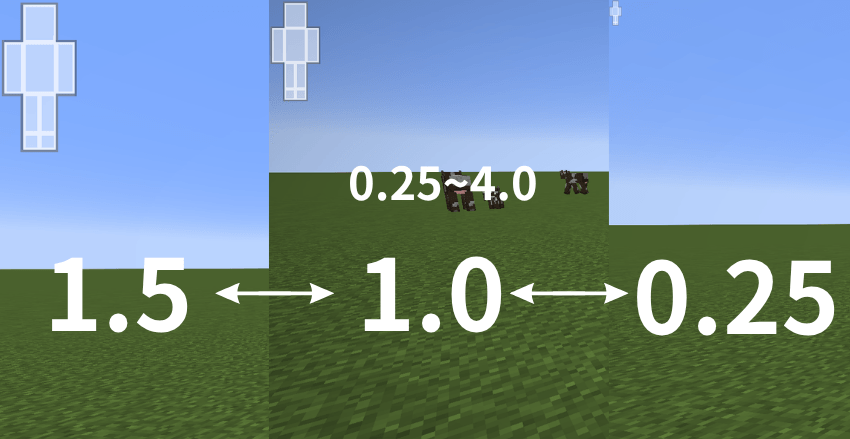
This is a lightweight add-on MOD that allows you to freely zoom in and out on the **First Aid** health HUD (body part display) **using only the config**.
Since this isn’t a setting you’ll likely adjust frequently, it’s managed via `config/faidhudscale-client.toml` rather than through in-game options. It’s perfect for players who find the HUD too large or too small when they increase the UI scale.
## ✨ Features
- Change the First Aid HUD size simply by editing the config (scale from 0.25 to 4.0)
- Designed to remain stable even after First Aid updates, as it does not directly modify First Aid’s core code (does not use Mixins, etc.)
- Completely optional dependency; will not crash even if First Aid is not installed
- Lightweight with minimal ongoing processing; virtually no impact on performance
## 📋 System Requirements
| Item | Version |
|---|---|
| Minecraft | 1.20.1 |
| Minecraft Forge | 47.4.10 or later |
| Dependent Mod | First Aid (not required, but this mod is pointless without it) |
## 🔧 Installation Instructions
1. Install Minecraft Forge 1.20.1 (47.4.10 or later)
2. Place First Aid in the `mods` folder
3. Place this mod’s JAR file in the same `mods` folder and launch the game
## ⚙️ Configuration Options
After the first launch, `config/faidhudscale-client.toml` will be automatically generated.
| Option | Description | Default |
|---|---|---|
| `enabled` | Enables/disables HUD scaling | `true` |
| `scale` | Scaling factor (`1.0` is original size, `2.0` is double size) | `1.0` |
| `overlayId` | ID of the overlay to zoom | `firstaid:hud` |
| `anchorX` / `anchorY` | Anchor points for zooming (screen ratio 0.0–1.0) | `0.0` / `0.0` |
| `logOverlayIds` | Output debug logs to identify target IDs | `false` |
## ❓ If the size does not change
The value of `overlayId` may not match your environment. Set `logOverlayIds` to `true`, start the game once, check the overlay ID detected from `logs/latest.log`, and set the correct value to `overlayId`.
# First Aid HUD Scale
**First Aid** の体力HUD(ボディパーツ表示)のサイズを、**config だけで**自由に拡大・縮小できるようにする軽量アドオンMODです。
頻繁にいじる設定ではないと思うので、ゲーム内オプションではなく `config/faidhudscale-client.toml` で管理する方式にしています。UIスケールを上げるとHUDが大きすぎる/小さすぎる…という方にぴったりです。
## ✨ 特徴
- config を編集するだけで First Aid のHUDサイズを変更可能(倍率 0.25〜4.0)
- First Aid 本体のコードを直接いじらない(Mixinなどを使わない)ので、First Aid が更新されても壊れにくい設計
- First Aid が導入されていなくてもクラッシュしない、完全な任意依存
- 軽量・常時処理は最小限、パフォーマンスへの影響はほぼなし
## 📋 動作環境
| 項目 | バージョン |
|---|---|
| Minecraft | 1.20.1 |
| Minecraft Forge | 47.4.10 以降 |
| 依存MOD | First Aid(必須ではありませんが、これがないと意味がありません) |
## 🔧 導入方法
1. Minecraft Forge 1.20.1 (47.4.10 以降) を導入
2. First Aid を `mods` フォルダに入れる
3. 本MODのjarファイルも同じ `mods` フォルダに入れて起動
## ⚙️ 設定項目
初回起動後、`config/faidhudscale-client.toml` が自動生成されます。
| 項目 | 説明 | デフォルト |
|---|---|---|
| `enabled` | HUD拡縮機能のON/OFF | `true` |
| `scale` | 拡大率(`1.0`が等倍、`2.0`で2倍サイズ) | `1.0` |
| `overlayId` | 拡大対象のオーバーレイID | `firstaid:hud` |
| `anchorX` / `anchorY` | 拡大の基準点(画面比率 0.0〜1.0) | `0.0` / `0.0` |
| `logOverlayIds` | 対象IDを調べるためのデバッグログ出力 | `false` |
Screenshots
Gallery
-
 image
image
Versions
Files
Relations
Project Relations
More like this
Similar Mods
Suggestions use data such as tags, dependencies, dependents, descriptions, titles, and more to rank how much they overlap with this mod.
On ModDex
Community snapshot
By the numbers
Statistics
Want to reach Minecraft players?
We're looking for a server hosting partner to feature here and other parts of the site. Interested? Send us a message!
Get in touchGet it on
Available Platforms
On ModDex
Community snapshot
By the numbers
Statistics
Resources