
Community listing page, reviews here may not be monitored by the author.
FlexiBook


No reviews yet
simply create a custom book with a web editor. supported inject image, auto layout, custom background, register book by resourcespack, i18n, inject click link
Community voices
Reviews
No reviews yet. Be the first to review this project!
Get it on
Available Platforms
Compatibility
Supported Environments
Must be installed on both the client and the server.
About
Project Details
For authors
Embed Badge
If you're the author of this project, you can embed a live badge anywhere that supports HTML or Markdown. It updates automatically whenever ratings change.
Use HTML for any page that supports it, or Markdown for README files and Markdown-based descriptions.
Identifiers
Platform IDs
About
Description
FlexiBook
Adaptive layout books for 1.20.1-26.2 neoforge&fabric
more versions coming soon
Custom DataComponent + client layout engine + AdaptiveBookScreen, keeping a book-like interaction while supporting:
You can use web book editor without coding. It is in sourcecode repo on Github
(the description on curseforge almost copied from Github README.md)
- HTML-subset markup (
[h1]/[p]/[b]/[color]/[img]/[link]…) - Resolve translation keys and reflow pagination when the book opens (current client language)
- Auto scale-down for long content; optional two-column layout
- Safe links: registered command ids only, or confirmed http(s) URLs
- In-book search highlight
- Built-in default font
flexibook:default(unihex Unifont; omittingfontdoes not fall back tominecraft:default) AdaptiveBookBuilder/FlexiBookAPIfor other mods- Data-driven themes (
assets/<ns>/flexibook/themes/<id>.json)
| Doc | Description |
|---|---|
| docs/API.md | Full API for other mods (fonts §12, data books §14) — English |
| docs/API.zh-CN.md | Full API — 中文 |
| editor/README.md | Companion real-time editor (Electron; same unihex ZIP as the game) |
| docs/EDITOR_PACK_GUIDE.md | Pack export/import & /flexibook give (detailed) |
| docs/README.md | Design / plans / todo index |
| README.zh-CN.md | 中文说明 |
Requirements
- JDK 21 for Gradle (JDK 25/26 breaks on Gradle/Groovy bytecode)
- Minecraft 1.21.1
- NeoForge 21.1.x (see
neo_versioningradle.properties)
Build
# If default java is not 21:
export JAVA_HOME=/usr/lib/jvm/java-21-openjdk
# Or set org.gradle.java.home=... in gradle.properties

./gradlew build
# jar: build/libs/flexibook-1.0.0.jar

./gradlew runClient
In-game
Creative tab FlexiBook:
- Blank
flexi_book - FlexiBook Field Guide sample (EN/ZH lang; adaptive layout, i18n, rich text, images, links, search)
Right-click to open; arrow keys or buttons to turn pages; search at the bottom.
Data-driven books from a resource pack (after enabling the pack, F3+T):
/flexibook list
/flexibook give <namespace:bookId>
# e.g. /flexibook give note:note11
Requires permission level ≥ 2. Creative only lists blank + built-in demo; custom packs use the command.
Integrating other mods
Full reference (dependencies, Builder, markup, link safety, components, i18n, theme JSON, FAQ): docs/API.md.
ItemStack book = FlexiBookAPI.builder("my_guide")
    .titleKey("mymod.book.title")
    // .defaultFont(...) optional → runtime resolvedFont() = flexibook:default
    .h1("mymod.book.ch1")
    .p("mymod.book.p1")
    .font("mymod.book.quote", ResourceLocation.withDefaultNamespace("uniform")) // per-paragraph override
    .bullet("mymod.book.b1")
    .image(ResourceLocation.fromNamespaceAndPath("mymod", "textures/gui/icon.png"), 48, 48)
    .link("mymod.book.click", FlexiBookAPI.commandAction("mymod:open_map"))
    .divider()
    .fromMarkup("[p]mymod.book.extra[/p]") // whole-book raw only if elements are empty
    .buildItem();

// Safe actions only (do not register arbitrary shell)
FlexiBookAPI.registerCommandAction("mymod:open_map", ctx -> ctx.message("mymod.map.opened"));
Raw markup only (no explicit font still uses the built-in default):
AdaptiveBookContent content = AdaptiveBookContent.ofMarkup(
    new TranslatableText("mymod.book.title"),
    """
    [h1]mymod.book.ch1[/h1]
    [p]mymod.book.p1[/p]
    [bullet]mymod.book.b1[/bullet]
    """
);
// content.resolvedFont() → flexibook:default
ItemStack stack = FlexiBookAPI.createBook(content);
DataComponent id: flexibook:adaptive_book_content.
Themes register from resource pack JSON: assets/<namespace>/flexibook/themes/<path>.json → id namespace:path.
Font priority: span/heading font → book-level font → flexibook:default (see docs/API.md §12).
Six-part pack layout
assets/<ns>/
  lang/*.json
  font/*
  textures/gui/book.png
  textures/item/flexi_book.png   # optional: overrides flexibook item icon when under assets/flexibook/...
  flexibook/
    books/<id>.json              # index: content + theme + optional font
    contents/<id>.json           # body
    themes/<id>.json
ItemStack stack = FlexiBookAPI.createBookFromDefinition(
ResourceLocation.fromNamespaceAndPath("myguide", "guide"));Markup cheat sheet
| Tag | Role |
|---|---|
[h1] [h2] |
Headings |
[p] |
Paragraph (inline styles nest) |
[b] [i] [u] |
Bold / italic / underline |
[color=#RRGGBB] |
Color |
[font font="ns:id"] / [font=ns:id] |
Inline font (overrides book font) |
[br] |
Line break |
[divider] |
Divider |
[img src="..." width="48" height="48" /] |
Image (resource path) |
[link cmd="modid:action"] / [link url="https://..."] |
Safe link |
[bullet] |
List item |
[div class="..."] |
Box container |
Escape: \[ \].
v1 scope
Done: DataComponent, dual storage (elements or rawMarkup), TagParser, adaptive layout + cache, single-page Screen, Builder, bilingual sample book, search, data-driven themes (default + contain + JSON reload), built-in flexibook:default unihex (same ZIP as editor), standalone editor with Unihex preview, pack export/import, /flexibook give|list.
Not in v1 / simplified:
- Full lectern support (
FlexiBookAPI.LecternCompatstub only) - No hijacking vanilla
written_book - In-book WYSIWYG edit, tables, auto TOC, 3D page-turn animation
License
GNU GPL v3 © PhantomDaze
A mod for pack authors and mod developers.
Features: multilingual support, insert images, custom fonts, custom text colors, clickable links, auto re-layout when switching languages, automatic pagination, custom book backgrounds, search and locate image keywords, and caching layout results to boost performance.
Includes an editor that can be launched directly or packaged as an Electron app.
You can register new books using pure texture packs, and the editor lets you export or import texture packs for editing.
Screenshots
Gallery
-
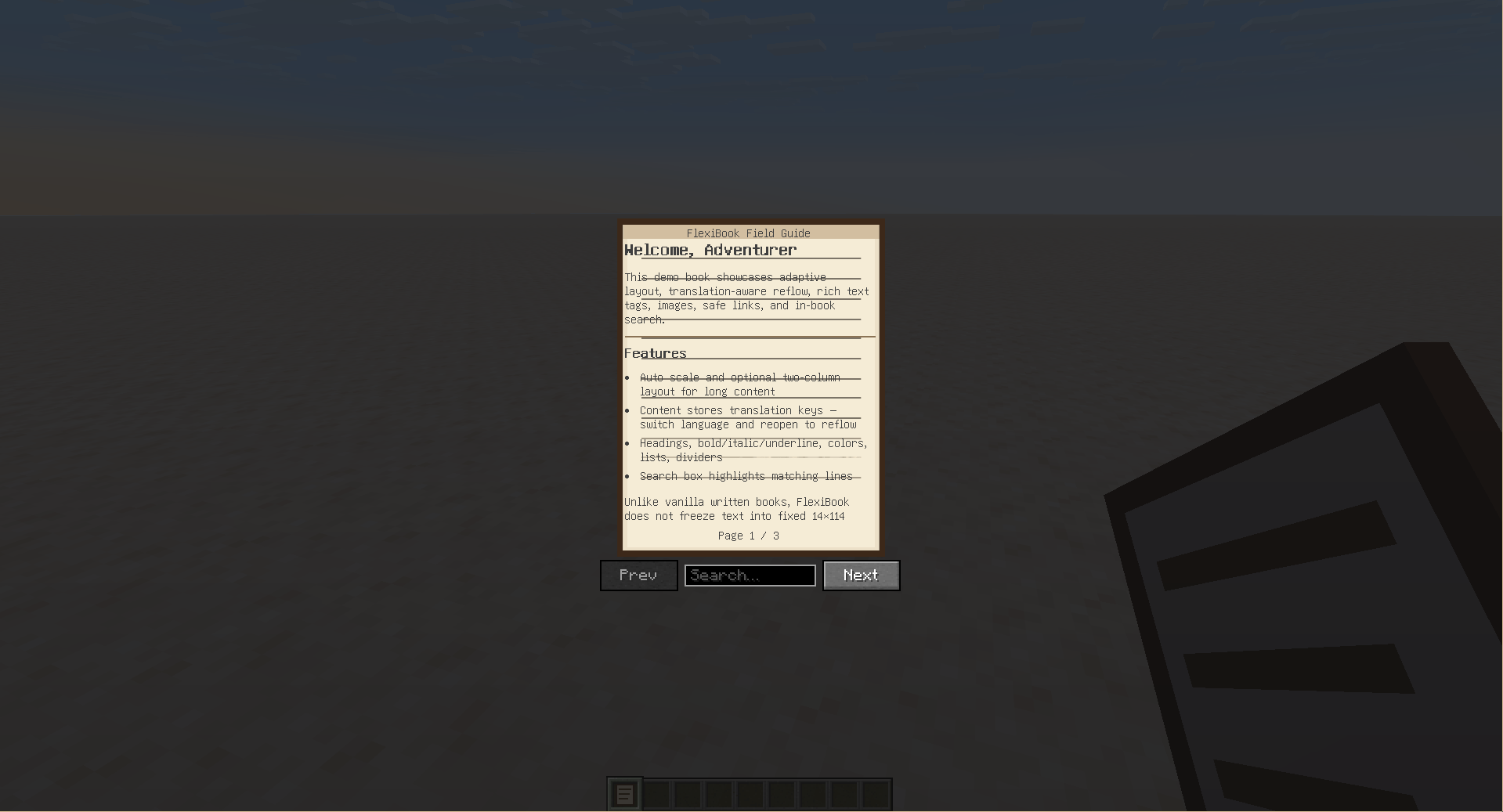 in game
 -
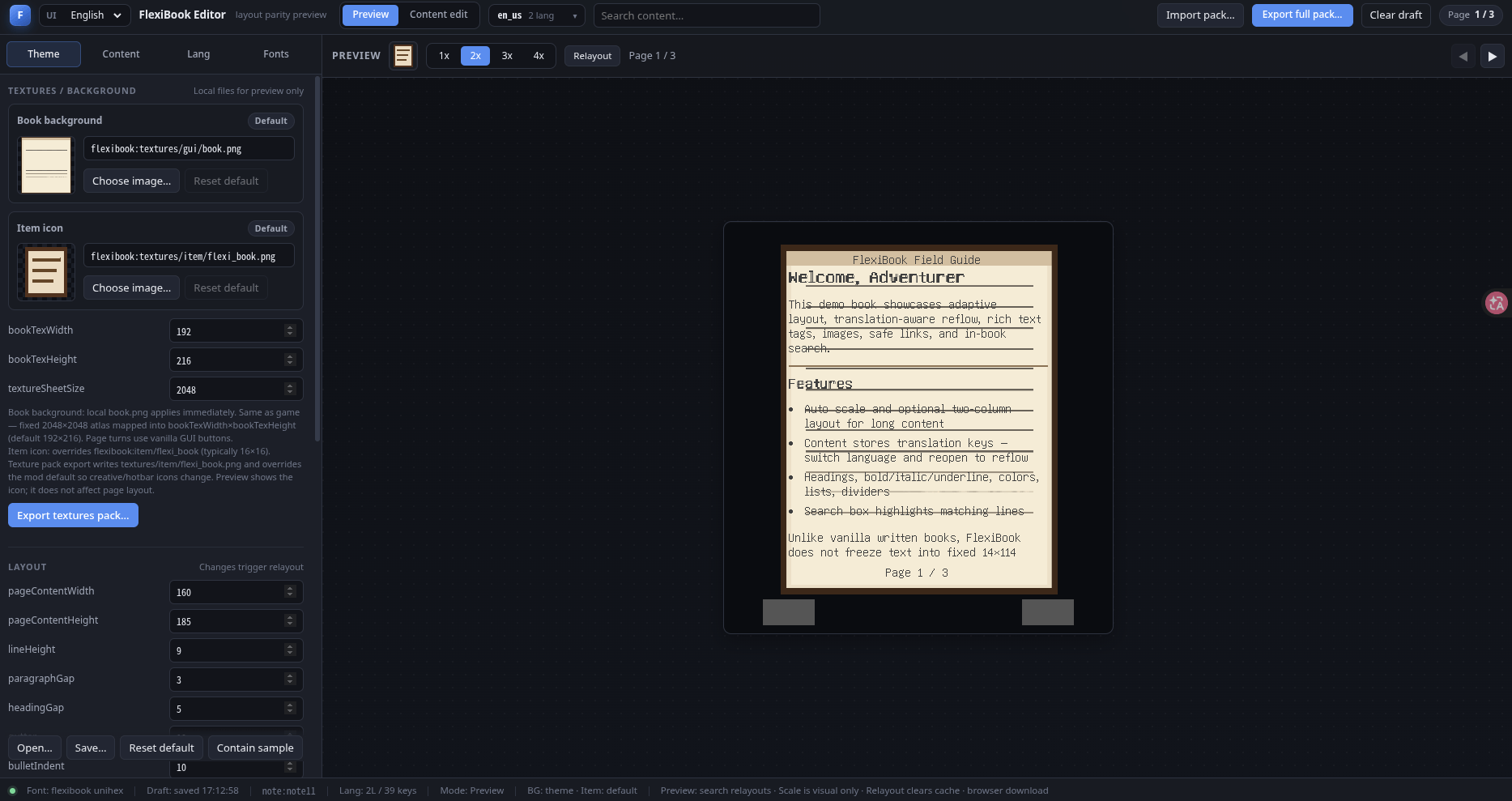 editor-en
-
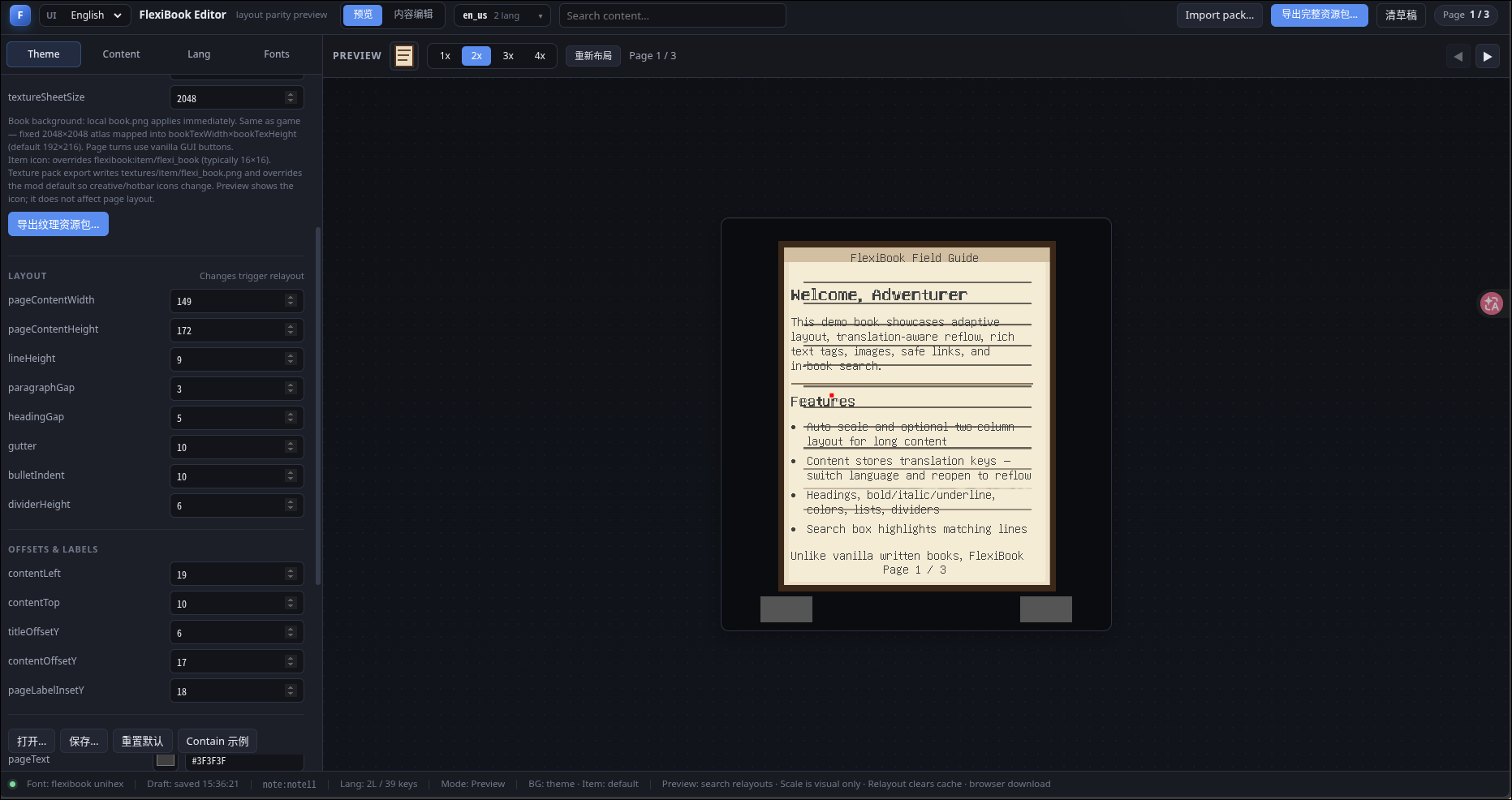 Web Editor Use it to simplely create new book
 -
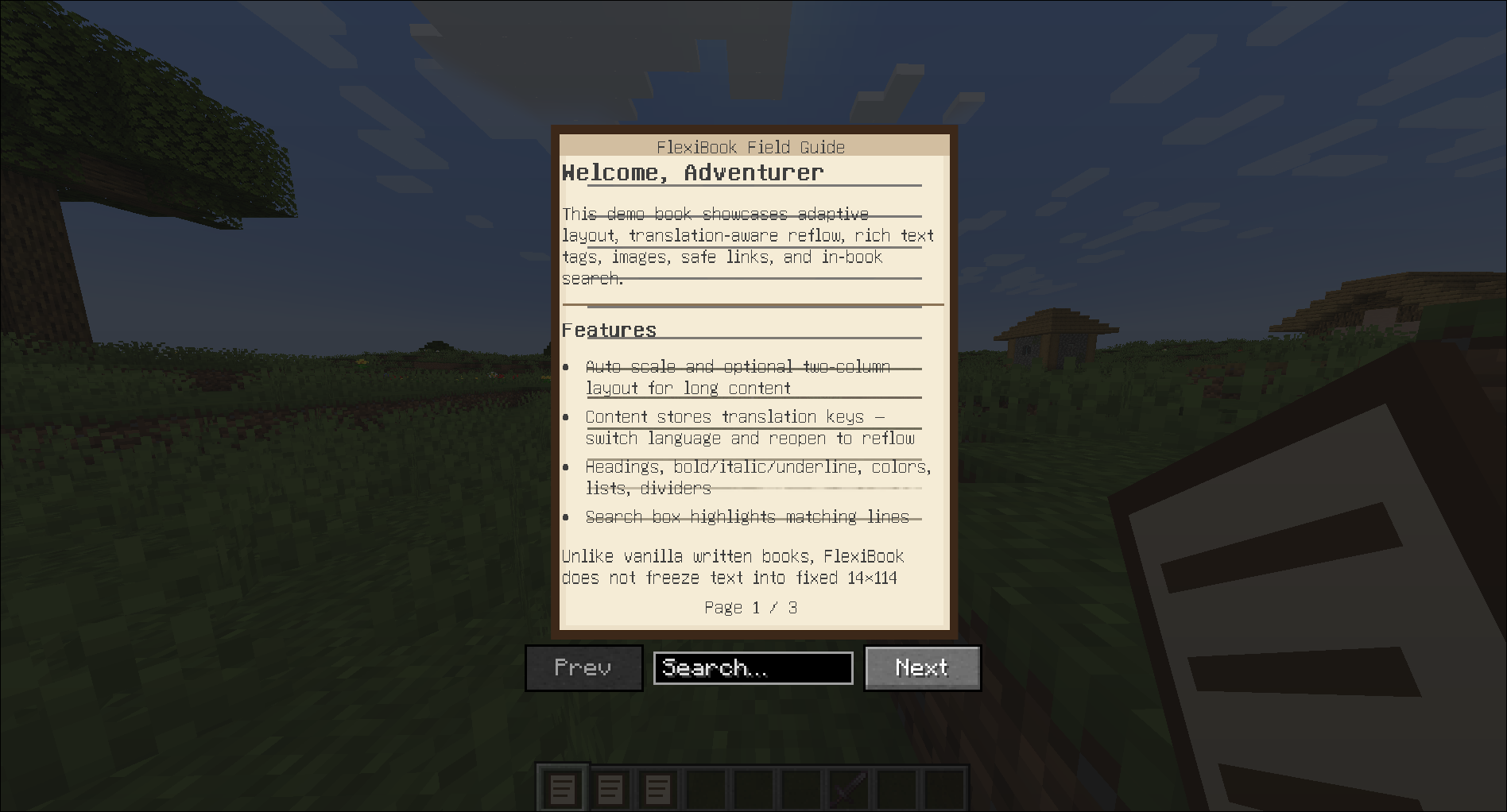 look the same
Versions
Files
Relations
Project Relations
More like this
Similar Mods
Suggestions use data such as tags, dependencies, dependents, descriptions, titles, and more to rank how much they overlap with this mod.
On ModDex
Community snapshot
By the numbers
Statistics
Want to reach Minecraft players?
We're looking for a server hosting partner to feature here and other parts of the site. Interested? Send us a message!
Get in touchGet it on
Available Platforms
On ModDex
Community snapshot
By the numbers