
Community listing page, reviews here may not be monitored by the author.
Focus on Importances


No reviews yet
A Mod that forces you to keep true to promises.
Community voices
Reviews
No reviews yet. Be the first to review this project!
Get it on
Available Platforms
Compatibility
Supported Environments
Runs entirely on the client. Works on vanilla servers.
About
Project Details
For authors
Embed Badge
If you're the author of this project, you can embed a live badge anywhere that supports HTML or Markdown. It updates automatically whenever ratings change.
Use HTML for any page that supports it, or Markdown for README files and Markdown-based descriptions.
Identifiers
Platform IDs
Resources
External Links
About
Description
Mod Name: SessionControl
Mod Overview:
The SessionControl mod for Minecraft is designed to help players manage and limit their daily gameplay time, ensuring that they take breaks and don't exceed their desired playtime. This mod can be particularly useful for parents, guardians, or anyone who wants to manage their screen time more effectively. The mod provides functionality to set a daily session limit, track the time spent playing, and lock the game after a certain period of play. Once the limit is reached, the mod will display a lockout screen and prevent further play until the next day. Additionally, the mod allows players to set a reminder of what they plan to do after their session ends.
Key Features:
-
Session Time Limit:
- Players can set a specific amount of time (in minutes) to play each day. This helps manage the overall gameplay time.
- The mod will track the time elapsed since the session started and compare it with the session duration.
- Once the set time is up, the game automatically locks and prevents further play until the next day.
-
Lockout Screen:
- When the daily session time is over, the player is shown a LockoutScreen, which tells them that they have exceeded their playtime limit for the day.
- The screen displays a friendly reminder to take a break, rest, or do something else (customizable reason).
- The screen also provides a Quit Game button that the player can click to exit Minecraft immediately.
-
Customizable Session Reason:
- Before starting a session, players can set a custom reason for their play session, such as "I will play for 30 minutes and then read a book."
- This reason is stored and displayed in the lockout screen as a reminder of what they planned to do after playing.
-
Delayed Lockout for Singleplayer:
- If the player is in a singleplayer world, they may experience a delay in the lockout screen. The mod will handle this transition smoothly by ensuring the player is returned to the TitleScreen or the LockoutScreen after a short delay.
-
Persistent Settings:
- The settings for the session duration, lock status, and session reason are saved to a properties file on disk (
sessioncontrol.properties), ensuring that the player's session preferences are preserved between game sessions. - This allows players to resume their locked session or continue where they left off even after restarting Minecraft.
- The settings for the session duration, lock status, and session reason are saved to a properties file on disk (
-
Configurable Settings:
- Players can set their desired session duration (in minutes) using a slider widget.
- The reason for playing can be typed into a text field, allowing customization for each session.
- Once the session starts, the mod remembers the playtime and reason and uses it when the session ends.
-
No External Dependencies:
- The mod does not rely on external libraries like Gson or org.json. Instead, it uses the java.util.Properties class, which is native to Java, making it lightweight and easy to use.
-
Non-Intrusive Gameplay:
- The mod integrates seamlessly with Minecraft’s user interface. It only triggers the lockout screen after the designated session time has passed.
- During normal playtime, there is no interruption. Only when the time limit is reached will the player be prompted to take a break.
How it Works:
-
Session Start:
- When the player first launches the game, if they haven't been locked out for the day, a prompt screen appears asking them to set a session duration (from a range of minutes) and a custom reason for playing.
- After setting the duration and reason, the player’s session begins.
-
Tracking Session Time:
- The mod tracks the start time of the session. Each time a client tick occurs (on every game loop), it checks the time elapsed since the session began.
- If the elapsed time exceeds the set session duration, the game locks the player out and displays the LockoutScreen.
-
Lockout Screen:
- The lockout screen is a special screen that appears after the session time has been exceeded.
- The screen shows a message informing the player that their playtime is over, along with a custom reason they set earlier.
- The player is provided with an option to quit the game immediately.
-
Session Persistence:
- The mod saves session data (such as the session start time, duration, and lock status) to a properties file in the
config/directory of the Minecraft installation. - This ensures that when the player restarts the game, their session data is preserved, and the lockout is enforced appropriately.
- The mod saves session data (such as the session start time, duration, and lock status) to a properties file in the
-
Multi-Platform Support:
- This mod works for both singleplayer and multiplayer modes.
- In singleplayer, the lockout screen is displayed once the session ends.
- In multiplayer, the mod will disconnect the player from the server and show the lockout screen.
Why Use This Mod:
- Time Management: It helps players manage their screen time, especially useful for children or anyone who tends to lose track of time while playing.
- Health Benefits: By enforcing breaks, the mod encourages healthy gaming habits, reducing long hours of continuous play.
- Focus: Players can set a goal for their gaming session (e.g., "I will play Minecraft for 30 minutes and then read a book"), helping them balance gaming with other activities.
- Customization: The player has full control over the session duration and can tailor the experience to suit their preferences.
- Easy Setup: With no external dependencies, this mod is lightweight and easy to install and configure.
Installation:
- Install Fabric: To use this mod, you need the Fabric mod loader. If you don’t have it installed yet, you can download and install it from the official website.
- Download the Mod: Download the SessionControl mod .jar file from a trusted mod repository (e.g., CurseForge, Modrinth).
- Place the Mod in the Mods Folder: Place the downloaded .jar file in the
mods/folder of your Minecraft directory. - Run Minecraft: Launch Minecraft with the Fabric mod loader, and the SessionControl mod should automatically load.
Future Updates and Features:
- More Customization: Future updates may include more granular controls, such as different lockout times based on the day of the week or multiple session limits.
- Graphical Enhancements: Improving the UI of the lockout screen to be more interactive and colorful.
- Multi-Account Support: Adding support for different session limits for different Minecraft accounts on the same installation.
Conclusion:
The SessionControl mod provides an effective, customizable, and lightweight solution to manage your daily gameplay time in Minecraft. By setting daily session limits, taking regular breaks, and ensuring that your gameplay doesn't get out of hand, this mod can help you maintain a healthy balance between gaming and other activities. With its user-friendly interface and persistence between game sessions, this mod is perfect for players of all ages who want to make sure they don’t overdo it while enjoying their Minecraft experience.
CURRENTLY YOU HAVE TO MANUALLY RESET THE SESSION IN THE FILES, THIS WILL BE FIXED SOON
Mod Name: SessionControl
Mod Overview:
The SessionControl mod for Minecraft is designed to help players manage and limit their daily gameplay time, ensuring that they take breaks and don't exceed their desired playtime. This mod can be particularly useful for parents, guardians, or anyone who wants to manage their screen time more effectively. The mod provides functionality to set a daily session limit, track the time spent playing, and lock the game after a certain period of play. Once the limit is reached, the mod will display a lockout screen and prevent further play until the next day. Additionally, the mod allows players to set a reminder of what they plan to do after their session ends.
Key Features:
-
Session Time Limit:
- Players can set a specific amount of time (in minutes) to play each day. This helps manage the overall gameplay time.
- The mod will track the time elapsed since the session started and compare it with the session duration.
- Once the set time is up, the game automatically locks and prevents further play until the next day.
-
Lockout Screen:
- When the daily session time is over, the player is shown a LockoutScreen, which tells them that they have exceeded their playtime limit for the day.
- The screen displays a friendly reminder to take a break, rest, or do something else (customizable reason).
- The screen also provides a Quit Game button that the player can click to exit Minecraft immediately.
-
Customizable Session Reason:
- Before starting a session, players can set a custom reason for their play session, such as "I will play for 30 minutes and then read a book."
- This reason is stored and displayed in the lockout screen as a reminder of what they planned to do after playing.
-
Delayed Lockout for Singleplayer:
- If the player is in a singleplayer world, they may experience a delay in the lockout screen. The mod will handle this transition smoothly by ensuring the player is returned to the TitleScreen or the LockoutScreen after a short delay.
-
Persistent Settings:
- The settings for the session duration, lock status, and session reason are saved to a properties file on disk (
sessioncontrol.properties), ensuring that the player's session preferences are preserved between game sessions. - This allows players to resume their locked session or continue where they left off even after restarting Minecraft.
- The settings for the session duration, lock status, and session reason are saved to a properties file on disk (
-
Configurable Settings:
- Players can set their desired session duration (in minutes) using a slider widget.
- The reason for playing can be typed into a text field, allowing customization for each session.
- Once the session starts, the mod remembers the playtime and reason and uses it when the session ends.
-
No External Dependencies:
- The mod does not rely on external libraries like Gson or org.json. Instead, it uses the java.util.Properties class, which is native to Java, making it lightweight and easy to use.
-
Non-Intrusive Gameplay:
- The mod integrates seamlessly with Minecraft’s user interface. It only triggers the lockout screen after the designated session time has passed.
- During normal playtime, there is no interruption. Only when the time limit is reached will the player be prompted to take a break.
How it Works:
-
Session Start:
- When the player first launches the game, if they haven't been locked out for the day, a prompt screen appears asking them to set a session duration (from a range of minutes) and a custom reason for playing.
- After setting the duration and reason, the player’s session begins.
-
Tracking Session Time:
- The mod tracks the start time of the session. Each time a client tick occurs (on every game loop), it checks the time elapsed since the session began.
- If the elapsed time exceeds the set session duration, the game locks the player out and displays the LockoutScreen.
-
Lockout Screen:
- The lockout screen is a special screen that appears after the session time has been exceeded.
- The screen shows a message informing the player that their playtime is over, along with a custom reason they set earlier.
- The player is provided with an option to quit the game immediately.
-
Session Persistence:
- The mod saves session data (such as the session start time, duration, and lock status) to a properties file in the
config/directory of the Minecraft installation. - This ensures that when the player restarts the game, their session data is preserved, and the lockout is enforced appropriately.
- The mod saves session data (such as the session start time, duration, and lock status) to a properties file in the
-
Multi-Platform Support:
- This mod works for both singleplayer and multiplayer modes.
- In singleplayer, the lockout screen is displayed once the session ends.
- In multiplayer, the mod will disconnect the player from the server and show the lockout screen.
Why Use This Mod:
- Time Management: It helps players manage their screen time, especially useful for children or anyone who tends to lose track of time while playing.
- Health Benefits: By enforcing breaks, the mod encourages healthy gaming habits, reducing long hours of continuous play.
- Focus: Players can set a goal for their gaming session (e.g., "I will play Minecraft for 30 minutes and then read a book"), helping them balance gaming with other activities.
- Customization: The player has full control over the session duration and can tailor the experience to suit their preferences.
- Easy Setup: With no external dependencies, this mod is lightweight and easy to install and configure.
Installation:
- Install Fabric: To use this mod, you need the Fabric mod loader. If you don’t have it installed yet, you can download and install it from the official website.
- Download the Mod: Download the SessionControl mod .jar file from a trusted mod repository (e.g., CurseForge, Modrinth).
- Place the Mod in the Mods Folder: Place the downloaded .jar file in the
mods/folder of your Minecraft directory. - Run Minecraft: Launch Minecraft with the Fabric mod loader, and the SessionControl mod should automatically load.
Future Updates and Features:
- More Customization: Future updates may include more granular controls, such as different lockout times based on the day of the week or multiple session limits.
- Graphical Enhancements: Improving the UI of the lockout screen to be more interactive and colorful.
- Multi-Account Support: Adding support for different session limits for different Minecraft accounts on the same installation.
Conclusion:
The SessionControl mod provides an effective, customizable, and lightweight solution to manage your daily gameplay time in Minecraft. By setting daily session limits, taking regular breaks, and ensuring that your gameplay doesn't get out of hand, this mod can help you maintain a healthy balance between gaming and other activities. With its user-friendly interface and persistence between game sessions, this mod is perfect for players of all ages who want to make sure they don’t overdo it while enjoying their Minecraft experience.
Screenshots
Gallery
-
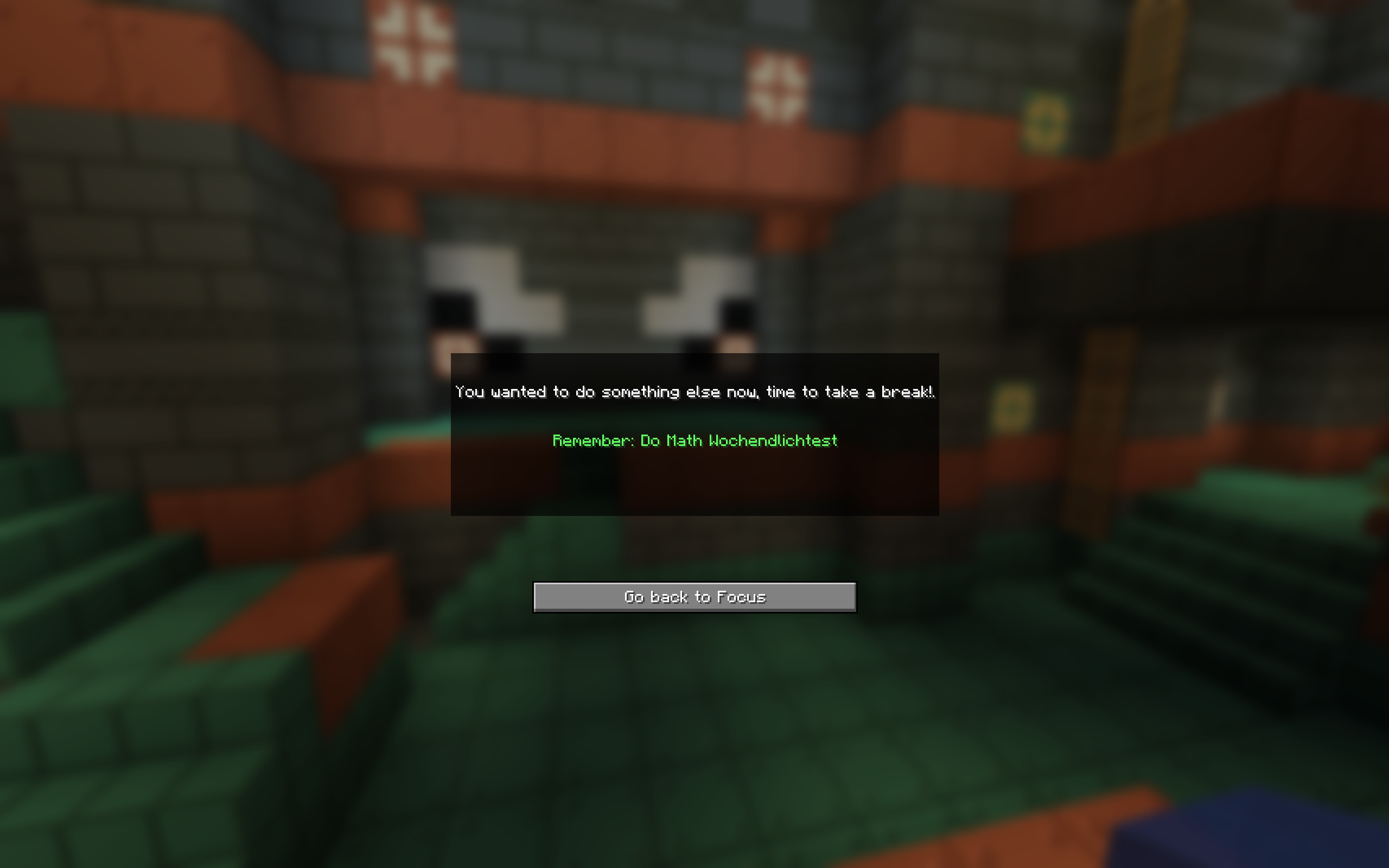 Lockout Screen
 -
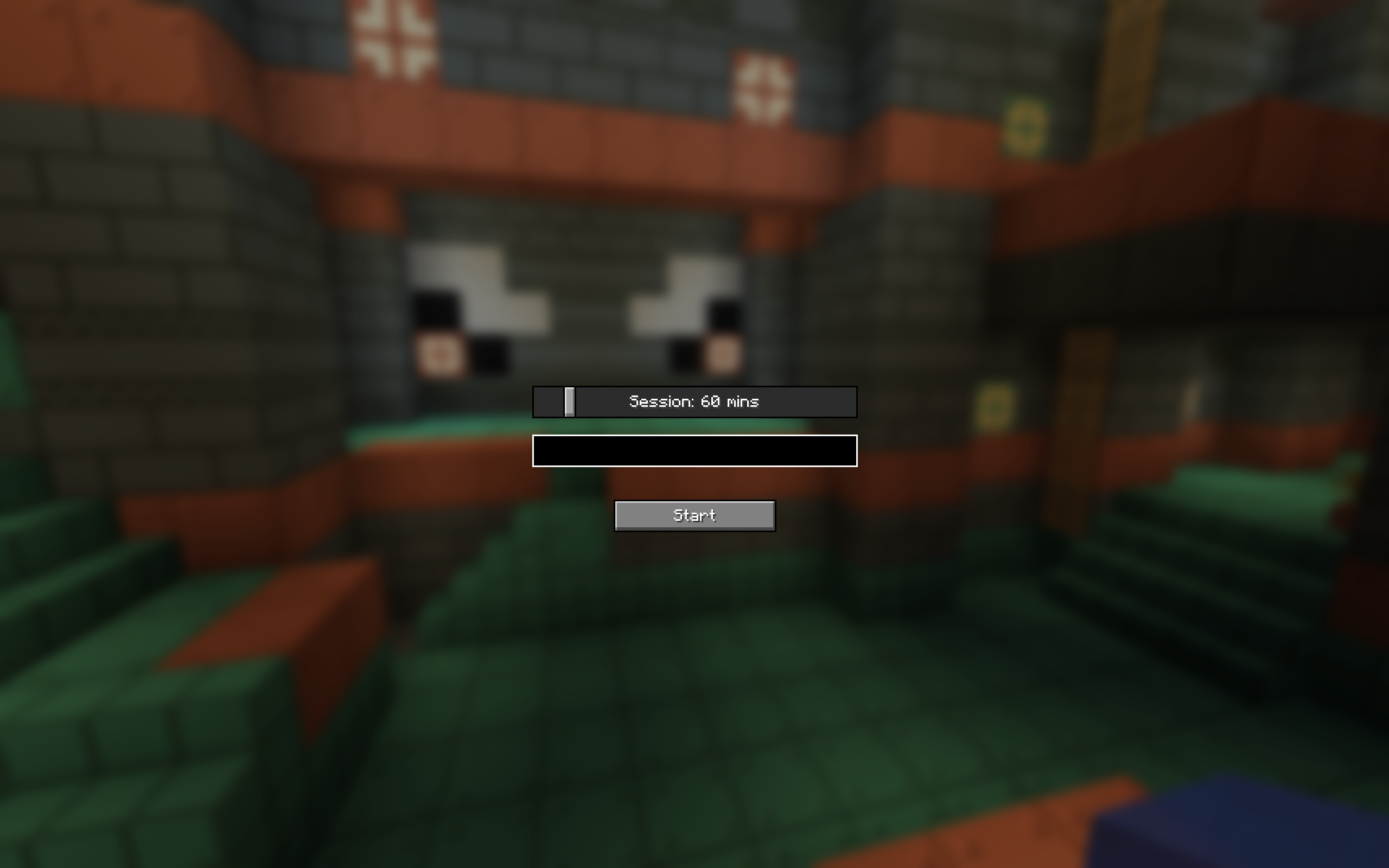 Enter Session Time and reason
Versions
Files
Relations
Project Relations
More like this
Similar Mods
Suggestions use data such as tags, dependencies, dependents, descriptions, titles, and more to rank how much they overlap with this mod.
On ModDex
Community snapshot
By the numbers
Statistics
Want to reach Minecraft players?
We're looking for a server hosting partner to feature here and other parts of the site. Interested? Send us a message!
Get in touchGet it on
Available Platforms
On ModDex
Community snapshot
By the numbers
Statistics
Resources