
Community listing page, reviews here may not be monitored by the author.
Formula Loader

No reviews yet
Load Json to Formula for modders and datapack users.
Community voices
Reviews
No reviews yet. Be the first to review this project!
Get it on
Available Platforms
Compatibility
Supported Environments
Required on the server. Installing it on the client adds functionality.
About
Project Details
For authors
Embed Badge
If you're the author of this project, you can embed a live badge anywhere that supports HTML or Markdown. It updates automatically whenever ratings change.
Use HTML for any page that supports it, or Markdown for README files and Markdown-based descriptions.
Identifiers
Platform IDs
Resources
External Links
About
Description
A mod for developers and datapack creators. Reads custom formulas from JSON files and evaluates them with parameters passed via the in-game command:
/formula <namespace:name> <parameters...>
or Java method.
Supported Operations
Arithmetic operators: +, -, *, /, % (floor remainder: a - floor(a / b) * b)
Two-argument formulas: min(x, y), max(x, y), pow(x, y), log(x, y) (logarithm base x of y), div(x, y) (floor division toward negative infinity)
One-argument formulas: round(x), floor(x), ceil(x), abs(x), exp(x), trunc(x) (truncation toward zero)
Trigonometric formulas: sin(x), cos(x), tan(x), asin(x), acos(x), atan(x)
Special — rem(x, y): Returns the remainder x - floor(x / y) * y and simultaneously writes the quotient floor(x / y) back into x. Note that if you write #a = rem(#a, #b), the assignment #a = ... will overwrite the quotient that rem just stored into #a with the return value (the remainder), so #a ends up holding the remainder, not the quotient.
Unary minus is supported without requiring parentheses: -3, -x, -min(a, b), 1 + -x all work.
Performance
Formulas are pre-compiled at load time into an optimized stack-based bytecode VM. Short formulas (4 or fewer operations) benefit from loop unrolling and super-instruction merging (e.g., variable-variable binary operations become single opcodes). Constant folding is applied at compile time. Benchmarks on a typical desktop JVM:
- Simple arithmetic: ~9 ns per evaluation
- Chained conditionals (3 branches): ~15 ns per evaluation
- Sequential steps (3 steps): ~14 ns per evaluation
- Trigonometric with rounding: ~40 ns per evaluation
In practice, even 3 million calls complete in under 120 ms. Performance is not a concern.
Client-Side Installation
This mod is optional on the client. If you only need server-side computation, client installation is unnecessary. If you need to display values in UI elements, install on the client to provide the formulas locally. When another mod that requires both sides (e.g. Tinkers' Armor Extension) deeply integrates this mod, this mod becomes a transitive dependency and must be installed on the client as well.
For Developers
- Access loaded formulas via
FormulaManager.getOrNull(ResourceLocation)and evaluate withformula.accept(double...). - Use
FormulaBuilderto programmatically construct formula JSON. Formulas are loaded fromdata/<namespace>/formula/at startup.
For Data Pack Creators
Use the /formula command to evaluate formulas with parameters in-game. This replaces scoreboard-based computations that would require dozens of commands with a single call, significantly improving datapack performance and readability.
JSON Format Reference
Simple Formula
{
    "inputs": ["result", "left", "right"],
    "formula": "#result = #left + #right * 2"
}
Sequential Steps
{
    "inputs": ["a", "b", "c"],
    "formula": [
        "#a = #b + #c",
        "#b = #a * #c",
        "#a = #b + 1"
    ]
}
If/Else Branching
{
    "inputs": ["score", "kills", "deaths"],
    "formula": {
        "if": "#kills > #deaths",
        "formula": "#score = #kills * 3 - #deaths * 2",
        "else": "#score = max(0, #kills - #deaths)"
    }
}
Conditional Chain (if / else-if / else)
{
    "inputs": ["result", "value"],
    "formula": {
        "chain": [
            {"condition": "#value >= 100", "formula": "#result = #value * 2"},
            {"condition": "#value >= 50",  "formula": "#result = #value * 1.5"},
            {"condition": "#value >= 10",  "formula": "#result = #value"}
        ],
        "default": "#result = 0"
    }
}
Mixed Nesting (Sequential + Conditional)
{
    "inputs": ["result", "base", "modifier"],
    "caches": ["scaled"],
    "formula": [
        "#scaled = log(2, #base + 1)",
        {
            "chain": [
                {"condition": "#modifier > 10", "formula": "#result = #scaled * #modifier * 2"},
                {"condition": "#modifier > 0",  "formula": "#result = #scaled * #modifier"}
            ],
            "default": "#result = #scaled"
        }
    ]
}
Explicit Output Slot
By default the result of the last step is returned. Use "output" to specify a different variable:
{
    "inputs": ["dummy", "x", "y"],
    "caches": ["tmp", "extra"],
    "output": "#extra",
    "formula": [
        "#tmp = #x * #y",
        "#dummy = #tmp + #x",
        "#extra = #tmp * 2 + #y"
    ]
}
Numeric Mode (Abbreviated)
{
    "input": 3,
    "cache": 2,
    "output": "#4",
    "formula": [
        "#0 = #1 + #2",
        "#3 = #0 * #1",
        "#4 = #3 + #2"
    ]
}
FormulaBuilder — Developer Guide
FormulaBuilder is a fluent API for generating formula JSON in Java. It automatically adds the # prefix to named variables.
I. Quick Start
// Named variables — automatic # prefix. "result = x + y" becomes "#result = #x + #y"
String json = FormulaBuilder
    .inputs("result", "x", "y")
    .flat("result = x + y + 2")
    .build();

// Numeric mode — write # manually
String json = FormulaBuilder
    .input(3)
    .flat("#0 = #1 + #2 + 2")
    .build();
II. Defining Inputs
// Named inputs (recommended) — automatic # prefix
FormulaBuilder.inputs("result", "amount", "tick")

// Numeric input — generates "input": 3; write #0, #1, #2 manually
FormulaBuilder.input(3)
III. Defining Caches (Intermediate Variables)
// Named caches — automatic # prefix
.caches("tmp1", "tmp2")    // generates "caches": ["tmp1","tmp2"]

// Numeric caches — write #3, #4 manually
.cache(2)                  // generates "cache": 2
IV. Output Field
.output("#result")    // specify which variable to return
// If omitted, the last step's result is returned.
V. Formula Shapes
flat — Single formula string. Returns FormulaBuilder.
.flat("result = x + y + 2")
array — Sequential steps. Each step can read results of previous steps. Returns FormulaBuilder.
.array(
    "a = b + c",
    "b = a * 2"
)
ifelse — Single if/else shorthand. Returns FormulaBuilder.
.ifelse(
    "kills > deaths",           // condition
    "score = kills * 3",        // if-true branch
    "score = deaths"            // else branch
)
mixed() — Enters a MixedBlock<P>. Entries execute sequentially and can include flat formulas, inline conditions, and nested blocks. Call .exit() to return to the parent context (the P type parameter).
b.inputs("a", "b").mixed()
    .flat("a = b + 1")                       // plain formula
    .cond("b > 10", "a = b * 2")             // inline condition shortcut
    .exit()                                   // return to FormulaBuilder
.build();
Inside a MixedBlock, the following methods are available:
.flat(String)— single formula.array(String...)— sequential formulas.cond(String condition, String formula)— inline condition shortcut.cond(String condition)— enters aCondBlock<MixedBlock<P>>for a complex body.ifelse(String cond, String ifTrue, String ifFalse)— if/else shorthand.chain()— enters aChainBlock<MixedBlock<P>>.mixed()— enters a nestedMixedBlock<MixedBlock<P>>
cond(String) — Enters a CondBlock<P> representing a single {"condition":..., "formula":...} entry. Supports .flat(), .array(), .mixed(). .exit() returns to the parent.
b.inputs("a", "b").mixed()
    .cond("b > 10").mixed()                  // complex body via nested mixed
        .flat("a = b * 2")
        .flat("a = a + 1")
    .exit()                                   // exit nested mixed
    .exit()                                   // exit CondBlock, back to MixedBlock
.exit()
.build();
chain() — Enters a ChainBlock<P>. Conditions are tested top-to-bottom; the first match executes. If none match, the def branch executes. .exit() returns to the parent.
b.inputs("result", "value").chain()
    .cond("value >= 100", "result = value * 2")   // inline: cond(c, f)
    .cond("value >= 50").mixed()                   // CondBlock with complex body
        .flat("result = value * 1.5")
    .exit()
    .def("result = 0")                              // default branch
.exit()
.build();
Inside a ChainBlock, the following methods are available:
.cond(String condition, String formula)— inline condition shortcut.cond(String condition)— enters aCondBlock<ChainBlock<P>>.def(String formula)— single formula as default.defArray(String... formulas)— sequential formulas as default.defMixed()— enters aMixedBlock<ChainBlock<P>>as default
VI. Nested Block Summary
| Entry Point | Returns | Available Methods | Exit Returns |
|---|---|---|---|
.mixed() |
MixedBlock<P> |
.flat() .array() .cond() .ifelse() .chain() .mixed() |
P |
.cond(String) |
CondBlock<P> |
.flat() .array() .mixed() |
P |
.chain() |
ChainBlock<P> |
.cond() .def() .defArray() .defMixed() |
P |
The parameterized P type tracks the parent context at compile time — .exit() always returns the correct parent type without casting.
VII. Building Output
.build()          // Returns String — formatted JSON, for writing to files
.buildFormula()   // Returns JsonFormula — for direct evaluation in code
VIII. Automatic # Prefix Rules
After declaring inputs("result","x","y"), these strings are processed automatically:
| Input | Output |
|---|---|
"result = x + y" |
"#result = #x + #y" |
"max(0, min(1, x))" |
"max(0, min(1, #x))" |
"x >= 10" (condition) |
"#x >= 10" |
The # prefix is NOT added again when already present: "#result = #x + #y" stays as-is, and numeric references like "#0 = #1 + #2" are unaffected.
Important: Do not name variables after formula names (avoid min, max, pow, log, etc. as variable identifiers).
IX. JSON Format Correspondence
| Builder Method | Generated JSON |
|---|---|
.flat("x") |
"formula": "..." |
.array("a","b") |
"formula": ["...", "..."] |
.chain() ... .exit() |
"formula": {"chain": [...], "default": ...} |
.ifelse(c,a,b) |
"formula": {"if": "...", "formula": ..., "else": ...} |
.output("x") |
"output": "#x" |
.inputs("a","b") |
"inputs": ["a", "b"] |
.input(3) |
"input": 3 |
.caches("a","b") |
"caches": ["a", "b"] |
.cache(2) |
"cache": 2 |
X. Typical Use Cases
// Basic arithmetic
FormulaBuilder.inputs("r", "a", "b")
    .flat("r = a + b * 2")
    .build();

// Sequential computation with cache
FormulaBuilder.inputs("r", "base", "mod")
    .caches("logval")
    .array(
        "logval = log(2, base + 1)",
        "r = logval * mod"
    )
    .build();

// Multi-condition chain
FormulaBuilder.inputs("result", "val").chain()
    .cond("val >= 100", "result = val * 2")
    .cond("val >= 50", "result = val")
    .def("result = 0")
.exit().build();

// If/else shorthand
FormulaBuilder.inputs("score", "kills", "deaths")
    .ifelse(
        "kills > deaths",
        "score = kills * 3 - deaths * 2",
        "score = max(0, kills - deaths)"
    )
    .build();

// Numeric mode (no named variables)
FormulaBuilder.input(3).cache(1).output("#3")
    .array(
        "#0 = #1 + #2",
        "#3 = #0 * 2 + #1"
    )
    .build();

// Mixed block with condition and chain
FormulaBuilder.inputs("a", "b", "c").mixed()
    .flat("a = b + c")
    .cond("b > 10", "a = a * 2")
    .chain()
        .cond("a > 100", "a = 100")
        .def("a = a")
    .exit()
.exit().build();
Screenshots
Gallery
-
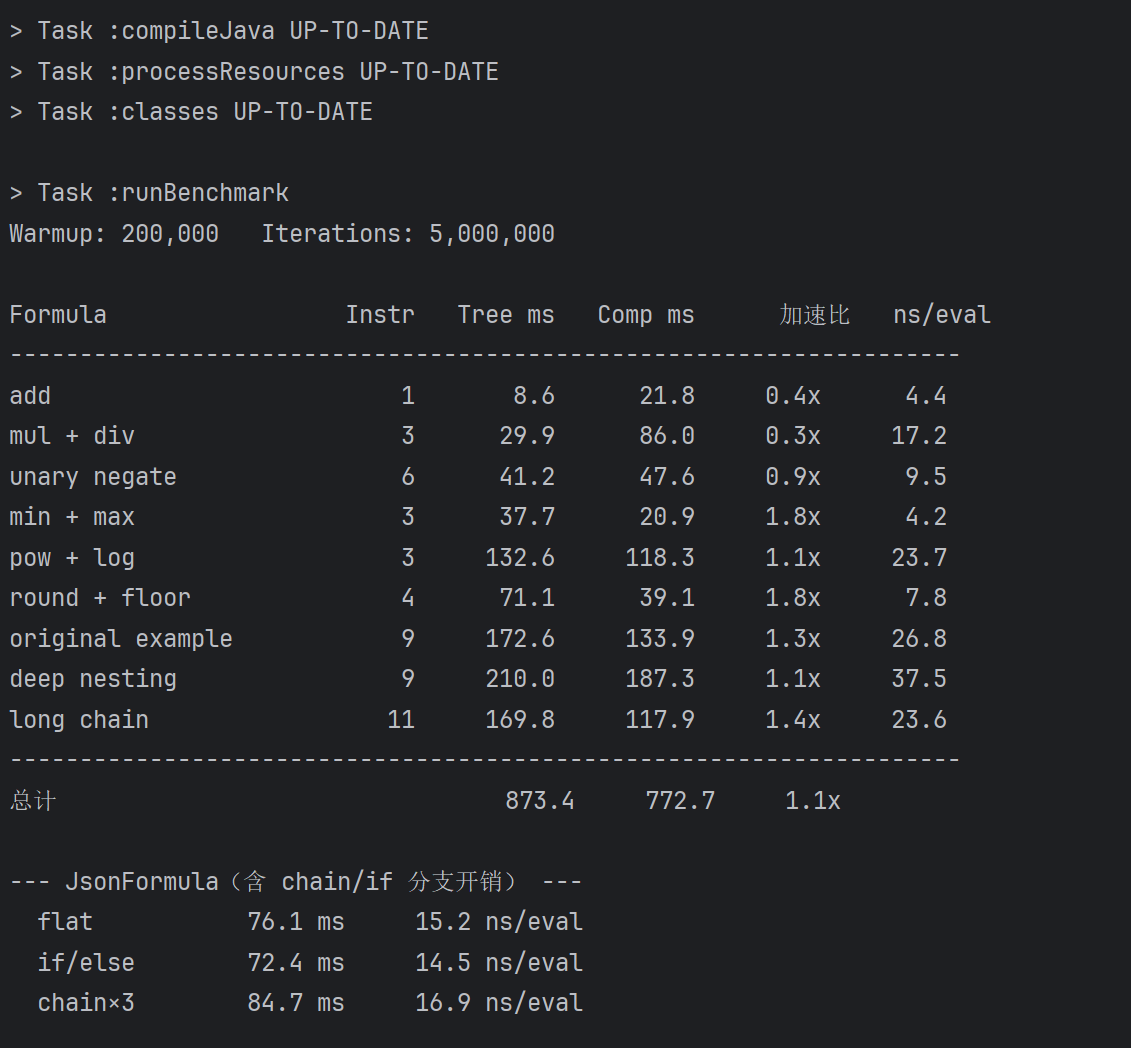 Benchmark Time consumption of different formula categories in the JavaTest environment. Sufficient for gameplay.
 -
 In Game Use a simple formula
 -
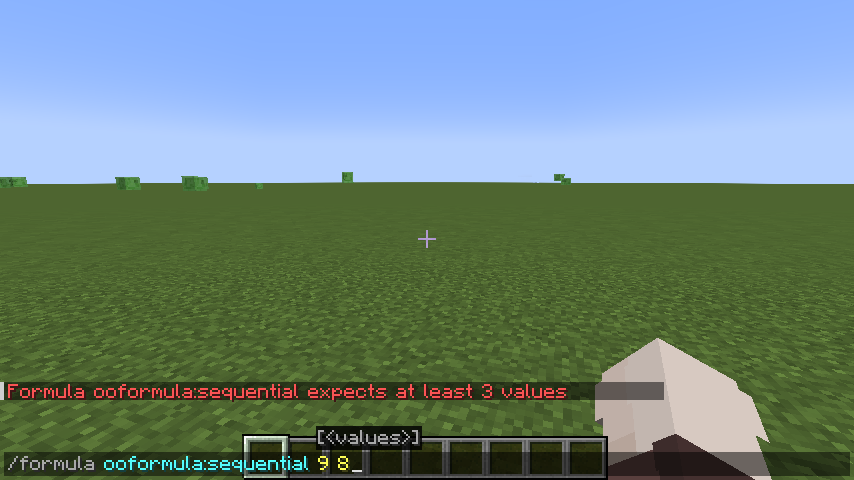 In Game Reject wrong parameters
Versions
Files
Relations
Project Relations
More like this
Similar Mods
Suggestions use data such as tags, dependencies, dependents, descriptions, titles, and more to rank how much they overlap with this mod.
On ModDex
Community snapshot
By the numbers
Statistics

Want to reach Minecraft players?
We're looking for a server hosting partner to feature here and other parts of the site. Interested? Send us a message!
Get in touchGet it on
Available Platforms
On ModDex
Community snapshot
By the numbers
Statistics
Resources