
Community listing page, reviews here may not be monitored by the author.
FPShud


No reviews yet
High precision FPS displaying mod with a customizable HUD
Community voices
Reviews
No reviews yet. Be the first to review this project!
Get it on
Available Platforms
Compatibility
Supported Environments
Runs entirely on the client. Works on vanilla servers.
About
Project Details
For authors
Embed Badge
If you're the author of this project, you can embed a live badge anywhere that supports HTML or Markdown. It updates automatically whenever ratings change.
Use HTML for any page that supports it, or Markdown for README files and Markdown-based descriptions.
Identifiers
Platform IDs
About
Description
FPShud,
a mod that displays FPS with high precision on a customizable HUD
Mod features:
Main FPSis the main FPS value, regulated by theMain Update IntervalAvererage FPSis the average FPS value from all the values took inAverage Update IntervalMax FPSis the maximum FPS value from all the values took inMin Update IntervalMin FPSis the minimum FPS value from all the values took inMax Update Interval

FPShud with default settings
HUD Features:
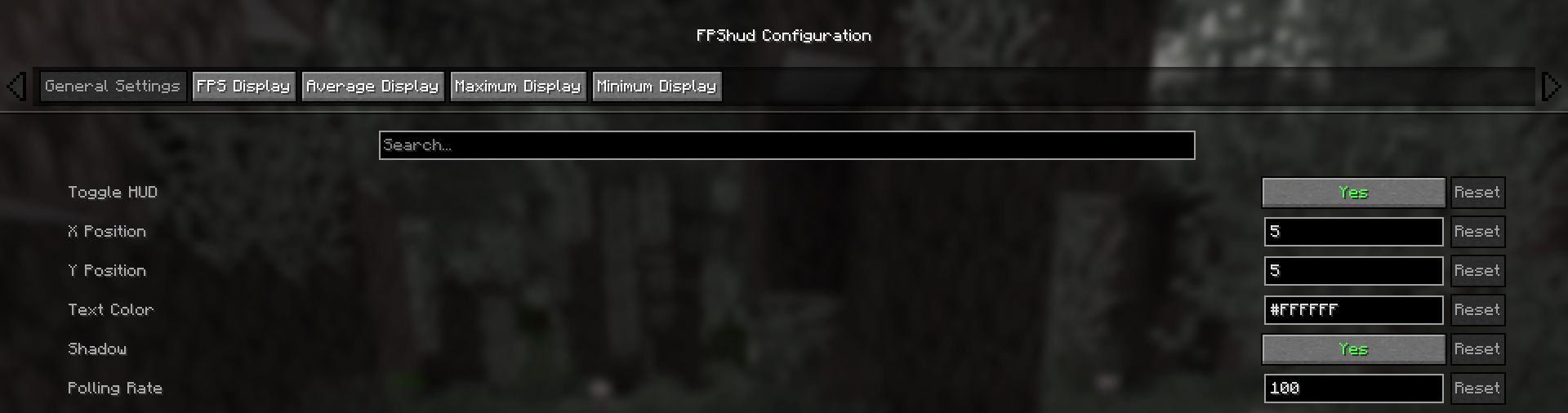
- General Settings:
Toggle HUDtoggles the entire HUDX Positionchanges the X position of the HUD on the screenY Positionchanges the Y position of the HUD on the screenText Colorchanges the color of the entire HUDShadowenables or disables the text shadow on the HUDPolling Rateindicates how frequently the mod should poll FPS
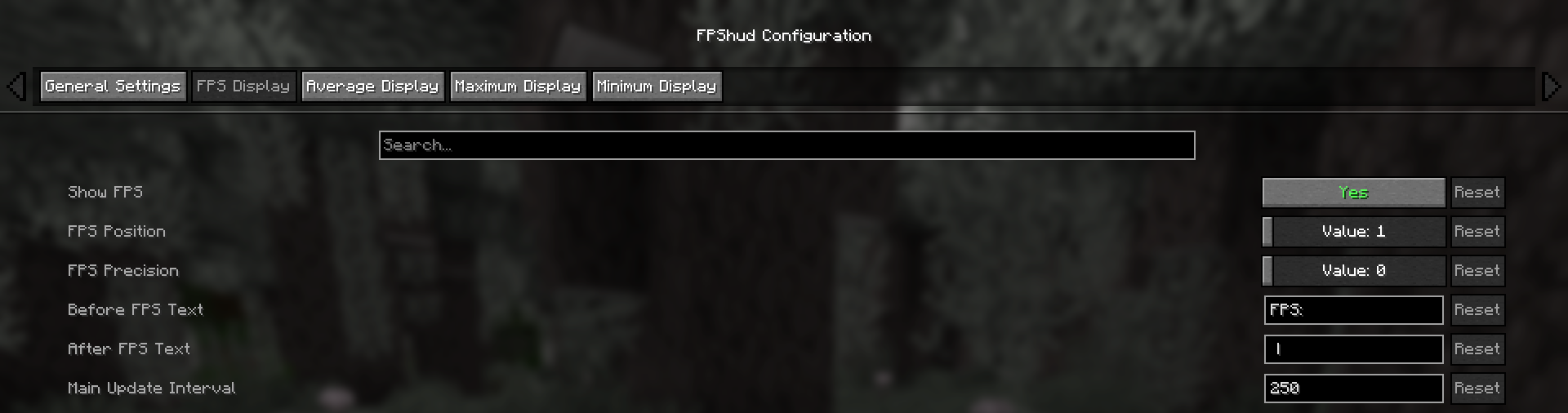
- FPS Display, Average Display, Maximum Display, Minimum display
Those settings can be changed for every one of the 4 fields:
Show FPStoggles the FPS fieldFPS Positionindicates the position of the field (first, second, third, fourth)FPS Precisionindicates how many points of precision the field haveBefore FPS Textchanges the text displayed before the specific field FPS valueAfter FPS Textchanges the text displayed after the specific field FPS value
ModMenu config:
- GUI config is accessible from the ModMenu mods list
The config screen is divided into 5 categories:
- General Settings:
- FPS Display, Average Display, Maximum Display, Minimum display:
Why FPShud?
Highly precise:
FPShud uses time elapsed from frame to frame for the FPS value calculation; This method of sampling elevates precision and customization, permitting millisecond precise calculations and FPS displaying
FPShud works with a
Polling Ratealgorithm; samples are taken every frame, then smoothen every poll-time and finally processed to make them match the requiredMain Update Interval,Average Update Interval,Maximum Update IntervalandMinimum Update IntervalrequirementsFor those reasons, it is not recommended to set
Polling RateandUpdate Intervalto low values because results may appear very fluctuating
Highly customizable:
You can customize the HUD to match every style:

only showing Avr and Max, modified 'Before Text', changed 'Text Color', removed 'Shadow', changed 'Precision' and modified 'Update Intervals'
Other:
If you are using ModMenu install ClothConfigAPI to access the config screen
Don't want ModMenu? The config file is accessible and editable in your config directory, changes apply after a game restart
Settings will be saved in your config folder and updated at runtime
The mod is client side (works on multiplayer)
Links:
FPShud,
a mod that displays FPS with high precision on a customizable HUD
Mod features:
Main FPSis the main FPS value, regulated by theMain Update IntervalAvererage FPSis the average FPS value from all the values took inAverage Update IntervalMax FPSis the maximum FPS value from all the values took inMin Update IntervalMin FPSis the minimum FPS value from all the values took inMax Update Interval
FPShud with default settings
HUD Features:
- General Settings:
Toggle HUDtoggles the entire HUDX Positionchanges the X position of the HUD on the screenY Positionchanges the Y position of the HUD on the screenText Colorchanges the color of the entire HUDShadowenables or disables the text shadow on the HUDPolling Rateindicates how frequently the mod should poll FPS
- FPS Display, Average Display, Maximum Display, Minimum display
Those settings can be changed for every one of the 4 fields:
Show FPStoggles the FPS fieldFPS Positionindicates the position of the field (first, second, third, fourth)FPS Precisionindicates how many points of precision the field haveBefore FPS Textchanges the text displayed before the specific field FPS valueAfter FPS Textchanges the text displayed after the specific field FPS value
ModMenu config:
- GUI config is accessible from the ModMenu mods list
The config screen is divided into 5 categories:
- General Settings:
- FPS Display, Average Display, Maximum Display, Minimum display:
Why FPShud?
Highly precise:
FPShud uses time elapsed from frame to frame for the FPS value calculation; This method of sampling elevates precision and customization, permitting millisecond precise calculations and FPS displaying
FPShud works with a
Polling Ratealgorithm; samples are taken every frame, then smoothen every poll-time and finally processed to make them match the requiredMain Update Interval,Average Update Interval,Maximum Update IntervalandMinimum Update IntervalrequirementsFor those reasons, it is not recommended to set
Polling RateandUpdate Intervalto low values because results may appear very fluctuating
Highly customizable:
You can customize the HUD to match every style:
only showing Avr and Max, modified 'Before Text', changed 'Text Color', removed 'Shadow', changed 'Precision' and modified 'Update Intervals'
Other:
If you are using ModMenu install ClothConfigAPI to access the config screen
Don't want ModMenu? The config file is accessible and editable in your config directory, changes apply after a game restart
Settings will be saved in your config folder and updated at runtime
The mod is client side (works on multiplayer)
Links:
Screenshots
Gallery
Versions
Files
Relations
Project Relations
More like this
Similar Mods
Suggestions use data such as tags, dependencies, dependents, descriptions, titles, and more to rank how much they overlap with this mod.
On ModDex
Community snapshot
By the numbers
Statistics
Want to reach Minecraft players?
We're looking for a server hosting partner to feature here and other parts of the site. Interested? Send us a message!
Get in touchGet it on
Available Platforms
On ModDex
Community snapshot
By the numbers