
Community listing page, reviews here may not be monitored by the author.
Fractal

No reviews yet
Library for item subgroups for the creative menu

Community voices
Reviews
No reviews yet. Be the first to review this project!
Get it on
Available Platforms
Compatibility
Supported Environments
Must be installed on both the client and the server.
About
Project Details
For authors
Embed Badge
If you're the author of this project, you can embed a live badge anywhere that supports HTML or Markdown. It updates automatically whenever ratings change.
Use HTML for any page that supports it, or Markdown for README files and Markdown-based descriptions.
Identifiers
Platform IDs
About
Description
About Fractal
This repo is a fork of lib39/fractal by unascribed, with added support for styled groups. I will take care of this repo while unascribed is busy.
Fractal introduces item subgroups for the creative menu.
Why Fractal?
- Fractals Subgroups are very condensed, allowing you to add up to 12 subgroups for each of your tabs
- Creating a new ItemSubGroup only takes one line of code and no changes in the way you assign your items to groups. Just pass them the ItemSubGroup instead of your main item group
Limitations
- More than 12 subgroups per item group, while fully functional, will look weird.
- The tiny font used for the labels does not support full unicode
Examples
Vanilla Style Subgroups
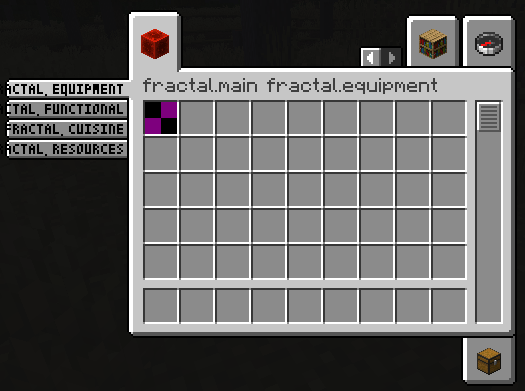
public static final Identifier GROUP_ID = new Identifier("mymod", "main");

public static final ItemGroup MAIN = FabricItemGroup.builder()
		.icon(() -> new ItemStack(Blocks.REDSTONE_BLOCK))
		.entries((displayContext, entries) -> entries.add(Items.APPLE))
		.displayName(Text.translatable("mymod.1"))
		.noRenderedName()
		.build();

public static final ItemGroup EQUIPMENT = new ItemSubGroup.Builder(MAIN, Text.translatable("itemGroup.mymod.equipment")).entries((displayContext, entries) -> entries.add(Items.APPLE)).build();
public static final ItemGroup FUNCTIONAL = new ItemSubGroup.Builder(MAIN, Text.translatable("itemGroup.mymod.functional")).styled(STYLE).entries((displayContext, entries) -> entries.add(Items.BAKED_POTATO)).build();
public static final ItemGroup CUISINE = new ItemSubGroup.Builder(MAIN, Text.translatable("itemGroup.mymod.cuisine")).entries((displayContext, entries) -> entries.add(Items.CACTUS)).build();
public static final ItemGroup RESOURCES = new ItemSubGroup.Builder(MAIN, Text.translatable("itemGroup.mymod.resources")).styled(STYLE).entries((displayContext, entries) -> entries.add(Items.DANDELION)).build();

@Override
public void onInitialize() {
    Registry.register(Registries.ITEM_GROUP, GROUP_ID, MAIN);
}
Applying a custom style
You are also able to apply a style to your ItemSubGroups, by supplying custom background, tab, subtab and scrollbar textures. You can even mix and match! In this example, the first two ItemSubGroups use a custom style by supplying texture files that are being shipped with your mod. The latter two tabs use the vanilla style.
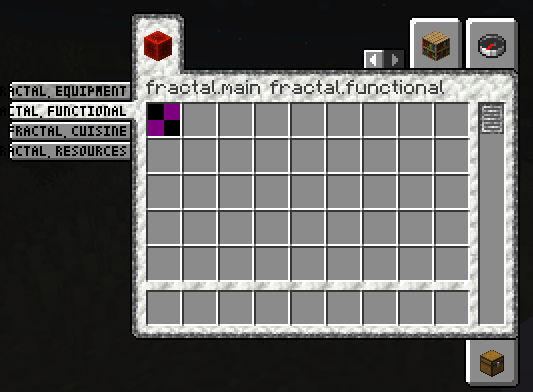
// Texture (put into \resources\assets\fractal\textures\gui\container\creative_inventory)
public static final Identifier BACKGROUND_TEXTURE = new Identifier("fractal", "textures/gui/container/creative_inventory/custom_background.png");

// Sprites (put into \resources\assets\fractal\textures\gui\sprites\container\creative_inventory)
public static final Identifier SCROLLBAR_ENABLED_TEXTURE = new Identifier("fractal", "container/creative_inventory/custom_scrollbar_enabled");
public static final Identifier SCROLLBAR_DISABLED_TEXTURE = new Identifier("fractal", "container/creative_inventory/custom_scrollbar_disabled");

public static final Identifier SUBTAB_SELECTED_TEXTURE = new Identifier("fractal", "container/creative_inventory/custom_subtab_selected");
public static final Identifier SUBTAB_UNSELECTED_TEXTURE = new Identifier("fractal", "container/creative_inventory/custom_subtab_unselected");

public static final Identifier TAB_TOP_FIRST_SELECTED_TEXTURE = new Identifier("fractal", "container/creative_inventory/custom_tab_top_first_selected");
public static final Identifier TAB_TOP_SELECTED_TEXTURE = new Identifier("fractal", "container/creative_inventory/custom_tab_top_selected");
public static final Identifier TAB_TOP_LAST_SELECTED_TEXTURE = new Identifier("fractal", "container/creative_inventory/custom_tab_top_last_selected");
public static final Identifier TAB_TOP_FIRST_UNSELECTED_TEXTURE = new Identifier("fractal", "container/creative_inventory/custom_tab_top_first_unselected");
public static final Identifier TAB_TOP_UNSELECTED_TEXTURE = new Identifier("fractal", "container/creative_inventory/custom_tab_top_unselected");
public static final Identifier TAB_TOP_LAST_UNSELECTED_TEXTURE = new Identifier("fractal", "container/creative_inventory/custom_tab_top_last_unselected");
public static final Identifier TAB_BOTTOM_FIRST_SELECTED_TEXTURE = new Identifier("fractal", "container/creative_inventory/custom_tab_bottom_first_selected");
public static final Identifier TAB_BOTTOM_SELECTED_TEXTURE = new Identifier("fractal", "container/creative_inventory/custom_tab_bottom_selected");
public static final Identifier TAB_BOTTOM_LAST_SELECTED_TEXTURE = new Identifier("fractal", "container/creative_inventory/custom_tab_bottom_last_selected");
public static final Identifier TAB_BOTTOM_FIRST_UNSELECTED_TEXTURE = new Identifier("fractal", "container/creative_inventory/custom_tab_bottom_first_unselected");
public static final Identifier TAB_BOTTOM_UNSELECTED_TEXTURE = new Identifier("fractal", "container/creative_inventory/custom_tab_bottom_unselected");
public static final Identifier TAB_BOTTOM_LAST_UNSELECTED_TEXTURE = new Identifier("fractal", "container/creative_inventory/custom_tab_bottom_last_unselected");

public static final ItemSubGroup.Style STYLE = new ItemSubGroup.Style.Builder()
        .background(BACKGROUND_TEXTURE)
        .scrollbar(SCROLLBAR_ENABLED_TEXTURE, SCROLLBAR_DISABLED_TEXTURE)
        .subtab(SUBTAB_SELECTED_TEXTURE, SUBTAB_UNSELECTED_TEXTURE)
        .tab(TAB_TOP_FIRST_SELECTED_TEXTURE, TAB_TOP_SELECTED_TEXTURE, TAB_TOP_LAST_SELECTED_TEXTURE, TAB_TOP_FIRST_UNSELECTED_TEXTURE, TAB_TOP_UNSELECTED_TEXTURE, TAB_TOP_LAST_UNSELECTED_TEXTURE,
                TAB_BOTTOM_FIRST_SELECTED_TEXTURE, TAB_BOTTOM_SELECTED_TEXTURE, TAB_BOTTOM_LAST_SELECTED_TEXTURE, TAB_BOTTOM_FIRST_UNSELECTED_TEXTURE, TAB_BOTTOM_UNSELECTED_TEXTURE, TAB_BOTTOM_LAST_UNSELECTED_TEXTURE)
        .build();

public static final ItemGroup EQUIPMENT = new ItemSubGroup.Builder(MAIN, Text.translatable("itemGroup.mymod.equipment")).styled(STYLE).entries((displayContext, entries) -> entries.add(Items.APPLE)).build();
public static final ItemGroup FUNCTIONAL = new ItemSubGroup.Builder(MAIN, Text.translatable("itemGroup.mymod.functional")).styled(STYLE).entries((displayContext, entries) -> entries.add(Items.BAKED_POTATO)).build();
public static final ItemGroup CUISINE = new ItemSubGroup.Builder(MAIN, Text.translatable("itemGroup.mymod.cuisine")).entries((displayContext, entries) -> entries.add(Items.CACTUS)).build();
public static final ItemGroup RESOURCES = new ItemSubGroup.Builder(MAIN, Text.translatable("itemGroup.mymod.resources")).entries((displayContext, entries) -> entries.add(Items.DANDELION)).build();
Screenshots
Gallery
-
Subtabs in vanillas style
-
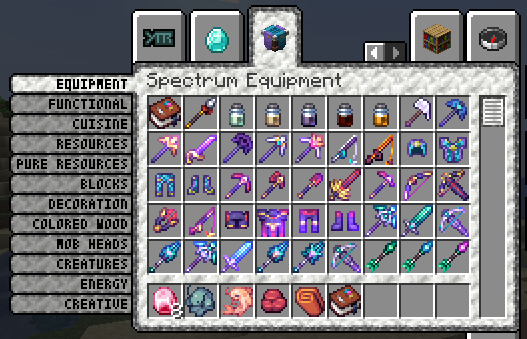 Subtabs with custom texture as implemented in Spectrum
 -
Subtabs using a custom style
Versions
Files
Relations
Project Relations
More like this
Similar Mods
Suggestions use data such as tags, dependencies, dependents, descriptions, titles, and more to rank how much they overlap with this mod.
On ModDex
Community snapshot
By the numbers
Statistics

 (opens in a new tab)
Get it on
Available Platforms
On ModDex
Community snapshot
By the numbers