
Community listing page, reviews here may not be monitored by the author.
Gamma Shifter - FullBright & Auto Night

No reviews yet
Customizable fullbright (brightness/gamma) utilities with auto night-sight for 1.19+

Community voices
Reviews
No reviews yet. Be the first to review this project!
Get it on
Available Platforms
Compatibility
Supported Environments
Runs entirely on the client. Works on vanilla servers.
About
Project Details
For authors
Embed Badge
If you're the author of this project, you can embed a live badge anywhere that supports HTML or Markdown. It updates automatically whenever ratings change.
Use HTML for any page that supports it, or Markdown for README files and Markdown-based descriptions.
Identifiers
Platform IDs
About
Description
Gamma Shifter
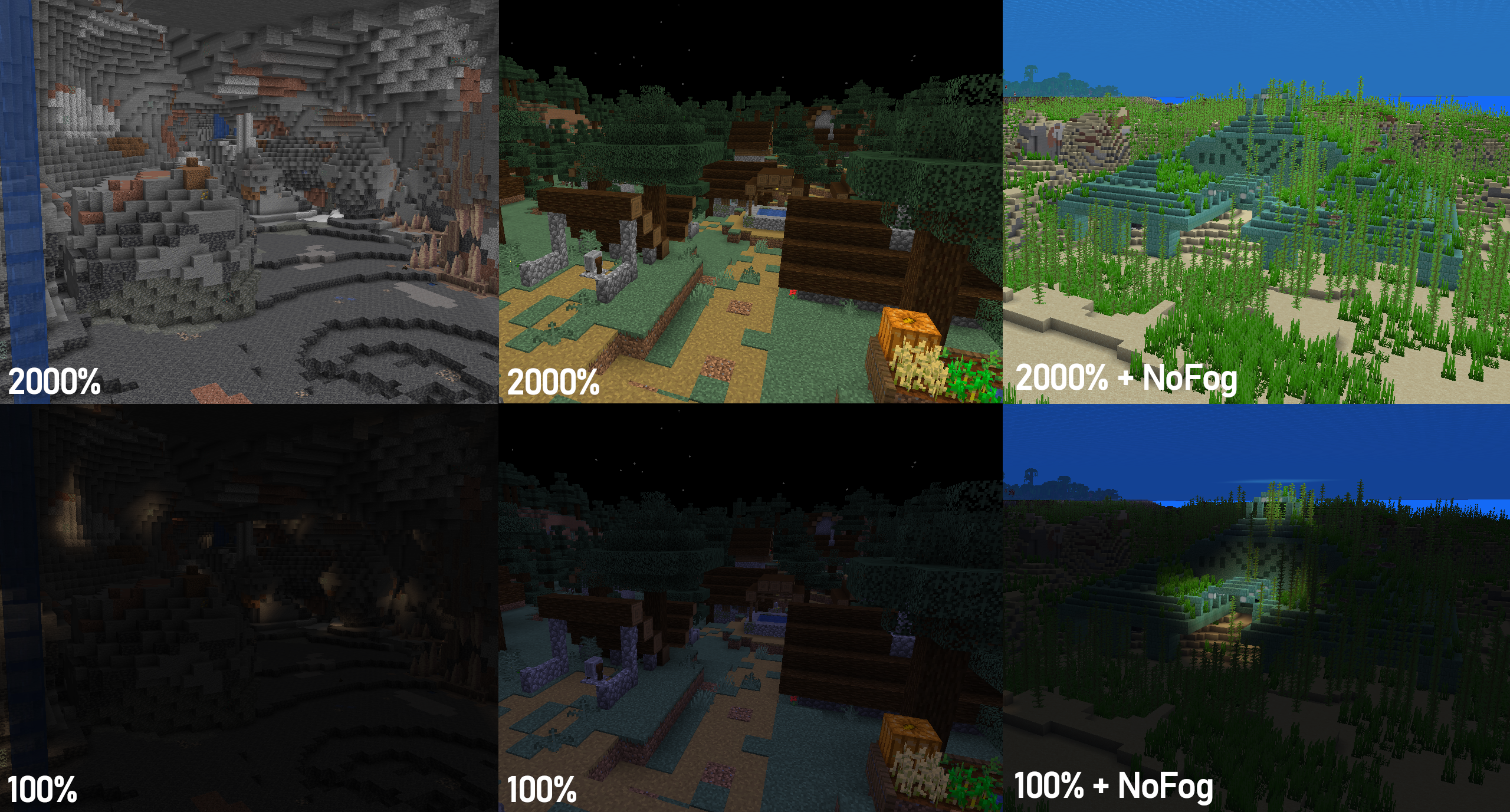
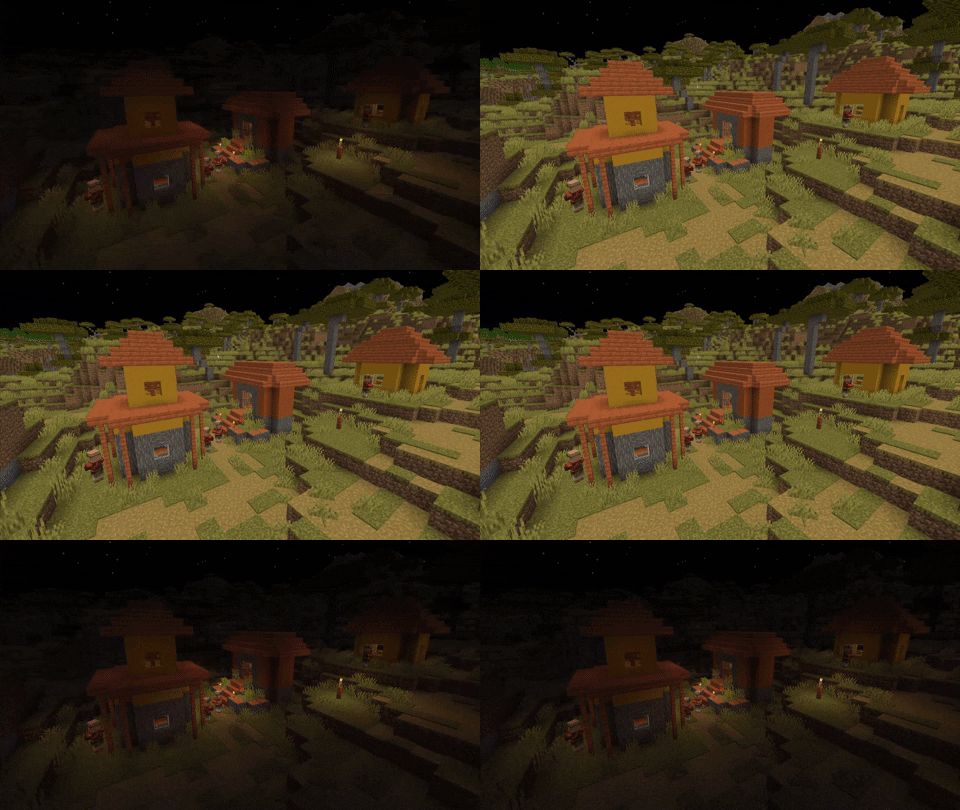
Gamma Shifter is a fully customizable fullbright utility mod for 1.19+ that allows you to raise the brightness well above the maximum default level so you'll never struggle to see again! Auto Night Mode automatically raises and lowers the gamma at dawn and dusk, and hotkeys and HUD lets you change your settings without needing to use the menu. With Mod Menu support, almost all mod behaviour can be customized to your liking!
How to Use
The following section describes the latest stable release version. Older versions or betas may not support all features or keybinds. Click the 'View' buttons to view a section.
Default Keybinds
View
Toggle gamma effects
Keybind: G
Set max gamma (2000%)
Keybind: ]
Set vanilla max gamma (100%)
Keybind: [
Decrease gamma (25% by default)
Keybind: -
Increase gamma (25% by default)
Keybind: =
Preset 1 (500% by default)
Keybind: ;
Preset 2 (1000% by default)
Keybind: '
Show current gamma
Keybind: m
Menu/Config settings
Menu settings are available through ModMenu (see Dependencies below).
View
General
Enable mod effects
Toggles mod effects on/off. The custom gamma cannot be changed when the mod is toggled off.
Custom gamma (%)
Sets the current gamma
Gamma change per input (%)
Sets the amount that the gamma value changes by when the increase/decrease gamma key is pressed
Always start enabled
Whether the mod will always start enabled or if it starts in the state the game previously closed in
Snap to change per input
Whether gamma changes will snap to the nearest multiple of the current change-per-input
Always save custom gamma
Whether the custom gamma (>=100%) will always be saved to options.txt, regardless of if the mod is enabled
Enforce maximum/minimum gamma
Whether gamma values are clamped to Gamma Shifter's max/min values (0% - 2000%)
Disable during Darkness effect
Temporarily disables gamma effects when the Darkness effect is applied to reduce visual anomalies
HUD
Enable Silent Mode
Disables all HUD elements
Show hotbar message
Enables/disables hotbar message when the gamma is changed by a keypress.
Display current gamma overlay
Shows the gamma at all times in the corner of the screen
HUD text colour
Sets a custom colour for the text in HUD elements
HUD location
Sets the corner of the screen that the persistent overlay is in
Auto Night Mode
Enable Auto Night Mode
Automatically increases and decreases gamma at dusk and dawn
Night Mode Gamma
The gamma will be set when Night Mode turns on
Presets
Preset 1 (%)
A preset to immediately set a specific gamma value
Preset 2 (%)
A preset to immediately set a specific gamma value
Dependencies
Required:
Fabric
Fabric API
or
QuiltMC
Quilted Fabric API + Quilt Standard Library
Optional (for ModMenu support):
ModMenu
Cloth Config API
ModMenu and Cloth Config API are optional, but all menu features will be unavailable without them. However, in this case the configuration file (.minecraft\config\gamma_shifter.properties) can still be edited manually.
Other notes
To get the underwater visibility shown in the above image, I suggest using this mod alongside NoFog.
Screenshots
Gallery
-
100% vs 2000% Comparison between 100% and 2000% gamma
-
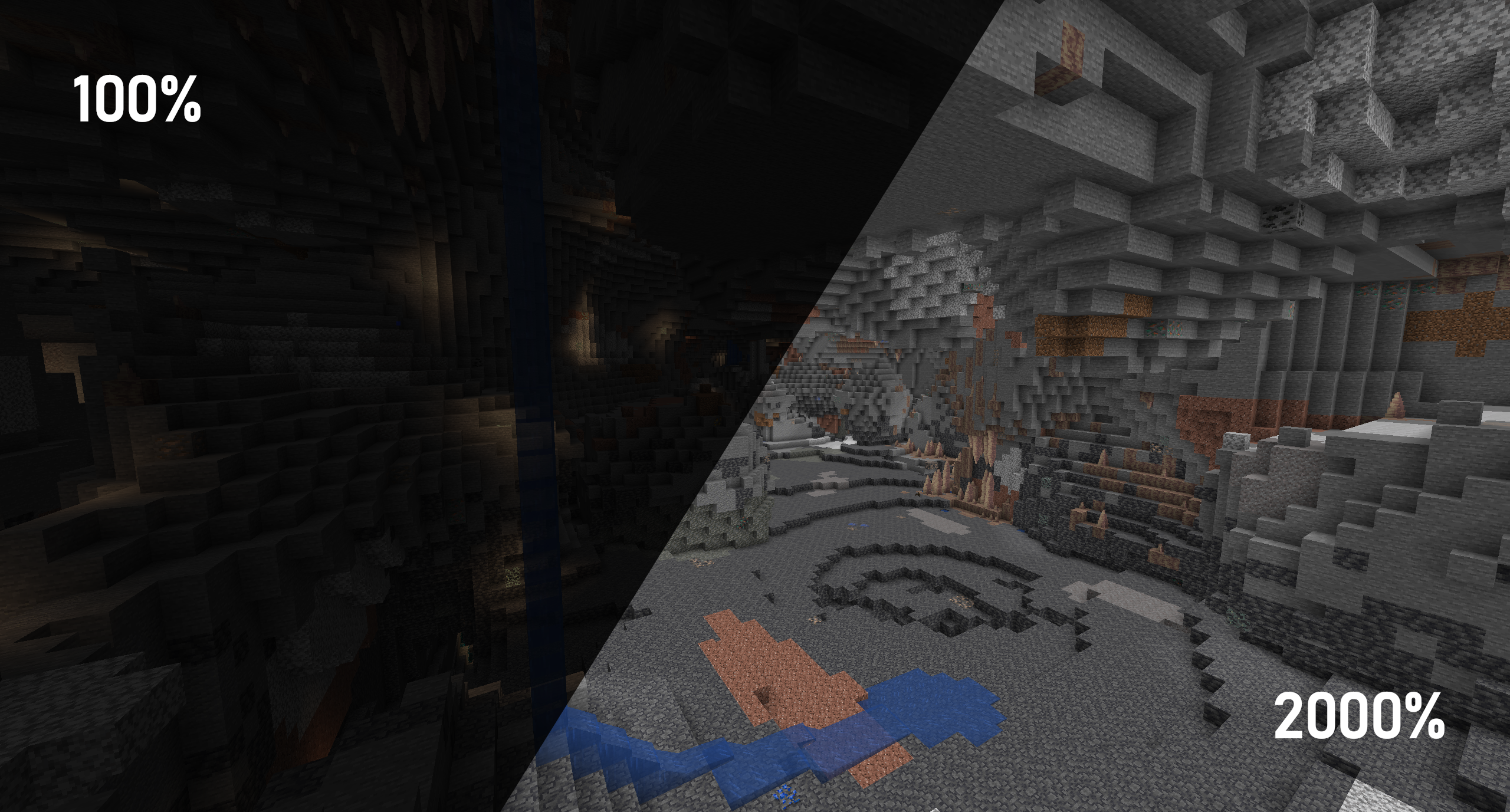 100% vs 2000% (cave) Comparison between 100% and 2000% gamma in a cave
 -
Max to Min The transition from 0% to 2000% gamma.
-
 Configuration Menu Demo The configuration menu accessible with ModMenu and Cloth-Config
Versions
Files
Relations
Project Relations
More like this
Similar Mods
Suggestions use data such as tags, dependencies, dependents, descriptions, titles, and more to rank how much they overlap with this mod.
On ModDex
Community snapshot
By the numbers
Statistics

 (opens in a new tab)
Get it on
Available Platforms
On ModDex
Community snapshot
By the numbers