
Community listing page, reviews may not be monitored by the author.
Guards-Deluxe

No reviews yet
Hire your own guards to protect your base and your town.

Community voices
Reviews
No reviews yet. Be the first to review this project!
Get it on
Available Platforms
About
Project Details
For authors
Embed Badge
If you're the author of this project, you can embed a live badge anywhere that supports HTML or Markdown. It updates automatically whenever ratings change.
Use HTML for any page that supports it, or Markdown for README files and Markdown-based descriptions.
Identifiers
Platform IDs
Resources
External Links
About
Description
Guards-Deluxe
Hire your own medieval army. Earn coins, buy contracts at a recruitment desk and lead ten kinds of guards, from a cheap Townguard with a lance up to a flame-sword-wielding Hero. Give them orders, send them on patrol routes and let them hold your walls while you're away.
Compatibility
Guards-Deluxe should be compatible with all mods that add mobs. The mods below will work right out of the box, so neutral and passive mobs will not be attacked by guards:
- Ice and fire;
- Alex's mobs;
- Alex's caves;
- Mowzie's mobs;
- Upgrade Aquatic;
- Hybrid Aquatic;
- Born in Chaos;
- Farlanders;
- Guard Villagers;
- Whisperwoods.
For mods not on this list you might want to add passive and neutral mobs to 'config/guardsdeluxe-common.toml'. Otherwise the guards will attack them!
NOTE! This mod is inspired by Guardscraft, which is an amazing mod by sgtmattbaker. Sadly it's no longer being maintained, so I took it on myself to recreate something similar from scratch.
Table of contents
- The Guards
- Getting Started
- Recipes
- Giving orders
- Leveling up
- How Guards Fight
- Cosmetics
- Configuration
- Planned future updates
- Credits
The Guards
There are ten different kind of guards.
Townguard
Armed with a spear for extra reach and lightly armored. Weak but cheap. Perfect for guarding towns.

Swordfighter
Slightly stronger and faster than the Townguard. Cheap and good for defending towns or for taking the offensive in numbers.

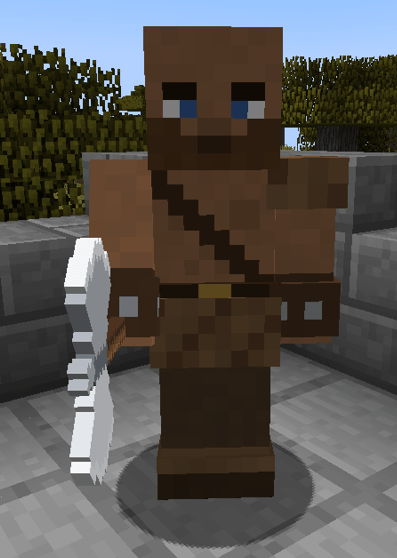
Axe-fighter
The strongest of the low-tier guards but also the least armored. The Axe-fighter is good against opponents with shields.
Castle-guard
A much stronger and elegant counterpart of the Townguard. Armed with a halberd he has extra reach.

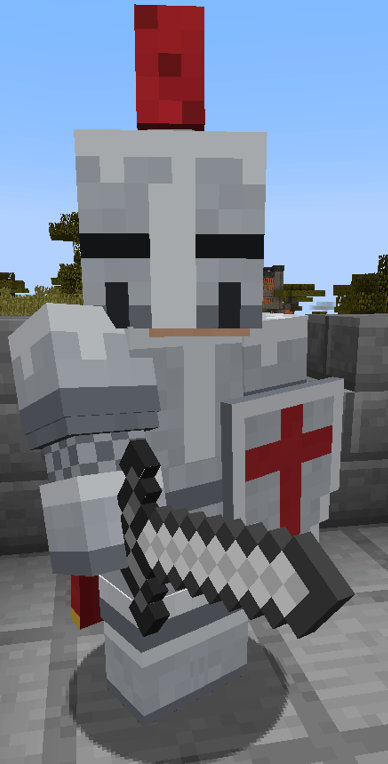
Knight
A tanky melee fighter. With his shield he can block up to 3 attacks before he gets tired and needs to rest for 5 seconds before he can block again.
Special ability: Shield Bash (15 second cooldown). The Knight charges at the nearest mob at high speed and slams into it with his shield, knocking it back and stunning it for 1 second.
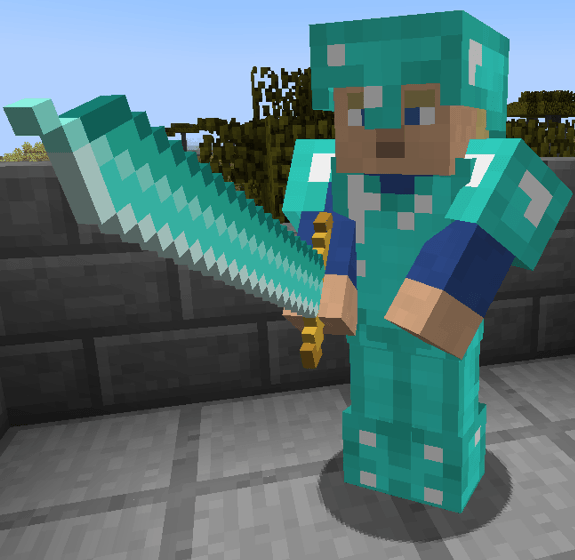
Champion
Armed with a two-handed diamond sword, the champion is powerful but due to the size and weight of his sword, his attack speed is slow.
Special ability: Great Sweep (20 second cooldown). A wide horizontal swing that hits every enemy in front of him for 35 damage and knocks them back.
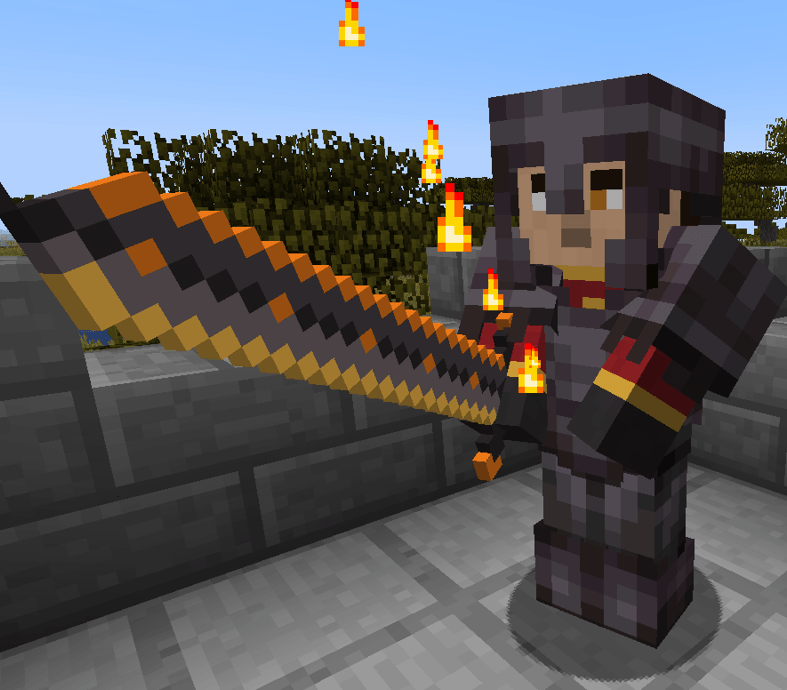
Hero
The Hero is the most expensive and most powerful of all of the guards. Each player can only hire one hero at a time.
Special abilities:
Crescent of Fire (15 second cooldown). The Hero sweeps his sword and launches a crescent of flames at a mob up to 20 blocks away. It burns every hostile mob in its path for 25 damage. It never harms players, guards, villagers or animals, and it never sets blocks on fire.
Healing Potion (20 second cooldown). The Hero throws a healing potion at the most injured guard, player, villager or pet nearby. It leaves a healing area on the ground for 2 seconds, and every friendly standing in it gains the healing effect which heals 20 HP (1 HP per second). Mobs are never healed.
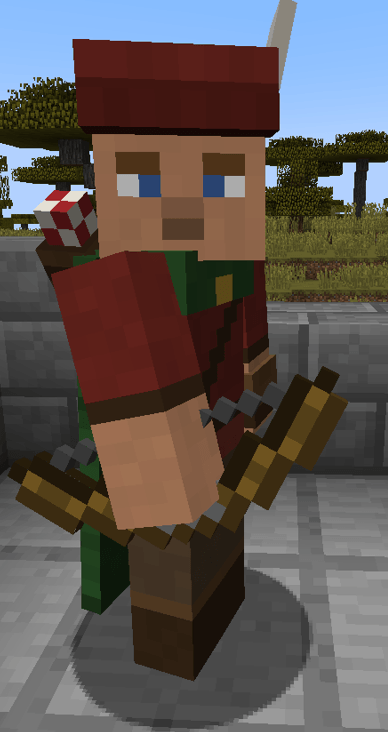
Bowman
The weakest out of all of the ranged guards. Cheap and replaceable.
Long-bowman
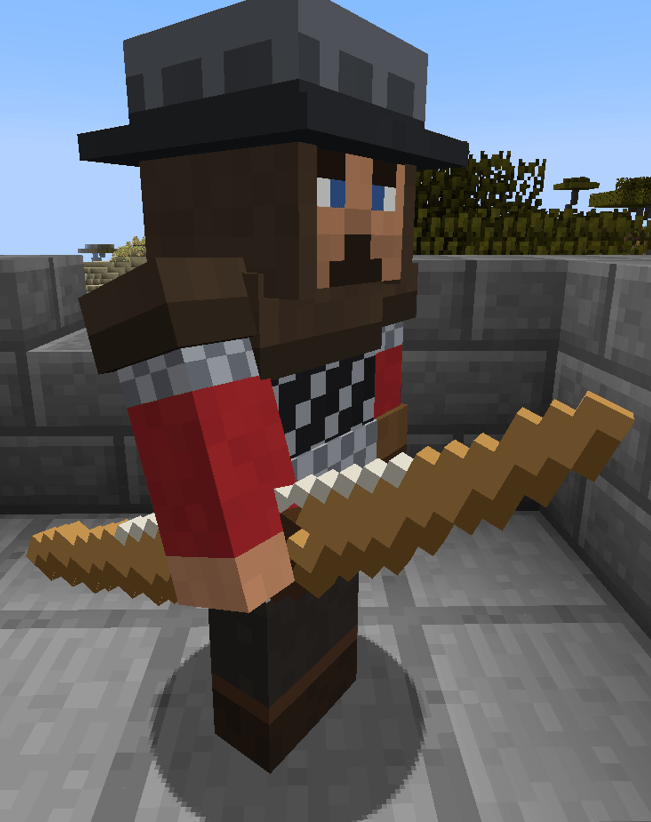
Stronger than the Bowman and with his longbow he has a much greater range.
Special ability: Critical Arrow (30 second cooldown). He shoots a sparkling arrow that deals 15 damage instead of 6.
Crossbowman
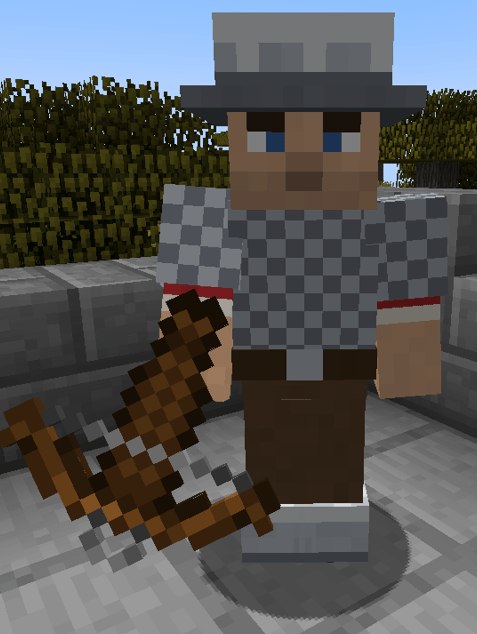
Stronger than the Long-bowman but with the range of the normal Bowman. He can attack without delay once he has loaded his crossbow.
Below are the stats of all of the guards and their default prices.
Melee Desk
| Guard | Price | HP | Damage | Attack speed | Armor | Weapon |
|---|---|---|---|---|---|---|
| Townguard | 3 coins | 50 | 3 | medium | 4 | Lance (long reach) |
| Swordfighter | 5 coins | 50 | 4 | fast | 6 | Iron sword |
| Axe-fighter | 10 coins | 35 | 9 | slow | 2 | Double-bladed battle-axe |
| Castle-guard | 30 coins | 50 | 7 | medium | 7 | Halberd (long reach, pokes and slashes) |
| Knight | 50 coins | 60 | 8 | medium | 7 | Iron sword and iron kite shield |
| Champion | 200 coins | 75 | 21 | every 5 s | 8 + toughness 2 | Two-handed diamond greatsword |
| Hero | 900 coins | 100 | 30 | every 3 s | 8 + toughness 3 | Flaming two-handed netherite greatsword |
Ranged Desk
| Guard | Price | HP | Damage | Attack speed | Armor | Weapon |
|---|---|---|---|---|---|---|
| Bowman | 8 coins | 50 | ~4 per arrow | every ~2 s | 3 | Bow |
| Long-bowman | 20 coins | 50 | 6 per arrow | every 3.5 s | 3 | Longbow, range 40 blocks |
| Crossbowman | 15 coins | 50 | 12 per bolt | 3.5 s reload | 6 | Crossbow |
Getting Started
- Earn coins by killing hostile mobs (mobs have a low chance of dropping coins) Or by smelting a gold nugget. One gold nugget equals 1 coin.
- Craft a recruitment desk. There's a melee desk and a ranged desk.
- Right-click the desk and buy a contract. The coins are taken from anywhere in your inventory, so you can carry them in several stacks.
- Right-click a block with the contract and your guard appears, ready to follow you. The contract is used up. Contracts stack to 16, so you can buy them in advance.
Recipes
Coins
Smelt 1 Gold Nugget in a furnace and you get 1 Coin.
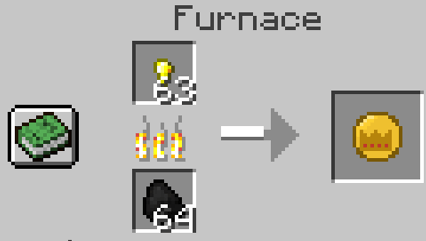
NOTE: A coin can be converted back into a gold nugget by placing it anywhere in the crafting grid.
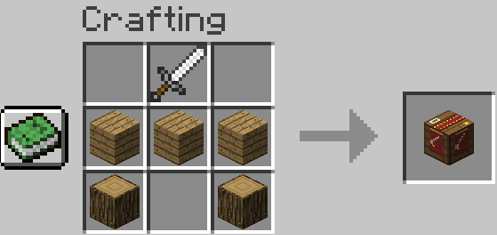
Melee Recruitment Desk
Any type of planks and logs works.
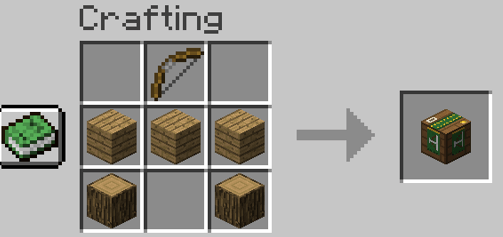
Ranged Recruitment Desk
Any type of planks and logs works.
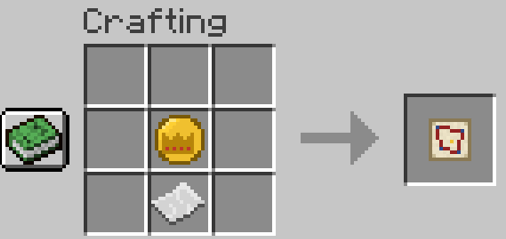
Patrol Orders
1 Paper + 1 Coin, placed anywhere in the crafting grid.
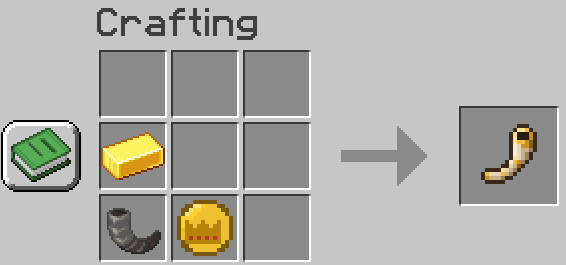
Commander's Horn
1 Goat's horn + 1 Gold ingot + 1 Coin, placed anywhere in the crafting grid.
Giving Orders
Only the guard's owner can give orders.
Right-clicking a guard
Right-click a guard to cycle through:
- Follow me. Guards walk at your walking pace, never sprint. If you get more than about 24 blocks away, they wait until they see you again.
- Hold this position. The guard chases enemies a short way, then returns to its spot.
- Hold position, don't jump down. The same, but the guard never drops off a ledge. Perfect for guards on town walls.
- Don't follow. The guard fights anything it sees and stays wherever the fight ends.
Crouch + right-click a guard to make it stand its ground: it won't move an inch and only fights what comes within reach. Do it again to make it follow you.
Right-click a guard with food to heal it. One item of food is consumed and the guard heals 20 HP at 1 HP per second.
Look at any guard to see its name and health above its head.
Patrols
Craft Patrol Orders and plan a route:
- Right-click blocks to set up to 8 patrol points. While you hold the orders, your planned route shows as gold markers.
- Crouch + right-click to send every guard that's following you (within 32 blocks) on that patrol route.
- Guards walk the route in a loop and wait about 5 seconds at each point. They fight anything they see, then go back to patrolling.
- Plan a new route for another group. You can run as many patrol groups as you like, and active routes show as blue markers (only visible while holding the Patrol orders item).
- Right-click a patrolling guard to call it back. Routes are deleted automatically once no guard is walking them.
Commander's Horn
With the Commander's Horn you can give your guards orders by richt-clicking with the Horn in hand. There are multiple commands available. To access them you must Crouch + right-click and pick your desired command. The available commands are:
- Rally: Calls your guards back to your side. They will stop what they are doing and come running straight to you.
- Attack: Look at a mob and right-click while holding the horn and your guards will attack your desired target.
- Move: Order your guards to move in formation to your specified block (can be used up to 128 blocks away).
- Escort: The guards will stay close by your side (2,5 blocks apart from the player) and they will move 3 blocks to chase after mobs getting too close.
- Surround: Same as Escort, except that the guards form a ring around you to protect you from all sides.
- Formation: Same as surround except the guards form two rows in front of you (melee guards in the front, archers in the back).
- Cancel orders: Cancels all of the orders given with the Horn.
Leveling up
Guards can level up by killing hostile mobs and staying alive for a set amount of days. There are 4 levels. For guards they are: Novice, Veteran, Elite, Legendary. Each time a guard levels up he gets a colored cape tied to that level and he gets 10% more HP and attack damage. From Veteran and onwards they will unlock new special abilities and strengthen their innate special abilities (if they have them).
To check a guard's progress, crouch and look at them.
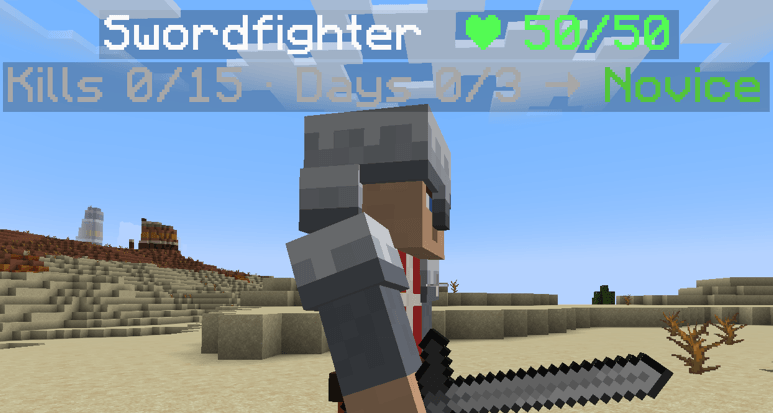
The table below gives an overview of the levels and their benefits for the guards.
| Rank | Kills | Days survived | Cape | Bonus |
|---|---|---|---|---|
| No rank | 0 | 0 | none | none |
| Novice | 15 | 3 | green | +10% attack, +10% HP |
| Veteran | 60 | 10 | blue | +20% attack, +20% HP, first special ability |
| Elite | 175 | 25 | orange | +30% attack, +30% HP, new or stronger ability |
| Legendary | 500 | 100 | purple | +40% attack, +40% HP, strongest abilities |
The Hero has his own ranks and higher requirements. He doesn't gain attack or HP. Instead each rank gives him a new ability.
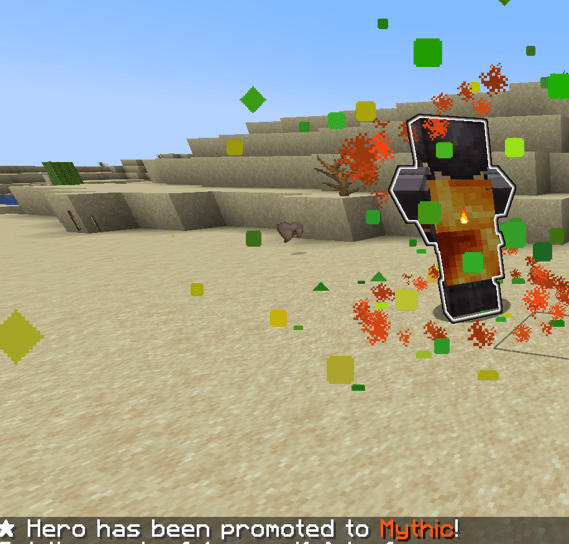
| Rank | Kills | Days survived | Cape | New ability |
|---|---|---|---|---|
| No rank | 0 | 0 | none | none |
| Professional | 25 | 5 | green | Despell |
| Expert | 100 | 15 | blue | Teleport |
| Master | 300 | 40 | orange | Faster Despell / Teleport + aura |
| Mythic | 1000 | 150 | lava | Phoenix Rebirth |
The amount of required kills and days to level up can be changed in the config/guardsdeluxe-common.toml.
--
How Guards Fight
- They attack hostile mobs they can actually see. They don't fight through walls.
- They leave villagers, animals, tamed pets, iron golems and other passive/neutral mobs alone.
- They defend you and each other. When one guard is attacked, nearby guards join in.
- Guards never hurt you, your pets or each other. Guards never despawn (unless when they are killed of course).
Cosmetics
Scarfs
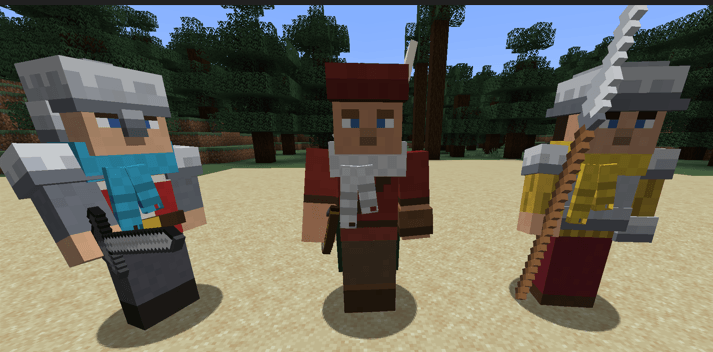
To personalize your guards you can craft scarfs for them. The scarfs can be dyed and to equip a guard with a scarf you must: Hold the scarf in your hand and then right-click the guard. To remove a scarf from a guard you have to use shears.
Below is the recipe to craft a scarf.
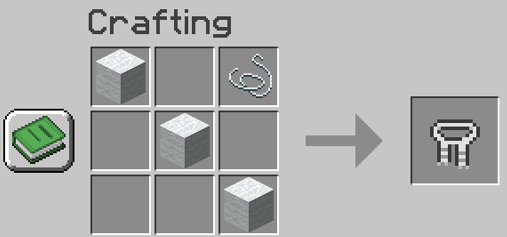
Nametag
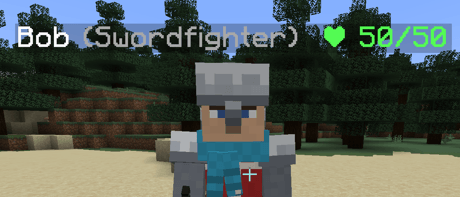
It is possible to name your guards with a nametag.
Cosmetics for the player
The are three cosmetics available for the player.
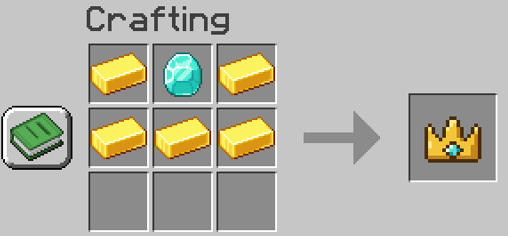
Royal Crown
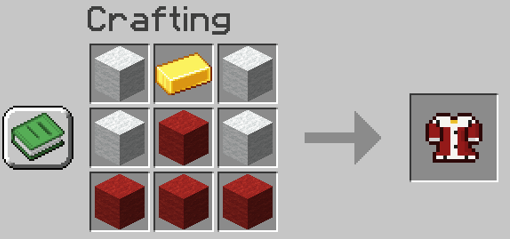
Royal Robe
The Royal Robe can be dyed.
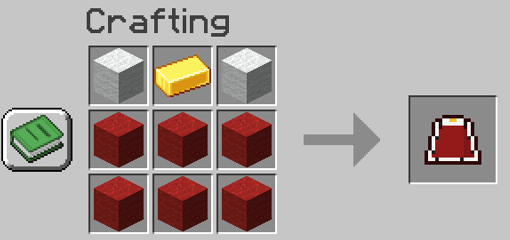
Royal Cape
The Royal Cape can be dyed.
Configuration
The config file is config/guardsdeluxe-common.toml and it can be used to:
- Change coin drop chance and amount.
- The hiring price of every guard.
- Change how many kills/days needed for a guard to level up.
- ignoredMobs: mobs guards never attack.
- neutralMobs: mobs guards only fight when attacked.
- hostileMobs: mobs guards always fight (this is needed as some mods such as Ice and Fire mark some of their mobs as animals. Guards never attack animals unless they are on this list).
Planned future updates
None as of yet. If any of you have any suggestions please let me know in the comments :-).
Credits
- All code, models and textures are original work.
- Guard death sounds: "Male grunt/yelling sounds" by HaelDB (OpenGameArt), used under CC0.
Screenshots
Gallery
Versions
Files
Relations
Project Relations
More like this
Similar Mods
Suggestions use data such as tags, dependencies, dependents, descriptions, titles, and more to rank how much they overlap with this mod.
On ModDex
Community snapshot
By the numbers
Statistics

Get it on
Available Platforms
On ModDex
Community snapshot
By the numbers
Statistics
Resources