
Community listing page, reviews may not be monitored by the author.
HologramMod

No reviews yet
Mod to create holograms texts scoreboards blocks and items the mod uses the sprite features from Chat Mod

Community voices
Reviews
No reviews yet. Be the first to review this project!
Get it on
Available Platforms
Compatibility
Supported Environments
Runs entirely on the server. Also works in singleplayer.
About
Project Details
For authors
Embed Badge
If you're the author of this project, you can embed a live badge anywhere that supports HTML or Markdown. It updates automatically whenever ratings change.
Use HTML for any page that supports it, or Markdown for README files and Markdown-based descriptions.
Identifiers
Platform IDs
Resources
External Links
About
Description
HologramMod — Text, Block, Item & Leaderboard Holograms

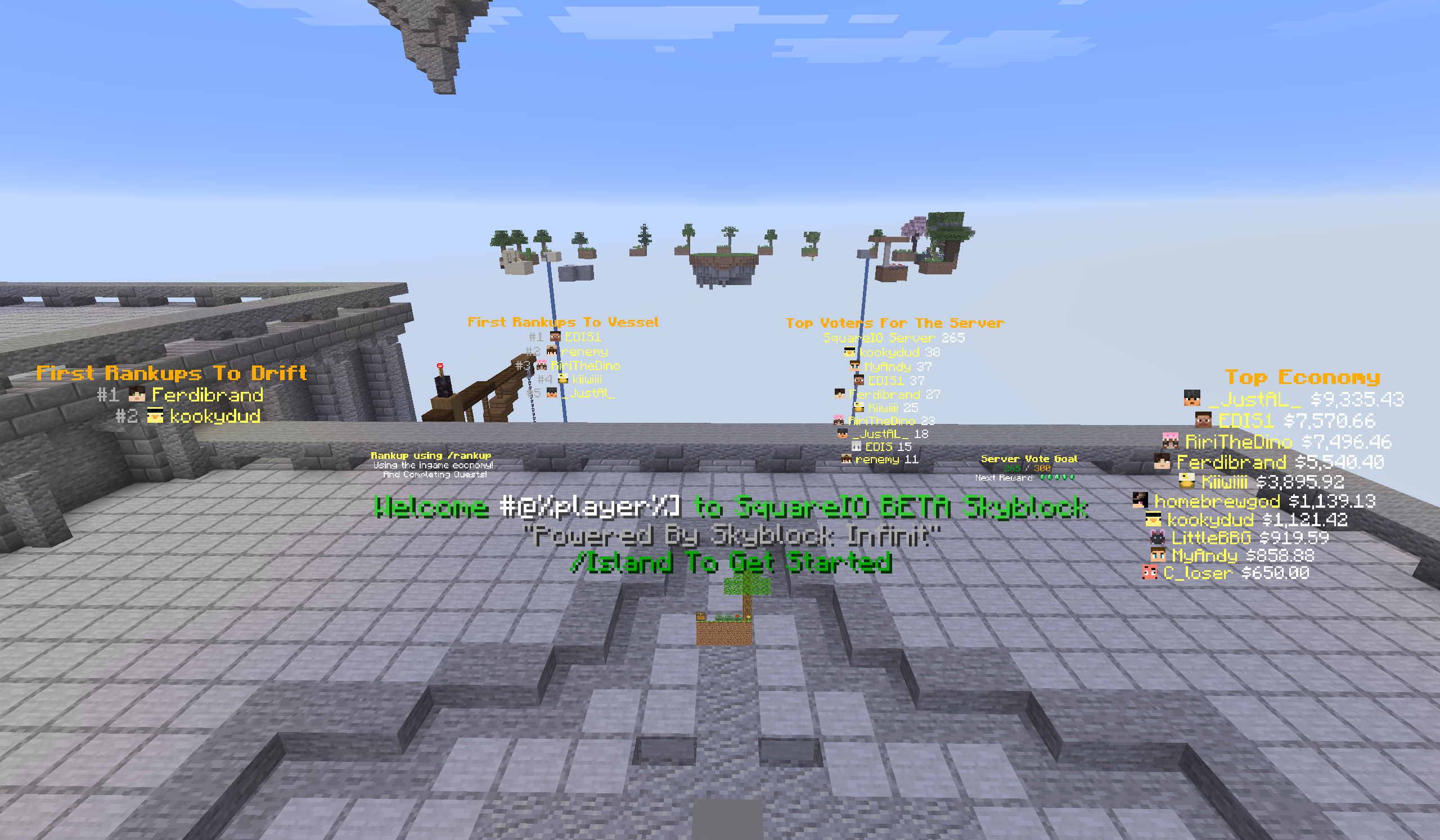
HologramMod is a server-side Fabric mod for placing floating text, blocks, items and live leaderboards anywhere in your world, all built and edited in-game. Every hologram supports rich colours, hex codes, hover text, click events, atlas sprites, player heads and per-player placeholders, and can be made clickable so a click runs a command. Everything is stored in YAML, saved automatically by the commands, and reloads without a restart. Players don't need to install anything.
Built as a companion to ChatMod. Sprite aliases from ChatMod's
sprites.ymlwork directly in hologram lines, so you can drop any atlas icon into your text with[#spriteName].
📧 Contact & Support
💬 Primary Support (Preferred)
All general questions, feature requests, and non-urgent bug reports should be posted in the appropriate channels on our Discord Server. We actively monitor it and will respond as soon as possible so the whole community benefits.
🆘 Urgent PM Policy
You may PM me directly only under specific urgent circumstances:
- Allowed reason: Your server is crashing or experiencing critical, game-breaking errors directly related to this mod.
- Requirement: You must be the server owner.
- Time zone: (CET/CEST) — Brussels Time
- PM hours: 10:00 AM – 10:00 PM Brussels Time only
Immediate responses are not guaranteed. Private messaging is a professional courtesy, not an entitlement. Thank you for your understanding!
✨ Why HologramMod
- Four hologram types: text, block, item and live scoreboard leaderboards
- Clickable holograms: run any command as the player or as the console when a hologram is clicked
- No duplicates: holograms are never saved into the world, so no extra copy can load back in when a chunk loads. Holograms in unloaded chunks are left alone until their chunk loads.
- Lightweight: text only re-sends when it actually changes, only the lines that changed are updated, and holograms aren't re-sent to players on a timer
- Per-player text: one entity shows a personalised line to every player (
%player%, health, coordinates …) - Immune to
/kill, and can't be broken by players - Full in-game editing: every command saves to YAML instantly
Formatting — Used on Every Line
| Syntax | Result |
|---|---|
&a, &b, &c … |
Minecraft colour codes |
&#RRGGBB |
Hex colour codes |
&l &o &n &m &k &r |
Bold, italic, underline, strikethrough, obfuscated, reset |
Text{Hover text} |
Hoverable text with a tooltip |
Text<action:run_command,/cmd> |
Click to run a command |
Text<action:suggest_command,/cmd> |
Click to suggest a command |
Text<action:open_url,https://…> |
Click to open a URL |
Text<action:copy_to_clipboard,value> |
Click to copy text |
[#spriteName] |
Atlas sprite icon (item, block or ChatMod alias) |
[#@Name] |
Player head + name |
[##@Name] |
Player head only |
[@Name] |
Player name only |
[#@%player%] |
Head of the player looking at the hologram |
%newline% |
Line break inside one line |
📝 Text Holograms — /holo
Floating text with per-line formatting. Lines stack from the top down and grow with the hologram's scale.
holograms:
  spawn_welcome:
    world: "minecraft:overworld"
    x: 0.5
    y: 65.0
    z: 0.5
    scale: 1.2
    billboard: CENTER
    shadow: true
    pages:
      default:
        - "&#FF5500&lWelcome, %player%!"
        - "[#christmas_chest] &7Seasonal crates are open"
        - "&a[ Click to teleport ]{&7Takes you to spawn}<action:run_command,/spawn>"
Appearance: billboard (CENTER / FIXED / HORIZONTAL / VERTICAL), scale (up to 200), brightness (0–15), see_through, shadow, line_width, opacity, bg_color, view_range_blocks, rotation_yaw / rotation_pitch / rotation_roll
🔄 Multi-Page Animation
Text holograms can have several pages that cycle automatically, which is useful for rotating announcements or animated signs.
| Command | What it does |
|---|---|
/holo <name> addpage |
Adds a new page (a, b, c …) |
/holo <name> addline a <text> |
Adds a line to page a |
/holo <name> addline @ <text> |
Adds a line to every page |
/holo <name> setline 2a <text> |
Edits line 2 of page a (2@ = every page) |
/holo <name> animate true |
Starts cycling |
/holo <name> timer 3 |
Seconds per page (decimals allowed) |
/holo <name> freeze <page|off> |
Pins one page / resumes cycling |
Pages with the same number of lines switch smoothly, without any flicker.
👤 Placeholders
Lines with player placeholders are resolved separately for each player, so one hologram shows each viewer their own name and stats. Server placeholders refresh automatically every placeholder_refresh_ms (default 1 s), and only when the value actually changed.
| Placeholder | Value |
|---|---|
%player% %player_display% |
Player name / display name |
%player_health% %player_max_health% %player_food% |
Health and hunger |
%player_level% %player_xp% |
XP level / progress % |
%player_x% %player_y% %player_z% |
Coordinates |
%player_world% %player_biome% |
Dimension / biome |
%player_ping% %player_gamemode% |
Ping / game mode |
%online% %max_players% %player_list% |
Players online |
%tps% %mspt% |
Server performance |
%ram_used% %ram_max% %ram_percent% |
JVM memory |
%time% %time_seconds% %date% %day% %month% %year% |
Real-world time and date |
%world_time% %world_day% |
In-game time and day |
%overworld_weather% |
Clear / Rain / Thunder |
Placeholder API placeholders (e.g. %player:name%) also work in every hologram when it is installed.
🖱️ Clickable Holograms — All Types
Any hologram (/holo, /holoblock, /holoitem, /holoscore) can run a command when a player left- or right-clicks it. This works just like a clickable chat link, but in the world.
| Command | What it does |
|---|---|
/<cmd> <name> interact |
Turns clicking on or off (off by default) |
/<cmd> <name> interact <command> |
Runs the command as the player who clicked |
/<cmd> <name> interactcon <command> |
Runs the command as the console |
/<cmd> <name> interactsize <width> <height> |
Sets the click area size yourself (0 0 = automatic) |
- Placeholders are filled in for the player who clicked:
interactcon give %player% diamond - Text holograms with
FIXEDorHORIZONTALbillboard get a flat click area that exactly matches the text. Holograms that turn to face the player get a tight box around the text. - Block and item displays get a click box that fits the model, including rotation, translation and both halves of double blocks
- The click area grows with the hologram's scale and follows page changes automatically
🧱 Block Display Holograms — /holoblock
Floating blocks with full block-state support, rotation and translation.
block_displays:
  my_block:
    world: "minecraft:overworld"
    x: 0.5
    y: 65.0
    z: 0.5
    block_state: "minecraft:stone_slab[type=top]"
    billboard: FIXED
    scale: 0.5
    rotation_yaw: 45.0
Double blocks are detected automatically: beds, doors and tall plants spawn both halves in the right place, so you only need the base block ID. To show a single half, add part= or half= to the block state.
🗡️ Item Display Holograms — /holoitem
Floating items with a configurable display context, rotation and translation.
item_displays:
  floating_sword:
    world: "minecraft:overworld"
    x: 0.5
    y: 65.0
    z: 0.5
    item: "minecraft:diamond_sword"
    display_context: FIXED
    billboard: CENTER
    scale: 1.0
Display contexts: FIXED, GROUND, GUI, HEAD, NONE, THIRD_PERSON_LEFT_HAND, THIRD_PERSON_RIGHT_HAND, FIRST_PERSON_LEFT_HAND, FIRST_PERSON_RIGHT_HAND
📊 Scoreboard Holograms — /holoscore
Live leaderboards that update the moment the data changes.
| Source | What it shows |
|---|---|
scoreboard |
Any vanilla scoreboard objective, sorted by score |
ecobal |
Top player balances from the EcoBal economy mod |
votes |
Total server votes with automatic goal milestones |
score_holograms:
  top_kills:
    world: "minecraft:overworld"
    x: 100.5
    y: 65.0
    z: 200.5
    source_type: scoreboard
    scoreboard: kills
    update_mode: scoreboard
    lines:
      - "&6&lTop Kills"
      - "&e#%rank% [#@%player%] &7— &a%score%"
      - "&e#%rank% [#@%player%] &7— &a%score%"
      - "&e#%rank% [#@%player%] &7— &a%score%"
Leaderboard placeholders: %scoreboardname%, %rank%, %player%, %displayname%, %score%, %balance%, %total_votes%, %vote_goal%, %votes_until_goal%
- Every line with a player placeholder shows the next ranked player; empty ranks stay blank
- Pagination:
/holoscore <name> newpagecreates a second board that continues the ranking where the first one ends - Update modes:
scoreboard(updates when the ranking or scores change) ortimed(updates everyupdateintervalseconds) - Only lines whose value changed are updated, so the board never flickers or respawns
Commands
All commands save to their YAML file instantly. /hologram and /holo are the same command.
Text Holograms /holo
| Command | Description |
|---|---|
/holo create <name> |
Create at your position |
/holo remove <name> |
Delete permanently |
/holo list |
List all text holograms |
/holo info <name> |
Show all settings and lines |
/holo <name> inforaw |
Raw lines, click a line to edit it |
/holo tp <name> [player] |
Teleport yourself or another player |
/holo <name> move |
Move to your position |
/holo <name> moveto <x> <y> <z> |
Move to exact coordinates |
/holo <name> addline [page|@] <text> |
Add a line |
/holo <name> setline <index>[page|@] <text> |
Edit a line |
/holo <name> removeline <index>[page|@] |
Remove a line |
/holo <name> addpage / removepage <page> |
Manage animation pages |
/holo <name> animate <true|false> |
Toggle page cycling |
/holo <name> timer <seconds> |
Time per page |
/holo <name> freeze <page|off> |
Pin a page |
/holo <name> scale|billboard|brightness|seethrough|shadow|linewidth|opacity|background|viewrange <value> |
Appearance |
/holo <name> interact|interactcon|interactsize … |
Click actions |
/holo reload |
Reload all hologram types and messages |
Block Displays /holoblock
create <name> [block], remove, list, info, <name> inforaw, tp <name> [player], <name> move, moveto, block <state>, scale, billboard, brightness, viewrange, translate <x> <y> <z>, rotate <yaw> <pitch> <roll>, interact, interactcon, interactsize, reload
Item Displays /holoitem
create <name> [item], remove, list, info, <name> inforaw, tp <name> [player], <name> move, moveto, item <id>, context <context>, scale, billboard, brightness, viewrange, translate <x> <y> <z>, rotate <yaw> <pitch> <roll>, interact, interactcon, interactsize, reload
Scoreboard Holograms /holoscore
create <name> scoreboard <objective>, create <name> ecobal [label], create <name> votes <objective> [holder], remove, list, <name> info, <name> inforaw, tp <name> [player], <name> newpage, move, moveto, addline, setline, removeline, updatemode <scoreboard|timed>, updateinterval <seconds>, votesholder <name>, voteinterval <n>, scale, billboard, brightness, seethrough, shadow, linewidth, opacity, background, viewrange, interact, interactcon, interactsize, reload
Permissions
Click to expand all permission nodes
Text Holograms
| Node | Grants |
|---|---|
hologrammod.command |
Base /holo access |
hologrammod.create |
/holo create |
hologrammod.remove |
/holo remove |
hologrammod.reload |
/holo reload |
hologrammod.list |
/holo list |
hologrammod.info |
/holo info |
hologrammod.inforaw |
/holo <name> inforaw |
hologrammod.tp |
/holo tp <name> |
hologrammod.edit |
All /holo <name> editing commands, including click actions |
Block & Item Displays
| Node | Grants |
|---|---|
hologrammod.holoblock |
All /holoblock commands |
hologrammod.holoitem |
All /holoitem commands |
Scoreboard Holograms
| Node | Grants |
|---|---|
hologrammod.score.command |
Base /holoscore access |
hologrammod.score.create |
/holoscore create |
hologrammod.score.remove |
/holoscore remove |
hologrammod.score.reload |
/holoscore reload |
hologrammod.score.list |
/holoscore list |
hologrammod.score.edit |
All /holoscore <name> editing commands |
Shared
| Node | Grants |
|---|---|
hologrammod.tp.others |
Teleport other players to any hologram type |
hologrammod.* |
Everything |
Every node falls back to op level 2 when no permission mod is installed. The console can always use every command.
⚠️
interactconcommands run with full console rights. Only give editing permissions to staff you'd trust with the console.
⚙️ Configuration
All files live in config/hologrammod/. Edit them freely, then run /holo reload; no restart is needed.
| File | Contains |
|---|---|
hologramtext.yml |
Text holograms |
hologramblock.yml |
Block displays |
hologramitem.yml |
Item displays |
hologramscores.yml |
Scoreboard holograms |
messages_format.yml |
All player-facing messages |
Dependencies
| Mod | Required? |
|---|---|
| Fabric API | ✅ Required |
| ChatMod | ⭐ Recommended, for shared sprite aliases |
| LuckPerms / Fabric Permissions API | 🔶 Optional, for permission nodes |
| Placeholder API | 🔶 Optional, for extra placeholders |
| EcoBal | 🔶 Optional, for ecobal leaderboards |
Modpack Policy
- ✅ You may include HologramMod in any modpack.
- ❌ The modpack must not be sold.
Screenshots
Gallery

Versions
Files
Relations
Project Relations
More like this
Similar Mods
Suggestions use data such as tags, dependencies, dependents, descriptions, titles, and more to rank how much they overlap with this mod.
On ModDex
Community snapshot
By the numbers
Statistics


Get it on
Available Platforms
On ModDex
Community snapshot
By the numbers
Statistics
Resources