
Community listing page, reviews here may not be monitored by the author.
XXL Enderchest


No reviews yet
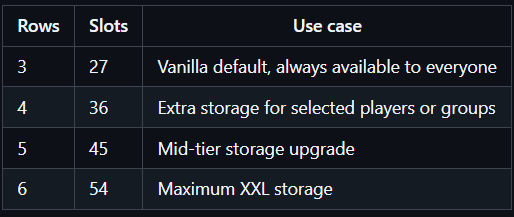
A Fabric mod that expands your enderchest from the vanilla 3 rows (27 slots) to up to 6 rows (54 slots).
Community voices
Reviews
No reviews yet. Be the first to review this project!
Get it on
Available Platforms
Compatibility
Supported Environments
Runs entirely on the server. Also works in singleplayer.
About
Project Details
For authors
Embed Badge
If you're the author of this project, you can embed a live badge anywhere that supports HTML or Markdown. It updates automatically whenever ratings change.
Use HTML for any page that supports it, or Markdown for README files and Markdown-based descriptions.
Identifiers
Platform IDs
About
Description
XXL Enderchest
A Fabric mod that expands your enderchest from the vanilla 3 rows (27 slots) to up to 6 rows (54 slots).
✨ Features
- Vanilla access is preserved: every player can always use a normal 3-row ender chest.
- Fixed config mode for simple servers or single-player worlds.
- Optional LuckPerms mode for per-group row upgrades.
- Optional Mod Menu + Cloth Config integration for an in-game config screen on the client.
- Optional /enderchest command, it opens the player's own enderchest.
- Automatic fallback to config mode if LuckPerms is enabled in config but the mod is not installed.
- Hidden rows keep their items stored safely; lowering access does not delete inventory contents.
- Works on dedicated servers and in single-player.
❗ How it works
XXL Enderchest always keeps the internal ender chest container at 54 slots so data is never thrown away.
What players can actually open depends on the active mode:
`enabled=false`: vanilla behavior only, 3 rows.
`enabled=true` and `useLuckPerms=false`: everyone gets the configured `rows` value.
`enabled=true` and `useLuckPerms=true` with LuckPerms installed: everyone keeps vanilla 3 rows by default, and permissions can upgrade that to 4, 5, or 6 rows.
`enabled=true` and `useLuckPerms=true` without LuckPerms installed: automatic fallback to configured `rows`.
`commandEnabled=true`: players can use `/enderchest`; in LuckPerms mode they also need the command permission node.
⚙️ Configuration
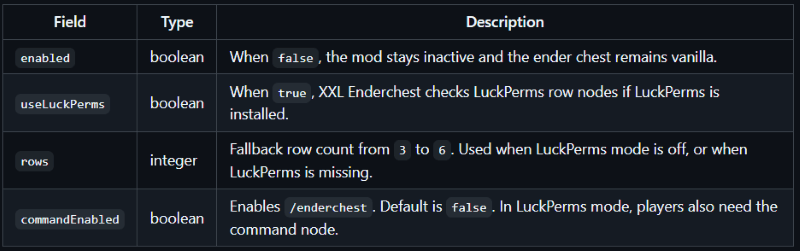
Config file: `config/xxlenderchest.json`
json
{
  "enabled": true,
  "useLuckPerms": false,
  "rows": 6,
  "commandEnabled": false
}
After editing the config, run `/xxlenderchest reload`.
If you install Mod Menu and Cloth Config API on the client, XXL Enderchest exposes a full config screen in-game.
🔄 LuckPerms permissions
There is intentionally no `use` permission.
Every player must always be able to open a vanilla 3-row ender chest.
If LuckPerms mode is active, these nodes can increase the available rows:
- `xxlenderchest.rows.4`
- `xxlenderchest.rows.5`
- `xxlenderchest.rows.6`
- `xxlenderchest.command.enderchest` for `/enderchest` when `commandEnabled=true`
Highest granted row wins.
LuckPerms quick start
Example: default users get 4 rows, moderators get 5 rows, VIPs get 6 rows.
- /lp group default permission set xxlenderchest.rows.4 true
- /lp group moderator permission set xxlenderchest.rows.5 true
- /lp group vip permission set xxlenderchest.rows.6 true
Example: give one player full 6-row access.
- /lp user permission set xxlenderchest.rows.6 true
Example: enable the `/enderchest` command for one player.
- /lp user <player> permission set xxlenderchest.command.enderchest true
Official LuckPerms docs:
- LuckPerms Wiki: https://luckperms.net/wiki/Home
- LuckPerms Command Usage]: https://luckperms.net/wiki/Command-Usage
🔄 Commands
❗ Important notes
Lowering row access
If a player had access to more rows before, the extra items remain stored.
They are simply hidden until that player regains enough rows again.
Removing the mod
Vanilla Minecraft only uses the first 27 ender chest slots.
If you remove XXL Enderchest from an existing world, items stored below the first 3 rows may no longer be accessible.
Make a backup before removing the mod from a world or server.
🏜️ Test Server
Feel free to join my Minecraft server to test my mods: play.swordfishbe.eu

A Fabric mod that expands your enderchest from the vanilla 3 rows (27 slots) to up to 6 rows (54 slots).
✨ Features
| Rows | Slots | Use case |
|---|---|---|
| 3 | 27 | Vanilla default, always available to everyone |
| 4 | 36 | Extra storage for selected players or groups |
| 5 | 45 | Mid-tier storage upgrade |
| 6 | 54 | Maximum XXL storage |
- Vanilla access is preserved: every player can always use a normal 3-row ender chest.
- Fixed config mode for simple servers or single-player worlds.
- Optional LuckPerms mode for per-group row upgrades.
- Optional Mod Menu + Cloth Config integration for an in-game config screen on the client.
- Optional /enderchest command, it opens the player's own enderchest.
- Automatic fallback to config mode if LuckPerms is enabled in config but the mod is not installed.
- Hidden rows keep their items stored safely; lowering access does not delete inventory contents.
- Works on dedicated servers and in single-player.
❗ How it works
XXL Enderchest always keeps the internal enderchest container at 54 slots so data is never thrown away.
What players can actually open depends on the active mode:
enabled=false: vanilla behavior only, 3 rows.enabled=trueanduseLuckPerms=false: everyone gets the configuredrowsvalue.enabled=trueanduseLuckPerms=truewith LuckPerms installed: everyone keeps vanilla 3 rows by default, and permissions can upgrade that to 4, 5, or 6 rows.enabled=trueanduseLuckPerms=truewithout LuckPerms installed: automatic fallback to configuredrows.commandEnabled=true: players can use/enderchest; in LuckPerms mode they also need the command permission node.
⚙️ Configuration
Config file: config/xxlenderchest.json
{
"enabled": true,
"useLuckPerms": false,
"rows": 6,
"commandEnabled": false
}
| Field | Type | Description |
|---|---|---|
enabled |
boolean | When false, the mod stays inactive and the ender chest remains vanilla. |
useLuckPerms |
boolean | When true, XXL Enderchest checks LuckPerms row nodes if LuckPerms is installed. |
rows |
integer | Fallback row count from 3 to 6. Used when LuckPerms mode is off, or when LuckPerms is missing. |
commandEnabled |
boolean | Enables /enderchest. Default is false. In LuckPerms mode, players also need the command node. |
After editing the config, run /xxlenderchest reload.
If you install Mod Menu and Cloth Config API on the client, XXL Enderchest exposes a full config screen in-game.
🔄 LuckPerms permissions
There is intentionally no use permission.
Every player must always be able to open a vanilla 3-row ender chest.
If LuckPerms mode is active, these nodes can increase the available rows:
xxlenderchest.rows.4xxlenderchest.rows.5xxlenderchest.rows.6xxlenderchest.command.enderchestfor/enderchestwhencommandEnabled=true
Highest granted row wins.
LuckPerms quick start
Example: default users get 4 rows, moderators get 5 rows, VIPs get 6 rows.
/lp group default permission set xxlenderchest.rows.4 true
/lp group moderator permission set xxlenderchest.rows.5 true
/lp group vip permission set xxlenderchest.rows.6 true
Example: give one player full 6-row access.
/lp user <player> permission set xxlenderchest.rows.6 true
Example: enable the /enderchest command for one player.
/lp user <player> permission set xxlenderchest.command.enderchest true
Official LuckPerms docs:
🔄 Commands
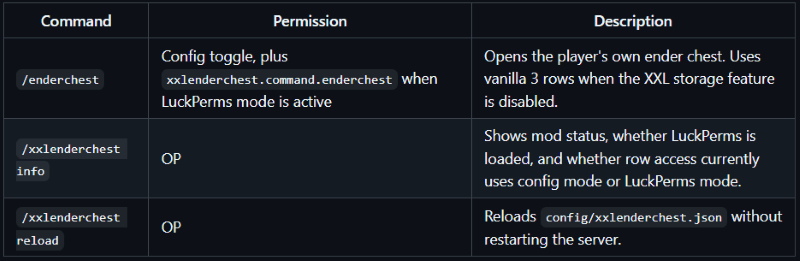
| Command | Permission | Description |
|---|---|---|
/enderchest |
Config toggle, plus xxlenderchest.command.enderchest when LuckPerms mode is active |
Opens the player's own ender chest. Uses vanilla 3 rows when the XXL storage feature is disabled. |
/xxlenderchest info |
OP | Shows mod status, whether LuckPerms is loaded, and whether row access currently uses config mode or LuckPerms mode. |
/xxlenderchest reload |
OP | Reloads config/xxlenderchest.json without restarting the server. |
❗ Important notes
Lowering row access
If a player had access to more rows before, the extra items remain stored. They are simply hidden until that player regains enough rows again.
Removing the mod
Vanilla Minecraft only uses the first 27 ender chest slots. If you remove XXL Enderchest from an existing world, items stored below the first 3 rows may no longer be accessible. Make a backup before removing the mod from a world or server.
🏜️ Test Server
Feel free to join my Minecraft server to test my mods: play.swordfishbe.eu
Screenshots
Gallery
-
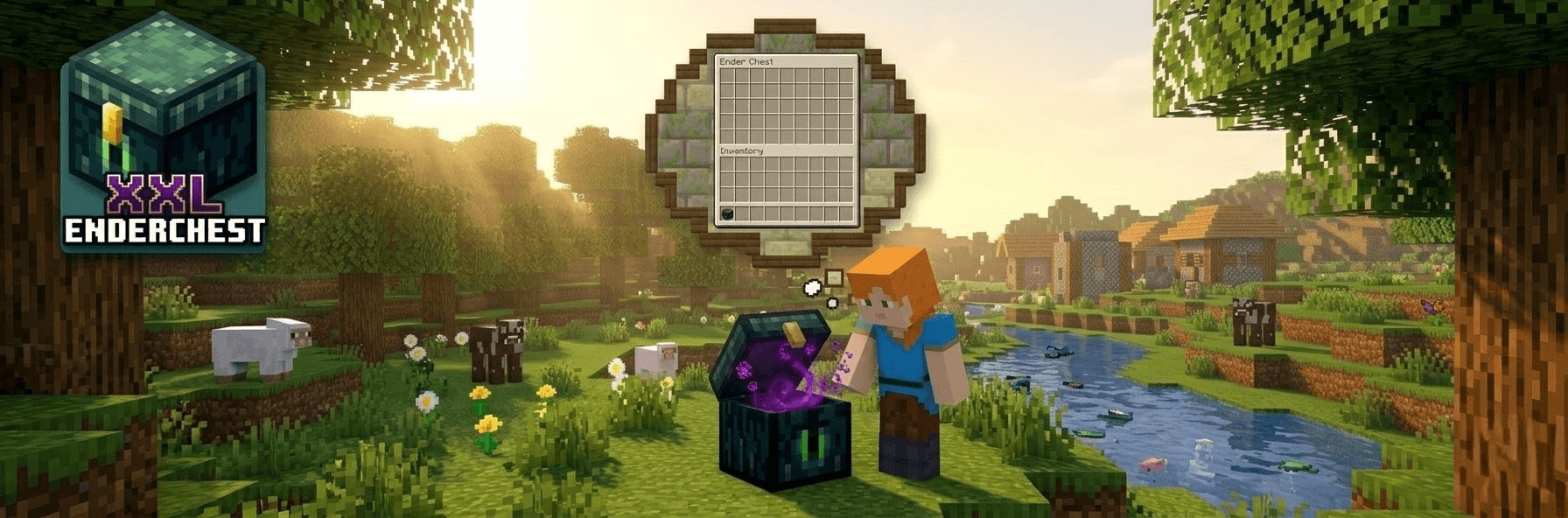 Alex is very happy! More storage.. Alex always wanted more enderchest storage 😉. Up to 6 rows! 54 slots!
 -
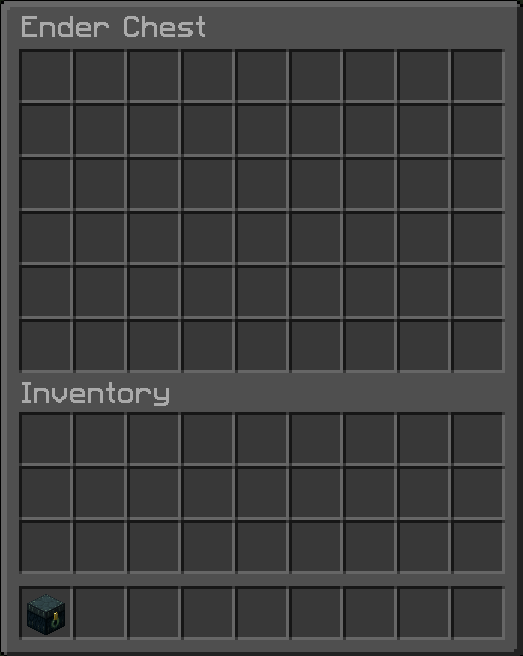 XXL Enderchest So much storage space!
-
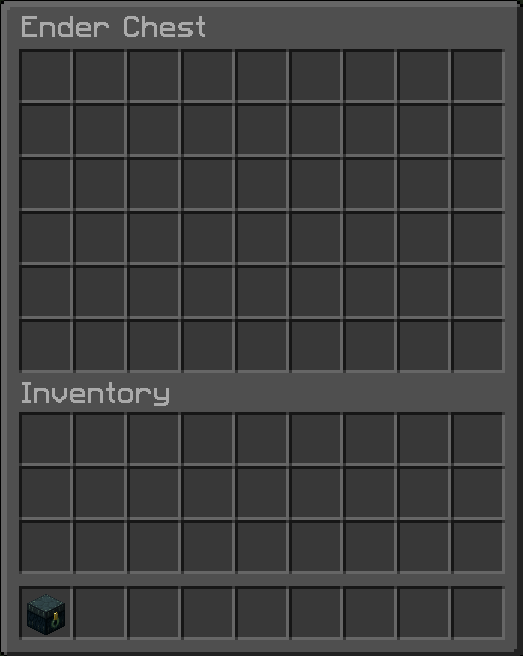 More storage.. Steve always wanted more enderchest storage 😉. Up to 6 rows! 54 slots!
Versions
Files
Relations
Project Relations
More like this
Similar Mods
Suggestions use data such as tags, dependencies, dependents, descriptions, titles, and more to rank how much they overlap with this mod.
On ModDex
Community snapshot
By the numbers
Statistics
Want to reach Minecraft players?
We're looking for a server hosting partner to feature here and other parts of the site. Interested? Send us a message!
Get in touchGet it on
Available Platforms
On ModDex
Community snapshot
By the numbers