
Community listing page, reviews here may not be monitored by the author.
Server Waypoint


No reviews yet
Manage waypoints and sync them to other player's client automatically. Compatible with Xaero's minimap.

Community voices
Reviews
No reviews yet. Be the first to review this project!
Get it on
Available Platforms
Compatibility
Supported Environments
Must be installed on both the client and the server.
Works on the client or the server alone, but does more when on both.
Varies by version.
About
Project Details
For authors
Embed Badge
If you're the author of this project, you can embed a live badge anywhere that supports HTML or Markdown. It updates automatically whenever ratings change.
Use HTML for any page that supports it, or Markdown for README files and Markdown-based descriptions.
Identifiers
Platform IDs
About
Description
Server Waypoint











Manage waypoints and sync them to other players' clients automatically. Compatible with Xaero's minimap.
Features
- Syncing waypoints from the server automatically.
- Customizable waypoints rendering.
- Allow players to manage waypoints by both GUI (need client installation) and commands (only need server installation).
- Commands auto-completion.
- Custom permission for
/wp <options>commands. Compatible with LuckPerms. - Support adding waypoint conveniently from Xaero's minimap waypoint chat sharing message without requiring client side installation.
Dependencies
Required:
Optional:
Keybinds
- Press
Right Shift(default keybind) or use/wp_guito open the waypoint manager screen in game. - In the waypoint manager screen, hover over a waypoint and press
Tto teleport (requires/wp tpcommand permission). - In the waypoint manager screen, press
Cto open client configuration screen.
Commands
/wp addadd a new waypoint. No duplicate name allowed. Prompts user to use/wp editto replace the existing one./wp add <dimension> <list>add a waypoint list.
/wp downloaddownload waypoints and add to Xaero's Minimap (will not work without client installation)./wp editedit a waypoint./wp listlist all waypoints. Shows all waypoints in a tree hierarchy. Allowing user to click to teleport, edit and remove the waypoint./wp reloadreloadconfig.jsonand translation files in/config/server_waypoint/lang, featuresendXaerosWorldIdrequires restarting to take effect./wp removeremove a waypoint by name. Shows the removed waypoint and click it to restore that waypoint./wp remove <dimension> <list>remove an empty waypoint list.
/wp tpteleport the executor player to a waypoint
Server-side Translations
Messages and command feedbacks sent by this mod will be automatically translated based on the language setting on the receiver's client. This works entirely on the server-side; players can see the translated message without client-side installation of this mod. Right now, the mod comes with translations for English and Simplified Chinese. If you’re interested, you can help out by adding translations on Crowdin!
Add translations
Place the lang files under the directory:
<config-path>/server_waypoint/lang/. This mod will load them on server starting, use/wp reloadif the server is already running.Create a lang file
Follow the format used in
en_us.json,zh_cn.json.Name the lang file with a valid language code.
### Translation order If the translation you’ve added uses the same language code as the built-in language, this mod will try to find the translation key in the file you added first. If that key isn’t there, it’ll fall back to the built-in translation. So, if you’d like to use your own translation version, you can easily do that by adding your own file and overriding the built-in translation.
Community translator credits and credit pull request guidelines are documented in TRANSLATOR_CREDITS.md.
Translation Credits
Thank you to the community translators who help make Server Waypoint available to more players in more languages.
Hebrew:
Spanish:
shimonsolo
Traditional Chinese:
Ymaomi
Traditional Chinese (Hong Kong):
Ymaomi
Waypoints
Location
For a dedicated server:
<config-path>/server_waypoint/waypoints/For a single player world:
<minecraft-root>/saves/<world-name>/server_waypoint/waypoints/#### File Format All waypoints are saved in json files. Each json file contains all waypoints in one dimension and the filename is the converted full registry name of that dimension. For example, all waypoints in the overworld is stored in
minecraft$overworld.json.
Server Configurations
Fabric, Quilt:
<minecraft-root>/config/server_waypoint/config.json
NeoForge, Forge:
<minecraft-root>/defaultconfigs/server_waypoint/config.json
Paper, Purpur:
<server-root>/plugins/ServerWaypoint/config.json
Some changes made in config.json may take effects after server restarts.
Command Permission
Changes the vanilla permission level required to execute the command.
This will be overridden by the permission set by LuckPerms.
Default value:
  {
    "CommandPermission": {
      // /wp add
      "add": 0,
      // /wp edit
      "edit": 0,
      // /wp remove
      "remove": 0,
      // /wp tp
      "tp": 2,
      // /wp reload
      "reload": 2
    }
  }
Features
- #### addWaypointFromChatSharing
Default value:
true
Prompts the user to add the waypoint they shared in chat. Requires
/wp addpermission.Example:
{ "Features": { "addWaypointFromChatSharing": true } }- #### sendXaerosWorldId
Default value:
true
Send world id to client to help Xaero's map mod recognize the server.
This should be set to
falseifxaero-map-protocolon the Leaves server or some similar features provided by other plugin or mod is enabled.Example:
{ "Features": { "sendXaerosWorldId": true } }- #### addWaypointFromChatSharing
Default value:
Client Configurations
#### Enable Waypoint Rendering Default value:
true#### Waypoint Rendering Scaling Factor (Percentage) Default value:
100#### Waypoint Background Transparence Default value:
128#### Waypoint Vertical Offset (Percentage) Default value:
0#### Local Waypoint View Distance (Chunks) Default value:
12Auto Sync to Xaero's Minimap
Default value:
trueRequires Xaero's Minimap mod installed.
Manually Sync to Xaero's Minimap
Default value:
NoneTriggered manually, requires Xaero's Minimap mod installed.
This will replace any waypoint sets on Xaeros' Minimap that has the same name as a list on the server.
- What stays: Waypoint sets with unique names that do not exist on the server.
- What is lost: Any waypoints you added to these shared lists. Any list you created that happens to share a name with a server list.
Server Waypoint





Manage waypoints and sync them to other players' clients automatically. Compatible with Xaero's minimap.
Features
- Syncing waypoints from the server automatically.
- Customizable waypoints rendering.
- Allow players to manage waypoints by both GUI (need client installation) and commands (only need server installation).
- Commands auto-completion.
- Custom permission for
/wp <options>commands. Compatible with LuckPerms. - Support adding waypoint conveniently from Xaero's minimap waypoint chat sharing message without requiring client side installation.
Dependencies
Required:
Optional:
Keybinds
- Press
Right Shift(default keybind) or use/wp_guito open the waypoint manager screen in game. - In the waypoint manager screen, hover over a waypoint and press
Tto teleport (requires/wp tpcommand permission). - In the waypoint manager screen, press
Cto open client configuration screen.
Commands
/wp addadd a new waypoint. No duplicate name allowed. Prompts user to use/wp editto replace the existing one./wp add <dimension> <list>add a waypoint list.
/wp downloaddownload waypoints and add to Xaero's Minimap (will not work without client installation)./wp editedit a waypoint./wp listlist all waypoints. Shows all waypoints in a tree hierarchy. Allowing user to click to teleport, edit and remove the waypoint./wp reloadreloadconfig.jsonand translation files in/config/server_waypoint/lang, featuresendXaerosWorldIdrequires restarting to take effect./wp removeremove a waypoint by name. Shows the removed waypoint and click it to restore that waypoint./wp remove <dimension> <list>remove an empty waypoint list.
/wp tpteleport the executor player to a waypoint
Server-side Translations
Messages and command feedbacks sent by this mod will be automatically translated based on the language setting on the receiver's client. This works entirely on the server-side; players can see the translated message without client-side installation of this mod. Right now, the mod comes with translations for English and Simplified Chinese. If you’re interested, you can help out by adding translations on Crowdin!
-
Add translations
Place the lang files under the directory:
<config-path>/server_waypoint/lang/. This mod will load them on server starting, use/wp reloadif the server is already running. -
Create a lang file
Follow the format used in
en_us.json,zh_cn.json.Name the lang file with a valid language code.
-
Translation order
If the translation you’ve added uses the same language code as the built-in language, this mod will try to find the translation key in the file you added first. If that key isn’t there, it’ll fall back to the built-in translation. So, if you’d like to use your own translation version, you can easily do that by adding your own file and overriding the built-in translation.
Community translator credits and credit pull request guidelines are documented in TRANSLATOR_CREDITS.md.
Translation Credits
Thank you to the community translators who help make Server Waypoint available to more players in more languages.
-
Hebrew
hotspotty -
Spanish
shimonsolo -
Traditional Chinese
Ymaomi -
Traditional Chinese (Hong Kong)
Ymaomi
Waypoints
-
Location
For a dedicated server:
<config-path>/server_waypoint/waypoints/For a single player world:
<minecraft-root>/saves/<world-name>/server_waypoint/waypoints/ -
File Format
All waypoints are saved in json files. Each json file contains all waypoints in one dimension and the filename is the converted full registry name of that dimension. For example, all waypoints in the overworld is stored in
minecraft$overworld.json.
Server Configurations
Fabric, Quilt:
<minecraft-root>/config/server_waypoint/config.json
NeoForge, Forge:
<minecraft-root>/defaultconfigs/server_waypoint/config.json
Paper, Purpur:
<server-root>/plugins/ServerWaypoint/config.json
Some changes made in config.json may take effects after server restarts.
-
Command Permission
Changes the vanilla permission level required to execute the command.
This will be overridden by the permission set by LuckPerms.
Default value:
{ "CommandPermission": { // /wp add "add": 0, // /wp edit "edit": 0, // /wp remove "remove": 0, // /wp tp "tp": 2, // /wp reload "reload": 2 } } -
Features
-
addWaypointFromChatSharing
Default value:
truePrompts the user to add the waypoint they shared in chat. Requires
/wp addpermission.Example:
{ "Features": { "addWaypointFromChatSharing": true } } -
sendXaerosWorldId
Default value:
trueSend world id to client to help Xaero's map mod recognize the server.
This should be set to
falseifxaero-map-protocolon the Leaves server or some similar features provided by other plugin or mod is enabled.Example:
 {
   "Features": {
     "sendXaerosWorldId": true
   }
 }
-
Client Configurations
-
Enable Waypoint Rendering
Default value:
true -
Waypoint Rendering Scaling Factor (Percentage)
Default value:
100 -
Waypoint Background Transparence
Default value:
128 -
Waypoint Vertical Offset (Percentage)
Default value:
0 -
Local Waypoint View Distance (Chunks)
Default value:
12 -
Auto Sync to Xaero's Minimap
Default value:
trueRequires Xaero's Minimap mod installed.
-
Manually Sync to Xaero's Minimap
Default value:
NoneTriggered manually, requires Xaero's Minimap mod installed.
This will replace any waypoint sets on Xaeros' Minimap that has the same name as a list on the server.
- What stays: Waypoint sets with unique names that do not exist on the server.
- What is lost: Any waypoints you added to these shared lists. Any list you created that happens to share a name with a server list.
Screenshots
Gallery
-
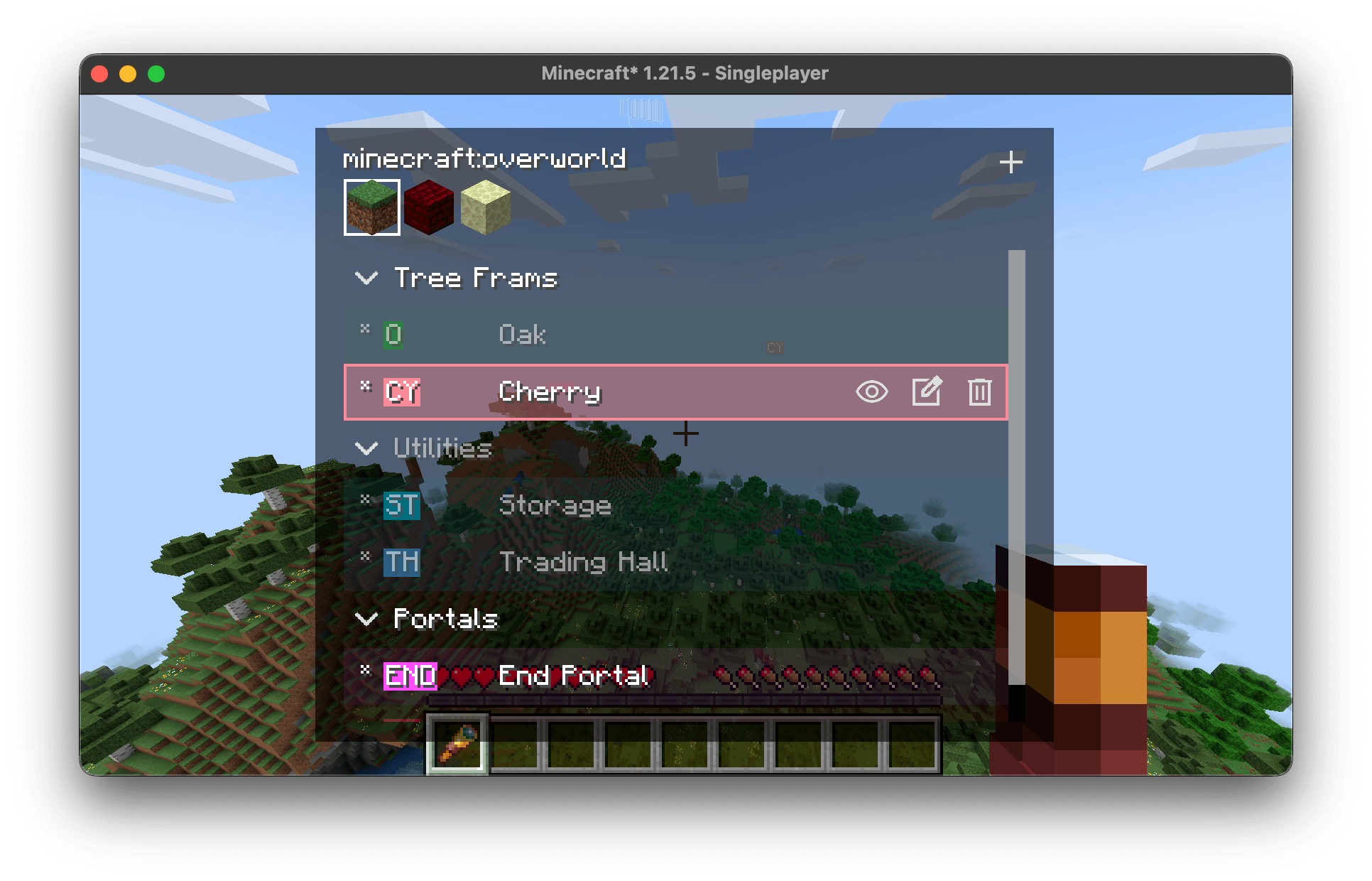 Waypoint Manager Screen All screens in this mod do not block movement, you can sprinting or boating when viewing the waypoints.
 -
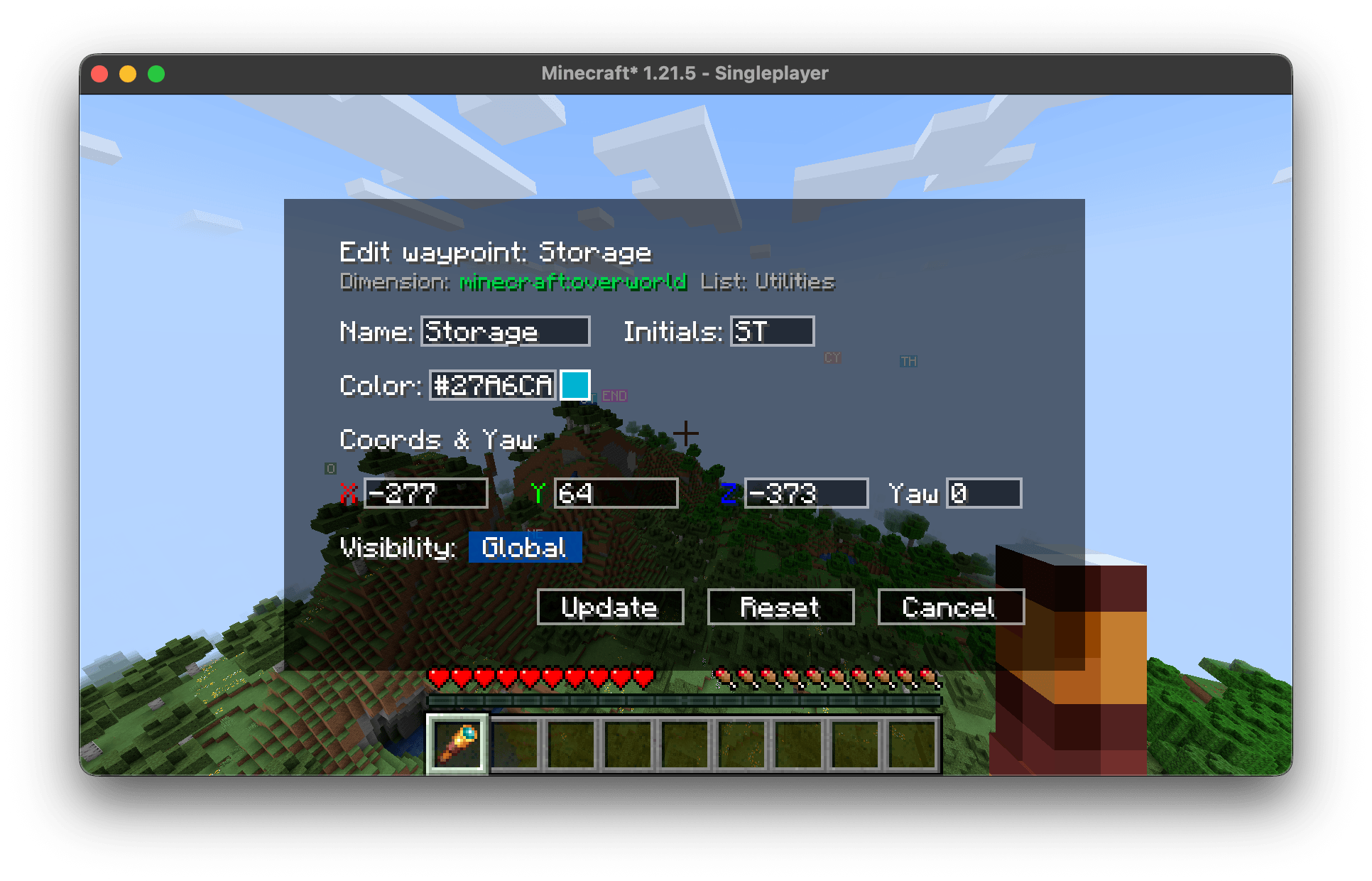 Waypoint Edit Screen
 -
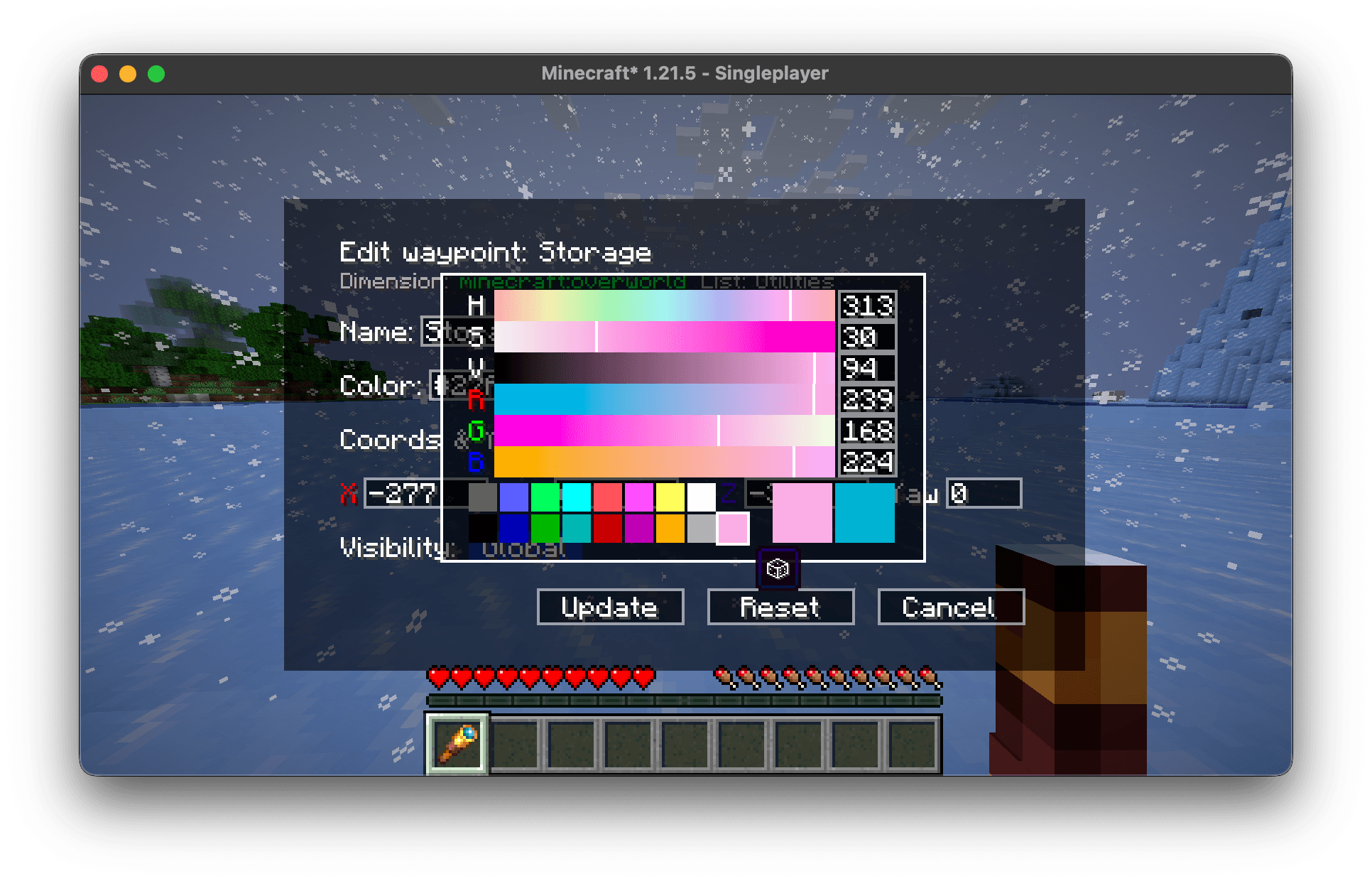 Color Picker Built-in advanced color picker, you can also pick a random color.
 -
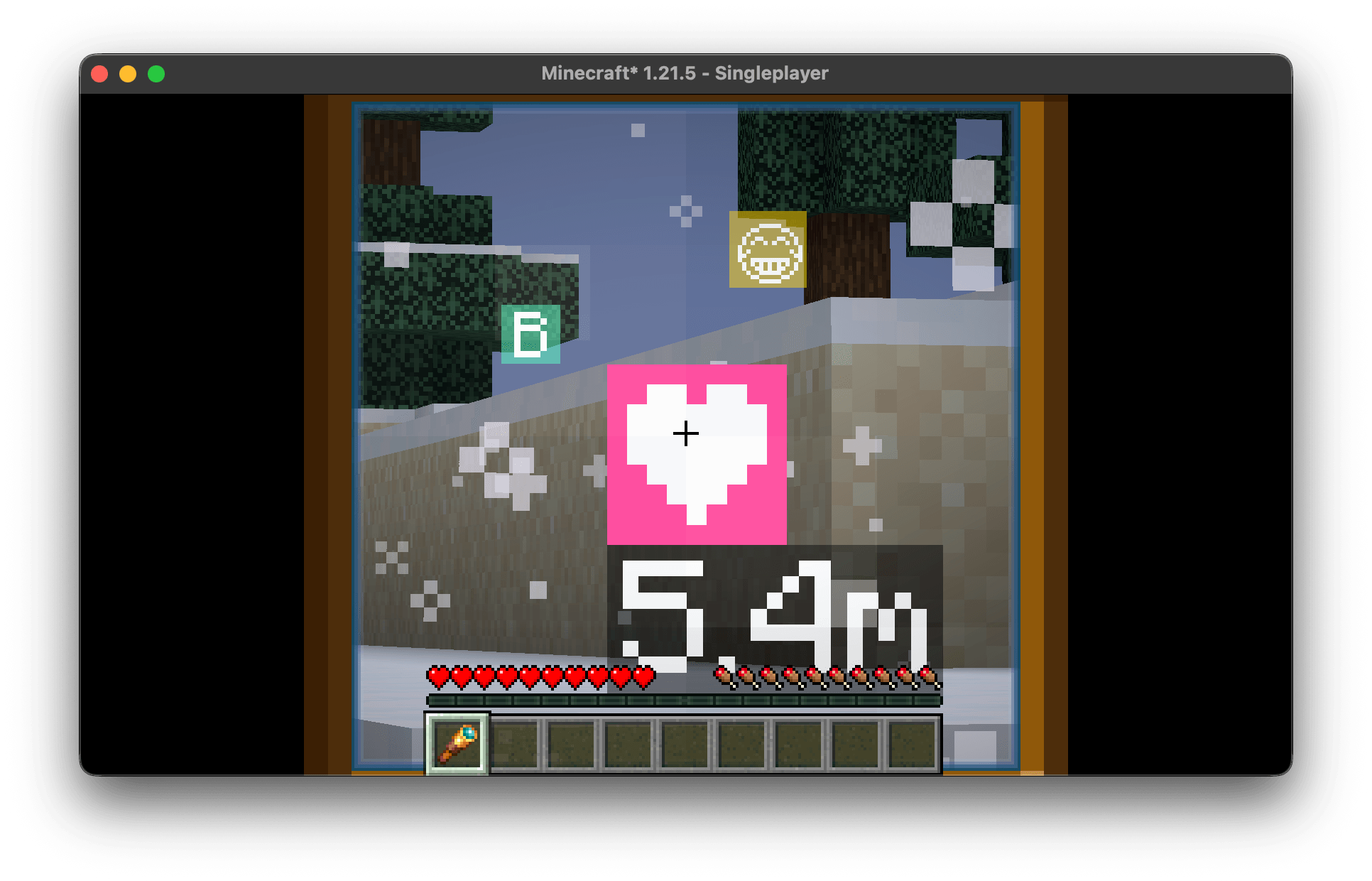 Waypoint Rendering Auto Scaling The waypoints on the HUD will be enlarged when using the spyglass, providing an immersive experience.
 -
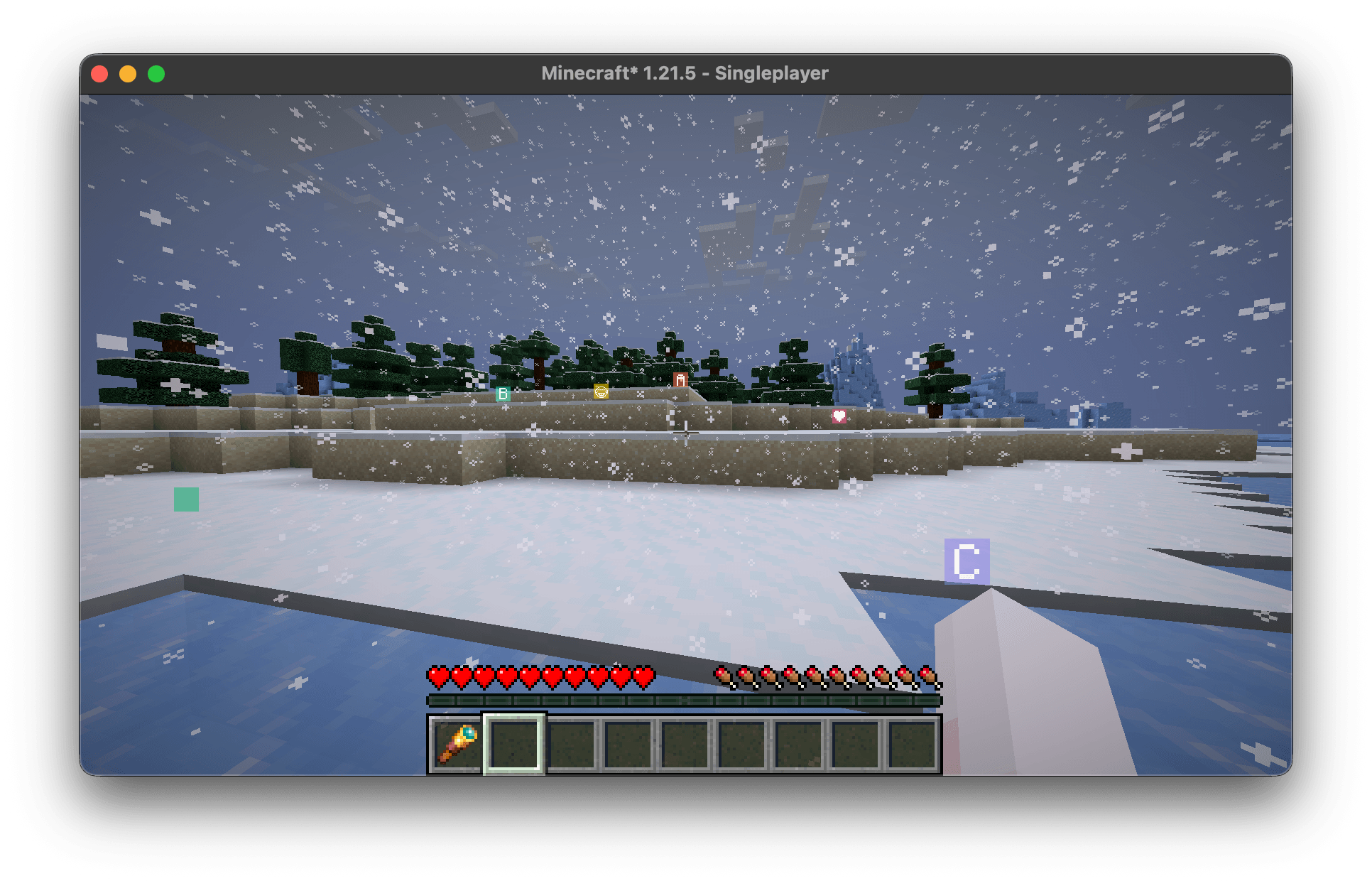 In World Waypoint Rendering Supports waypoints in RGB color and having emoji or even "space" as its name.
 -
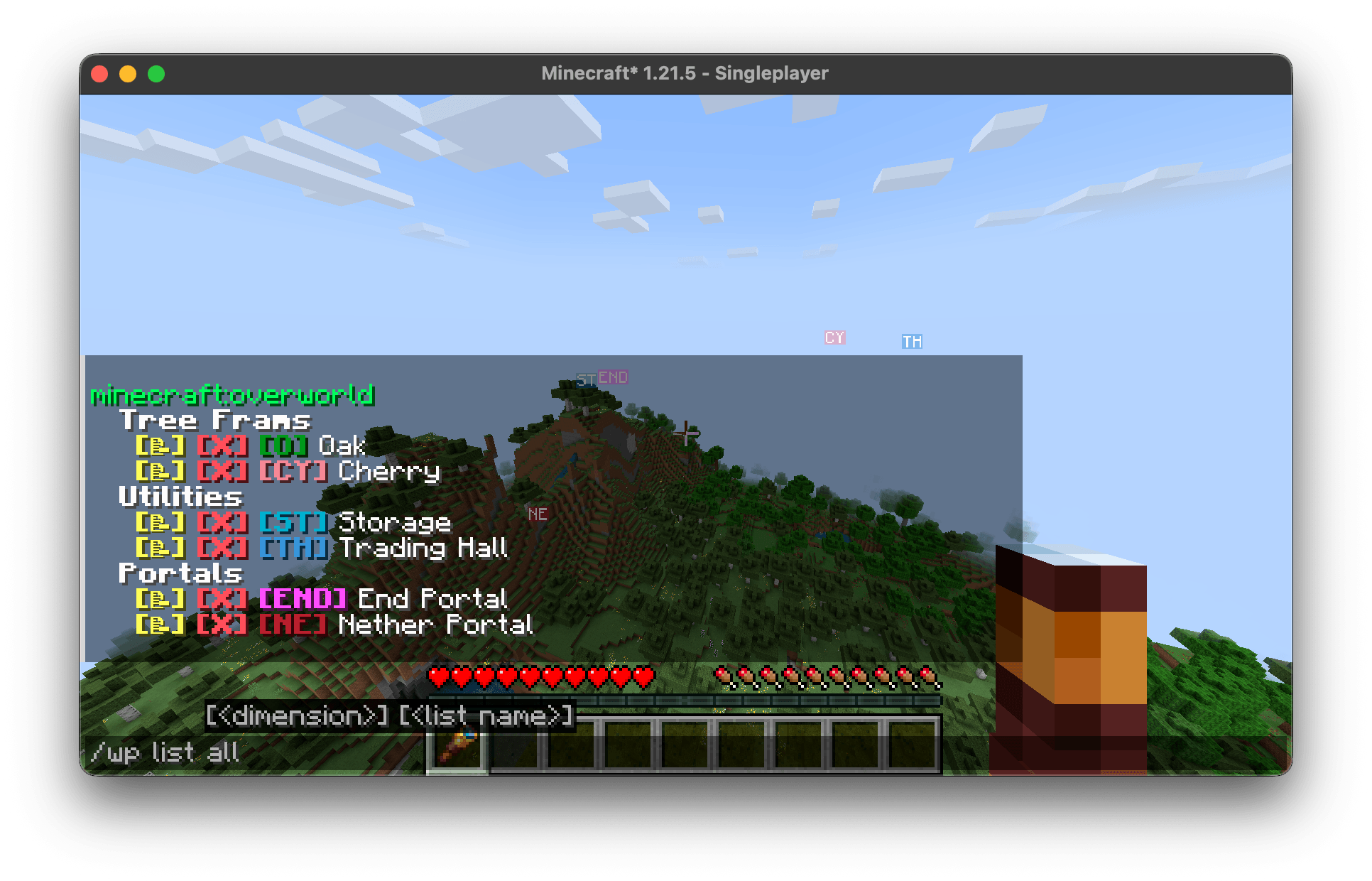 Waypoint List Command You can click the buttons besides the waypoint name to quick edit, remove and tp a waypoint.
 -
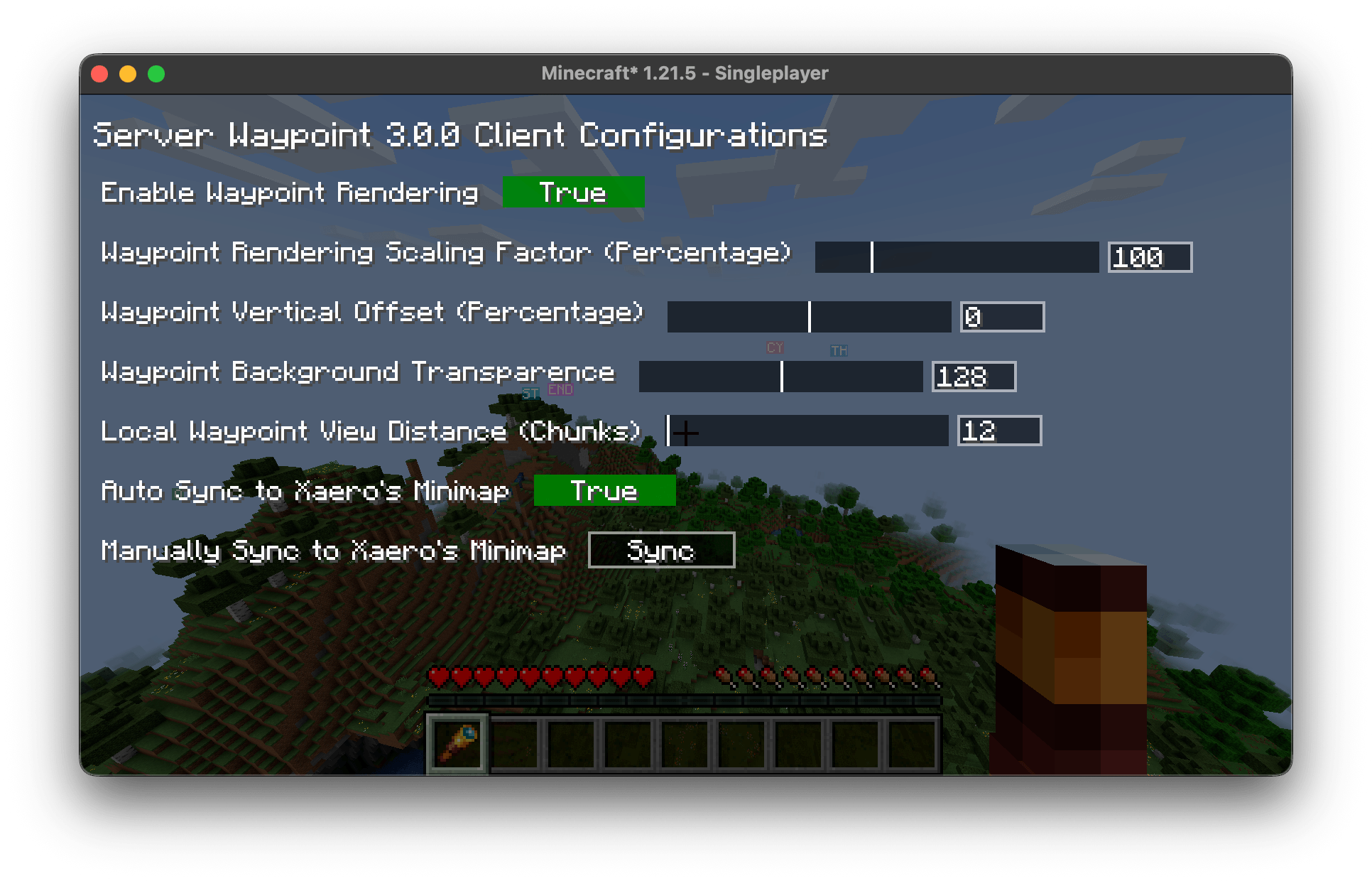 Configurations Screen
-
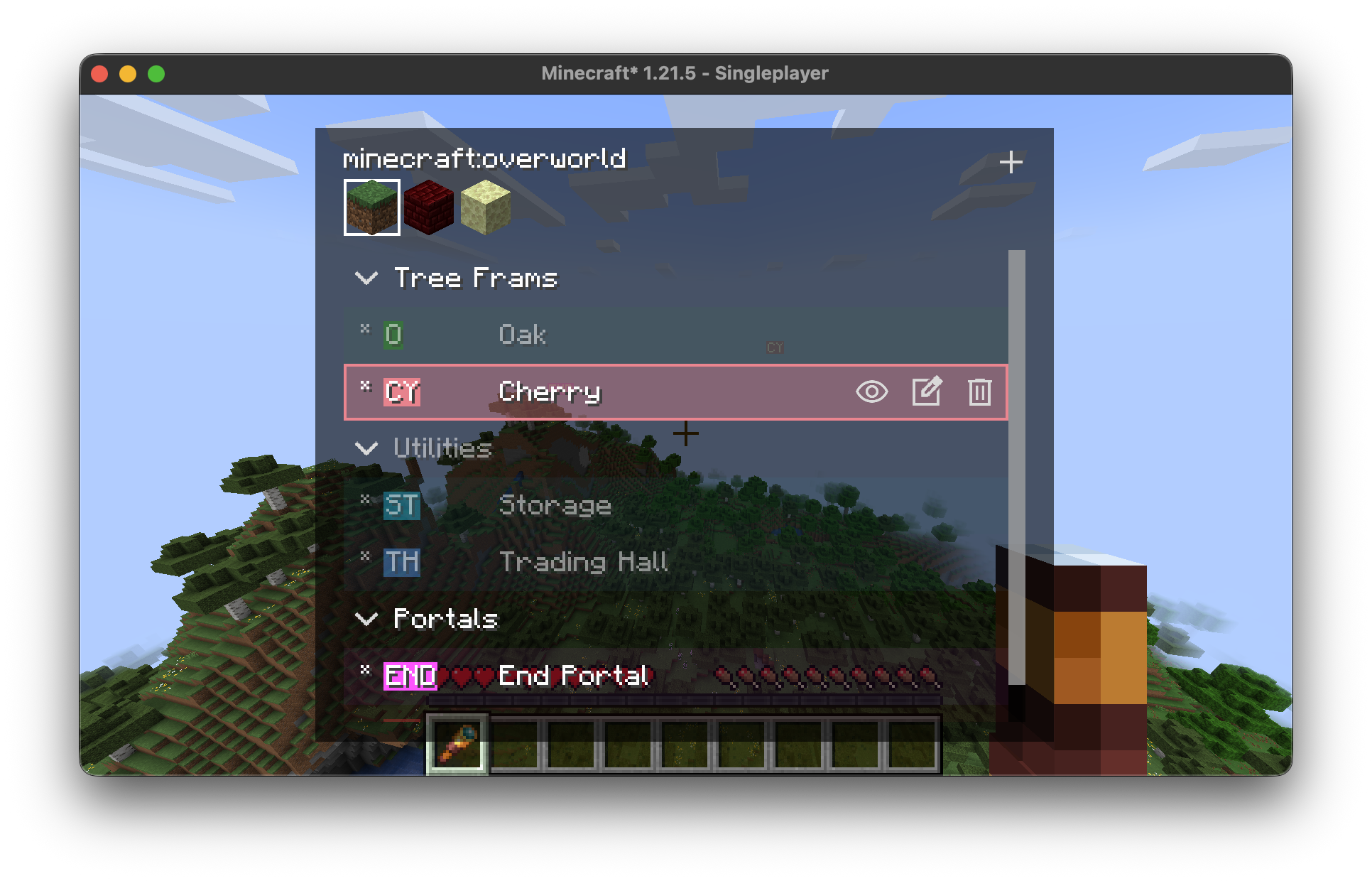 Waypoint Manager Screen All screens in this mod do not block movement, you can sprinting or boating when viewing the waypoints.
 -
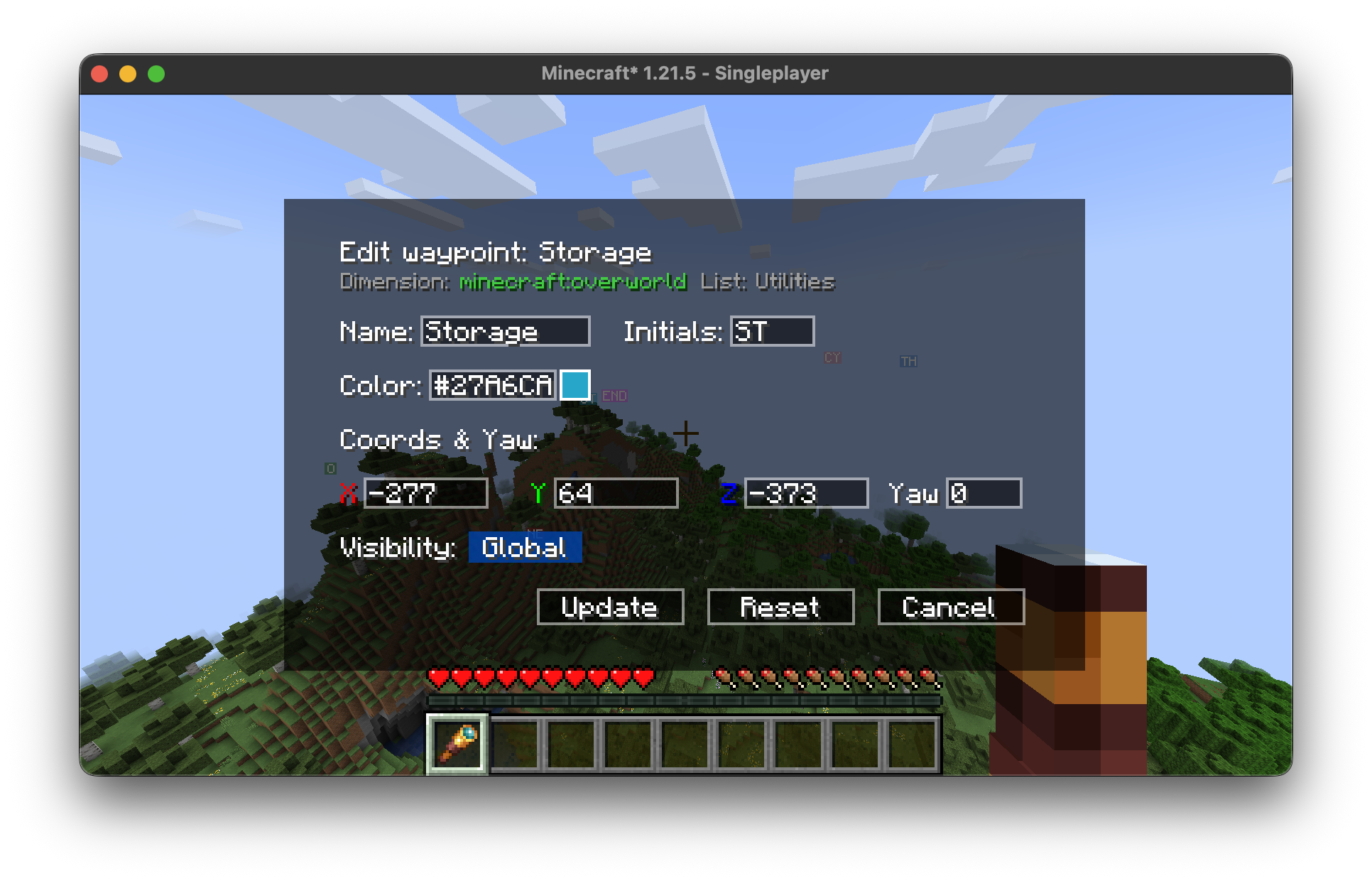 Waypoint Edit Screen
 -
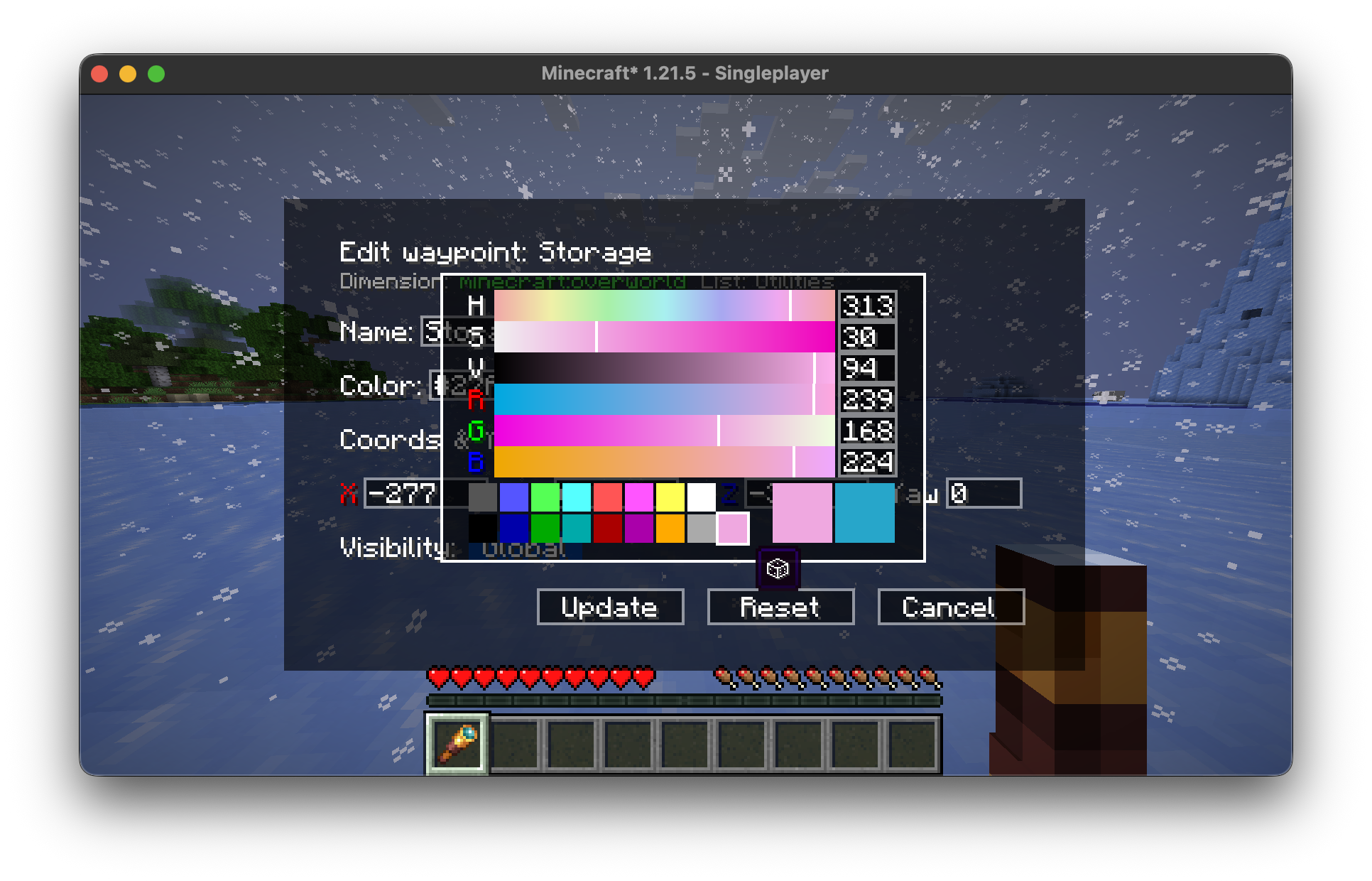 Color Picker Built-in advanced color picker, you can also pick a random color.
 -
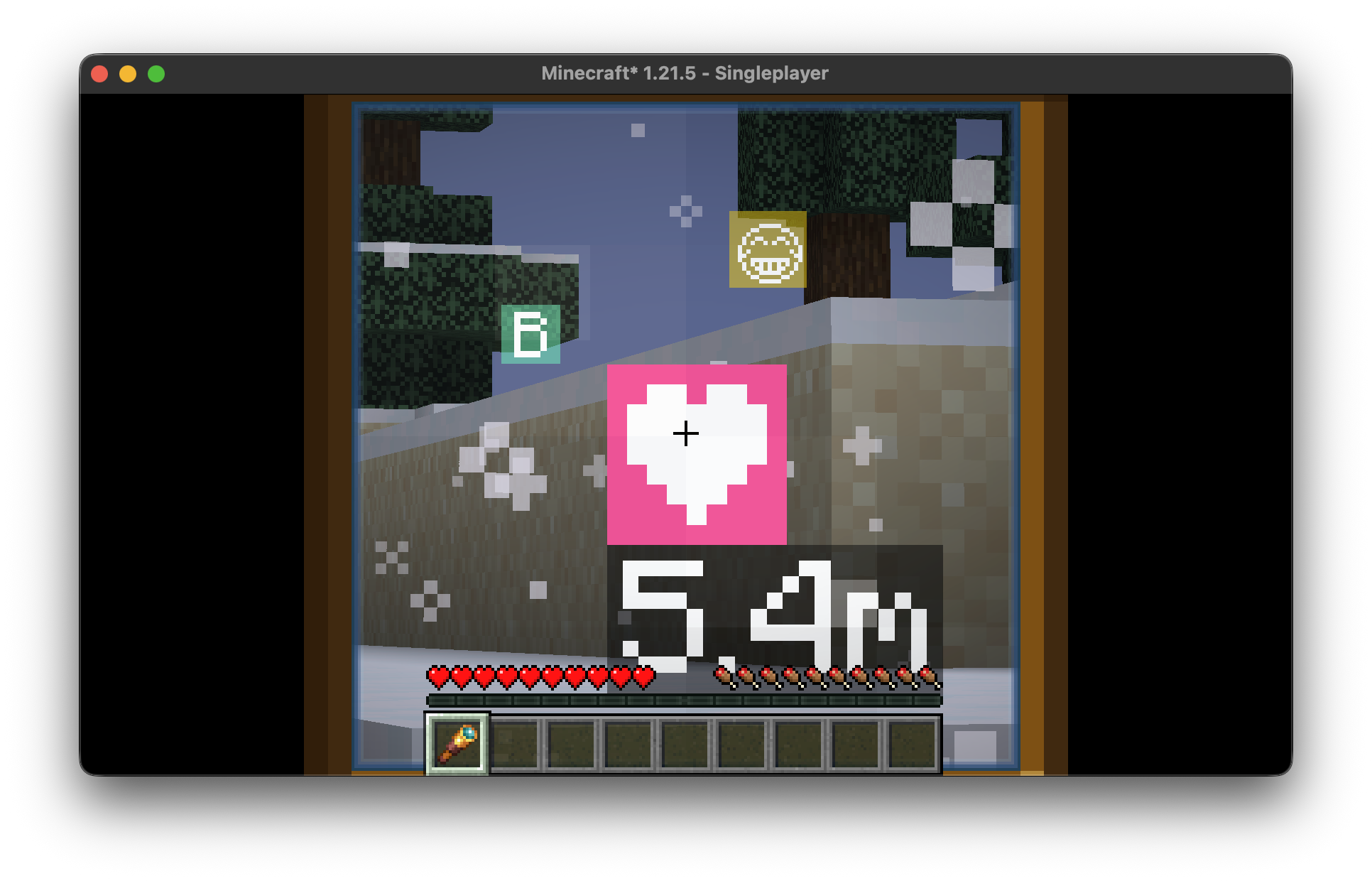 Waypoint Rendering Auto Scaling The waypoints on the HUD will be enlarged when using the spyglass, providing an immersive visual experience.
 -
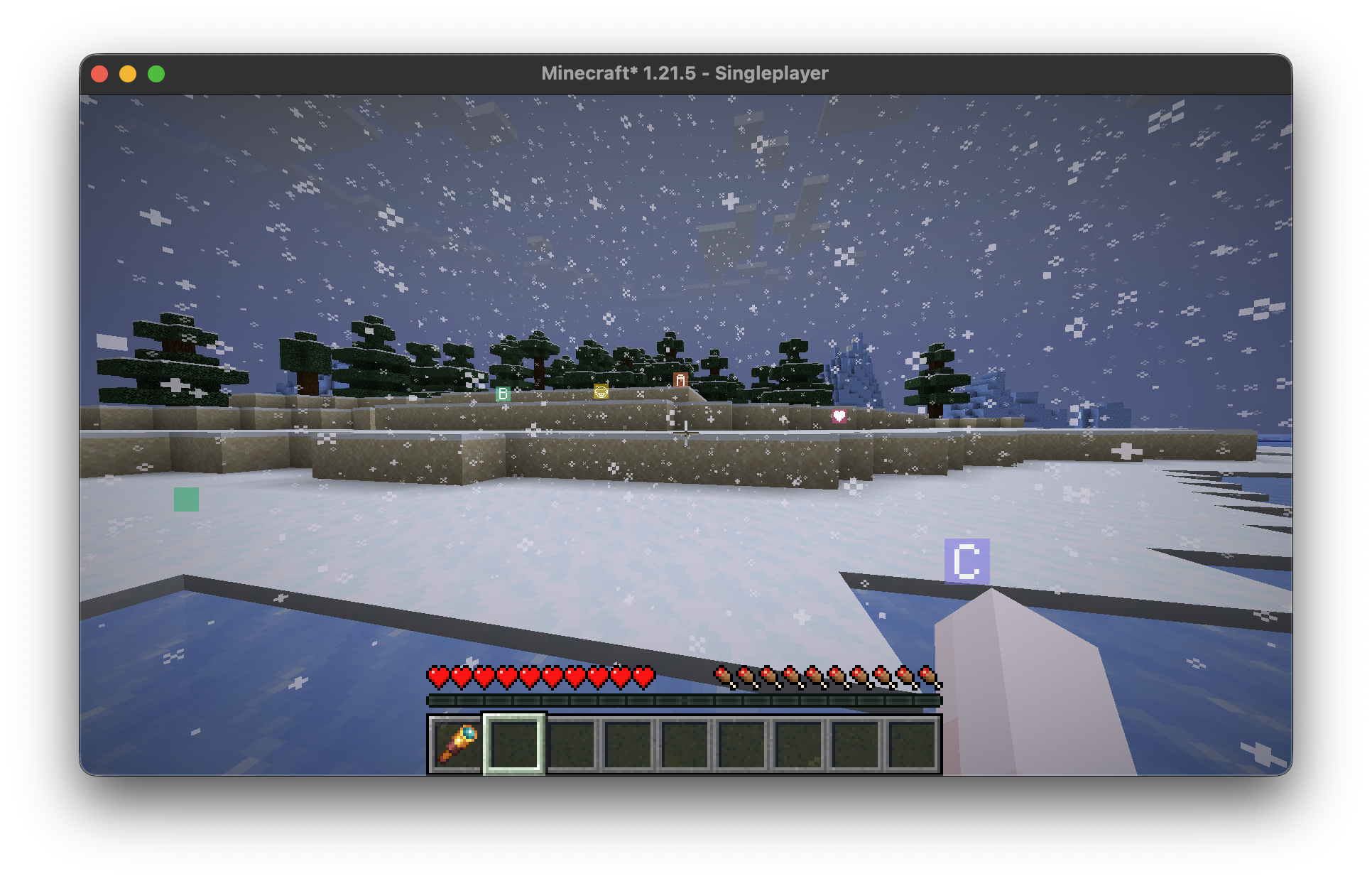 In World Waypoint Rendering Supports waypoints in RGB color and having emoji or even "space" as its name.
 -
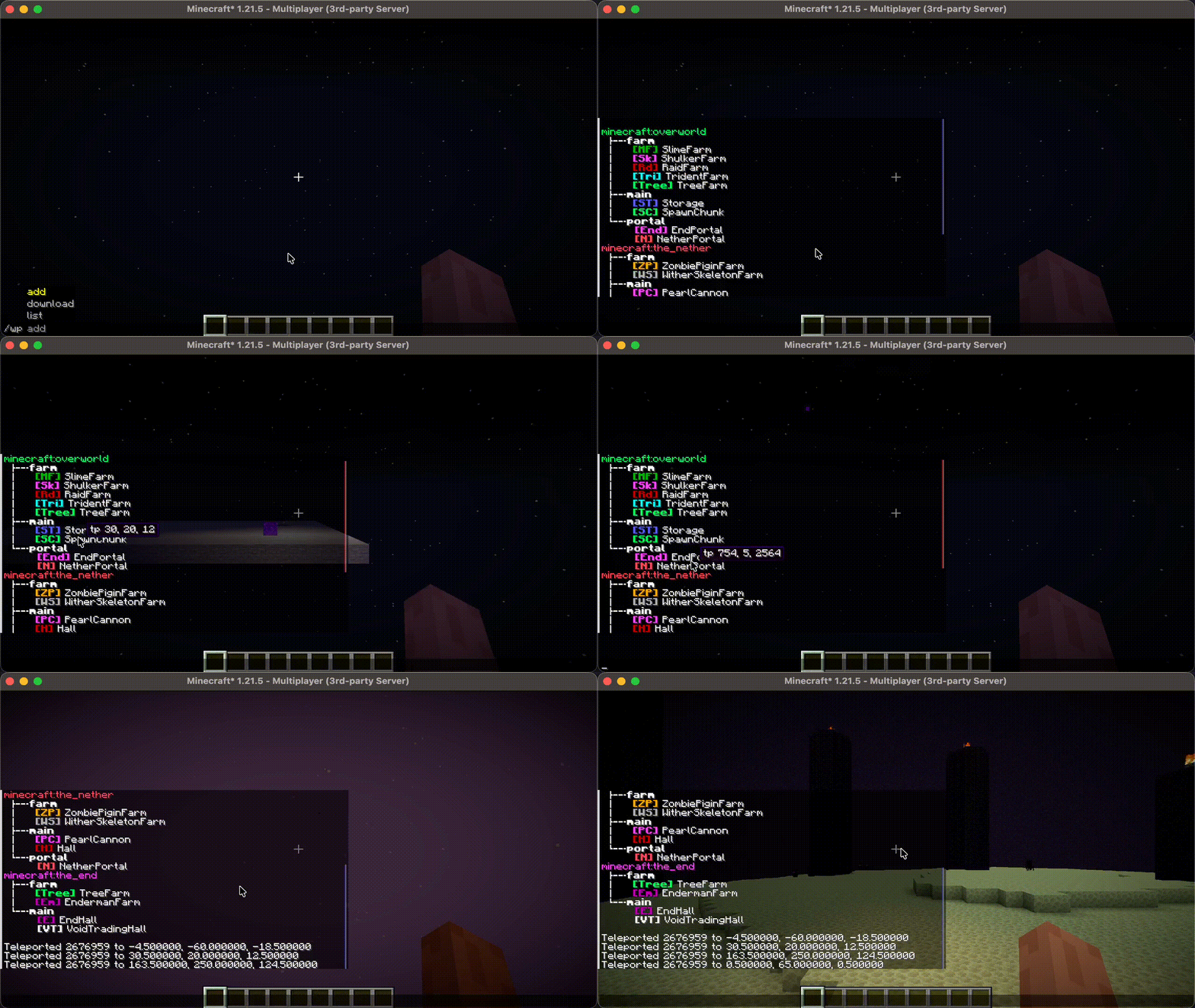 Waypoint list Click waypoint name to teleport.
 -
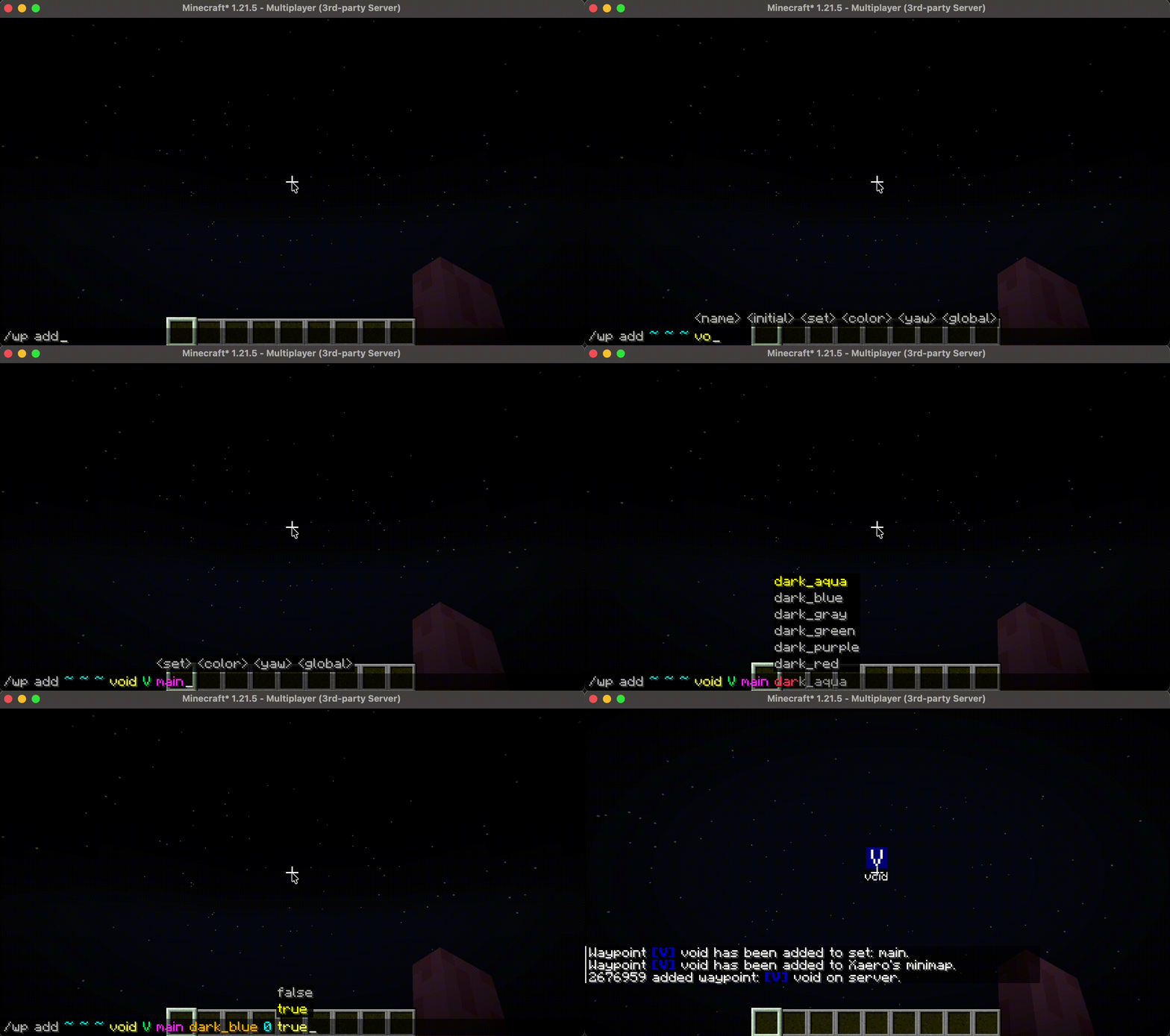 Add a waypoint Waypoint added will be synced to every player on the server.
Versions
Files
Relations
Project Relations
More like this
Similar Mods
Suggestions use data such as tags, dependencies, dependents, descriptions, titles, and more to rank how much they overlap with this mod.
On ModDex
Community snapshot
By the numbers
Statistics
 (opens in a new tab)
Get it on
Available Platforms
On ModDex
Community snapshot
By the numbers