
Community listing page, reviews here may not be monitored by the author.
Discord-Linker


No reviews yet
MC Linker is the easiest way to connect your Minecraft server with Discord. NO custom bot creation or configuration files needed!
Community voices
Reviews
No reviews yet. Be the first to review this project!
Get it on
Available Platforms
Compatibility
Supported Environments
Runs on a dedicated server only; does not work in singleplayer.
The author has not specified where this runs.
Varies by version.
About
Project Details
For authors
Embed Badge
If you're the author of this project, you can embed a live badge anywhere that supports HTML or Markdown. It updates automatically whenever ratings change.
Use HTML for any page that supports it, or Markdown for README files and Markdown-based descriptions.
Identifiers
Platform IDs
About
Description
Discord-Linker
The server-side plugin/mod for MC Linker — the easiest way to connect your Minecraft server with Discord. No custom bot creation or configuration files needed!
Features
- Chat Bridge — Relay messages bidirectionally between Minecraft and Discord
- Player Stats — View player statistics, advancements, and inventories from Discord
- Command Execution — Run Minecraft commands directly from Discord with tab completions
- Server Moderation — Ban, kick, and manage players from Discord
- Account Linking — Connect Discord accounts with Minecraft players
- Status Channels — Display live online player counts in Discord
- Synced Roles — Sync Discord roles with Minecraft teams or LuckPerms groups
- Console Forwarding — Forward your server console output to a Discord channel
Setup
- Invite the MC Linker Discord bot from the App Directory or from Top.gg
- Download the plugin
- Install it on your Minecraft server and restart
- Run
/connect pluginin Discord and follow the instructions - You can now run
/chatchannel add #channelin Discord to set up a chat bridge
In-Game Commands
| Command | Description |
|---|---|
/linker reload |
Reload configuration and reconnect |
/linker connect <code> |
Connect server to Discord bot |
/linker disconnect |
Disconnect server from Discord |
/linker bot_port [port] |
Get or set the bot port (for custom-bot connections) |
/linker debug |
Toggle debug mode |
/verify <code> |
Verify your Minecraft account with Discord |
/discord |
Get the Discord server invite link |
/dm <user> <message> |
Send a Discord DM to a user (accepts Discord username/id or, if linked, MC username/uuid) |
Plugin Integrations (Hooks)
Discord-Linker supports optional integrations with popular permission plugins to power the Synced Roles feature:
| Hook | Description |
|---|---|
| LuckPerms | Sync Discord roles with LuckPerms groups. Supports live group change events. |
Vanilla Minecraft teams are used as a fallback when neither hook is available.
Discord Bot Commands
Run /help in Discord for a full list of commands, or check the MC Linker Guide for more details.
Discord-Linker
The server-side plugin/mod for MC Linker — the easiest way to connect your Minecraft server with Discord. No custom bot creation or configuration files needed!
Features
- Chat Bridge — Relay messages bidirectionally between Minecraft and Discord
- Player Stats — View player statistics, advancements, and inventories from Discord
- Command Execution — Run Minecraft commands directly from Discord with tab completions
- Server Moderation — Ban, kick, and manage players from Discord
- Account Linking — Connect Discord accounts with Minecraft players
- Status Channels — Display live online player counts in Discord
- Synced Roles — Sync Discord roles with Minecraft teams or LuckPerms groups
- Console Forwarding — Forward your server console output to a Discord channel
Setup
- Invite the MC Linker Discord bot from the App Directory or from Top.gg
- Download the plugin
- Install it on your Minecraft server and restart
- Run
/connect pluginin Discord and follow the instructions - You can now run
/chatchannel add #channelin Discord to set up a chat bridge
In-Game Commands
| Command | Description |
|---|---|
/linker reload |
Reload configuration and reconnect |
/linker connect <code> |
Connect server to Discord bot |
/linker disconnect |
Disconnect server from Discord |
/linker bot_port [port] |
Get or set the bot port (for custom-bot connections) |
/linker debug |
Toggle debug mode |
/verify <code> |
Verify your Minecraft account with Discord |
/discord |
Get the Discord server invite link |
/dm <user> <message> |
Send a Discord DM to a user (accepts Discord username/id or, if linked, MC username/uuid) |
Plugin Integrations (Hooks)
Discord-Linker supports optional integrations with popular permission plugins to power the Synced Roles feature:
| Hook | Platform | Description |
|---|---|---|
| LuckPerms | All platforms | Sync Discord roles with LuckPerms groups. Supports live group change events. |
| Vault | Spigot only | Sync Discord roles with any Vault-compatible permission plugin's groups. |
If both LuckPerms and Vault are present, LuckPerms takes priority. Vanilla Minecraft teams are used as a fallback when neither hook is available.
Discord Bot Commands
Run /help in Discord for a full list of commands, or check the MC Linker Guide for more details.
Screenshots
Gallery
-
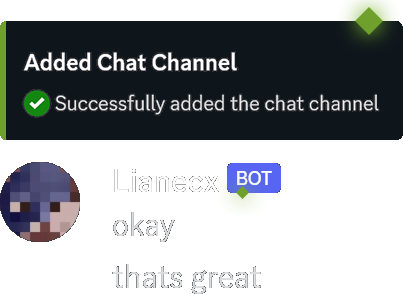 Chat-Bridge You can add chatchannels in which members can chat between Minecraft and Discord!
 -
 Account Connections You can connect your Minecraft account and obtain an exclusive role!
 -
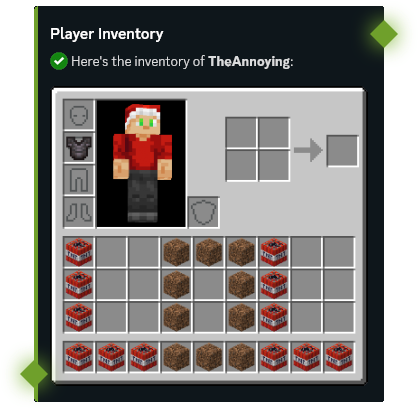 View Inventories You can view the inventory of any member in Discord!
 -
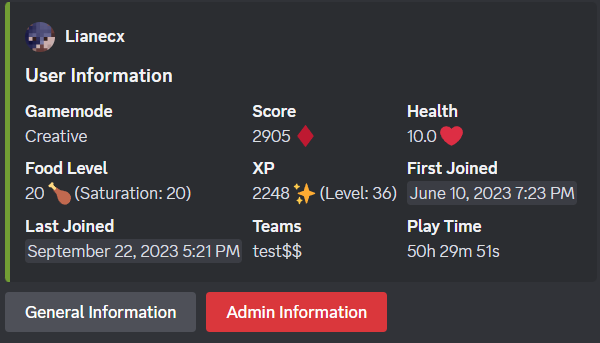 User Info You can view useful information about any player directly in Discord!
 -
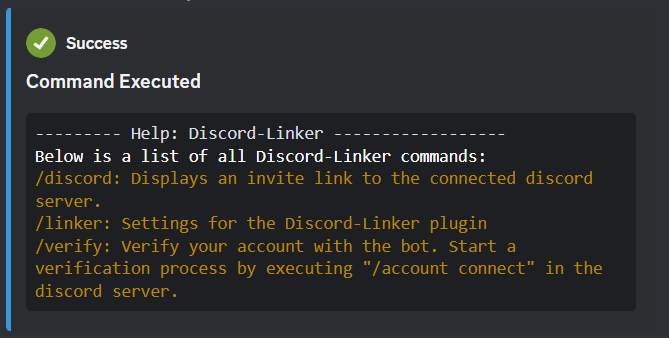 Execute Commands You can run any command in the console from Discord with auto-completions!
 -
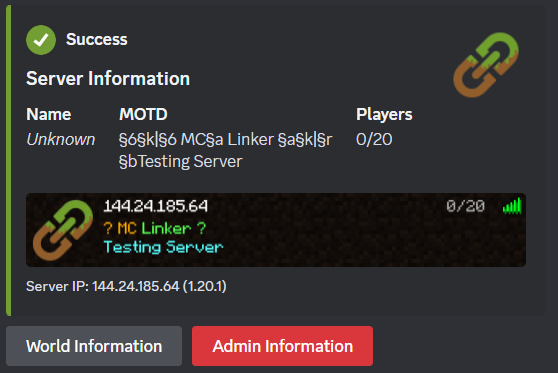 Server Info You can view stats of your Minecraft server!
 -
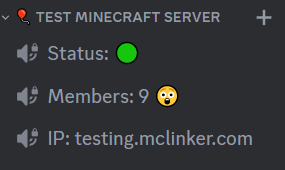 Create Stats Channels You can set up channels that track the online status or member count of your server!
 -
 Banner This is a banner of MC Linker
Versions
Files
Relations
Project Relations
More like this
Similar Mods
Suggestions use data such as tags, dependencies, dependents, descriptions, titles, and more to rank how much they overlap with this mod.
On ModDex
Community snapshot
By the numbers
Statistics
Want to reach Minecraft players?
We're looking for a server hosting partner to feature here and other parts of the site. Interested? Send us a message!
Get in touchGet it on
Available Platforms
On ModDex
Community snapshot
By the numbers