
Community listing page, reviews here may not be monitored by the author.
ShowcaseOnChat


No reviews yet
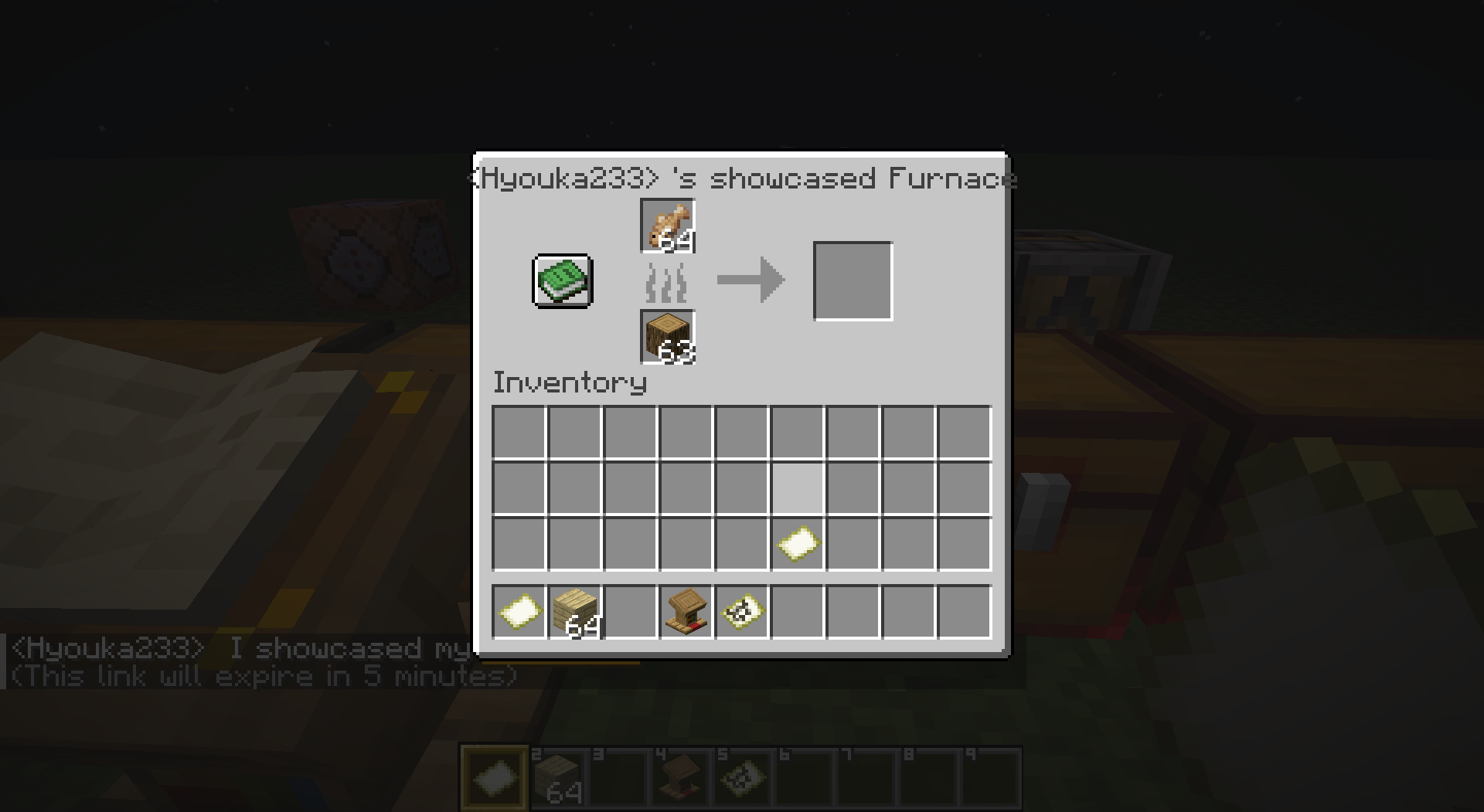
A server-side Minecraft mod that allows players to share links in chat to showcase items, inventories, containers, villager trades, and statistics through commands or chat keywords.
Community voices
Reviews
No reviews yet. Be the first to review this project!
Get it on
Available Platforms
Compatibility
Supported Environments
Runs entirely on the server. Also works in singleplayer.
About
Project Details
For authors
Embed Badge
If you're the author of this project, you can embed a live badge anywhere that supports HTML or Markdown. It updates automatically whenever ratings change.
Use HTML for any page that supports it, or Markdown for README files and Markdown-based descriptions.
Identifiers
Platform IDs
Resources
External Links
About
Description
Showcase Mod
The current description is for V2. For V1, please click here.
A server-side Minecraft mod that allows players to share links in chat to showcase items, inventories, containers, villager trades, and statistics through commands or chat keywords.
✨ Features
- Comprehensive Sharing: Items, inventories, containers, and villager trades
- Server-Side: No client installation required
- Interactive Previews: Auto-unpack containers, view books and maps
- Multi-Language: Support for 17+ languages
- Persistent Storage: Shares saved until expiration
- Permission System: LuckPerms integration
- Configurable Chat Keywords: Customizable trigger words for quick sharing
- Statistics Tracking: Player statistics with detailed categorization
- Developer Placeholders: PlaceholderAPI integration for other plugins
- Chat Item Icons: Customizable item icons in chat messages (Experimental)
<details> <summary>About Chat Item Icons (Experimental)</summary>
Displays item icons in chat messages for shared items.
Why Resource Pack? As a server-side mod, we use Minecraft's custom font system to render icons.
Setup:
- Generate resource pack at IconifyCraft
- Host the pack on a web server
- Enable in
config/showcase/config.yml:itemIcons.enabled = true - Add to
server.properties:
   resource-pack=<your-hosted-pack-url>
   resource-pack-sha1=<pack-sha1-hash>
   require-resource-pack=true
Config Options:
itemIcons:
  enabled: false                    # Enable/disable icons
  fontNamespace: "iconifycraft"     # Resource pack namespace
  includeInItemNames: true          # Show icons in item names
⚠Warning: Experimental feature. Current support for displaying blocks, including chests and ender chests, is incomplete. </details>
⌨️ Commands
💡 View detailed command reference with examples and permissions
Player Commands
/showcase <type> [player] [duration] [description]Types: item, inventory, hotbar, enderchest, container, merchant, stats
Duration formats: 30s, 5m, 1h, 1h30m or raw seconds (e.g. 300)
Other Commands:
/showcase cancel <id>- Cancel your share/showcase-view <id>- View shared content
Admin Commands
/admin-showcase <type> <player> [receiver] [duration] [description]
/showcase-manage <action> [args]Actions: reload, list [page], cancel <id|player>
Chat Keywords
Players can type keywords in square brackets to quickly share content:
Default Keywords (configurable in config.yml):
[item]or[i]- Share held item[inventory]or[inv]- Share inventory[hotbar]or[hb]- Share hotbar[ender_chest]or[ec]- Share ender chest[stats]or[stat]- Share statistics
Example: Check out my [item]! → automatically replaced with clickable share link
🔌 Developer API
🔗 Full API Documentation - Integration guides and examples
PlaceholdersAPI Integration
Basic Sharing:
%showcase:item%        - Share held item
%showcase:inventory%   - Share inventory
%showcase:hotbar%      - Share hotbar
%showcase:ender_chest% - Share ender chest
%showcase:stats%       - Share statistics
Essential Statistics:
%showcase:shares_count% - Number of active shares
%showcase:total_views%  - Total views received
%showcase:can_share_item% - Permission check (true/false)
%showcase:has_admin_perms% - Admin check (true/false)⚙️ Configuration
⚙️ Configuration Reference - Complete settings guide
Main configuration file: config/showcase/config.yml (YAML format)
Key Settings:
- Share cooldowns and permissions
- Chat keywords and triggers
- Statistics tracking options
- Performance optimization
- Multi-language support
📖 View example config | 🔐 Permission setup
📚 Documentation & Resources
- Complete Documentation - Full feature documentation
- Getting Started - Installation and setup guide
- Command Reference - All commands with examples
- Configuration Guide - Settings and customization
- Developer API - PlaceholderAPI integration
- FAQ & Troubleshooting - Common issues and solutions
📝 License
Showcase Mod
The current description is for V2. For V1, please click here.
A server-side Minecraft mod that allows players to share links in chat to showcase items, inventories, containers, villager trades, and statistics through commands or chat keywords.
✨ Features
- Comprehensive Sharing: Items, inventories, containers, and villager trades
- Server-Side: No client installation required
- Interactive Previews: Auto-unpack containers, view books and maps
- Multi-Language: Support for 17+ languages
- Persistent Storage: Shares saved until expiration
- Permission System: LuckPerms integration
- Configurable Chat Keywords: Customizable trigger words for quick sharing
- Statistics Tracking: Player statistics with detailed categorization
- Developer Placeholders: PlaceholderAPI integration for other plugins
- Chat Item Icons: Customizable item icons in chat messages (Experimental)
About Chat Item Icons (Experimental)
Displays item icons in chat messages for shared items.
Why Resource Pack? As a server-side mod, we use Minecraft's custom font system to render icons.
Setup:
- Generate resource pack at IconifyCraft
- Host the pack on a web server
- Enable in
config/showcase/config.yml:itemIcons.enabled = true - Add to
server.properties:resource-pack=<your-hosted-pack-url> resource-pack-sha1=<pack-sha1-hash> require-resource-pack=true
Config Options:
itemIcons:
  enabled: false                    # Enable/disable icons
  fontNamespace: "iconifycraft"     # Resource pack namespace
  includeInItemNames: true          # Show icons in item names
⚠Warning: Experimental feature. Current support for displaying blocks, including chests and ender chests, is incomplete.
⌨️ Commands
💡 View detailed command reference with examples and permissions
Player Commands
/showcase <type> [player] [duration] [description]
Types: item, inventory, hotbar, enderchest, container, merchant, stats
Duration formats: 30s, 5m, 1h, 1h30m or raw seconds (e.g. 300)
Other Commands:
/showcase cancel <id>- Cancel your share/showcase-view <id>- View shared content
Admin Commands
/admin-showcase <type> <player> [receiver] [duration] [description]
/showcase-manage <action> [args]
Actions: reload, list [page], cancel <id|player>
Chat Keywords
Players can type keywords in square brackets to quickly share content:
Default Keywords (configurable in config.yml):
[item]or[i]- Share held item[inventory]or[inv]- Share inventory[hotbar]or[hb]- Share hotbar[ender_chest]or[ec]- Share ender chest[stats]or[stat]- Share statistics
Example: Check out my [item]! → automatically replaced with clickable share link
🔌 Developer API
🔗 Full API Documentation - Integration guides and examples
PlaceholdersAPI Integration
Basic Sharing:
%showcase:item%        - Share held item
%showcase:inventory%   - Share inventory
%showcase:hotbar%      - Share hotbar
%showcase:ender_chest% - Share ender chest
%showcase:stats%       - Share statistics
Essential Statistics:
%showcase:shares_count% - Number of active shares
%showcase:total_views%  - Total views received
%showcase:can_share_item% - Permission check (true/false)
%showcase:has_admin_perms% - Admin check (true/false)
⚙️ Configuration
⚙️ Configuration Reference - Complete settings guide
Main configuration file: config/showcase/config.yml (YAML format)
Key Settings:
- Share cooldowns and permissions
- Chat keywords and triggers
- Statistics tracking options
- Performance optimization
- Multi-language support
📖 View example config | 🔐 Permission setup
📚 Documentation & Resources
- Complete Documentation - Full feature documentation
- Getting Started - Installation and setup guide
- Command Reference - All commands with examples
- Configuration Guide - Settings and customization
- Developer API - PlaceholderAPI integration
- FAQ & Troubleshooting - Common issues and solutions
📝 License
Screenshots
Gallery

Versions
Files
Relations
Project Relations
More like this
Similar Mods
Suggestions use data such as tags, dependencies, dependents, descriptions, titles, and more to rank how much they overlap with this mod.
On ModDex
Community snapshot
By the numbers
Statistics
Want to reach Minecraft players?
We're looking for a server hosting partner to feature here and other parts of the site. Interested? Send us a message!
Get in touchGet it on
Available Platforms
On ModDex
Community snapshot
By the numbers
Statistics
Resources