
Community listing page, reviews here may not be monitored by the author.
HomeGui


No reviews yet
Home GUI is a lightweight Minecraft client mod that provides a sleek and user-friendly graphical interface for managing homes. It allows players to easily teleport to their saved homes with just one click, without the need for commands.
Community voices
Reviews
No reviews yet. Be the first to review this project!
Get it on
Available Platforms
Compatibility
Supported Environments
Runs entirely on the client. Works on vanilla servers.
About
Project Details
For authors
Embed Badge
If you're the author of this project, you can embed a live badge anywhere that supports HTML or Markdown. It updates automatically whenever ratings change.
Use HTML for any page that supports it, or Markdown for README files and Markdown-based descriptions.
Identifiers
Platform IDs
About
Description
🏠 Home GUI
✨ Access your homes with just one click! ✨



📖 Description
Home GUI is a lightweight and sleek client mod that allows you to access all your homes through a beautiful graphical interface!
No need to type /home base, /home mine, /home farm… Simply press H and teleport with just one click! 🚀
💡 Compatible with all servers using home plugins (EssentialsX, CMI, etc.)
✨ Features
| 🎯 Feature | 📝 Description |
|---|---|
| 🖱️ Sleek GUI | Modern interface with smooth animations |
| ⭐ Favorites | Mark your favorite homes (right-click) |
| 🔍 Search | Quickly find a home |
| 🎨 5 Themes | Purple, Ocean, Forest, Sunset, Cherry |
| 📊 Statistics | Track your teleports |
| 📜 History | Quick access to recent homes |
| ⌨️ Shortcuts | Keys 1-9 for instant teleport |
| 📱 Compact Mode | List view for more homes |
| 🔔 Notifications | Visual confirmations |
| 💾 Save | Your preferences are saved |
🎮 Usage
Keyboard Shortcuts
| Key | Action |
|---|---|
H |
Open Home GUI menu |
1-9 |
Quick teleport |
Esc |
Close the menu |
Mouse Wheel |
Navigate the list |
Mouse Actions
| Action | Effect |
|---|---|
Left Click |
Teleport to the home |
Right Click |
Add/remove from favorites ⭐ |
🎨 Available Themes
💜 Purple → Elegant and modern
🌊 Ocean → Fresh and calming
🌲 Forest → Natural and soft
🌅 Sunset → Warm and vibrant
🌸 Cherry → Soft and feminine
Change themes with the 🎨 button in the interface!
📥 Installation
- Install Fabric Loader for 1.21.4
- Install Fabric API
- Download Home GUI and place it in your
mods/folder - Launch the game and press H! 🎉
⚙️ Configuration
The mod automatically saves your preferences in:
.minecraft\config\homegui.jsonHomeGui
You Type /home Twenty Times Per Session. There's a Better Way.
Open any survival Minecraft stream right now. Watch the chat. You'll see it: /home, /home base, /home farm, /home nether, /home shop, /home base, /home farm again. Every few minutes. For hours. It's muscle memory at this point and nobody questions it because "that's just how you teleport home."
But it's slow. You have to stop what you're doing. Open chat. Type the command. Sometimes you misspell it. Sometimes you forget the name. On servers with 10+ homes, you end up tab-completing through a list that scrolls off screen.
HomeGui replaces all of that with one keybind and one click.
Press H. See all your homes in a clean grid. Click the one you want. You're there. Three seconds instead of ten. No chat spam. No typos. No forgetting names. No stopping your flow.
How It Works
HomeGui is a client-side Fabric mod. It does not replace or modify your server's home system — it reads from it. The server (EssentialsX, CMI, or whatever home plugin it runs) stores your homes. HomeGui reads that data and presents it in a graphical interface on your client.
That's the important thing: HomeGui is a VISUAL LAYER on top of your
existing home system. It doesn't create its own separate home database.
It doesn't conflict with the server's plugin. It doesn't send commands
differently than you would manually. When you click a home in the GUI,
it sends the same /home <name> command that you'd type in chat — it
just does it instantly, without you typing anything.
This means:
- Works on ANY server that uses a home command system
- No server installation required
- No permission changes needed
- No configuration for server admins to do
- Your homes are the same homes the server already knows about
Compatible Server Plugins
HomeGui detects and works with:
- EssentialsX — The most common home plugin. Full support.
- CMI — Another popular choice. Full support.
- Any plugin using standard /home commands — HomeGui monitors your home list through the chat responses these plugins send. If a plugin responds to /homelist or /homes with a formatted list, HomeGui parses it.
Not sure if your server's plugin works? Install HomeGui and run /homelist or /homes in chat. If the server responds with a list of your homes, HomeGui can read it.
Features — Complete Breakdown
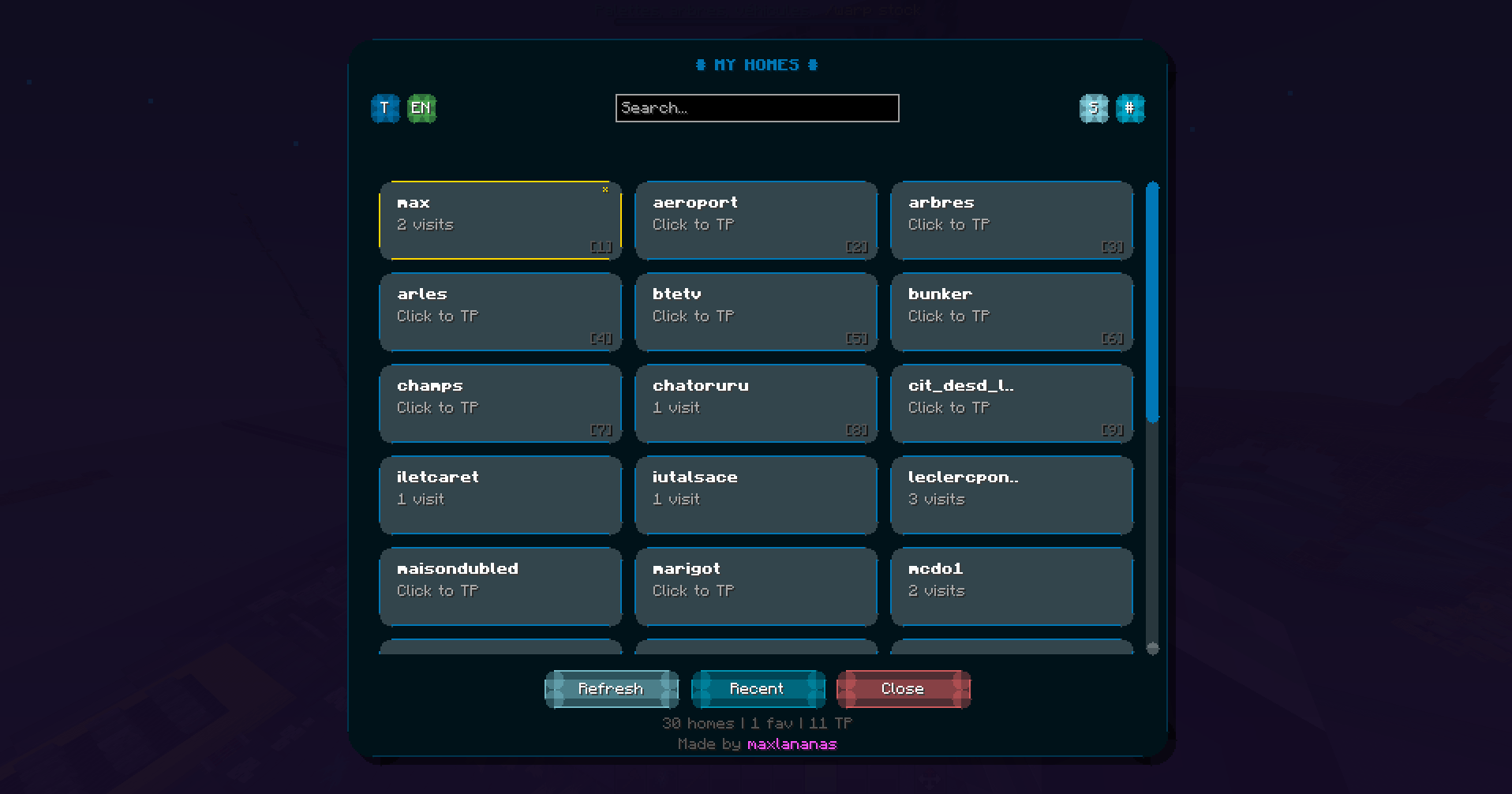
Visual Home Grid
When you press H, a clean grid interface opens showing every home you have saved. Each home appears as an item in the grid with:
- The home name displayed below the item
- An icon (configurable — defaults to a compass or bed based on context)
- Visual indicators for favorites and recent homes
- Smooth hover animation when your cursor is over a home
The grid handles any number of homes. 5 homes? Fits in one page. 50 homes? Scrollable with smooth momentum. The layout auto-adjusts to fill the available space cleanly.
One-Click Teleport
Click a home. You teleport. That's the entire interaction.
No confirmation dialog (unless you enable one in settings). No "are you sure?" popup. No secondary menu. Click and go. The teleport command fires instantly, the GUI closes, and you're at your destination.
If you want a confirmation step for expensive teleports (servers with teleport cooldowns or costs), you can enable a confirmation toggle in settings.
Favorites
Right-click any home to mark it as a favorite. Favorited homes appear at the top of the grid with a gold star indicator. This is for the homes you use constantly — your base, your farm, your shop.
One right-click. That's it. Right-click again to unfavorite.
Favorites persist across sessions. They're stored in the local config file on your client.
History
The mod tracks which homes you've teleported to recently. A "History" section at the top of the GUI shows your last 10 teleports in reverse chronological order. Click to teleport to a recent home without scrolling through your full list.
This is useful when you're bouncing between two or three homes during a building session — base to farm, farm to base, base to shop. The history section keeps them within one click at all times.
Keyboard Shortcuts
When the GUI is open, keys 1-9 map to the first 9 homes in your list. Press 1 to teleport to the first home. Press 5 for the fifth. This is for power users who've memorized their home order and want sub- second teleportation.
The shortcuts map to the visual order in the GUI — favorites first, then the rest. Reorder by adjusting favorites, and the shortcuts follow.
Search
A search bar at the top of the GUI. Type to filter homes by name. The list updates in real time as you type. Useful when you have dozens of homes and need to find one fast.
Search clears when you close the GUI. Next time you open it, you see everything again.
Themes
Five built-in color themes for the GUI:
- Purple — Deep purple with violet accents (default)
- Ocean — Blue tones with teal highlights
- Forest — Green with earthy brown borders
- Sunset — Warm orange and pink gradient
- Cherry — Soft pink with white accents
Switch themes in the config file or through the in-game settings (coming soon). Themes change the background, borders, text colors, and accent elements. Every theme is designed to look good on any monitor and not clash with your resource pack.
Statistics
The mod tracks basic statistics locally:
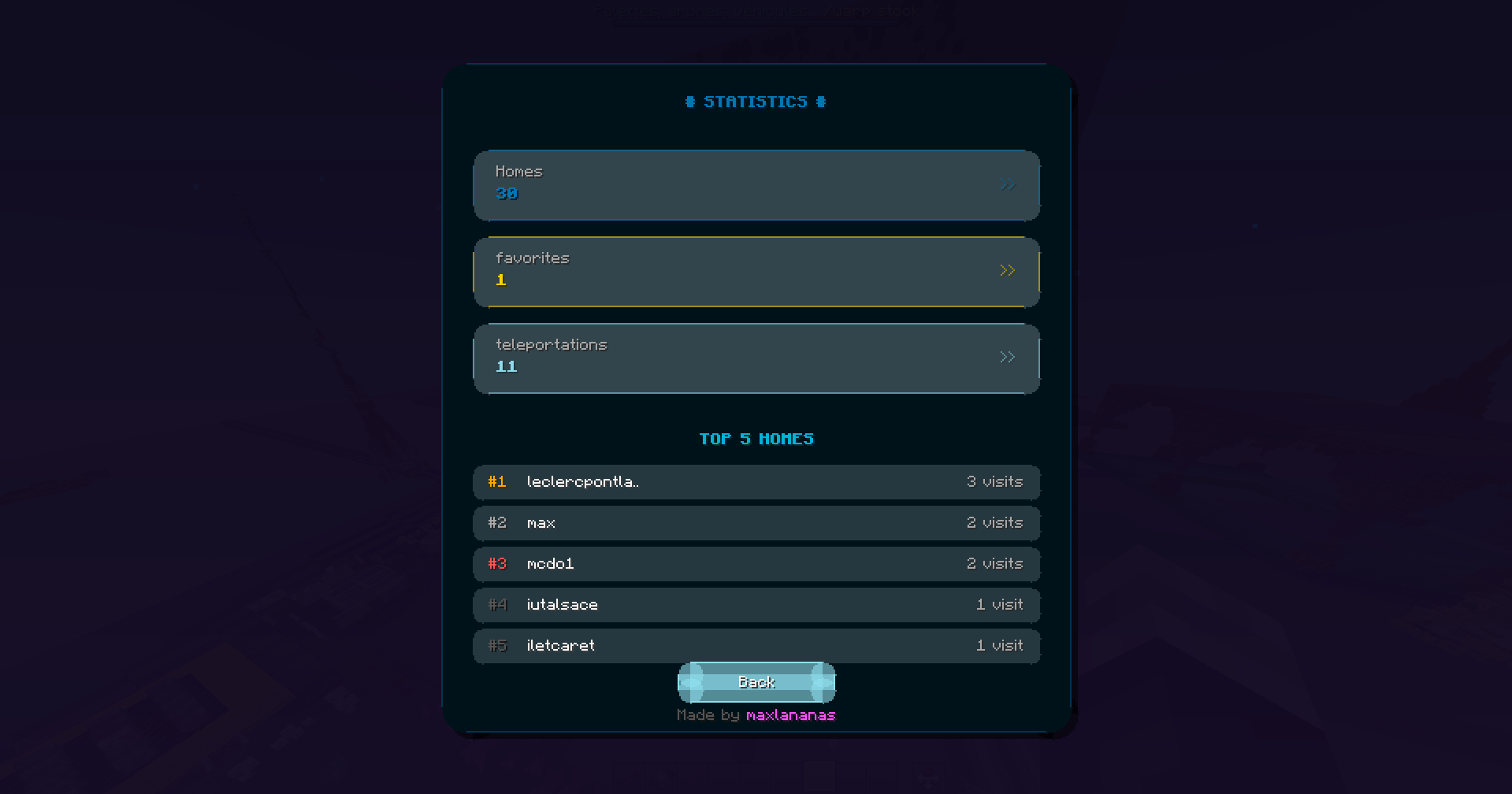
- Total teleports performed through HomeGui
- Most teleported-to home
- Teleports per session
- Total sessions tracked
A stats panel in the GUI shows your numbers. Some players find it interesting. Some ignore it entirely. It's there if you want it.
Stats are stored locally in the config file. They're yours — nothing is sent anywhere.
Preferences Persistence
Everything you configure is saved automatically:
- Theme selection
- Favorite homes
- GUI position and scale
- Confirmation toggle
- History entries
- Keyboard shortcut mappings
- Stats data
All stored in a single JSON config file:
.minecraft/config/homegui.json
Delete this file to reset everything to defaults. Edit it manually if you want (it's readable JSON). Back it up if you're switching machines and want to keep your favorites.
Who Is This For?
Survival Multiplayer Players If you play on an SMP server with a home system, you use /home dozens of times per session. HomeGui makes every one of those teleports faster and more pleasant. It adds up — over a two-hour session, you might save a few minutes of cumulative chat typing and waiting. But more than the time, it's the flow. You don't stop what you're doing to type a command. You press H, click, and keep going.
Players With Many Homes Some players have 5, 10, 20+ homes. A base, a farm for every crop, a mob grinder, a nether hub, a shop district, builds in different biomes. Managing all of those through chat commands is tedious. The search function, favorites, and history make a large home list manageable.
Players Who Forget Home Names You named it "base" six months ago. Or was it "main"? Or "home"? Or "base1"? With HomeGui, you see all your homes visually. You recognize them by context, position, and favorites. Name memory becomes irrelevant.
Players Who Share Screens / Stream Chat full of /home commands doesn't look great on stream. A clean GUI overlay looks professional. Some streamers use HomeGui partly for the visual cleanliness of their content.
Players on Servers With Teleport Costs If your server charges for teleportation or has cooldowns, you want each teleport to count. Clicking the right home instantly is less error-prone than typing, especially when you're tired or distracted. No more accidentally teleporting to the wrong home because you misspelled it.
Performance & Architecture
HomeGui is designed to be invisible to your system.
Client-side only:
- Zero server impact
- Zero network packets sent (beyond the standard /home command)
- Zero server-side processing
- The server doesn't know HomeGui exists
Resource usage:
- The GUI renders only when open — no background rendering
- No tick loops, no scheduled tasks, no polling
- History and favorites stored in memory as a small list
- Config file is read once at startup, written on change
- FPS impact: zero when GUI is closed, negligible when open (standard inventory-style screen rendering)
Compatibility with other mods:
- Does not modify Minecraft's rendering pipeline
- Does not inject into the chat system beyond reading responses
- Does not touch network packets
- Works alongside Sodium, Iris, OptiFine, and any client mod
- No known conflicts with any mod
Controls
| Action | Default Key | Notes |
|---|---|---|
| Open Home GUI | H | Remappable in Minecraft Controls |
| Teleport to home | Left Click on home item | Closes GUI and teleports |
| Favorite / Unfavorite | Right Click on home item | Star indicator toggles |
| Quick teleport (1-9) | Number keys 1-9 | Maps to first 9 homes in list |
| Search | Type in search bar | Real-time filtering |
| Close GUI | Escape | Standard behavior |
All keybinds are remappable through Minecraft's controls menu under the HomeGui category.
Installation
Under one minute. No configuration needed.
-
Install Fabric Loader for Minecraft 1.21.4 → fabricmc.net/use/installer
-
Install Fabric API → modrinth.com/mod/fabric-api → place in /mods/ folder
-
Download HomeGui.jar from this page → place in /mods/ folder
-
Launch Minecraft with the Fabric profile
-
Join a server with a home system (EssentialsX, CMI, etc.)
-
Press H to see your homes
First launch: the mod reads your home list from the server's chat response when you join or when you open the GUI for the first time. If no homes appear, type /homelist or /homes in chat once to let the mod parse the server's response. After that, it works automatically.
Requirements
- Minecraft Java Edition 1.21.4
- Fabric Loader
- Fabric API
- A server with a home command system (EssentialsX, CMI, or compatible)
No server installation required. The mod runs entirely on your client and interacts with the server's existing home commands.
Configuration
The config file at .minecraft/config/homegui.json controls:
{
  "theme": "PURPLE",
  "showConfirmDialog": false,
  "showStatistics": true,
  "showHistory": true,
  "maxHistoryEntries": 10,
  "guiScale": 1.0,
  "keybindOpenGui": "H",
  "favorites": ["base", "farm", "shop"],
  "history": []
}
Every setting is self-explanatory. Edit the file directly or wait for the in-game settings menu (roadmap). Changes take effect on next GUI open — no restart needed.
FAQ
Does the server need to install HomeGui? No. Never. 100% client-side. The server runs its home plugin (EssentialsX, CMI, whatever). HomeGui reads the home list from chat responses and sends /home commands when you click. The server doesn't know HomeGui exists.
Will I get banned for using this? HomeGui sends the same /home command you'd type manually. It doesn't modify packets, inject into the server, or do anything a player couldn't do with their keyboard. No anti-cheat will flag it because the output is identical to normal gameplay. That said, check your specific server's rules — some servers have blanket mod bans.
It's not detecting my homes. What do I do? HomeGui reads homes from the server's chat responses. If your server uses a non-standard home plugin that formats its /homelist response differently, the parser might not catch it. Try typing /homelist or /homes in chat and see what the server responds. If it shows a formatted list but HomeGui doesn't pick it up, open a GitHub issue with a screenshot of the chat response.
Can I use this on Hypixel / a server that doesn't have homes? HomeGui requires a server-side home system. If the server doesn't have a /home command, there's nothing for the mod to interface with. It won't cause errors — it just won't have any homes to show.
Does it work with EssentialsX's /home format? Yes. EssentialsX supports both named homes and numbered homes. HomeGui reads whatever format the server's /homelist response uses.
I have 100+ homes. Will the GUI lag? No. The GUI renders a paginated grid. Only the visible homes are rendered at any time. 100 homes loads and displays the same as 10 homes from a performance perspective.
Can I change the keybind from H? Yes. Minecraft Controls menu → HomeGui category → rebind "Open Home GUI" to whatever you want. Some players use G, some use N, some use a mouse button.
Does this work on Bedrock / Geyser servers? HomeGui is a Java Edition Fabric mod. It does not work on Bedrock Edition. On a Geyser server, it works for Java clients connecting to that server — Bedrock clients connected through Geyser cannot use Fabric mods.
Can I use this in a modpack? Yes. No restrictions.
Favorites disappeared after an update. What happened? Occasionally, mod updates change the config file format. If your favorites or settings reset after an update, check the config file — the old data may still be there in a renamed backup file. If not, re-set your favorites (right-click). This is rare and only happens on major config format changes.
Why This Exists
I play on a survival server where I have 15+ homes. Farms, grinders, builds in different biomes, shops, a nether hub — each one has a home set. Every session I type /home at least 30-40 times. I've been doing this for years and one day I realized: I'm spending more time typing commands than actually playing the game.
I looked for a client-side mod that gave me a visual home interface. Couldn't find one. There were server-side plugins that added GUIs, but those require the server admin to install and configure them. On most servers, you can't control what plugins the admin installs.
So I built a client-side solution. It reads the home data that the server already provides through chat and wraps it in a GUI. No server changes needed. No admin permission needed. You install it, press H, and your homes are there.
The moment I first used it — pressed H, saw all my homes in a grid, clicked "base," teleported instantly — I knew I couldn't go back to typing. It's one of those things where once you try it, the old way feels absurd.
Roadmap
- In-game settings menu (no manual JSON editing)
- Custom icons per home (choose an item to represent each home)
- Home groups / folders (organize farms, builds, etc.)
- Drag-to-reorder in the GUI
- Color labels for homes
- Quick-switch hotbar integration (assign homes to specific keys globally)
- Multi-account config sync
- Forge port (if demand exists)
Features ship when they work. No ETAs. GitHub issues drive priorities.
Support
- Bugs: GitHub Issues — include your Fabric version, HomeGui version, server plugin type (EssentialsX/CMI/other), and a screenshot of the issue
- Feature requests: GitHub Issues or Discord
- Reviews: If HomeGui saved you from typing /home ten thousand times, leave a review. It's the single biggest thing that helps other players find this mod.
Built by someone who got tired of typing /home.
Screenshots
Gallery
-
 f6ee20eb7b27c86376168abba74cb8ca4b16717b.png f6ee20eb7b27c86376168abba74cb8ca4b16717b.png
 -
 c9bc9dad88b7bc654459054dc0273a3fa9600b26.png c9bc9dad88b7bc654459054dc0273a3fa9600b26.png
-
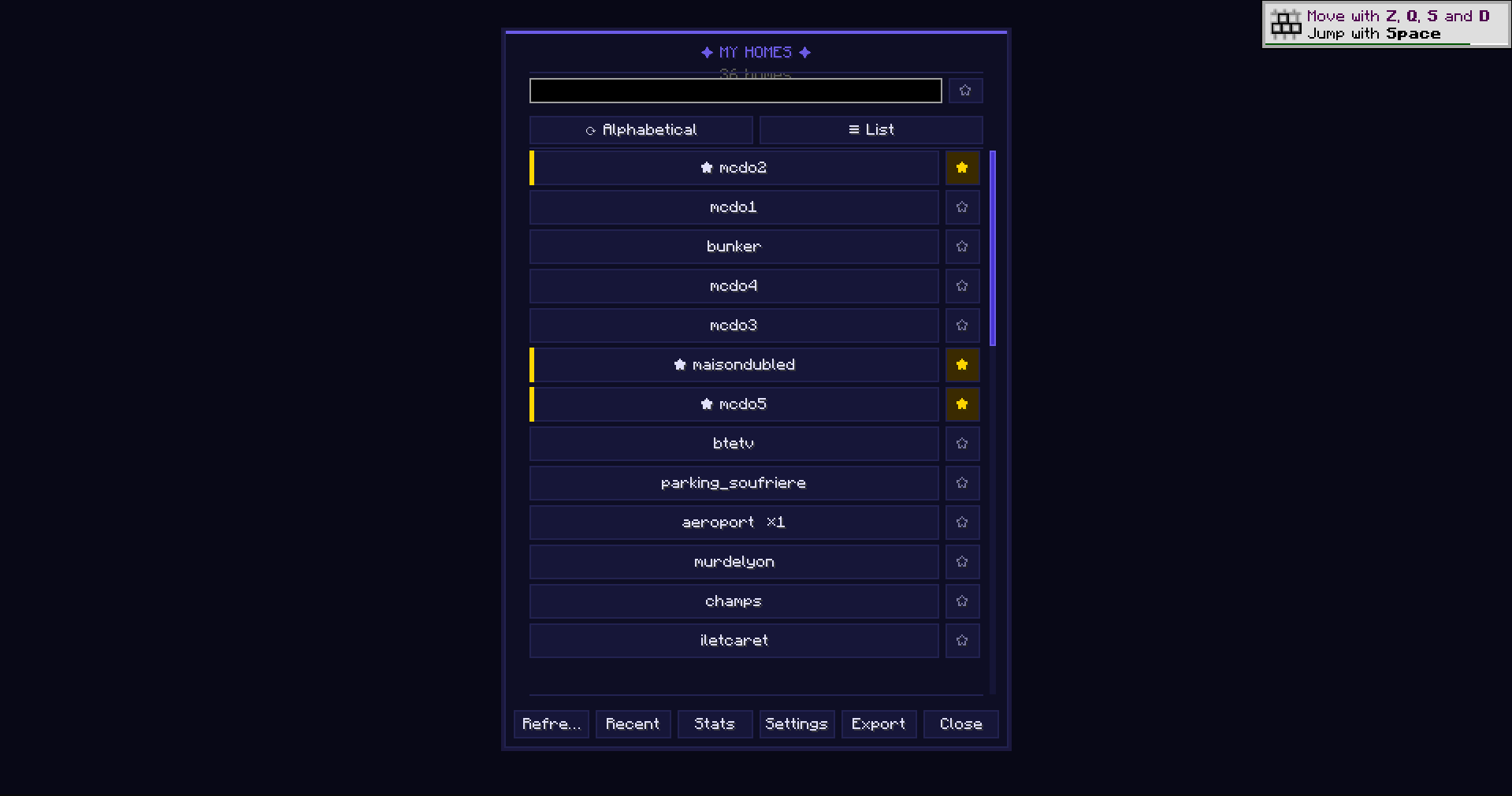 Home List with Search, Sort, and Grid View Browse all your homes in a searchable, scrollable list. Sort by name, usage, recency, or favorites. Toggle between list and grid view. Right-click any home to mark it as favorite. Teleport with a single click.
 -
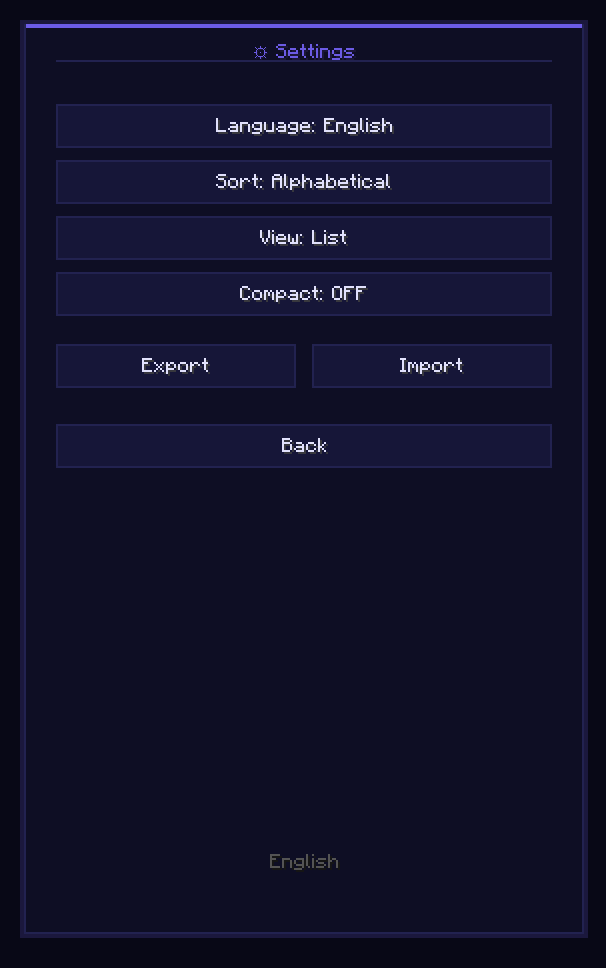 Multi-Language Settings Panel Configure your language (17 supported), sort order, view mode, and compact mode directly in-game. Export and import your homes data as JSON for backup or sharing between instances.
 -
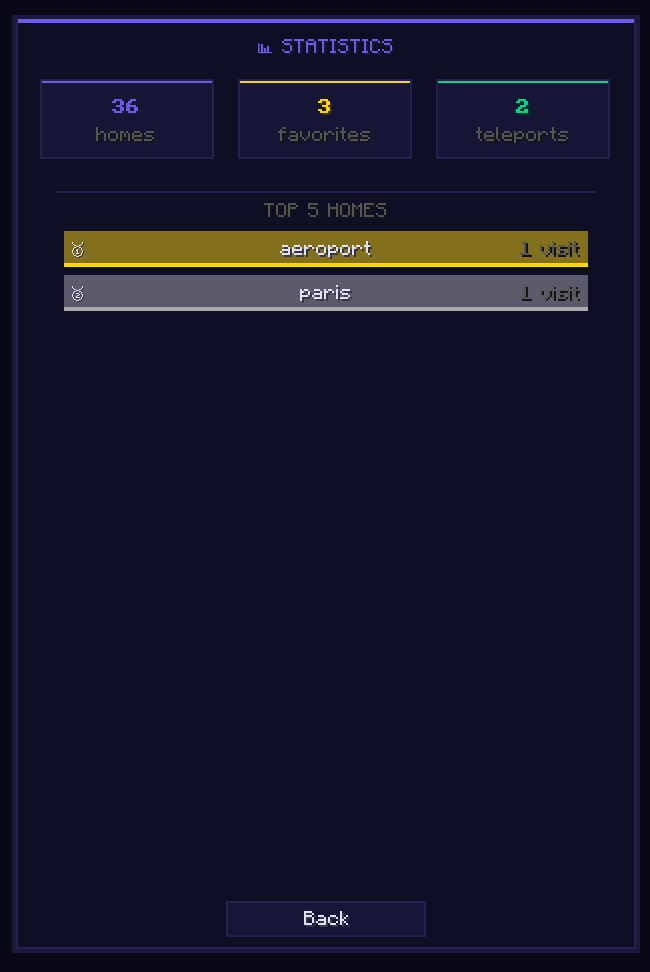 Usage Statistics and Top Homes Track your total homes, favorites count, and total teleports. View your top 5 most-used homes with visit counts and a color-coded bar chart showing relative usage.
Versions
Files
Relations
Project Relations
More like this
Similar Mods
Suggestions use data such as tags, dependencies, dependents, descriptions, titles, and more to rank how much they overlap with this mod.
On ModDex
Community snapshot
By the numbers
Statistics
Want to reach Minecraft players?
We're looking for a server hosting partner to feature here and other parts of the site. Interested? Send us a message!
Get in touchGet it on
Available Platforms
On ModDex
Community snapshot
By the numbers