
Community listing page, reviews here may not be monitored by the author.
HUD Icon Lib


No reviews yet
A lightweight Minecraft Fabric library mod that enables other mods to display customizable graphical icons with optional text on the user interface.

Community voices
Reviews
No reviews yet. Be the first to review this project!
Get it on
Available Platforms
Compatibility
Supported Environments
Must be installed on both the client and the server.
About
Project Details
For authors
Embed Badge
If you're the author of this project, you can embed a live badge anywhere that supports HTML or Markdown. It updates automatically whenever ratings change.
Use HTML for any page that supports it, or Markdown for README files and Markdown-based descriptions.
Identifiers
Platform IDs
Resources
External Links
About
Description
What is HUD Icon Library?
HUD Icon Library is a utility mod that provides a simple API for other Fabric mods to display icons on your screen. This is commonly used for:
- **Status *_indicators_* (health, mana, stamina)**
- Buff/debuff notifications (speed boost, strength, etc.)
- Quest markers and objectives
- Custom HUD elements
- Temporary notifications with timers
Features
✨ Multiple Icons: Display multiple icons simultaneously
⏱️ Timer Support: Icons can be permanent or auto-remove after a set duration
🎯 Flexible Positioning: Position icons anywhere on screen (default: top-left)
📐 Customizable Size: Default 16x16 pixels (inventory item size), fully adjustable
🖼️ Image Support: PNG and JPG formats
📝 Text Display: Optional text labels next to icons
⚙️ Code-Based Configuration: Simple API, no config files needed
🪶 Lightweight: No additional dependencies beyond Fabric API
Integration Guide
This guide explains how to integrate the HUD Icon Library into your existing Fabric mod.
Table of Contents
Adding the Dependency
Option 1: Using the Compiled JAR
-
Download the JAR file to the libs/ folder in your mod
-
Add it to your mod's
build.gradle:
   repositories {
       flatDir {
           dirs 'libs'
       }
   }

   dependencies {
       // ... other dependencies

       // Add the HUD Icon Library
    modImplementation project(':hudiconlib')
    include project(':hudiconlib')
   }
Declaring the Dependency
Add the library to your fabric.mod.json dependencies:
{
  "depends": {
    "fabricloader": ">=0.15.0",
    "minecraft": "~1.20.1",
    "hudiconlib": "*"
  }
}
Basic Usage
Importing the API
import net.cookiebrain.hudiconlib.HudIconLib;
import net.cookiebrain.hudiconlib.Icon;
Creating and Registering Icons
Simple Icon (Always Visible)
// Create an identifier for your texture
Identifier iconTexture = new Identifier("mymod", "textures/gui/icon.png");

// Create an icon at default position (top-left)
Icon myIcon = HudIconLib.createIcon(
    "mymod:my_icon",              // Unique ID
    iconTexture,                  // Identifier to texture
    10, 10, 16, 16               // X, Y, Width, Height
);

// Optionally add text
myIcon.setText("My Icon");

// Register the icon
HudIconLib.registerIcon(myIcon);
Custom Position and Size
Identifier customTexture = new Identifier("mymod", "textures/gui/custom.png");

Icon customIcon = HudIconLib.createIcon(
    "mymod:custom_icon",
    customTexture,
    100,  // X position
    50,   // Y position
    24,   // Width
    24    // Height
);
HudIconLib.registerIcon(customIcon);
Timed Icon (Auto-Remove After Duration)
Identifier buffTexture = new Identifier("mymod", "textures/gui/buff.png");

Icon timedIcon = HudIconLib.createIcon(
    "mymod:timed_icon",
    buffTexture,
    10, 10, 16, 16
);
timedIcon.setText("Buff Active!");
timedIcon.setTextColor(0x00FF00);  // Green text
timedIcon.setDuration(30);         // 30 seconds

HudIconLib.registerIcon(timedIcon);
Quick Start Example
Here's a complete example for your mod's initialization:
package com.example.mymod;

import net.fabricmc.api.ClientModInitializer;
import net.minecraft.util.Identifier;
import net.cookiebrain.hudiconlib.HudIconLib;
import net.cookiebrain.hudiconlib.Icon;

public class MyModClient implements ClientModInitializer {
    private static final String MOD_ID = "mymod";

    @Override
    public void onInitializeClient() {
        // Initialize your mod...

        // Add icons during initialization
        setupIcons();
    }

    private void setupIcons() {
        // Example 1: Permanent health icon
        Identifier heartTexture = new Identifier(MOD_ID, "textures/gui/heart.png");
        Icon healthIcon = HudIconLib.createIcon(
            "mymod:health",
            heartTexture,
            10, 10, 16, 16
        );
        healthIcon.setText("❤ 20");
        healthIcon.setTextColor(0xFF0000); // Red
        HudIconLib.registerIcon(healthIcon);

        // Example 2: Timer-based buff icon
        Identifier speedTexture = new Identifier(MOD_ID, "textures/gui/speed.png");
        Icon buffIcon = HudIconLib.createIcon(
            "mymod:speed_buff",
            speedTexture,
            10, 30, 16, 16
        );
        buffIcon.setText("Speed Boost");
        buffIcon.setDuration(60); // 60 seconds
        HudIconLib.registerIcon(buffIcon);
    }

    // You can add/remove icons at any time
    public void showCustomIcon(String message, int duration) {
        Identifier infoTexture = new Identifier(MOD_ID, "textures/gui/info.png");
        Icon notification = HudIconLib.createIcon(
            "mymod:notification_" + System.currentTimeMillis(),
            infoTexture,
            10, 50, 16, 16
        );
        notification.setText(message);
        notification.setDuration(duration);
        HudIconLib.registerIcon(notification);
    }
}
Advanced Usage
Using the Builder Pattern
Identifier advancedTexture = new Identifier("mymod", "textures/gui/advanced.png");

HudIconLib.builder("mymod:advanced_icon", advancedTexture)
    .position(150, 100)
    .size(32, 32)
    .text("Advanced Icon")
    .textColor(0xFFAA00)
    .duration(45)
    .alpha(0.8f)
    .buildAndRegister();
Dynamic Icon Management
// Show/hide icons
HudIconLib.hideIcon("mymod:my_icon");
HudIconLib.showIcon("mymod:my_icon");

// Remove icons
HudIconLib.removeIcon("mymod:my_icon");

// Check if icon exists
if (HudIconLib.hasIcon("mymod:my_icon")) {
    // Do something
}

// Update existing icon
Icon icon = HudIconLib.getIcon("mymod:my_icon");
if (icon != null) {
    icon.setText("Updated text");
    icon.setAlpha(0.5f);
}

// Clear all icons
HudIconLib.clearAllIcons();
Responding to Game Events
import net.fabricmc.fabric.api.client.event.lifecycle.v1.ClientTickEvents;

public class MyModClient implements ClientModInitializer {

    @Override
    public void onInitializeClient() {
        // Update icons on player tick
        ClientTickEvents.END_CLIENT_TICK.register(client -> {
            if (client.player != null) {
                updatePlayerIcons(client.player);
            }
        });
    }

    private void updatePlayerIcons(PlayerEntity player) {
        // Update health display
        Icon healthIcon = HudIconLib.getIcon("mymod:health");
        if (healthIcon != null) {
            int health = (int) player.getHealth();
            healthIcon.setText("❤ " + health);
        }

        // Show low health warning
        if (player.getHealth() < 6.0f) {
            if (!HudIconLib.hasIcon("mymod:low_health_warning")) {
                Identifier warningTexture = new Identifier("mymod", "textures/gui/warning.png");
                Icon warning = HudIconLib.createIcon(
                    "mymod:low_health_warning",
                    warningTexture,
                    10, 50, 16, 16
                );
                warning.setText("Low Health!");
                warning.setTextColor(0xFF0000);
                HudIconLib.registerIcon(warning);
            }
        } else {
            HudIconLib.removeIcon("mymod:low_health_warning");
        }
    }
}
Best Practices
1. Icon File Organization
Store your icon files in a predictable location:
src/main/resources/
  assets/
    yourmod/
      textures/
        gui/
          icon1.png
          icon2.png
2. Use Namespaced IDs
Always prefix your icon IDs with your mod ID:
    // Good
    HudIconLib.createIcon("mymod:health_icon", ...)

    // Bad - could conflict with other mods
    HudIconLib.createIcon("health_icon", ...)
3. Clean Up Timed Icons
For short-lived icons, always use .setDuration() so they auto-remove:
icon.setDuration(30); // Auto-removes after 30 seconds4. Check for Existing Icons
Before creating duplicate icons:
if (!HudIconLib.hasIcon("mymod:my_icon")) {
    Icon icon = HudIconLib.createIcon(...);
    HudIconLib.registerIcon(icon);
}
5. Handle Null Safely
When getting icons:
Icon icon = HudIconLib.getIcon("mymod:my_icon");
if (icon != null) {
    // Update icon
}
6. Performance Considerations
- Limit the number of simultaneous icons (recommended: < 20)
- Use appropriate icon sizes (16x16 recommended, avoid large images)
- Remove icons when no longer needed
7. Text Formatting
Use Minecraft color codes for colored text:
icon.setTextColor(0xFFFFFF); // White
icon.setTextColor(0xFF0000); // Red
icon.setTextColor(0x00FF00); // Green
icon.setTextColor(0x0000FF); // Blue
icon.setTextColor(0xFFAA00); // Orange
Troubleshooting
Icons Not Appearing
- Check file path: Ensure the texture path is correct and the file exists
- Check visibility: Make sure
icon.isVisible()returns true - Check registration: Verify the icon was successfully registered
Icons Flickering
- Don't create/remove icons every frame
- Use
hideIcon()/showIcon()instead of removing and re-creating
Performance Issues
- Reduce the number of simultaneous icons
- Use smaller texture files
- Remove unused icons with
removeIcon()orclearAllIcons()
Example Project Structure
your-mod/
├── build.gradle
├── src/main/
│   ├── java/com/yourmod/
│   │   ├── YourMod.java
│   │   └── YourModClient.java
│   └── resources/
│       ├── fabric.mod.json
│       └── assets/
│           └── yourmod/
│               └── textures/
│                   └── gui/
│                       ├── icon1.png
│                       └── icon2.png
└── libs/
    └── hudiconlib-0.2.0.jar
What is HUD Icon Library?
HUD Icon Library is a utility mod that provides a simple API for other Fabric mods to display icons on your screen. This is commonly used for:
- Status indicators (health, mana, stamina)
- Buff/debuff notifications (speed boost, strength, etc.)
- Quest markers and objectives
- Custom HUD elements
- Temporary notifications with timers
Features
✨ Multiple Icons: Display multiple icons simultaneously
⏱️ Timer Support: Icons can be permanent or auto-remove after a set duration
🎯 Flexible Positioning: Position icons anywhere on screen (default: top-left)
📐 Customizable Size: Default 16x16 pixels (inventory item size), fully adjustable
🖼️ Image Support: PNG and JPG formats
📝 Text Display: Optional text labels next to icons
⚙️ Code-Based Configuration: Simple API, no config files needed
🪶 Lightweight: No additional dependencies beyond Fabric API
Integration Guide
This guide explains how to integrate the HUD Icon Library into your existing Fabric mod.
Table of Contents
Adding the Dependency
Option 1: Using the Compiled JAR
-
Download the JAR file to the libs/ folder in your mod
-
Add it to your mod's
build.gradle:repositories { flatDir { dirs 'libs' } } dependencies { // ... other dependencies // Add the HUD Icon Library modImplementation project(':hudiconlib') include project(':hudiconlib') }
Declaring the Dependency
Add the library to your fabric.mod.json dependencies:
{
  "depends": {
    "fabricloader": ">=0.15.0",
    "minecraft": "~1.20.1",
    "hudiconlib": "*"
  }
}
Basic Usage
Importing the API
import net.cookiebrain.hudiconlib.HudIconLib;
import net.cookiebrain.hudiconlib.Icon;
Creating and Registering Icons
Simple Icon (Always Visible)
// Create an identifier for your texture
Identifier iconTexture = new Identifier("mymod", "textures/gui/icon.png");

// Create an icon at default position (top-left)
Icon myIcon = HudIconLib.createIcon(
    "mymod:my_icon",              // Unique ID
    iconTexture,                  // Identifier to texture
    10, 10, 16, 16               // X, Y, Width, Height
);

// Optionally add text
myIcon.setText("My Icon");

// Register the icon
HudIconLib.registerIcon(myIcon);
Custom Position and Size
Identifier customTexture = new Identifier("mymod", "textures/gui/custom.png");

Icon customIcon = HudIconLib.createIcon(
    "mymod:custom_icon",
    customTexture,
    100,  // X position
    50,   // Y position
    24,   // Width
    24    // Height
);
HudIconLib.registerIcon(customIcon);
Timed Icon (Auto-Remove After Duration)
Identifier buffTexture = new Identifier("mymod", "textures/gui/buff.png");

Icon timedIcon = HudIconLib.createIcon(
    "mymod:timed_icon",
    buffTexture,
    10, 10, 16, 16
);
timedIcon.setText("Buff Active!");
timedIcon.setTextColor(0x00FF00);  // Green text
timedIcon.setDuration(30);         // 30 seconds

HudIconLib.registerIcon(timedIcon);
Quick Start Example
Here's a complete example for your mod's initialization:
package com.example.mymod;

import net.fabricmc.api.ClientModInitializer;
import net.minecraft.util.Identifier;
import net.cookiebrain.hudiconlib.HudIconLib;
import net.cookiebrain.hudiconlib.Icon;

public class MyModClient implements ClientModInitializer {
    private static final String MOD_ID = "mymod";

    @Override
    public void onInitializeClient() {
        // Initialize your mod...

        // Add icons during initialization
        setupIcons();
    }

    private void setupIcons() {
        // Example 1: Permanent health icon
        Identifier heartTexture = new Identifier(MOD_ID, "textures/gui/heart.png");
        Icon healthIcon = HudIconLib.createIcon(
            "mymod:health",
            heartTexture,
            10, 10, 16, 16
        );
        healthIcon.setText("❤ 20");
        healthIcon.setTextColor(0xFF0000); // Red
        HudIconLib.registerIcon(healthIcon);

        // Example 2: Timer-based buff icon
        Identifier speedTexture = new Identifier(MOD_ID, "textures/gui/speed.png");
        Icon buffIcon = HudIconLib.createIcon(
            "mymod:speed_buff",
            speedTexture,
            10, 30, 16, 16
        );
        buffIcon.setText("Speed Boost");
        buffIcon.setDuration(60); // 60 seconds
        HudIconLib.registerIcon(buffIcon);
    }

    // You can add/remove icons at any time
    public void showCustomIcon(String message, int duration) {
        Identifier infoTexture = new Identifier(MOD_ID, "textures/gui/info.png");
        Icon notification = HudIconLib.createIcon(
            "mymod:notification_" + System.currentTimeMillis(),
            infoTexture,
            10, 50, 16, 16
        );
        notification.setText(message);
        notification.setDuration(duration);
        HudIconLib.registerIcon(notification);
    }
}
Advanced Usage
Using the Builder Pattern
Identifier advancedTexture = new Identifier("mymod", "textures/gui/advanced.png");

HudIconLib.builder("mymod:advanced_icon", advancedTexture)
    .position(150, 100)
    .size(32, 32)
    .text("Advanced Icon")
    .textColor(0xFFAA00)
    .duration(45)
    .alpha(0.8f)
    .buildAndRegister();
Dynamic Icon Management
// Show/hide icons
HudIconLib.hideIcon("mymod:my_icon");
HudIconLib.showIcon("mymod:my_icon");

// Remove icons
HudIconLib.removeIcon("mymod:my_icon");

// Check if icon exists
if (HudIconLib.hasIcon("mymod:my_icon")) {
    // Do something
}

// Update existing icon
Icon icon = HudIconLib.getIcon("mymod:my_icon");
if (icon != null) {
    icon.setText("Updated text");
    icon.setAlpha(0.5f);
}

// Clear all icons
HudIconLib.clearAllIcons();
Responding to Game Events
import net.fabricmc.fabric.api.client.event.lifecycle.v1.ClientTickEvents;

public class MyModClient implements ClientModInitializer {

    @Override
    public void onInitializeClient() {
        // Update icons on player tick
        ClientTickEvents.END_CLIENT_TICK.register(client -> {
            if (client.player != null) {
                updatePlayerIcons(client.player);
            }
        });
    }

    private void updatePlayerIcons(PlayerEntity player) {
        // Update health display
        Icon healthIcon = HudIconLib.getIcon("mymod:health");
        if (healthIcon != null) {
            int health = (int) player.getHealth();
            healthIcon.setText("❤ " + health);
        }

        // Show low health warning
        if (player.getHealth() < 6.0f) {
            if (!HudIconLib.hasIcon("mymod:low_health_warning")) {
                Identifier warningTexture = new Identifier("mymod", "textures/gui/warning.png");
                Icon warning = HudIconLib.createIcon(
                    "mymod:low_health_warning",
                    warningTexture,
                    10, 50, 16, 16
                );
                warning.setText("Low Health!");
                warning.setTextColor(0xFF0000);
                HudIconLib.registerIcon(warning);
            }
        } else {
            HudIconLib.removeIcon("mymod:low_health_warning");
        }
    }
}
Best Practices
1. Icon File Organization
Store your icon files in a predictable location:
src/main/resources/
  assets/
    yourmod/
      textures/
        gui/
          icon1.png
          icon2.png
2. Use Namespaced IDs
Always prefix your icon IDs with your mod ID:
// Good
HudIconLib.createIcon("mymod:health_icon", ...)

// Bad - could conflict with other mods
HudIconLib.createIcon("health_icon", ...)
3. Clean Up Timed Icons
For short-lived icons, always use .setDuration() so they auto-remove:
icon.setDuration(30); // Auto-removes after 30 seconds
4. Check for Existing Icons
Before creating duplicate icons:
if (!HudIconLib.hasIcon("mymod:my_icon")) {
    Icon icon = HudIconLib.createIcon(...);
    HudIconLib.registerIcon(icon);
}
5. Handle Null Safely
When getting icons:
Icon icon = HudIconLib.getIcon("mymod:my_icon");
if (icon != null) {
    // Update icon
}
6. Performance Considerations
- Limit the number of simultaneous icons (recommended: < 20)
- Use appropriate icon sizes (16x16 recommended, avoid large images)
- Remove icons when no longer needed
7. Text Formatting
Use Minecraft color codes for colored text:
icon.setTextColor(0xFFFFFF); // White
icon.setTextColor(0xFF0000); // Red
icon.setTextColor(0x00FF00); // Green
icon.setTextColor(0x0000FF); // Blue
icon.setTextColor(0xFFAA00); // Orange
Troubleshooting
Icons Not Appearing
- Check file path: Ensure the texture path is correct and the file exists
- Check visibility: Make sure
icon.isVisible()returns true - Check registration: Verify the icon was successfully registered
Icons Flickering
- Don't create/remove icons every frame
- Use
hideIcon()/showIcon()instead of removing and re-creating
Performance Issues
- Reduce the number of simultaneous icons
- Use smaller texture files
- Remove unused icons with
removeIcon()orclearAllIcons()
Example Project Structure
your-mod/
├── build.gradle
├── src/main/
│   ├── java/com/yourmod/
│   │   ├── YourMod.java
│   │   └── YourModClient.java
│   └── resources/
│       ├── fabric.mod.json
│       └── assets/
│           └── yourmod/
│               └── textures/
│                   └── gui/
│                       ├── icon1.png
│                       └── icon2.png
└── libs/
    └── hudiconlib-0.2.0.jar
Screenshots
Gallery
-
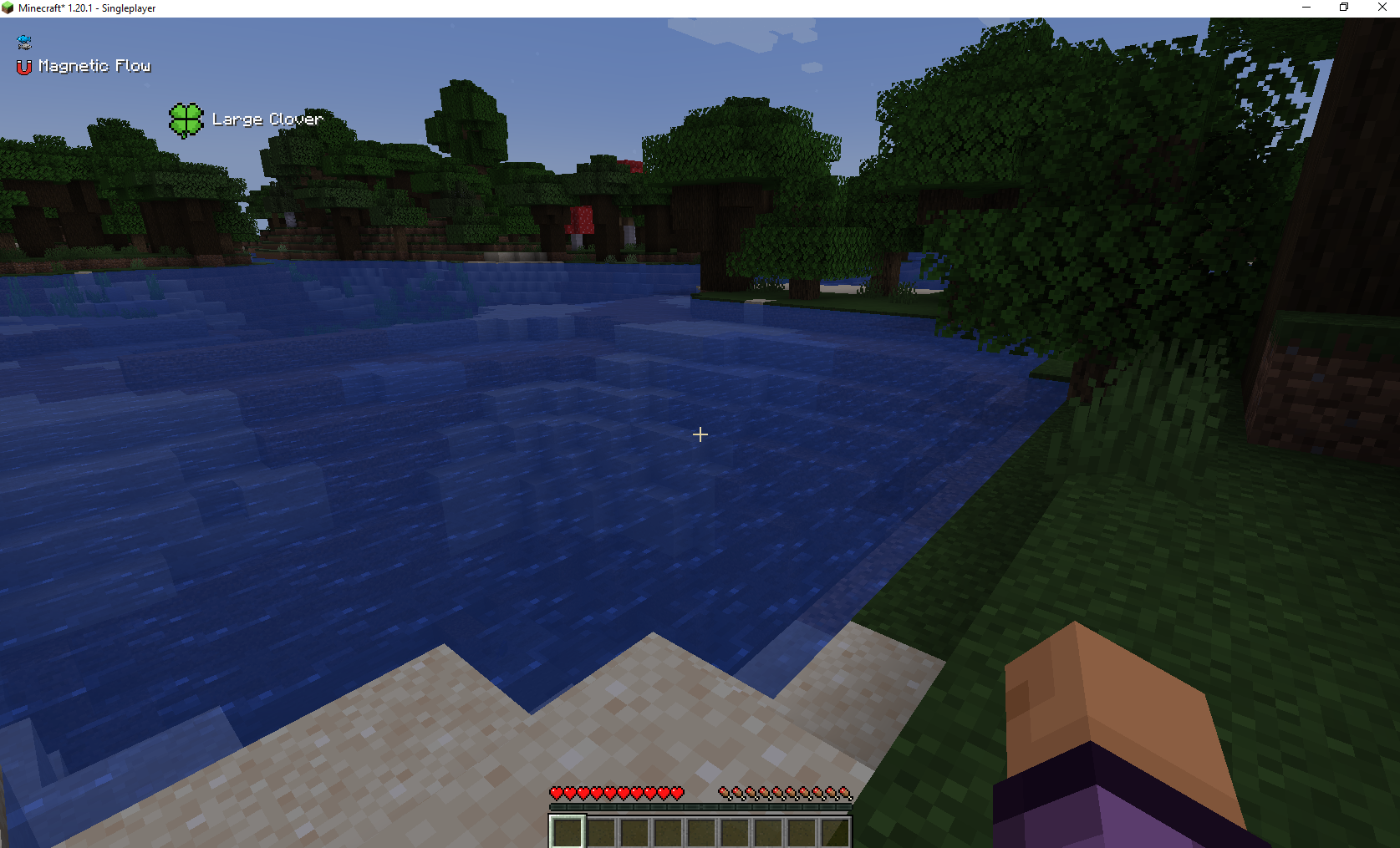 Sample Usage Shows sample usage of an icon with no text, an icon with text and a large custom position icon with text
Versions
Files
Relations
Project Relations
More like this
Similar Mods
Suggestions use data such as tags, dependencies, dependents, descriptions, titles, and more to rank how much they overlap with this mod.
On ModDex
Community snapshot
By the numbers
Statistics
 (opens in a new tab)
Get it on
Available Platforms
On ModDex
Community snapshot
By the numbers
Statistics
Resources