
Community listing page, reviews here may not be monitored by the author.
IconButtons API


No reviews yet
API for easily adding buttons to the Icon Buttons row in the title menu and pause menu
Community voices
Reviews
No reviews yet. Be the first to review this project!
Get it on
Available Platforms
Compatibility
Supported Environments
Runs entirely on the client. Works on vanilla servers.
About
Project Details
For authors
Embed Badge
If you're the author of this project, you can embed a live badge anywhere that supports HTML or Markdown. It updates automatically whenever ratings change.
Use HTML for any page that supports it, or Markdown for README files and Markdown-based descriptions.
Identifiers
Platform IDs
About
Description
IconButtons API
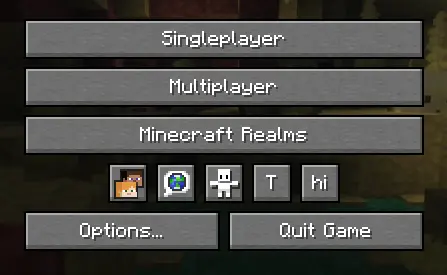
API for easily adding buttons to the Icon Buttons row in the title menu and pause menu
Implementation
1. Configure build.gradle
repositories {
    maven {
        url "https://api.modrinth.com/maven"
    }
}
dependencies {
    implementation "maven.modrinth:iconbuttonsapi:${project.iconbuttonsapi_version}+mc-${project.minecraft_version}"
}
2. Configure gradle.properties
Add the following lines to your gradle.properties file and replace the values with your target versions:
iconbuttonsapi_version=1.0.03. Configure fabric.mod.json
Don't forget to declare the dependency in your fabric.mod.json so Fabric Loader can verify it at runtime:
"depends": {
    ...
    "iconbuttonsapi": ">=1.0.0"
}
Usage
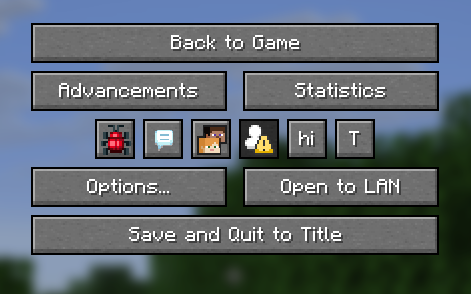
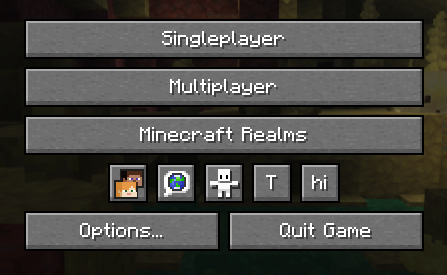
The main entry point of the API is the IconButtons class. It provides methods to easily add any AbstractWidget (like buttons, sliders, etc.) to the Minecraft Title Screen or Pause Menu rows.
You can register buttons to stay visible permanently or control their visibility dynamically using a BooleanSupplier.
Example
public class ExampleModClient implements ClientModInitializer {
    public static final String MOD_ID = "iconbuttonsapi";
    public static final Logger LOGGER = LoggerFactory.getLogger(MOD_ID);
    public static boolean willShow = true;

    @Override
    public void onInitializeClient() {
        Button buttonHi = Button.builder(
                Component.literal("hi"),
                b -> {
                    LOGGER.info("Hi!");
                }
        ).size(IconButtons.getButtonWidthAndHeight(), IconButtons.getButtonWidthAndHeight()).build();
        Button buttonToggleShow = Button.builder(
                Component.literal("T"),
                b -> {
                    willShow = !willShow;
                }
        ).size(IconButtons.getButtonWidthAndHeight(), IconButtons.getButtonWidthAndHeight()).build();

        IconButtons.addTitleScreenButton(buttonHi, () -> willShow);
        IconButtons.addPauseScreenButton(buttonHi, () -> willShow);

        IconButtons.addTitleScreenButton(buttonToggleShow);
        IconButtons.addPauseScreenButton(buttonToggleShow);
    }
}
Features
- Automatic Positioning: You don't need to specify coordinates (
XandY) for your widgets. The API calculates and applies positioning automatically, arranging your buttons into a neat row. - Size: It is recommended to use
IconButtons.getButtonWidthAndHeight()(returns20) for the correct size to ensure your icons fit perfectly alongside vanilla icons.
IconButtons API
API for easily adding buttons to the Icon Buttons row in the title menu and pause menu
Implementation
1. Configure build.gradle
repositories {
    maven {
        url "https://api.modrinth.com/maven"
    }
}
dependencies {
    implementation "maven.modrinth:iconbuttonsapi:${project.iconbuttonsapi_version}+mc-${project.minecraft_version}"
}
2. Configure gradle.properties
Add the following lines to your gradle.properties file and replace the values with your target versions:
iconbuttonsapi_version=1.0.0
3. Configure fabric.mod.json
Don't forget to declare the dependency in your fabric.mod.json so Fabric Loader can verify it at runtime:
"depends": {
    ...
    "iconbuttonsapi": ">=1.0.0"
}
Usage
The main entry point of the API is the IconButtons class. It provides methods to easily add any AbstractWidget (like buttons, sliders, etc.) to the Minecraft Title Screen or Pause Menu rows.
You can register buttons to stay visible permanently or control their visibility dynamically using a BooleanSupplier.
Example
public class ExampleModClient implements ClientModInitializer {
    public static final String MOD_ID = "iconbuttonsapi";
    public static final Logger LOGGER = LoggerFactory.getLogger(MOD_ID);
    public static boolean willShow = true;

    @Override
    public void onInitializeClient() {
        Button buttonHi = Button.builder(
                Component.literal("hi"),
                b -> {
                    LOGGER.info("Hi!");
                }
        ).size(IconButtons.getButtonWidthAndHeight(), IconButtons.getButtonWidthAndHeight()).build();
        Button buttonToggleShow = Button.builder(
                Component.literal("T"),
                b -> {
                    willShow = !willShow;
                }
        ).size(IconButtons.getButtonWidthAndHeight(), IconButtons.getButtonWidthAndHeight()).build();

        IconButtons.addTitleScreenButton(buttonHi, () -> willShow);
        IconButtons.addPauseScreenButton(buttonHi, () -> willShow);

        IconButtons.addTitleScreenButton(buttonToggleShow);
        IconButtons.addPauseScreenButton(buttonToggleShow);
    }
}
Features
- Automatic Positioning: You don't need to specify coordinates (
XandY) for your widgets. The API calculates and applies positioning automatically, arranging your buttons into a neat row. - Size: It is recommended to use
IconButtons.getButtonWidthAndHeight()(returns20) for the correct size to ensure your icons fit perfectly alongside vanilla icons.
Screenshots
Gallery
-
 Example Buttons 2
 -
 Example Buttons
Versions
Files
Relations
Project Relations
More like this
Similar Mods
Suggestions use data such as tags, dependencies, dependents, descriptions, titles, and more to rank how much they overlap with this mod.
On ModDex
Community snapshot
By the numbers
Statistics
Want to reach Minecraft players?
We're looking for a server hosting partner to feature here and other parts of the site. Interested? Send us a message!
Get in touchGet it on
Available Platforms
On ModDex
Community snapshot
By the numbers