
Community listing page, reviews here may not be monitored by the author.
Iconify

No reviews yet
Adds additional tooltip information to items marked by icons

Community voices
Reviews
No reviews yet. Be the first to review this project!
Get it on
Available Platforms
About
Project Details
For authors
Embed Badge
If you're the author of this project, you can embed a live badge anywhere that supports HTML or Markdown. It updates automatically whenever ratings change.
Use HTML for any page that supports it, or Markdown for README files and Markdown-based descriptions.
Identifiers
Platform IDs
About
Description
Introduction
Iconify has one goal: make comparing items easier. It does so by adding additional information to the items' tooltips, but labels them with icons instead of text. For example, an items durability (max uses) is marked with a diamond, and the value is displayed after that.
Iconify replaces Equipment Tooltips. The name was changed because the mod is much more versatile now.
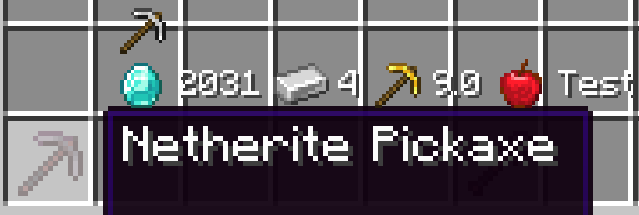 Screenshot of an early version (0.1.0)
API and Data Packs
New icons can be added with data packs. Likewise, mods can also add new icons and even new text functions, which allow custom information to be displayed next to the icon.
At the time of writing (before initial release), the API is very unstable. Expect major code changes in the future. Because of this, I will omit most information about it for now. The wiki on GitHub will contain more information once the API is more stable.
Icons
Icons check for items that match certain conditions and display themselves when their conditions match. Icons also have a texture and text function associated with them.
Text Functions
Text functions create text based on the item. For example, the food text function will show the hunger and saturation restored by food items. Icons will display the text produced next to their image.
Screenshots
Gallery
-
Example of tooltip icons
Versions
Files
Relations
Project Relations
More like this
Similar Mods
Suggestions use data such as tags, dependencies, dependents, descriptions, titles, and more to rank how much they overlap with this mod.
On ModDex
Community snapshot
By the numbers
Statistics
 (opens in a new tab)
Get it on
Available Platforms
On ModDex
Community snapshot
By the numbers