Community listing page, reviews here may not be monitored by the author.
Immersive Damage Indicators


No reviews yet
Adds animated damage indicators with custom fonts using Immersive Messages API

Community voices
Reviews
No reviews yet. Be the first to review this project!
Get it on
Available Platforms
Compatibility
Supported Environments
Runs entirely on the client. Works on vanilla servers.
About
Project Details
For authors
Embed Badge
If you're the author of this project, you can embed a live badge anywhere that supports HTML or Markdown. It updates automatically whenever ratings change.
Use HTML for any page that supports it, or Markdown for README files and Markdown-based descriptions.
Identifiers
Platform IDs
About
Description
Immersive Damage Indicators adds floating animated text whenever you damage a mob, with support for custom fonts, animations, and color effects using Immersive Messages API.
This mod is an updated multiloader fork of Mmm Indicators with the rendering system entirely replaced through Immersive Messages, to support custom effects and animations.







If you want custom fonts, you will need to install Caxton. However, custom fonts will not work with Iris shaders enabled, and this mod will automatically default back to using the vanilla text renderer.
This mod will automatically use the Anton font by default if Caxton is installed, which can be changed in the config or set to blank to disable:
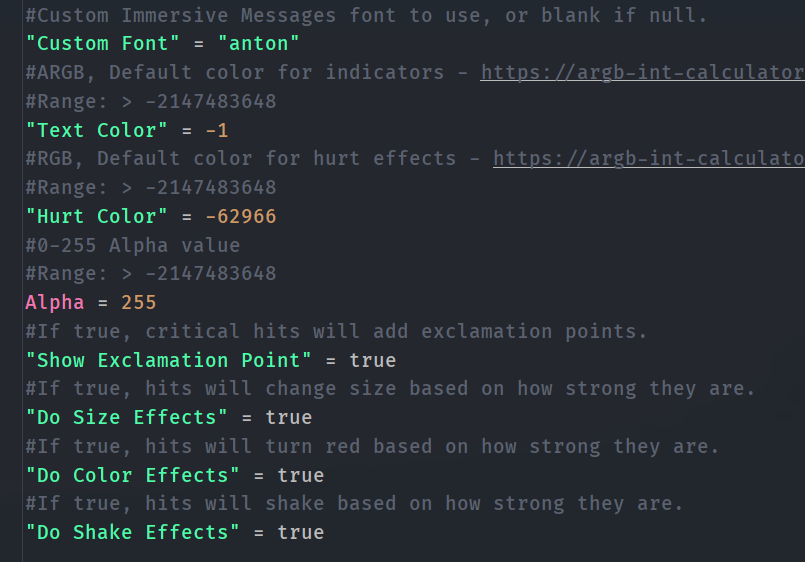
You can also set custom colors, change the red hurt color to something else, and toggle off each effect individually.
If you are a developer, you can also use the provided events to have full access to the particle instance and the ImmersiveMessage object for custom styling:

Immersive Damage Indicators adds floating animated text whenever you damage a mob, with support for custom fonts, animations, and color effects using Immersive Messages API.
This mod is an updated multiloader fork of Mmm Indicators with the rendering system entirely replaced through Immersive Messages, to support custom effects and animations.
If you want custom fonts, you will need to install Caxton. However, custom fonts will not work with Iris shaders enabled, and this mod will automatically default back to using the vanilla text renderer.
This mod will automatically use the Anton font by default if Caxton is installed, which can be changed in the config or set to blank to disable:
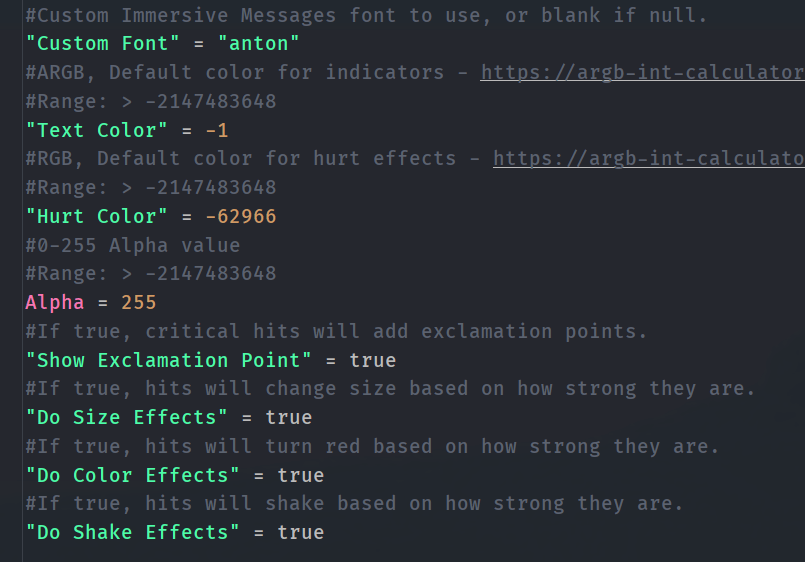
You can also set custom colors, change the red hurt color to something else, and toggle off each effect individually.
If you are a developer, you can also use the provided events to have full access to the particle instance and the ImmersiveMessage object for custom styling:

Screenshots
Gallery
Versions
Files
Relations
Project Relations
More like this
Similar Mods
Suggestions use data such as tags, dependencies, dependents, descriptions, titles, and more to rank how much they overlap with this mod.
On ModDex
Community snapshot
By the numbers
Statistics
 (opens in a new tab)
Get it on
Available Platforms
On ModDex
Community snapshot
By the numbers