Community listing page, reviews may not be monitored by the author.
Infinity Nexus Cables

No reviews yet
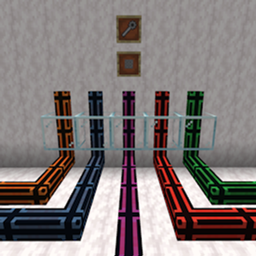
Seven cable types (item, fluid, energy, redstone, gas, entity and universal) with per-face configuration, filters, four tiers, cosmetic facades and an in-game performance dashboard.

Community voices
Reviews
No reviews yet. Be the first to review this project!
Get it on
Available Platforms
About
Project Details
For authors
Embed Badge
If you're the author of this project, you can embed a live badge anywhere that supports HTML or Markdown. It updates automatically whenever ratings change.
Use HTML for any page that supports it, or Markdown for README files and Markdown-based descriptions.
Identifiers
Platform IDs
Resources
External Links
About
Description
Infinity Nexus Cables adds 28 configurable cables for moving items, fluids, energy, redstone signals, gases and entities through your base. Every connection can be configured independently, so one cable network can feed machines, tanks, storage, redstone contraptions and entity transport without mixing their behavior.
Features
- 7 cable types: Item, Fluid, Energy, Redstone, Gas, Entity and Universal, totaling 28 cables across four tiers.
- 4 tiers (T1-T4): each tier improves transfer rate, transfer interval, operations per cycle and network range. Values are configurable.
- Per-face configuration: set INSERT, EXTRACT or DISABLED mode, filters, limits, redstone behavior and target distribution for each connected face.
- Flexible filters: filter items, fluids, gases and entities by specific entry or tag. Item filters also support NBT matching and durability handling.
- Entity transport: an Entity Cable moves players, mobs, dropped items and XP orbs between air endpoints, with independent toggles for each category. All four categories are enabled by default. Sleeping players, spectators, passengers, entities carrying passengers and uncategorized entities such as boats and minecarts are skipped. Copyable entities are recreated with a fresh UUID; players and non-copyable entities use teleportation.
- Entity endpoints: shift-click an air-facing side with the Cable Wrench to create or remove an endpoint. Each tier caps entity width and height, from 1.0x1.0 at T1 up to 4.0x4.0 at T4.
- Entity filters and limits: filter by entity ID or tag, invert the match, and use per-face
All/Passive/HostileandAll/Baby/Adultbuttons plus keep limits, transfer limits and distribution. Destination keep limits count only entities whose hitboxes occupy the target block, so mobs in adjacent blocks do not block valid insertions while overlapping endpoints still work. Global[entity]config can block IDs, exclude bosses/players/named mobs, default extraction to the connected air block, and optionally use a per-tier extraction scan radius. - Distribution modes: NEAREST, RANDOM and ROUND_ROBIN for extract faces.
- Redstone support: use redstone signals to control transfer, or use the Redstone cable as a network signal source with comparators and DIRECT, NEGATE, PULSE and FLIP transforms.
- Universal cable: combines item, fluid, energy, redstone, gas and entity channels in a single cable, with independent settings per channel.
- Cauldrons and beehives: fluid cables can interact with cauldrons, and item cables can extract honeycomb from bee nests and beehives.
- Cable Wrench: shift-click to disconnect or reconnect a face, or to create/remove an entity endpoint on an air-facing side; regular click to switch a face between INSERT and EXTRACT; shift-attack removes the full facade. Shift-click or shift-attack an entity to copy its registry ID to the clipboard. Wrench/facade actions only run from the main hand.
- Compact configuration GUI: per-face controls, tag and amount fields, filter slot, face cycling and player inventory in one screen.
- Hops panel: on an EXTRACT face, click the info button next to the face switch to list every insert in that network, including block icon, coordinates and distance. On a redstone extract face it lists the network's INSERT outputs. The header shows
Hops: current/max; clicking a destination closes the GUI and highlights the target block for 10 seconds. - Metrics screen: press K to inspect per-save cable activity. See operations, moved volume, success rate and average latency, filtered by Item, Fluid, Energy, Gas or Entity and viewed in Operations, Volume or Latency mode. A hop chart splits traffic into four bands (1-8, 9-32, 33-64 and 65+ hops), names the active metric and shows its unit once, while the details panel shows exact totals for the hovered bar. A 10-minute bar marks the oldest sample with a 5-minute midpoint and an expiry tooltip. The Slowest processes panel lists the 80 highest-latency cable faces, keeping only the highest-latency sample per face from the last 10 minutes, with latency in microseconds; administrators can click one to teleport to the source cable. Metrics refresh automatically and can be reset by gamemasters.
- Jade integration: optional tooltip showing tier, active face and channel configuration. Hold Shift for filters, limits, signal details and redstone settings.
- Facades (covers): copy almost any block appearance into a reusable facade, apply it to the whole cable (all six faces), clone an existing cable facade, and remove it with wrench + shift-attack. Facades are visual covers; a full facade uses the copied block's hitbox (altered/partial facades use a full block), are all-or-none, and a cable drops at most one facade.
- Client render control:
renderCableUnderFacade(defaulttrue) controls whether the cable model is drawn underneath facades, useful for glass covers. - Performance-minded: event-driven connection updates, cached network snapshots, smart sleep for idle faces and transactional transfer batching.
Requirements
- Minecraft 26.1.2
- NeoForge 26.1.2.120+
- Java 25
- Mekanism is optional: required only for Gas cables. Without Mekanism, Gas cables remain registered for world compatibility but are hidden from the creative tab and do not transfer gas.
- Jade is optional: enables the detailed cable tooltip.
Getting started
Craft a T1 cable, place it next to the block you want to connect, and right-click the cable face to open its configuration. Use the Cable Wrench to manage connections and quickly switch between INSERT and EXTRACT. Upgrade cables through the progressive T1-T4 recipes.
Press K at any time to open the Cable Metrics screen and check how your network is performing. Metrics are stored per world, updated every five seconds while the screen is open, and reset requires gamemaster permissions. The Slowest processes panel shows the 80 highest-latency cable faces, keeping one entry per face from the last 10 minutes; administrators can click one to teleport to the cable that produced it.
For entity transport, place Entity Cables and point the faces you want to use at air. Shift-click those air-facing sides with the wrench to create an endpoint, then configure one side as EXTRACT and another as INSERT. The Entity page controls categories, ID/tag and mob/age filters, keep limits and distribution. The Universal Cable carries entities as well; its T1 recipe includes the Entity Cable.
To decorate cables, craft an empty facade (4 iron nuggets + 1 glass yields 4), right-click a block to copy its appearance, then apply it to a cable. Facades always cover all six faces; wrench + shift-attack removes the full facade and drops one facade on the clicked face.
Credits
Inspired by the concepts and observable behavior of: Pipez by Max Henkel. Pipez Optimizer by Sakurain (Saku_rain). Mekanism by bradyaidanc. X-Net by McJty. Cable Facades by thepigcat76.
No source code from those projects is included. All credits belong to their respective authors.
License
All Rights Reserved.
Screenshots
Gallery
Versions
Files
Relations
Project Relations
More like this
Similar Mods
Suggestions use data such as tags, dependencies, dependents, descriptions, titles, and more to rank how much they overlap with this mod.
On ModDex
Community snapshot
By the numbers
Statistics

Get it on
Available Platforms
On ModDex
Community snapshot
By the numbers
Statistics
Resources