
Community listing page, reviews may not be monitored by the author.
InGameInfo-Reloaded

No reviews yet
Enhancing in-game HUD functionality

Community voices
Reviews
No reviews yet. Be the first to review this project!
Get it on
Available Platforms
About
Project Details
For authors
Embed Badge
If you're the author of this project, you can embed a live badge anywhere that supports HTML or Markdown. It updates automatically whenever ratings change.
Use HTML for any page that supports it, or Markdown for README files and Markdown-based descriptions.
Identifiers
Platform IDs
Resources
External Links
About
Description
InGameInfoXML (Reloaded)
A fully customizable, data-driven HUD for Minecraft 1.20.1, 1.21.1 and 26.1.2.
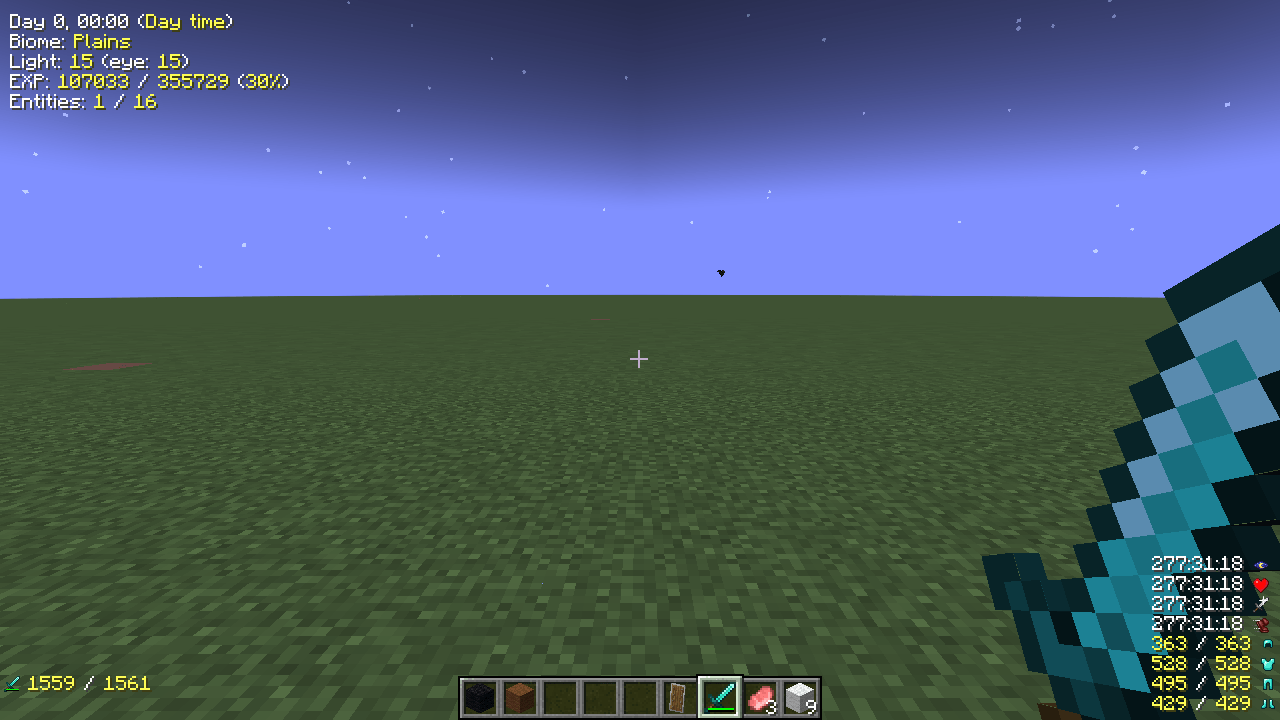
InGameInfoXML adds an information overlay that you design yourself. Write the lines you want in XML, JSON or TXT. Each line can mix plain text, color codes, live game values, item icons, potion effects, armor durability and values supplied by other mods.
The overlay supports nine screen alignments and a scale from 0.5x to 2x.
About this project
This is a fork of InGameInfoXML by Lunatrius. The original mod targeted Minecraft 1.12.2 under the MIT license.
The code was initially written with AI-assisted vibe coding and then reviewed and debugged by a human.
What is different from the 1.12.2 original
- Modern versions. Forge 1.20.1, NeoForge 1.21.1 and NeoForge 26.1.2.
- Same HUD definitions. The XML, JSON and TXT formats, the
{tag}syntax, the nine alignments and the scale setting are retained. - Visual HUD editor. Press
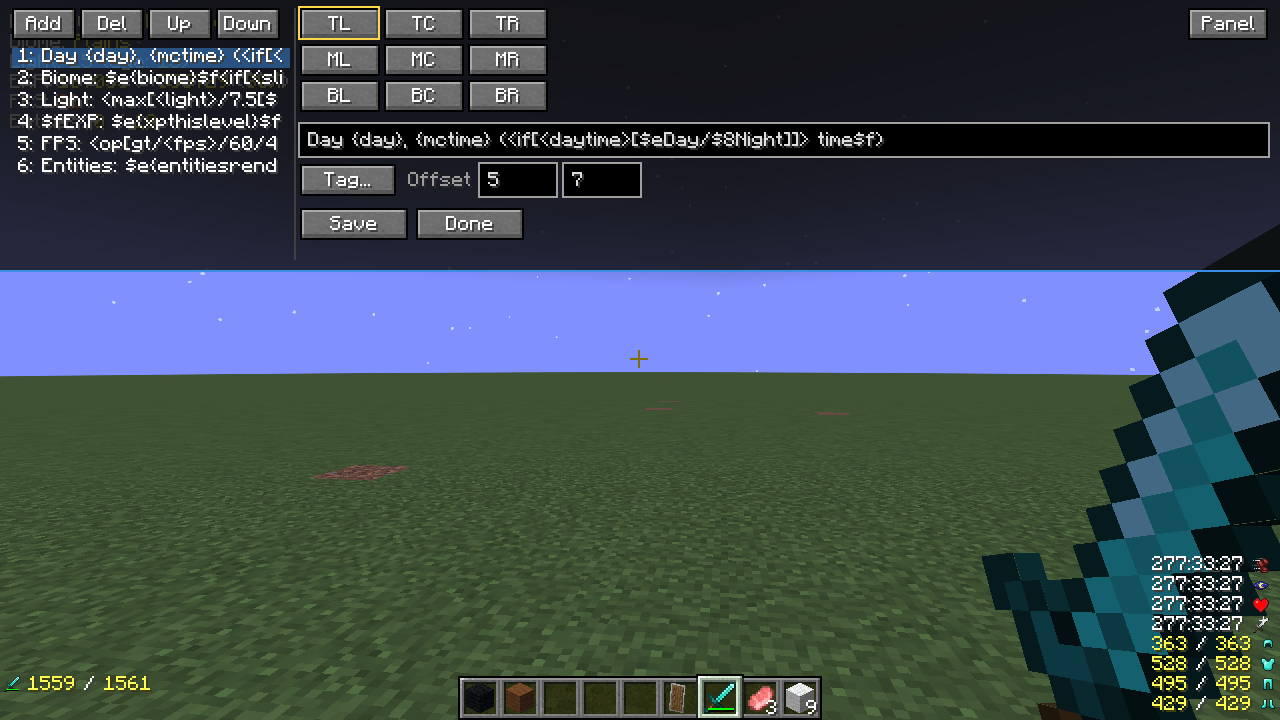
F9(or run/igi editor) to add, remove and reorder lines, insert tags, switch alignment and adjust X / Y offsets. A Panel button moves the editor between the bottom and top edges. - Tag browser and debug inspector.
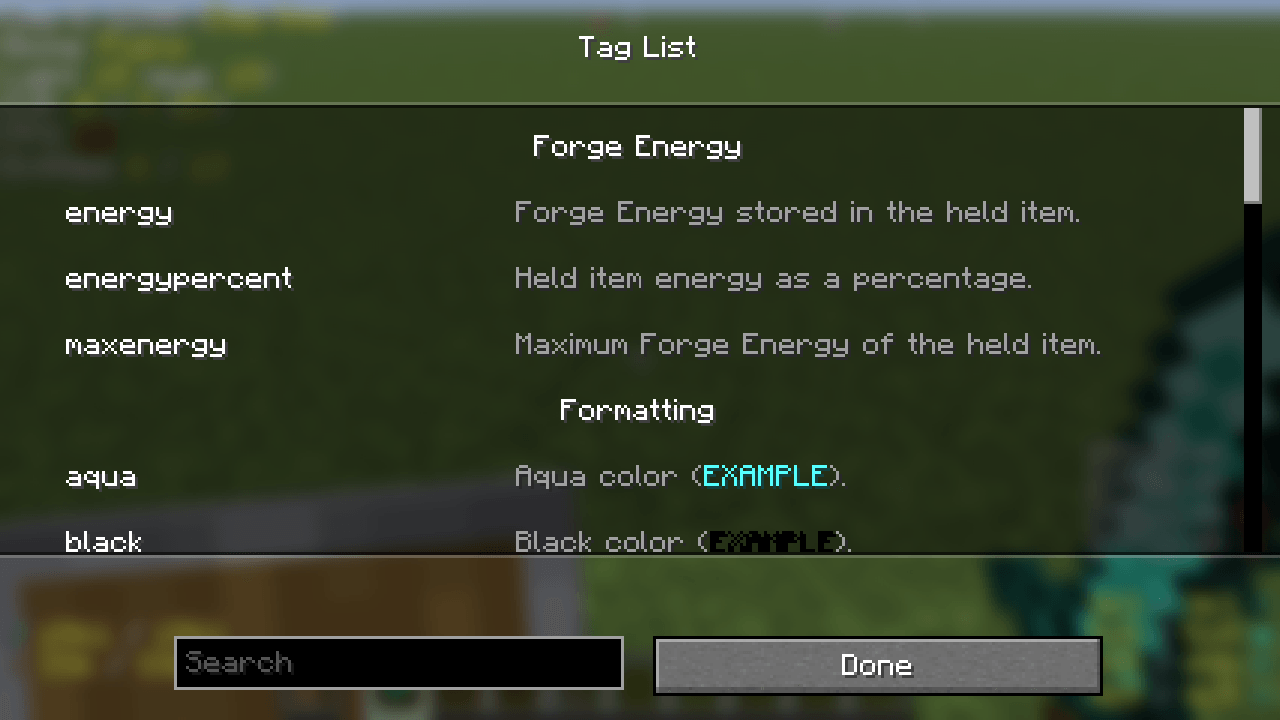
/igi taglistopens the searchable tag list.F8(or/igi debug) opens an inspector that shows every registered tag and its current value by category; clicking a tag copies<tag>. - Expressions.
{{ ... }}evaluates arithmetic, parentheses and functions such asround,min,max,abs,floor,ceilandformat. - Modern mod integrations. Optional tags for Create, Curios, Applied Energistics 2, Mekanism, Botania, Tinkers' Construct, Cobblemon, Paragliders and other mods.
- Modern configuration. A TOML client config and an in-game config screen replace the
old config file. The HUD definition lives in
config/InGameInfo.xml. - Nine languages. English, Japanese, German, French, Norwegian, Polish, Russian, Simplified Chinese and Traditional Chinese.
What you can display
Player, world, inventory, effects, performance and mod values.
Player: health, max health, absorption, hunger, saturation, armor, air, experience,level, game mode, score, team, effects and attributes.
World: biome, dimension, coordinates, facing direction, light level, time, day,weather, moon phase, difficulty and seed.
Inventory and equipment: main-hand and off-hand items, armor slots, durability,item counts, item names, icons and hovered-item information.
Potion effects: name, amplifier, duration and icons for the active effects.
Performance: FPS, MSPT and TPS.
Other mods: energy, AE2 networks and cells, Create kinetics, Mekanism radiation, Botania mana, Cobblemon party data, Tinkers' tool stats, Paragliders stamina and more.
The full tag list, including aliases kept for 1.12.2 compatibility, is available through
/igi taglist.
A HUD definition
The XML structure, color codes and save formats.
Lines are grouped under an alignment in config/InGameInfo.xml:
<config>
  <lines at="topleft">
    <line><str>HP: {health}/{maxhealth}</str></line>
    <line><str>Biome: {biome}</str></line>
    <line><str>Position: {{ round(x, 1) }}, {{ round(z, 1) }}</str></line>
  </lines>
</config>
{tag} is replaced with the tag value. Color codes $0 to $f and the reset code
$r are supported. The same definition can be saved as XML, JSON or TXT with
/igi save <file>; the extension selects the format.
Expressions
Arithmetic, functions and Java-style formatting.
The {{ ... }} form lets a line contain a small calculation:
<str>Damage: {{ attackdamage * 2 + 1 }}</str>
<str>Health: {{ format("%.1f", health / maxhealth * 100) }}%</str>
- Operators:
+,-,*,/,%, parentheses and unary+/- - Functions:
round(value[, digits]),min(...),max(...),abs(value),floor(value),ceil(value),format("java format", value, ...) formatuses the same argument order as JavaString.format- Whole numbers print without a decimal part; other numbers are rounded to at most three decimals and trailing zeros are removed
- If a tag is unknown, the syntax is invalid or the format fails, the original
{{ ... }}text is displayed unchanged
HUD editor and inspector
- F9 or
/igi editor: opens the visual editor. Select a line to edit its text, insert tags with Tag..., change the 3x3 alignment, adjust X / Y offsets and save. - Panel flips the editor between the bottom and top of the screen.
- F8 or
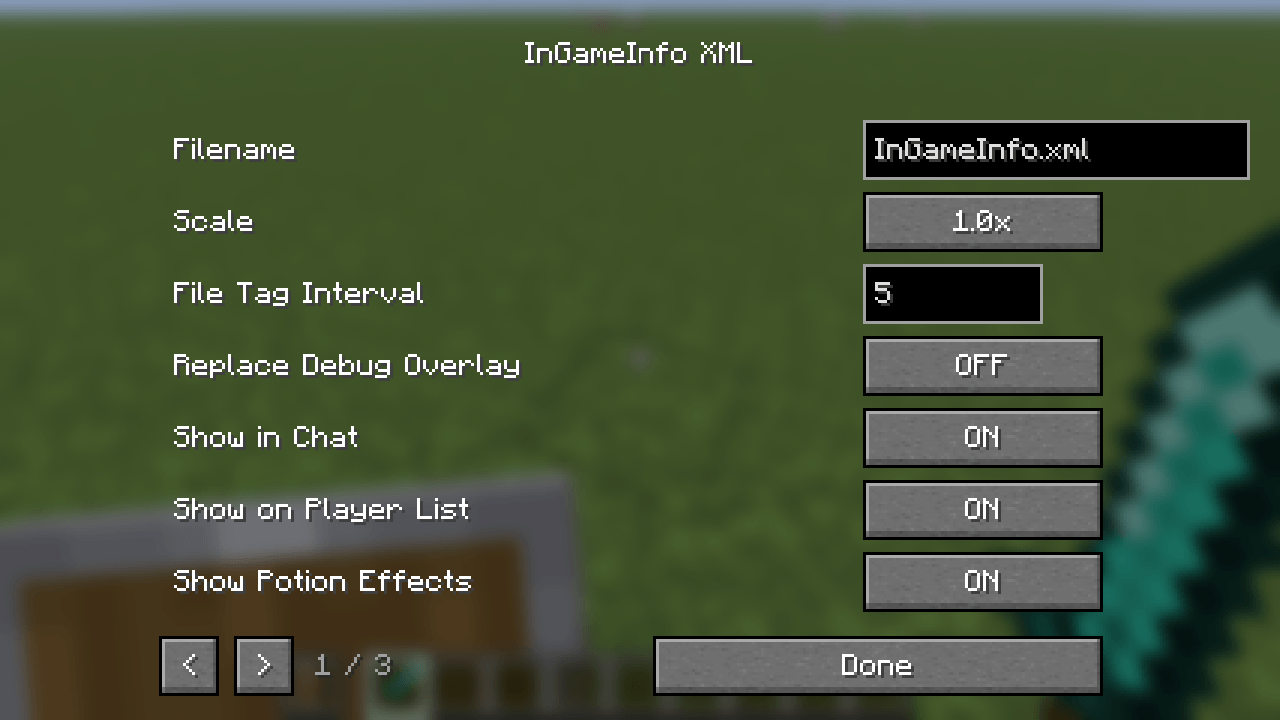
/igi debug: opens the tag inspector. Tags are grouped by category and show their current value; click a name to copy<tag>. - Config in the Mods screen: changes the HUD file name, scale, vanilla HUD visibility, chat/player-list behavior, potion and item icon overlays, decimal places and other settings.
The editor writes the HUD definition to config/InGameInfo.xml and alignment offsets to
config/ingameinfoxml-client.toml.
Gallery
The Gallery tab shows the HUD, the in-game editor with its movable panel, the tag browser, the config screen, expressions and optional mod integrations.
Commands
Reload, load, save, show or hide the overlay, open the editor or inspector, and change alignment.
| Command | What it does |
|---|---|
/igi reload |
Reload the current HUD definition |
/igi load <file> |
Load another XML, JSON or TXT definition |
/igi save <file> |
Save the current definition using the extension as the format |
/igi enable / /igi disable |
Temporarily show or hide the overlay |
/igi taglist |
Open the searchable tag list |
/igi editor |
Open the HUD editor |
/igi debug |
Open the tag inspector |
/igi alignment get <ALIGN> |
Print the X / Y offset of an alignment |
/igi alignment set <ALIGN> [x y] |
Change an alignment offset |
/igi config <key> <value> |
Change a supported client setting |
Supported versions
| Minecraft | Loader | Java |
|---|---|---|
| 1.20.1 | Forge 47.4.28 | 17 |
| 1.21.1 | NeoForge 21.1.264 | 21 |
| 26.1.2 | NeoForge 26.1.2.122 | 25 |
Installation
- Install Forge or NeoForge for your Minecraft version.
- Put the matching
ingameinfoxml-*.jarin themodsfolder. - Start the game once. The mod creates
config/InGameInfo.xmlandconfig/ingameinfoxml-client.toml. - Press
F9to open the editor, or editconfig/InGameInfo.xmland run/igi reload.
Mod integration
Optional tags for other mods. AE2 values update once per second.
| Mod | Data exposed as tags | Versions | Verification |
|---|---|---|---|
| Applied Energistics 2 | Network channels and mode, grid power, average usage, cell capacity and status | All | HUD checked |
| Mekanism | Personal and environmental radiation, severity, enabled state, percentage | All | HUD checked |
| Botania | Mana in the targeted pool, spreader or flower, including maximum and percentage | 1.20.1 | HUD checked |
| Tinkers' Construct | Tool durability, mining speed, attack damage, harvest level, modifiers, broken state | 1.20.1 | HUD checked via the official API |
| Cobblemon | Party size and per-slot species, nickname, level, HP, status, shiny and type | All | HUD checked |
| Paragliders | Stamina, maximum stamina, percentage and exhausted state | All | HUD checked |
| Create | Kinetic speed, stress and contraption values for the targeted block or mounted contraption | All | Compiled |
| Curios | Curio slot information | All | Compiled |
| Serene Seasons | Season and related world values | All | Compiled |
| Ars Nouveau | Mana and spell-related values | All | Compiled |
| Iron's Spells 'n Spellbooks | Mana and spell-related values | All | Compiled |
| Tough As Nails | Temperature and thirst values | All | Compiled |
| Vampirism | Vampire-level and related values | All | Compiled |
| Cold Sweat | Temperature and body values | All | Compiled |
| Thirst Was Taken | Thirst values | All | Compiled |
| Goety | Soul energy and related values | All | Compiled |
| Forge / NeoForge Energy | Energy, maximum energy and percentage from the held item | All | Built in |
Compatibility with 1.12.2 HUD files
What is retained, what changed, and which tags return compatibility values.
- The file structure,
{tag}syntax, alignment names and color codes are retained. - Tag names that still have a modern equivalent keep their old names. Common alternatives are registered as aliases.
- Tags that depended on removed concepts such as numeric item IDs, item metadata or client-side world size return a compatibility value or a registry ID.
- The config file is now TOML and is managed by the config screen. HUD definitions remain XML, JSON or TXT.
{{ ... }}expressions are new and are not understood by 1.12.2.
A 1.12.2 HUD file that only uses supported tags should load as-is.
Languages
The interface and tag descriptions are available in:
- English (
en_us) - Japanese (
ja_jp) - German (
de_de) - French (
fr_fr) - Norwegian (
no_no) - Polish (
pl_pl) - Russian (
ru_ru) - Simplified Chinese (
zh_cn) - Traditional Chinese (
zh_tw)
Known limitations
Build-only integrations and 26.1.2 coverage.
- Some optional integrations are compiled but not value-verified in every version.
- Some third-party mods do not publish a 26.1.2 build.
License
This project is licensed under the MIT License.
Credits
- Original InGameInfoXML for Minecraft 1.12.2: Lunatrius
- Earlier InGameInfo work: DaftPVF, bspkrs
- 1.20.1 Forge fork used as a starting point: DF11ZomGraves
- 1.20.1 / 1.21.1 / 26.1.2 port and maintenance: code-onigiri
Links
- Source and issue tracker: https://github.com/code-onigiri/InGameInfo-reloaded
- Documentation: https://github.com/code-onigiri/InGameInfo-reloaded/tree/master/docs
- License: https://github.com/code-onigiri/InGameInfo-reloaded/blob/master/LICENSE
InGameInfoXML is not affiliated with Mojang Studios, Microsoft, Forge, NeoForge or the original author. Minecraft is a trademark of Mojang Studios.
Screenshots
Gallery
-
 01-hud.png 01-hud.png
 -
 02-editor.png 02-editor.png
 -
 03-taglist.png 03-taglist.png
 -
 04-config.png 04-config.png
 -
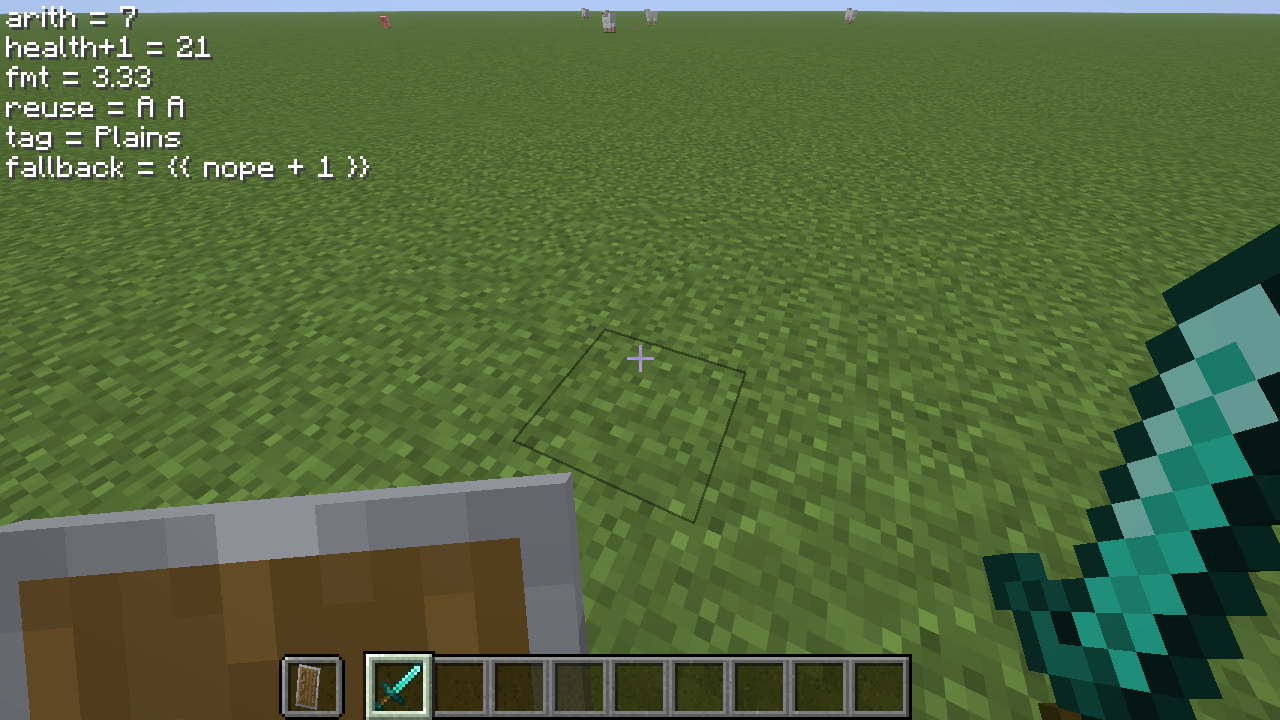 05-expressions.png 05-expressions.png
 -
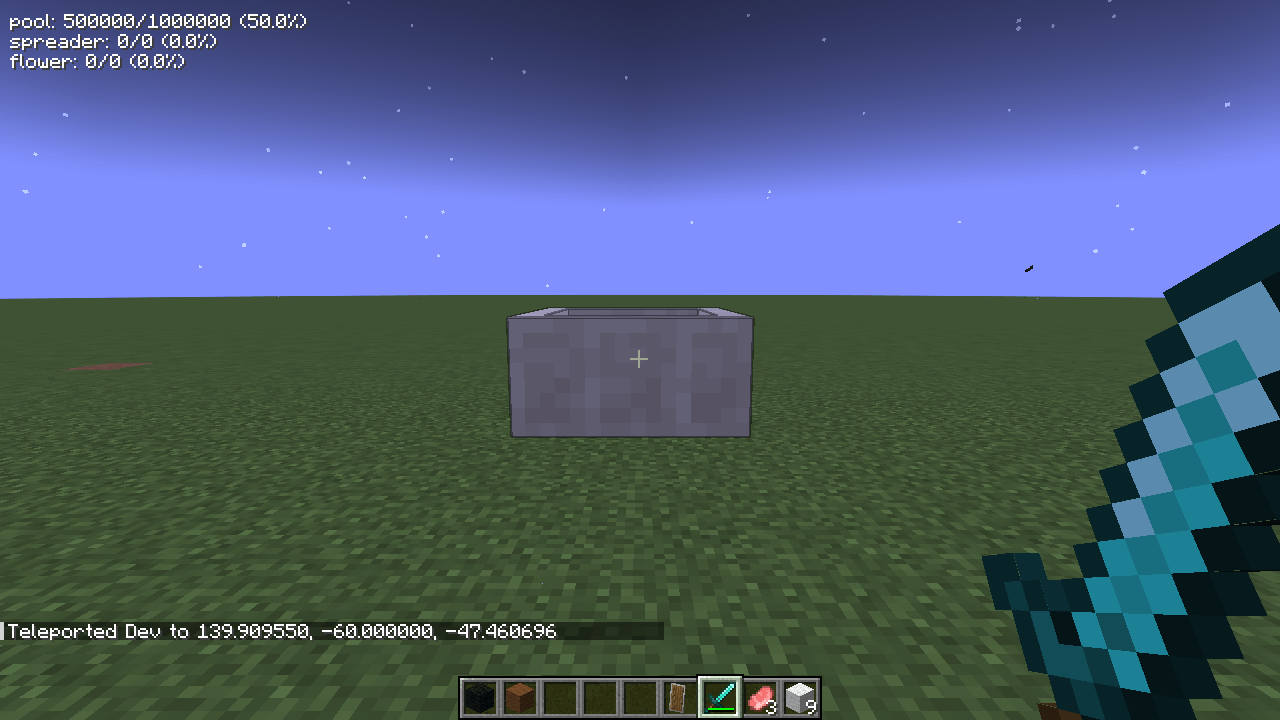 06-botania.png 06-botania.png
 -
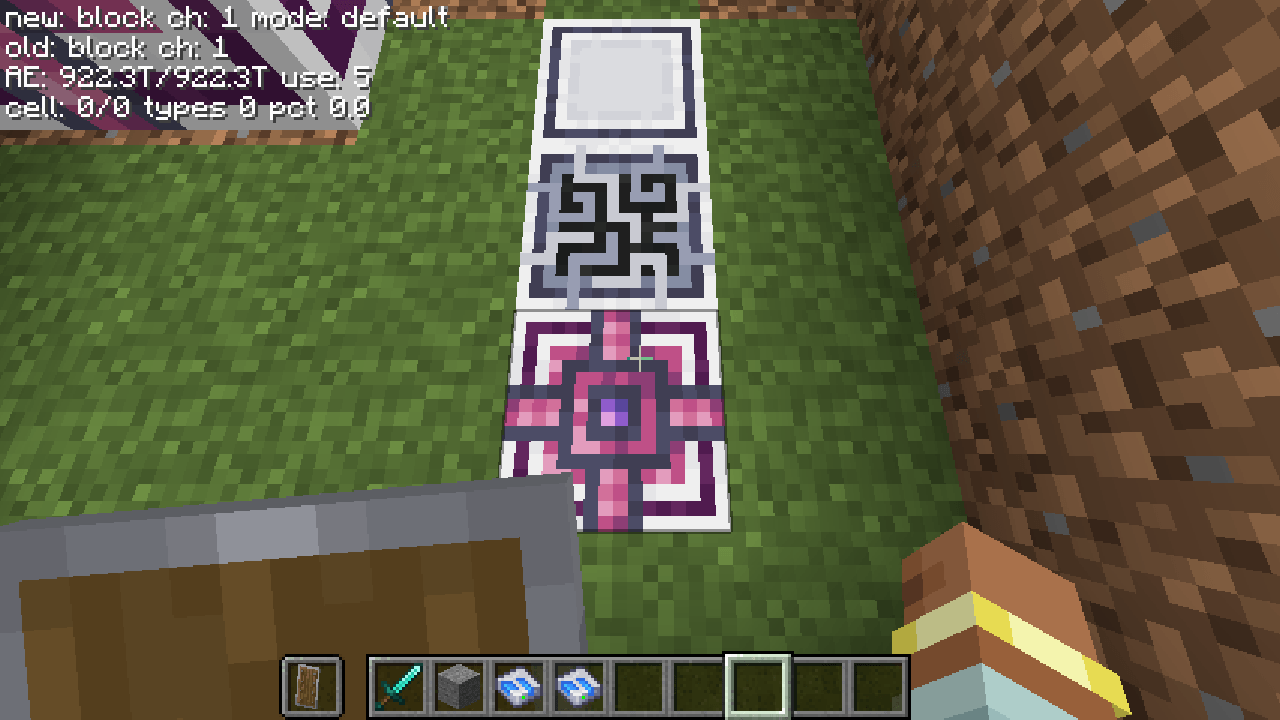 07-ae2.png 07-ae2.png
Versions
Files
Relations
Project Relations
More like this
Similar Mods
Suggestions use data such as tags, dependencies, dependents, descriptions, titles, and more to rank how much they overlap with this mod.
- Classic Stats
- InGame Info XML
- InGame Info XML - Serene Seasons
- InGame Info XML Addon - Blood Magic
- InGame Info XML Addon - Thaumcraft
- InGame Info XML Addon - RFTools Dimensions
- InGame Info XML Addon - Deep Resonance
- InGame Info Reborn
- InGame Info XML CanoeEdition
- InGame Info JSON
- InGame Info XML Addon - ProjectE
- Krougal Ingame Info
On ModDex
Community snapshot
By the numbers
Statistics

Get it on
Available Platforms
On ModDex
Community snapshot
By the numbers
Statistics
Resources