
Community listing page, reviews may not be monitored by the author.
Item Display

No reviews yet
Want to display your items to decorate your world? That's what this pack does.

Community voices
Reviews
No reviews yet. Be the first to review this project!
Get it on
Available Platforms
About
Project Details
For authors
Embed Badge
If you're the author of this project, you can embed a live badge anywhere that supports HTML or Markdown. It updates automatically whenever ratings change.
Use HTML for any page that supports it, or Markdown for README files and Markdown-based descriptions.
Identifiers
Platform IDs
About
Description
This data pack adds item display cases that you can display dropped items that will never despawn and can never be picked up. Use this pack to display your cool items!
Features:
- Make it glow in the dark like a glow item frame.
- Use a name tag to rename the item.
- Encase the item in glass to keep it safe from fire, lava, etc.
- More customizability coming soon!
How To Use
- Place down a valid display block.
- Drop the item that you want to be displayed.
- Then drop the item frame with the display item. (make sure your display item is dropped first)
- To remove break the block and you will receive your item.
How To Customize:
- To change valid display blocks go to: pack/data/item_display/tags/blocks/display_blocks.json
- Inside that file, you can change what blocks are valid.
- Once you have changed it type '/reload' to reset the datapack
Valid Blocks:
- gold_block
- iron_block
- diamond_block
- emerald_block
- redstone_block
- quartz_block
- coal_block
- chiseled_stone_bricks
FAQ
Can I add this to my mod pack?
Sure, as long as you give proper credit and follow the license.
Are you going to downgrade to older versions (ie; 1.15, 1.12, 1.8)?
I will if there is enough demand for a certain version and I have time to.
Screenshots
Gallery
-
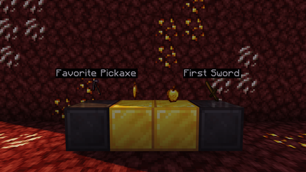 Custom Named Items Displayed items that are renamed will display their custom name.
 -
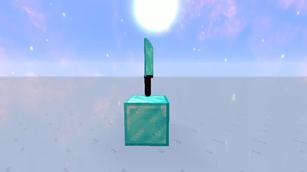 NBT Support Support for custom items that have nbt data
 -
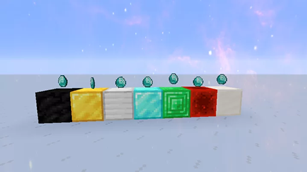 Never Despawn Items will never despawn and can never be picked up
 -
 Banner
Versions
Files
Relations
Project Relations
More like this
Similar Mods
Suggestions use data such as tags, dependencies, dependents, descriptions, titles, and more to rank how much they overlap with this mod.
On ModDex
Community snapshot
By the numbers
Statistics


Get it on
Available Platforms
On ModDex
Community snapshot
By the numbers