Community listing page, reviews here may not be monitored by the author.
jackperry2187/Effigies


No reviews yet
Effigies is a mod that adds powerful mob spawning prevention options to the game

Community voices
Reviews
No reviews yet. Be the first to review this project!
Get it on
Available Platforms
Compatibility
Supported Environments
Must be installed on both the client and the server.
About
Project Details
For authors
Embed Badge
If you're the author of this project, you can embed a live badge anywhere that supports HTML or Markdown. It updates automatically whenever ratings change.
Use HTML for any page that supports it, or Markdown for README files and Markdown-based descriptions.
Identifiers
Platform IDs
About
Description

Effigies is a mod that adds powerful mob spawning prevention options to the game.
Version Support
Effigies supports multiple Minecraft versions and mod loaders:
| Loader | Minecraft Versions |
|---|---|
| Fabric | 1.21.11+ |
| NeoForge | 1.21.11+ |
Features
- Adds 7 new Pikes (one for each spear variant) that prevent specific mob types from spawning within a radius based on their tier
- Refer to the Pike Table below for specifics about the radius and recipes
- Pikes also have item tooltips in-game describing their range
- Radius' can now also be customized via the
config/effigies-config.tomlfile- You can disable Pikes from preventing spawns by setting the radius to
-1 - Any config options will also update the in-game tooltips
- You can disable Pikes from preventing spawns by setting the radius to
- Place a Pike block in the world, then right-click it with a mob head (or place the mob head on top of it) to activate it
- When active, the Pike will prevent that mob type from spawning within its area of effect
- Fire particles spawn when it becomes active!
- Fire particles will also spawn whenever the Pike successfully prevents a mob spawn
- Smoke particles spawn when it becomes inactive (the head is removed)
- Supported mob heads by default: Skeleton, Wither Skeleton, Zombie, Creeper, and Piglin
- Completely configurable via the
config/effigies-config.tomlfile - Supports vanilla definitions, such as
minecraft:sand=minecraft:zombieto make sand prevent zombie spawns - Also supports modded definitions, such as
ecologics:coconut_planks=ecologics:penguinto make coconut planks prevent penguin spawns - Also supports multiple references, so adding both
minecraft:sand=minecraft:zombieandminecraft:zombie_head=minecraft:zombiewould mean either sand or a zombie head would work as intended! - Does NOT support a single block preventing spawns of multiple mobs, so having
minecraft:sand=minecraft:zombieand on the next line havingminecraft:sand=minecraft:skeletonwould make sand ONLY prevent skeletons - Any blocks that are defined as Pike Heads (sand or coconut planks from the above examples) will be automatically scaled to the size of a mob head when placed on a pike, to make sure that any custom blocks looks decent on the Pike
- Invalid blocks (ones not in the config file) that are placed on top will not be downscaled
- Completely configurable via the
- When the player looks at an activated Pike, the mob it is currently preventing will hover on top of the Pike
- When active, the Pike will prevent that mob type from spawning within its area of effect
- Shift+Right-Click an activated Pike to remove the head (the head will drop as an item)
- Breaking a Pike will drop both the Pike block and the head (if activated)
- Pikes work in all dimensions (Overworld, Nether, End, and modded dimensions)
- Also adds a new Anti-Spear which has slightly higher damage than Netherite and the same attack speed as Diamond
- The Anti-Spear can also be used to craft the Anti-Pike which acts as a powerful mob spawner for whatever mob head is placed on it
- Adds a convenient Grimoire which lists all the crafting recipes, radius of the Pikes, and valid mob heads
In-Game Example
Inactive (left) and Active (right) Diamond Pikes

Examples of Random Blocks Being Correctly Head-Sized

Examples of Hovering Over an Active Pike

Examples of Modded (Penguin from Ecologics) and Normal (Skeleton) mobs in JEI

Examples of Large (Iron Golem) and Small (Axolotl) mobs in JEI

The Grimoire shows you recipes for items which are added from Effigies

And shows you which mob heads prevent which mobs!

Pike Table
| Tier | Default Area of Effect |
|---|---|
| Wooden | 1 Chunk (the chunk it's in) |
| Stone | 1 Chunk + 1 Radius (the chunk it's in + all 8 surrounding chunks) |
| Copper | 1 Chunk + 2 Radius |
| Iron | 1 Chunk + 4 Radius |
| Golden | 1 Chunk + 6 Radius |
| Diamond | 1 Chunk + 8 Radius |
| Netherite | 1 Chunk + 16 Radius |
Recipes
| Tier | Recipe | Upgrade Recipe |
|---|---|---|
| Wooden | 1 Wooden Spear + 2 Sticks | N/A |
| Stone | 1 Stone Spear + 2 Sticks | 1 Cobblestone + 1 Wooden Pike + 1 Stick |
| Copper | 1 Copper Spear + 2 Sticks | 1 Copper Ingot + 1 Stone Pike + 1 Stick |
| Iron | 1 Iron Spear + 2 Sticks | 1 Iron Ingot + 1 Copper Pike + 1 Stick |
| Golden | 1 Golden Spear + 2 Sticks | 1 Gold Ingot + 1 Iron Pike + 1 Stick |
| Diamond | 1 Diamond Spear + 2 Sticks | 1 Diamond + 1 Golden Pike + 1 Stick |
| Netherite | 1 Netherite Spear + 2 Sticks | Smithing Table: 1 Netherite Upgrade + 1 Diamond Pike + 1 Netherite Ingot |
| Anti-Spear | 1 Nether Star + 1 Netherite Spear + 1 Dragon Breath | N/A |
| Anti-Pike | 1 Anti-Spear + 2 Breeze Rods | 1 Netherite Pike + 2 Breeze Rods + 1 Nether Star + 1 Dragon Breath |
| Grimoire (Guide Book) | 4 Blackstone + 4 Gilded Blackstone + 1 Book | N/A |
Notes
- Each Pike only prevents the spawn of the mob type matching the head placed on it
- Multiple Pikes with different heads can be used to prevent multiple mob types from spawning within the radius
- Pikes are efficient even in large numbers - they use an optimized chunk-based lookup system
- When connecting to a server, the server will send it's config to the player, meaning the tooltips will update accurately and the player's own config file won't be modified or used
- Supports JEI 27.4.0.15 or Newer!
Effigies is a mod that adds powerful mob spawning prevention options to the game.
Version Support
Effigies supports multiple Minecraft versions and mod loaders:
| Loader | Minecraft Versions |
|---|---|
| Fabric | 1.21.11+ |
| NeoForge | 1.21.11+ |
Features
- Adds 7 new Pikes (one for each spear variant) that prevent specific mob types from spawning within a radius based on their tier
- Refer to the Pike Table below for specifics about the radius and recipes
- Pikes also have item tooltips in-game describing their range
- Radius' can now also be customized via the
config/effigies-config.tomlfile- You can disable Pikes from preventing spawns by setting the radius to
-1 - Any config options will also update the in-game tooltips
- You can disable Pikes from preventing spawns by setting the radius to
- Place a Pike block in the world, then right-click it with a mob head (or place the mob head on top of it) to activate it
- When active, the Pike will prevent that mob type from spawning within its area of effect
- Fire particles spawn when it becomes active!
- Fire particles will also spawn whenever the Pike successfully prevents a mob spawn
- Smoke particles spawn when it becomes inactive (the head is removed)
- Supported mob heads by default: Skeleton, Wither Skeleton, Zombie, Creeper, and Piglin
- Completely configurable via the
config/effigies-config.tomlfile - Supports vanilla definitions, such as
minecraft:sand=minecraft:zombieto make sand prevent zombie spawns - Also supports modded definitions, such as
ecologics:coconut_planks=ecologics:penguinto make coconut planks prevent penguin spawns - Also supports multiple references, so adding both
minecraft:sand=minecraft:zombieandminecraft:zombie_head=minecraft:zombiewould mean either sand or a zombie head would work as intended! - Does NOT support a single block preventing spawns of multiple mobs, so having
minecraft:sand=minecraft:zombieand on the next line havingminecraft:sand=minecraft:skeletonwould make sand ONLY prevent skeletons - Any blocks that are defined as Pike Heads (sand or coconut planks from the above examples) will be automatically scaled to the size of a mob head when placed on a pike, to make sure that any custom blocks looks decent on the Pike
- Invalid blocks (ones not in the config file) that are placed on top will not be downscaled
- Completely configurable via the
- When the player looks at an activated Pike, the mob it is currently preventing will hover on top of the Pike
- When active, the Pike will prevent that mob type from spawning within its area of effect
- Shift+Right-Click an activated Pike to remove the head (the head will drop as an item)
- Breaking a Pike will drop both the Pike block and the head (if activated)
- Pikes work in all dimensions (Overworld, Nether, End, and modded dimensions)
- Also adds a new Anti-Spear which has slightly higher damage than Netherite and the same attack speed as Diamond
- The Anti-Spear can also be used to craft the Anti-Pike which acts as a powerful mob spawner for whatever mob head is placed on it
- Adds a convenient Grimoire which lists all the crafting recipes, radius of the Pikes, and valid mob heads
In-Game Example
Inactive (left) and Active (right) Diamond Pikes
Examples of Random Blocks Being Correctly Head-Sized
Examples of Hovering Over an Active Pike
Examples of Modded (Penguin from Ecologics) and Normal (Skeleton) mobs in JEI
Examples of Large (Iron Golem) and Small (Axolotl) mobs in JEI
The Grimoire shows you recipes for items which are added from Effigies
And shows you which mob heads prevent which mobs!
Pike Table
| Tier | Default Area of Effect |
|---|---|
| Wooden | 1 Chunk (the chunk it's in) |
| Stone | 1 Chunk + 1 Radius (the chunk it's in + all 8 surrounding chunks) |
| Copper | 1 Chunk + 2 Radius |
| Iron | 1 Chunk + 4 Radius |
| Golden | 1 Chunk + 6 Radius |
| Diamond | 1 Chunk + 8 Radius |
| Netherite | 1 Chunk + 16 Radius |
Recipes
| Tier | Recipe | Upgrade Recipe |
|---|---|---|
| Wooden | 1 Wooden Spear + 2 Sticks | N/A |
| Stone | 1 Stone Spear + 2 Sticks | 1 Cobblestone + 1 Wooden Pike + 1 Stick |
| Copper | 1 Copper Spear + 2 Sticks | 1 Copper Ingot + 1 Stone Pike + 1 Stick |
| Iron | 1 Iron Spear + 2 Sticks | 1 Iron Ingot + 1 Copper Pike + 1 Stick |
| Golden | 1 Golden Spear + 2 Sticks | 1 Gold Ingot + 1 Iron Pike + 1 Stick |
| Diamond | 1 Diamond Spear + 2 Sticks | 1 Diamond + 1 Golden Pike + 1 Stick |
| Netherite | 1 Netherite Spear + 2 Sticks | Smithing Table: 1 Netherite Upgrade + 1 Diamond Pike + 1 Netherite Ingot |
| Anti-Spear | 1 Nether Star + 1 Netherite Spear + 1 Dragon Breath | N/A |
| Anti-Pike | 1 Anti-Spear + 2 Breeze Rods | 1 Netherite Pike + 2 Breeze Rods + 1 Nether Star + 1 Dragon Breath |
| Grimoire (Guide Book) | 4 Blackstone + 4 Gilded Blackstone + 1 Book | N/A |
Notes
- Each Pike only prevents the spawn of the mob type matching the head placed on it
- Multiple Pikes with different heads can be used to prevent multiple mob types from spawning within the radius
- Pikes are efficient even in large numbers - they use an optimized chunk-based lookup system
- When connecting to a server, the server will send it's config to the player, meaning the tooltips will update accurately and the player's own config file won't be modified or used
- Supports JEI 27.4.0.15 or Newer!
Screenshots
Gallery
-
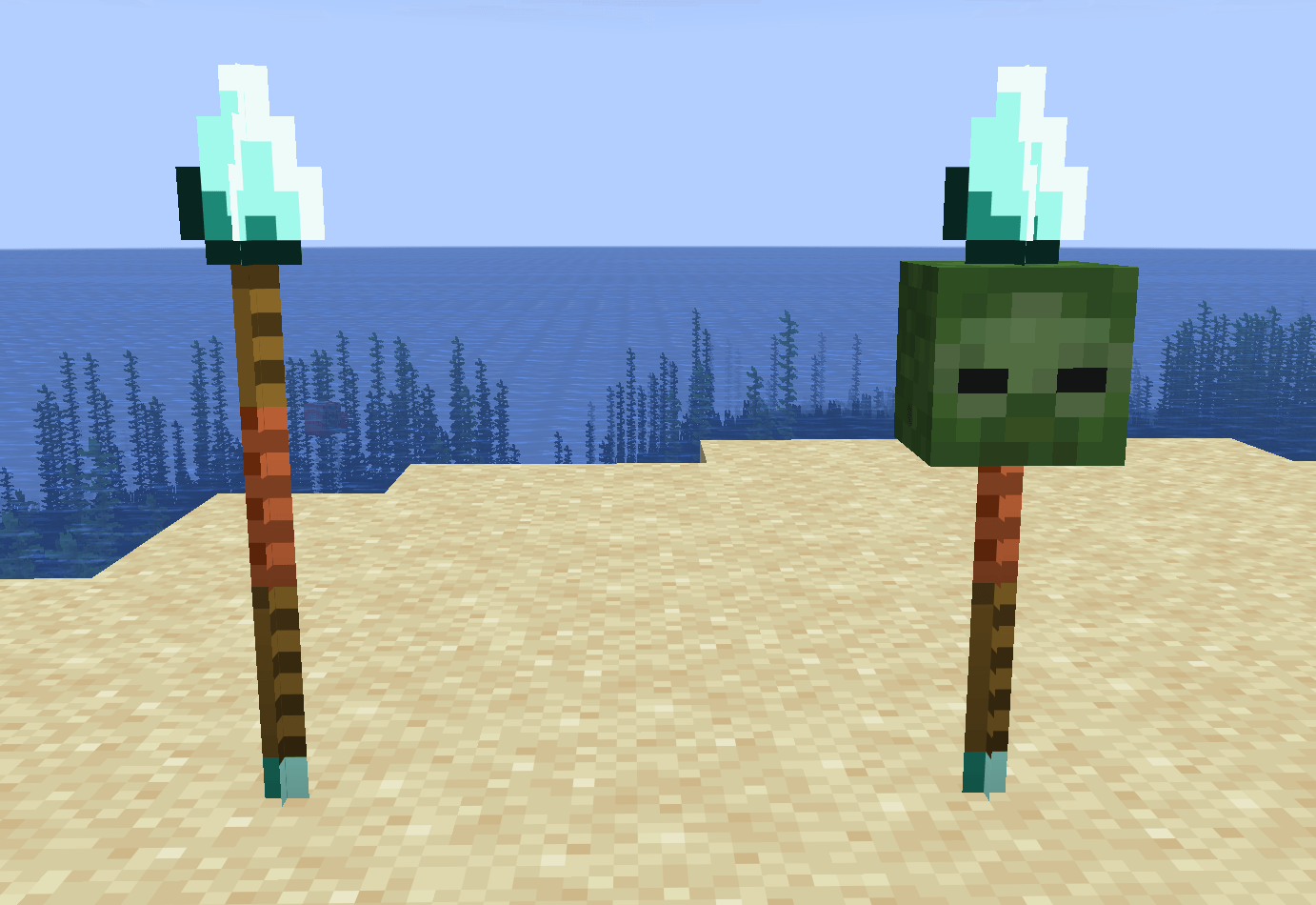 Inactive (left) and Active (right) Diamond Pikes An example of some pikes when they're placed in the world!
 -
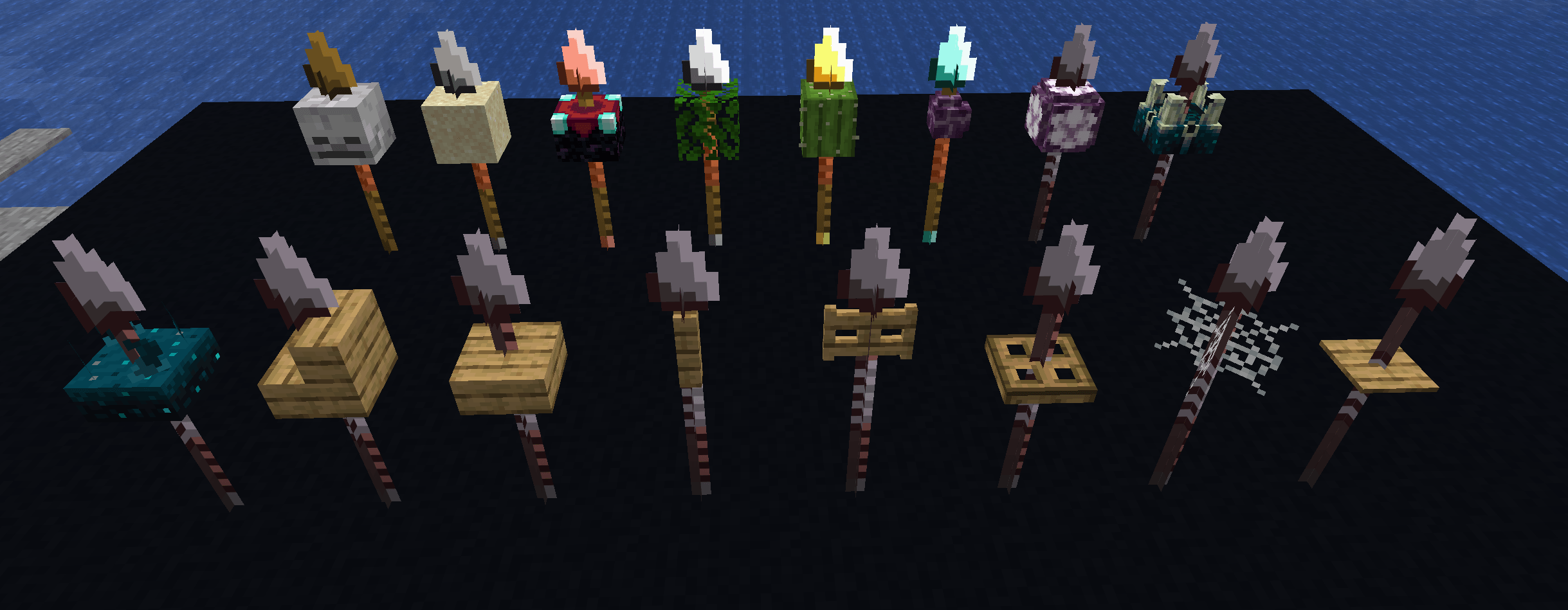 Downsized Example When included in the config file: Skeleton Skull, Sand, Enchanting Table, Oak Leaves, Cactus, Chorus Plant, Chorus Fruit, Sculk Shrieker, Sculk Sensor, Oak Stairs, Slab, Fence, Fence Gate, Trapdoor, Cobweb, Pressure Plate
 -
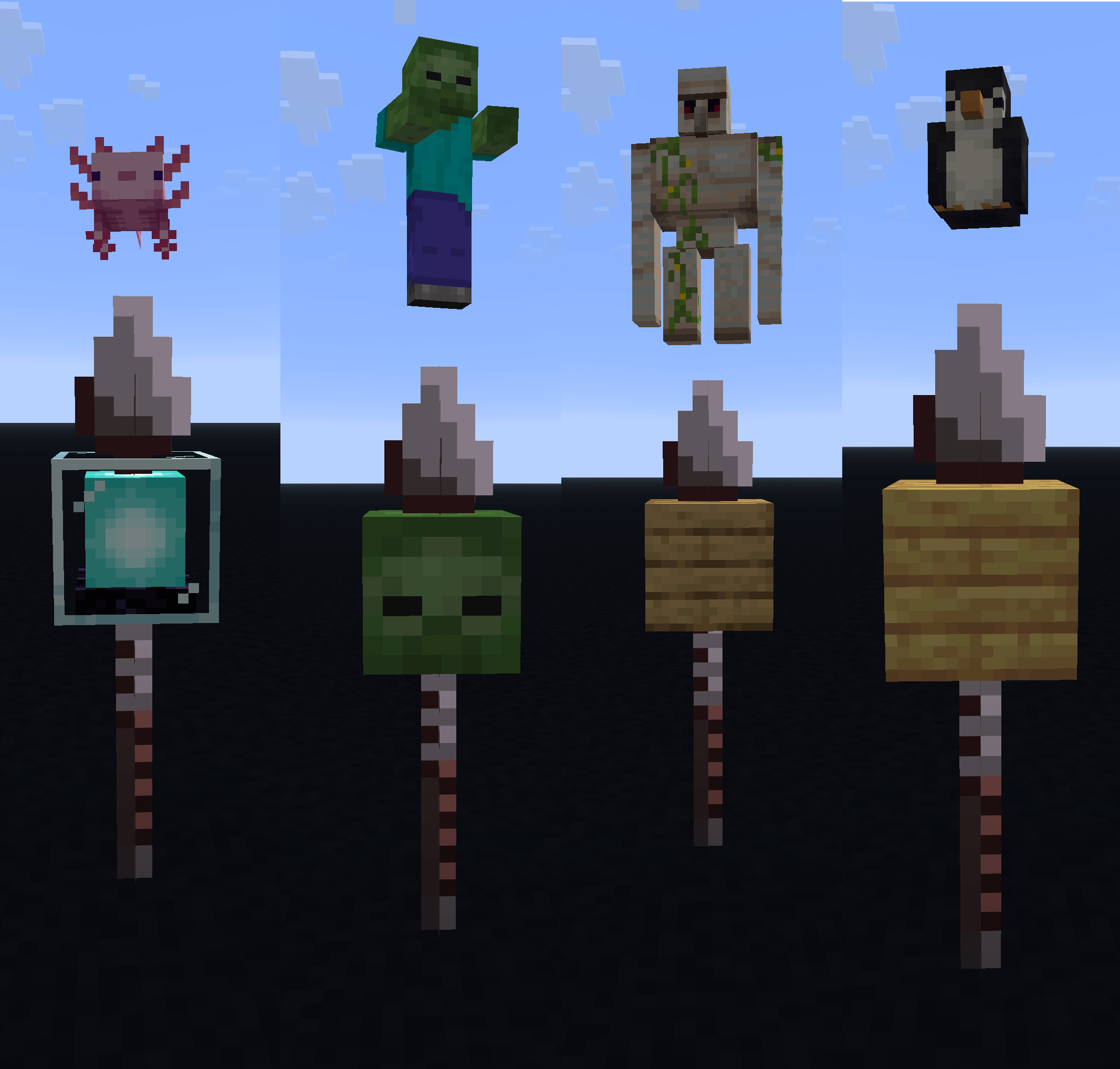 Hovering Preview/Hologram When you hover over an active Pike, it shows which mob it's preventing! Works with small mobs (Axolotl), normal mobs (Zombie), large mobs (Iron Golem), and modded mobs (Penguin from Ecologics)!
-
 Hovering Preview/Holgram When you hover over an active Pike, it shows which mob it's preventing! Works with small mobs (Axolotl), normal mobs (Zombie), large mobs (Iron Golem), and modded mobs (Penguin from Ecologics)!
 -
 Downsized Example When included in the config file: Skeleton Skull, Sand, Enchanting Table, Oak Leaves, Cactus, Chorus Plant, Chorus Fruit, Sculk Shrieker, Sculk Sensor, Oak Stairs, Slab, Fence, Fence Gate, Trapdoor, Cobweb, Pressure Plate
 -
 Inactive (left) and Active (right) Diamond Pikes An example of some pikes when they're placed in the world!
Versions
Files
Relations
Project Relations
More like this
Similar Mods
Suggestions use data such as tags, dependencies, dependents, descriptions, titles, and more to rank how much they overlap with this mod.
On ModDex
Community snapshot
By the numbers
Statistics
 (opens in a new tab)
Get it on
Available Platforms
On ModDex
Community snapshot
By the numbers