
Community listing page, reviews here may not be monitored by the author.
Just Enough Descriptions (JED)

No reviews yet
JED adds descriptions to every block and item in Minecraft!
Community voices
Reviews
No reviews yet. Be the first to review this project!
Get it on
Available Platforms
About
Project Details
For authors
Embed Badge
If you're the author of this project, you can embed a live badge anywhere that supports HTML or Markdown. It updates automatically whenever ratings change.
Use HTML for any page that supports it, or Markdown for README files and Markdown-based descriptions.
Identifiers
Platform IDs
About
Description


Just Enough Descriptions is Forge mod that adds descriptions to every item and block in Minecraft with a simple UI!
To open it, simply Hold Shift when hovering over an item!
Images

Configuration Options
You can change the keybind in keybind options. The default is Left Shift.
The configuration file can be found in the config folder, and is titled jed-client.toml. The options are:
- jei_integration - Wether the mod should add a JEI information tab (true by default, if JEI is present).
- tooltip_activation_time - The time in ticks to hold shift for the UI to open (20 ticks default).
- allow_if_empty - Wether the mod should show the description tooltip even if no entry exists (true by default).
- always_en_us - Always force english US, despite language selected (false by default).
- excluded_mod_ids - A list of mod IDs to not add descriptions from (empty by default). Add "jed" to exclude default descriptions.
Contributing to JED
We have currently completed translations for English (US) and English (UK) (And possibly an easter egg language?). If you want to work on any translation that has not been completed, join the discord.
Integrating JED support into your Mods / Resourcepacks
To integrate JED support into your mods or resourcepacks, simply create a jed folder in your assets folder. For example:
- assets/minecraft/jed/ - for Minecraft descriptions.
- assets/<modid>/jed/ - for custom mods.
Inside this folder, create .json files similar to the language format. These must be titled with the correct language ID, for example en_us.json or ru_ru.json. An example json is shown here.

Screenshots
Gallery
-
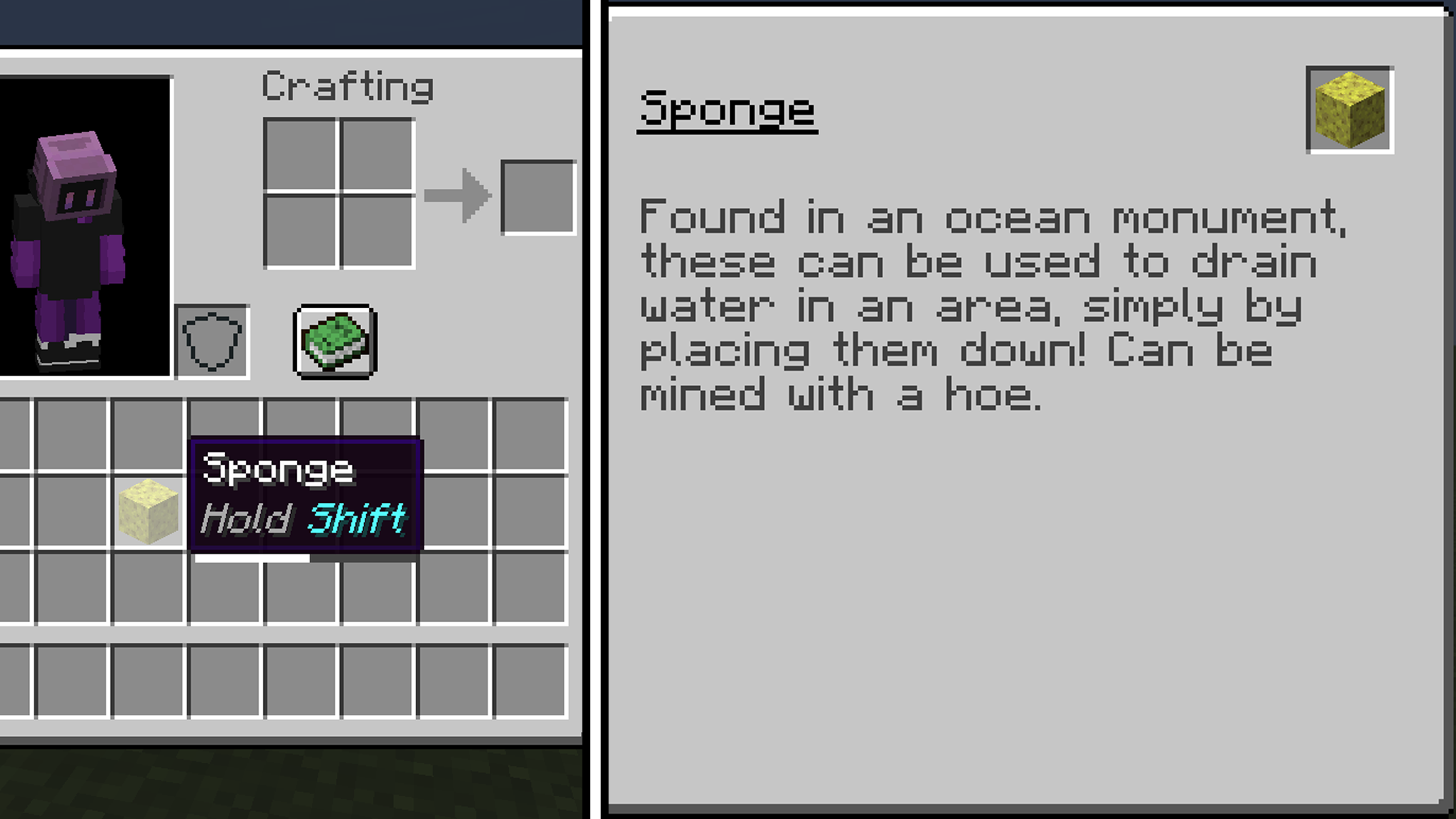 Sponge! An example of JED being used to determine the function of a block!
Versions
Files
Relations
Project Relations
More like this
Similar Mods
Suggestions use data such as tags, dependencies, dependents, descriptions, titles, and more to rank how much they overlap with this mod.
On ModDex
Community snapshot
By the numbers
Statistics
Want to reach Minecraft players?
We're looking for a server hosting partner to feature here and other parts of the site. Interested? Send us a message!
Get in touchGet it on
Available Platforms
On ModDex
Community snapshot
By the numbers