Community listing page, reviews here may not be monitored by the author.
Just SYBAU

No reviews yet
Client-side chat category filter that lets you turn off chat partially
Community voices
Reviews
No reviews yet. Be the first to review this project!
Get it on
Available Platforms
Compatibility
Supported Environments
Runs entirely on the client. Works on vanilla servers.
About
Project Details
For authors
Embed Badge
If you're the author of this project, you can embed a live badge anywhere that supports HTML or Markdown. It updates automatically whenever ratings change.
Use HTML for any page that supports it, or Markdown for README files and Markdown-based descriptions.
Identifiers
Platform IDs
About
Description
Just SYBAU
Just SYBAU is a client-side Fabric mod that gives you full control over which chat messages you see in Minecraft.
You can hide specific categories of chat instantly, open a clean vanilla-style menu, assign your own shortcuts, clear chat with a custom key, and review hidden messages in a built-in archive.
No server install is required.
Features
- 100% client-side (works on vanilla servers and modded servers)
- Live toggles (no restart needed)
- Filter categories:
- Command output (
/say,/tellraw, command feedback, etc.) - Private messages (
/msg,/tell,/w) - User chat (normal player messages)
- Join/leave messages
- Death/kill messages
- Command block output
- Open menu with command:
/justsybau - Customizable shortcuts inside the GUI:
- Open menu key (default:
None) - Clear chat key (default:
None)
- Open menu key (default:
- Filtered message archive:
- Read past messages that were hidden by filters
- Scrollable history view
- Clear archive button
- Clean vanilla-style UI
- Command output (
Requirements
- Minecraft:
1.21.11 - Fabric Loader:
0.18.6+ - Fabric API:
0.141.3+1.21.11(or compatible) - Java:
21+
Installation
- Install Fabric Loader for Minecraft
1.21.11. - Put Fabric API into your
modsfolder. - Put
just-sybau-1.0.0.jarinto yourmodsfolder. - Start Minecraft.
Quick Tutorial
1) Open the menu
Use:
/justsybau
2) Toggle chat categories
- In the menu, each button controls one message type.
ONmeans visible.OFFmeans hidden.- Changes apply instantly.
3) Set custom shortcuts
- In the same menu, click
Open Menu KeyorClear Chat Key. - Press any keyboard key or mouse button.
- Press
ESCwhile assigning to reset it toNone.
4) Read hidden messages
- Click
View Filtered Messages. - Scroll with mouse wheel or arrow keys.
- Use
Clear Stored Messagesif you want to wipe history.
Notes
- This mod only changes what you see.
- It does not block, edit, or modify server messages.
- It does not require the server to have the mod.
Troubleshooting
The menu does not open
- Confirm you are using
/justsybau(with slash). - Make sure the correct jar is in the
modsfolder. - Confirm game version and Fabric API match the requirements.
Filters seem not to work
- Check each category button state (
OFF= filtered). - Some custom server/plugin formats may not match perfectly.
- If needed, open an issue with logs and an example message format.
Game crashes or UI conflicts
- Update Fabric Loader and Fabric API.
- Test with only Fabric API + Just SYBAU to confirm conflict source.
License
This project is licensed under CC0 1.0 Universal.
Screenshots
Gallery
-
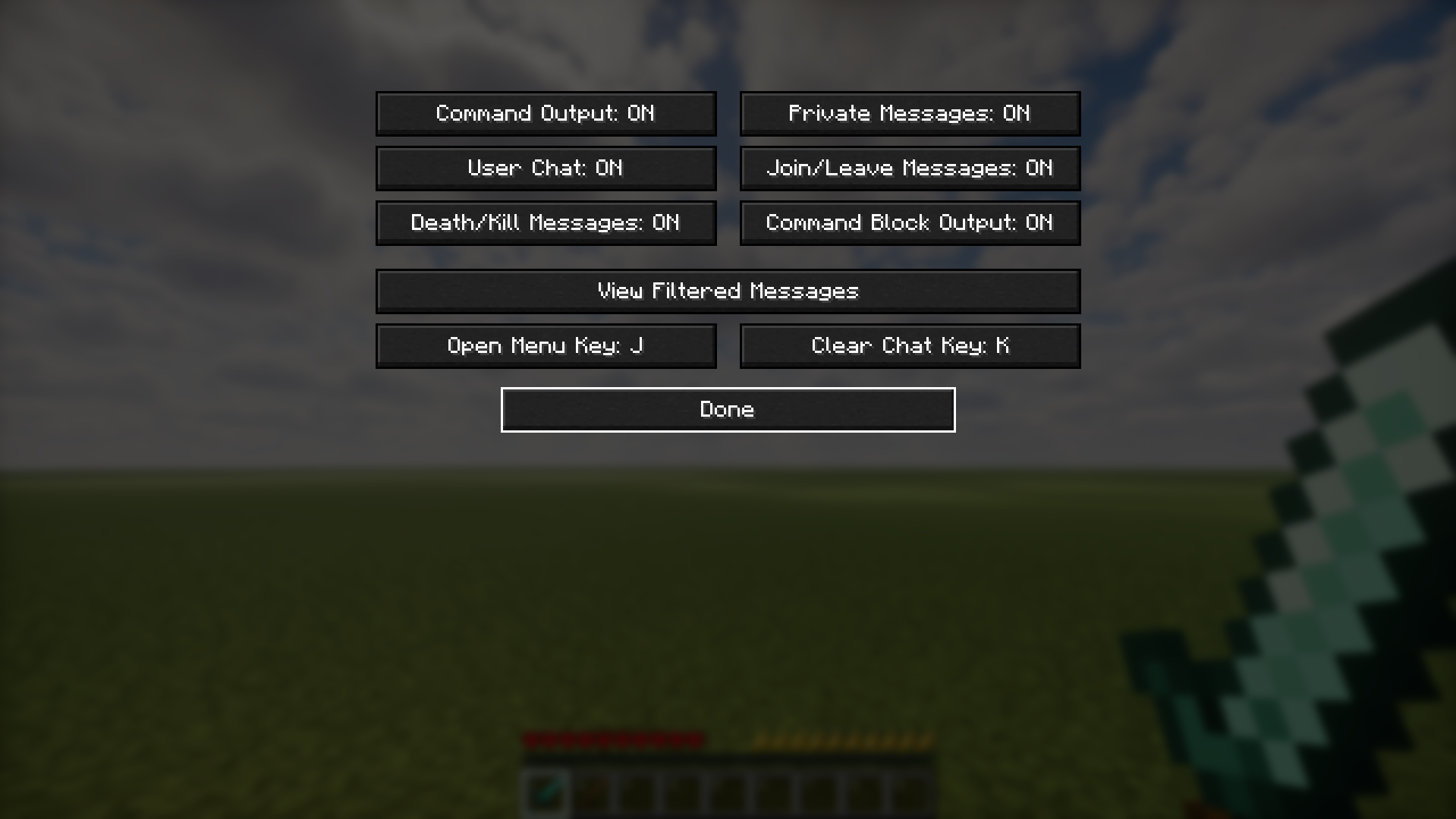 Full UI Screenshot thats how the ui looks like
Versions
Files
Relations
Project Relations
More like this
Similar Mods
Suggestions use data such as tags, dependencies, dependents, descriptions, titles, and more to rank how much they overlap with this mod.
- Just Enough Items (JEI)
- Just Enough Resources (JER)
- Just Enough Professions (JEP)
- Just Zoom
- Just Enough Breeding (JEBr)
- Just Enough HarvestCraft (JEHC)
- Just Enough Effect Descriptions (JEED)
- Just Enough Mekanism Multiblocks
- Just Enough Archaeology
- Just Enough Energistics (JEE)
- Just Enough Characters
- Just Enough Calculation
On ModDex
Community snapshot
By the numbers
Statistics

Want to reach Minecraft players?
We're looking for a server hosting partner to feature here and other parts of the site. Interested? Send us a message!
Get in touchGet it on
Available Platforms
On ModDex
Community snapshot
By the numbers