

Mod

Just Enough Items (JEI)
Rank 86
Rank 45 among mods

Quick rating

Just Enough Items (JEI)

Overall rating distribution
0.5★ (no ratings)
1.0★ (no ratings)
1.5★ (no ratings)
2.0★ (no ratings)
2.5★ (no ratings)
3.0★ (no ratings)
3 ratings (43%) · 3.5★
1 rating (14%) · 4.0★
4.5★ (no ratings)
3 ratings (43%) · 5.0★
0.5★ 5★
Gameplay rating distribution
0.5★ (no reviews)
1.0★ (no reviews)
1.5★ (no reviews)
2.0★ (no reviews)
2.5★ (no reviews)
3.0★ (no reviews)
3.5★ (no reviews)
4.0★ (no reviews)
4.5★ (no reviews)
2 reviews (100%) · 5.0★
0.5★ 5★
Aesthetics rating distribution
0.5★ (no reviews)
1.0★ (no reviews)
1.5★ (no reviews)
2.0★ (no reviews)
2.5★ (no reviews)
3.0★ (no reviews)
3.5★ (no reviews)
1 review (50%) · 4.0★
4.5★ (no reviews)
1 review (50%) · 5.0★
0.5★ 5★
Performance rating distribution
0.5★ (no reviews)
1.0★ (no reviews)
1.5★ (no reviews)
2.0★ (no reviews)
2.5★ (no reviews)
3.0★ (no reviews)
3.5★ (no reviews)
4.0★ (no reviews)
4.5★ (no reviews)
2 reviews (100%) · 5.0★
0.5★ 5★

View Items and Recipes

No Theme
No Genre
Maps & Information
Client Utility
API/Library
Mod Loaders
Forge
NeoForge
Fabric
Minecraft
26.2

Community voices

Reviews

Versions
Loading versions…
Match includes

Click once to include, again to exclude, again to clear

Rating Any
Any 0.5 1.0 1.5 2.0 2.5 3.0 3.5 4.0 4.5 5.0
Min
Max
Play Status
Reviews
Time Played
hrs+
Verified developers only
Has developer response
List view
Grid view
Compact view
Sort by
Date
Rating
Helpful
Unhelpful
Edited
Sort ascending
Delete this review?

This removes your review from the project. You can write a new review after.

Review submitted for moderation

Your review has been sent to moderators, who will check that it meets our guidelines before it appears publicly.

5.0
Pyxal42

Reputation ranks

Explorer 0 pts
Contributor 100 pts
Guide 500 pts
Veteran 1,500 pts
Luminary 4,000 pts

Ranks only ever go up; points can drop but your rank stays.

About reputation ranks
Posted: June 12, 2026 at 1:06:24 PM UTC
1,000 hrs
Total hours played at time of review
The version(s) the reviewer played
Gameplay
5.0
Aesthetics
5.0
Performance
5.0

Is it smelted? is it for tools? is it used in some mod specific machine? JEI has the answer for you!
It's grown into a community standard so most mods have compat with it. And unless you want the hardcore experience of knowing/figuring out all recipes added by mods all by yourself, this mod is a must. It's available for a lot of versions as well so no worries there, and is even compatible with some of its alternatives (mostly thinking of EMI)

1
1
5.0
Pyxal42

Reputation ranks

Explorer 0 pts
Contributor 100 pts
Guide 500 pts
Veteran 1,500 pts
Luminary 4,000 pts

Ranks only ever go up; points can drop but your rank stays.

About reputation ranks
Posted: June 12, 2026 at 1:06:24 PM UTC
1,000 hrs
Total hours played at time of review
The version(s) the reviewer played
Gameplay
5.0
Aesthetics
5.0
Performance
5.0

Is it smelted? is it for tools? is it used in some mod specific machine? JEI has the answer for you!
It's grown into a community standard so most mods have compat with it. And unless you want the hardcore experience of knowing/figuring out all recipes added by mods all by yourself, this mod is a must. It's available for a lot of versions as well so no worries there, and is even compatible with some of its alternatives (mostly thinking of EMI)

1
1
5.0
Pyxal42

Reputation ranks

Explorer 0 pts
Contributor 100 pts
Guide 500 pts
Veteran 1,500 pts
Luminary 4,000 pts

Ranks only ever go up; points can drop but your rank stays.

About reputation ranks
Posted: June 12, 2026 at 1:06:24 PM UTC
1,000 hrs
Total hours played at time of review
The version(s) the reviewer played
1
1
5.0
ShelLuser

Reputation ranks

Explorer 0 pts
Contributor 100 pts
Guide 500 pts
Veteran 1,500 pts
Luminary 4,000 pts

Ranks only ever go up; points can drop but your rank stays.

About reputation ranks
Posted: August 5, 2024 at 9:15:59 AM UTC
MC 1.8, 1.9,… MC 1.8, 1.9, 1.10, 1.11, 1.12, 1.16, 1.17, 1.18, 1.19, 1.20
The version(s) the reviewer played
Gameplay
5.0
Aesthetics
4.0
Performance
5.0

Long before Minecraft gave us the official recipebook us modded players already had something much better: Just Enough Items.

The perfect crafting tool

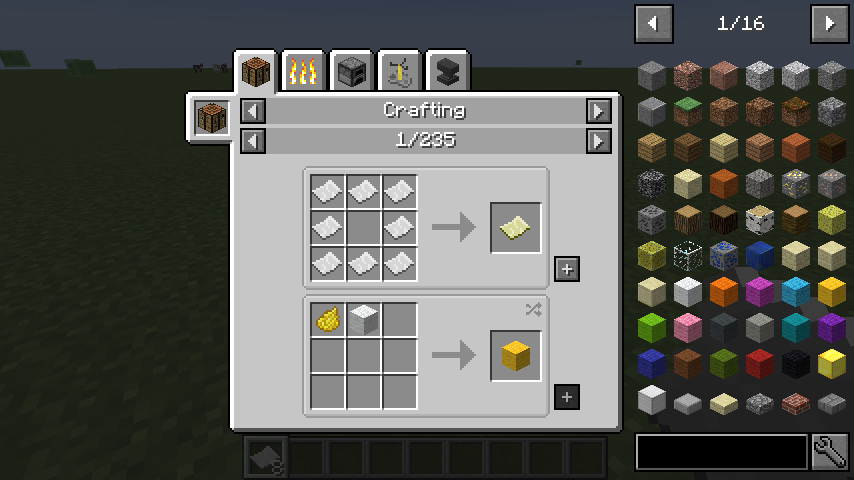
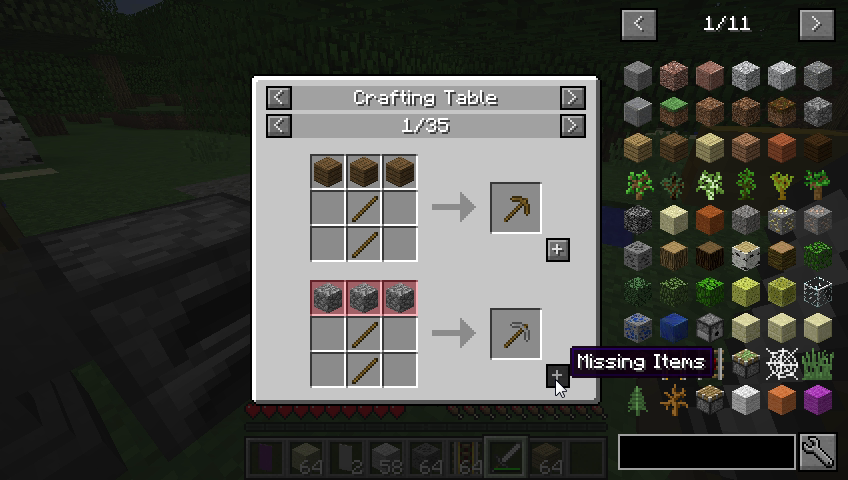
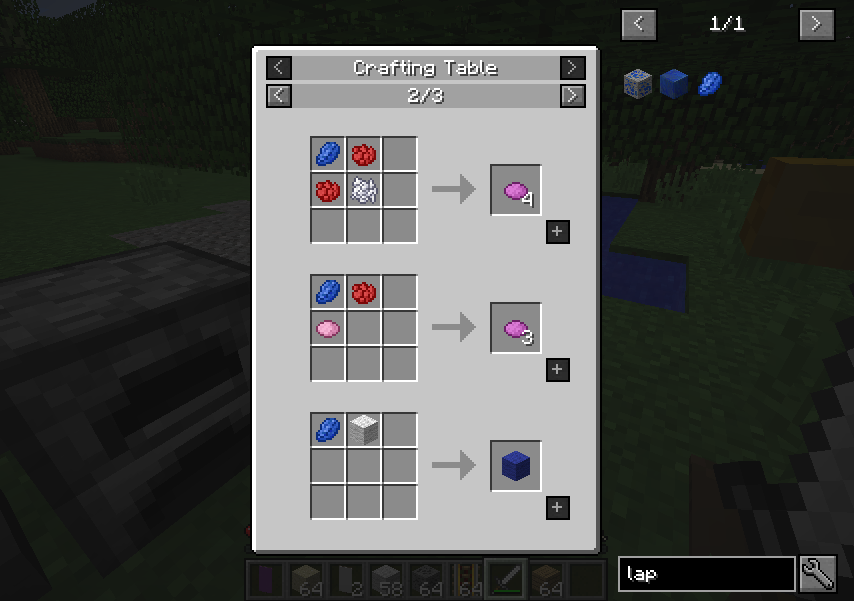
Just Enough Items ("JEI") is all about giving you a full overview of all the items in your game, both vanilla and modded, and this includes their crafting recipes which you can easily look up thanks to some useful keyboard shortcuts. If you have opened a recipe while you also have a crafting grid active then JEI can check if all the required items are in your inventory. If they are you can click the "+" icon to place them onto your crafting grid, but if you don't have all the items then JEI will mark the missing ones in red as soon as you hover your mouse over this "+ icon".

Keyboard shortcuts

What makes JEI really powerful is its use of keyboard shortcuts. Do you have an item in your inventory and wondering how to craft it? Press 'r' and you'll look up the recipe. But wait! There's more: if you press 'u' instead you'll get an overview of recipes which use the item as an ingredient. So if you have an item of which you know that it's an ingredient... this is the perfect way to check its uses.

And keep in mind that this mechanic isn't limited to just items, it'll apply to liquids and gasses as well, which will come in very handy while playing with tech mods.

Fun fact: many mods actually rely on JEI to be present so that you can use its features to dive further into the mod at hand.

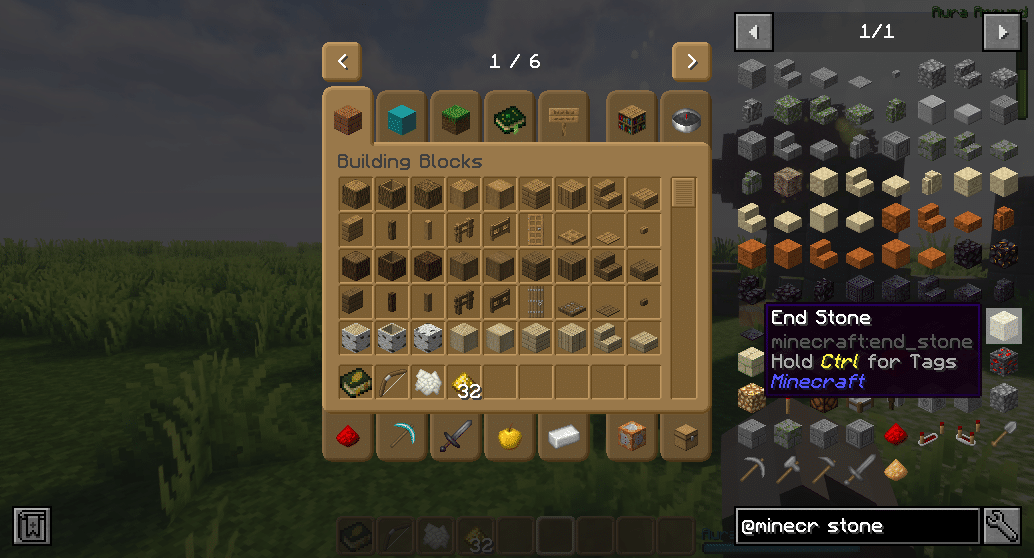
See, JEI also allows you to look up items on a per-mod basis. In the JEI overview you can search for mods by using the "@" character, but can also search tooltips, the ore dictionary and/or the creative tab. And of course these searches can be combined.

If you play modded Minecraft then this is a mod you don't want to miss out on!

  • Screenshot 1: This is one of those mods you'll miss the very moment you stop using it!
1
0
5.0
ShelLuser

Reputation ranks

Explorer 0 pts
Contributor 100 pts
Guide 500 pts
Veteran 1,500 pts
Luminary 4,000 pts

Ranks only ever go up; points can drop but your rank stays.

About reputation ranks
Posted: August 5, 2024 at 9:15:59 AM UTC
MC 1.8, 1.9,… MC 1.8, 1.9, 1.10, 1.11, 1.12, 1.16, 1.17, 1.18, 1.19, 1.20
The version(s) the reviewer played
Gameplay
5.0
Aesthetics
4.0
Performance
5.0

Long before Minecraft gave us the official recipebook us modded players already had something much better: Just Enough Items.

The perfect crafting tool

Just Enough Items ("JEI") is all about giving you a full overview of all the items in your game, both vanilla and modded, and this includes their crafting recipes which you can easily look up thanks to some useful keyboard shortcuts. If you have opened a recipe while you also have a crafting grid active then JEI can check if all the required items are in your inventory. If they are you can click the "+" icon to place them onto your crafting grid, but if you don't have all the items then JEI will mark the missing ones in red as soon as you hover your mouse over this "+ icon".

Keyboard shortcuts

What makes JEI really powerful is its use of keyboard shortcuts. Do you have an item in your inventory and wondering how to craft it? Press 'r' and you'll look up the recipe. But wait! There's more: if you press 'u' instead you'll get an overview of recipes which use the item as an ingredient. So if you have an item of which you know that it's an ingredient... this is the perfect way to check its uses.

And keep in mind that this mechanic isn't limited to just items, it'll apply to liquids and gasses as well, which will come in very handy while playing with tech mods.

Fun fact: many mods actually rely on JEI to be present so that you can use its features to dive further into the mod at hand.

See, JEI also allows you to look up items on a per-mod basis. In the JEI overview you can search for mods by using the "@" character, but can also search tooltips, the ore dictionary and/or the creative tab. And of course these searches can be combined.

If you play modded Minecraft then this is a mod you don't want to miss out on!

  • Screenshot 1: This is one of those mods you'll miss the very moment you stop using it!
1
0
5.0
ShelLuser

Reputation ranks

Explorer 0 pts
Contributor 100 pts
Guide 500 pts
Veteran 1,500 pts
Luminary 4,000 pts

Ranks only ever go up; points can drop but your rank stays.

About reputation ranks
Posted: August 5, 2024 at 9:15:59 AM UTC
MC 1.8, 1.9,… MC 1.8, 1.9, 1.10, 1.11, 1.12, 1.16, 1.17, 1.18, 1.19, 1.20
The version(s) the reviewer played
1
0

Get it on

Available Platforms

Compatibility

Supported Environments

Dev Environment
Client Optional
Server Optional

About

Project Details

Type
Mod
License
MIT License
Latest Version
30.12.0.72 for NeoForge 26.2
Authors
CurseForge
Modrinth

For authors

Embed Badge

If you're the author of this project, you can embed a live badge anywhere that supports HTML or Markdown. It updates automatically whenever ratings change.

Custom banner text
ModDex rating badge preview

Use HTML for any page that supports it, or Markdown for README files and Markdown-based descriptions.

Identifiers

Platform IDs

CurseForge ID
Modrinth ID

Resources

External Links

Source Issues Wiki Discord

About

Description

JEI is an item and recipe viewing mod for Minecraft, built from the ground up for stability and performance.

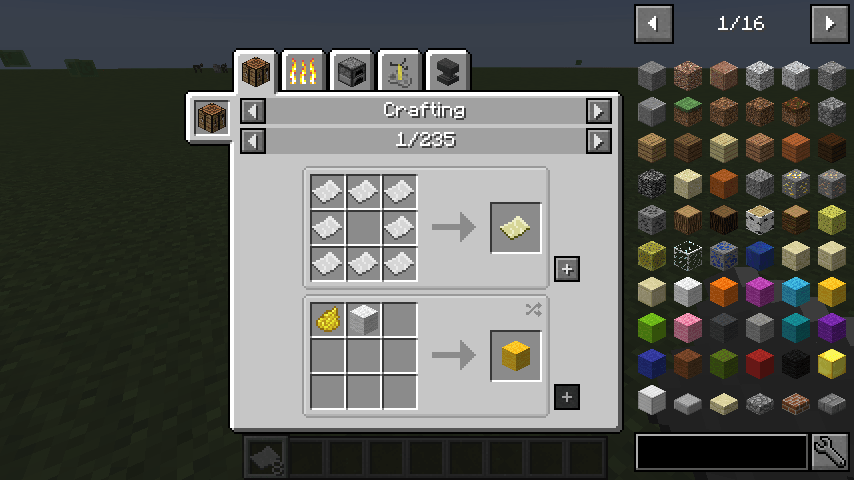
JEI Recipe GUI

Basic Controls:

Inventory:
(Minecraft Options -> Controls)
Show Recipes: Hover over item + R
Show Uses: Hover over item + U
Toggle Item List Overlay: Control + O

Item List:
Show Recipes Click Item or type R
Show Uses : Right-Click Item or type U
Next/Previous page: Scroll Wheel

Open Config Menu: Click Wrench at bottom-right
Toggle Cheat mode: Control-Click Wrench at bottom-right

Search:
Select Search Bar: Click or Control + F
Clear Search: Right Click
Previous Search: Up Arrow
Search by Mod Name: Type @ in front of a word (@thaum)
Multiple terms work together (wand @thaum)

Exclude search terms: Type - in front of a word (@thaum -wand)

Search terms that have spaces in them: Type "" around the words ("two words")

Recipe View:
Next/Previous page: Scroll Wheel
Show all Recipes: Click the recipe category's name
Move items into crafting area: Click the [+] button. Shift-Click to move multiple sets of items.

Advanced Controls:

Advanced Search:
Search by Tooltip Only: Type # in front of a word
Search by OreDict name: Type $ in front of a word
Search by Creative Tab: Type % in front of a word
Multiple Searches: Separate terms with | characters, like "wrench|hammer"

With Cheat Mode Active:
Get a full stack of Items: Click Item
Get one Item: Right-Click Item
Delete Item: Drop an Item into the Item List

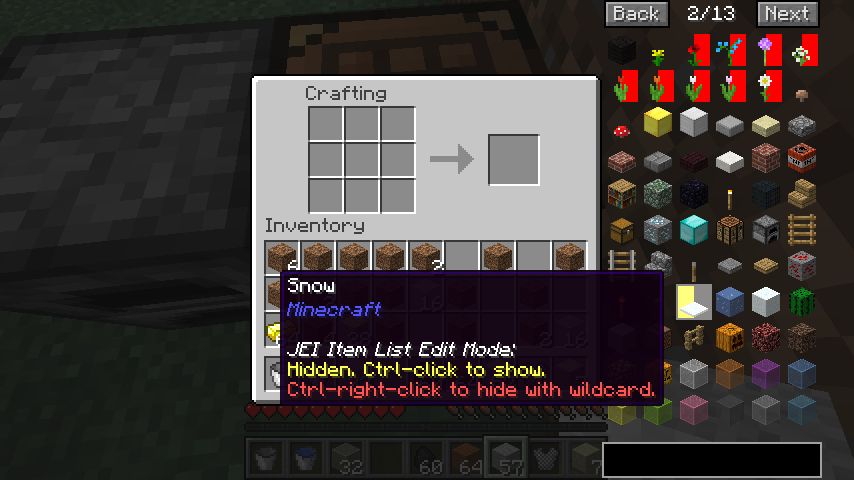
With Item List Edit Mode Active:
(These controls are shown in-game on the item tooltip)
Hide Item: Control-Click Item
Hide Items and Sub-Items: Control-Right-Click Item
Hide all Items from a mod: Control-Shift-Click Item

FAQ:

  • Can I include JEI in my mod pack?
    • Of course!
  • Can JEI run client-only, or with a vanilla server?
    • [1.21.1 or lower] Yes, with some features disabled:
      • The "Move items into crafting area" [+] buttons.
      • Cheating in items that have lots of NBT data.
      • Deleting items.
    • [1.21.2+] Since Minecraft 1.21.2, recipes are stored on the server and not the client. Please install JEI and NeoForge/Fabric on the server to sync recipes to the client.
  • Where can I find the ___ feature from NEI?
  • I have an issue / bug / crash / report / request, where can I send it?

Become my patreon

Just Enough Items

JEI is an item and recipe viewing mod for Minecraft, built from the ground up for stability and performance.

JEI Recipe GUI

Controls

Inventory:

(Minecraft Options -> Controls)

Show Recipes: Hover over item + R
Show Uses: Hover over item + U
Toggle Item List Overlay: Control + O

Item List:

Show Recipes: Click Item or type R
Show Uses: Right-Click Item or type U
Next/Previous page: Scroll Wheel

Search:

Select Search Bar: Click or Control + F
Clear Search: Right Click
Previous Search: *Up Arrow * Search by Mod Name: Type @ in front of a word (@thaum)
Multiple terms work together (wand @thaum)

Exclude search terms: Type - in front of a word (@thaum -wand)

Search terms that have spaces in them: Type "" around the words ("two words")

Recipe View:

Next/Previous page: Scroll Wheel
Show all Recipes: Click the recipe category's name
Move items into crafting area: Click the [+] button. Shift-Click to move multiple sets of items.

View advanced controls

Advanced Search:

Search by Tooltip Only: Type # in front of a word
Search by OreDict name: Type $ in front of a word
Search by Creative Tab: Type % in front of a word
Multiple Searches: Separate terms with | characters, like "wrench|hammer"

With Cheat Mode Active:

Get a full stack of Items: Click Item
Get one Item: Right-Click Item
Delete Item: Drop an Item into the Item List

With Item List Edit Mode Active:

(These controls are shown in-game on the item tooltip)

Hide Item: Control-Click Item
Hide Items and Sub-Items: Control-Right-Click Item
Hide all Items from a mod: Control-Shift-Click Item

FAQ

Can I include JEI in my mod pack?

Of course!

Can JEI run client-only, or with a vanilla server?

[1.21.1 or lower] Yes, with some features disabled:

  • The "Move items into crafting area" [+] buttons.
  • Cheating in items that have lots of NBT data.
  • Deleting items.

[1.21.2+] Since Minecraft 1.21.2, recipes are stored on the server and not the client. Please install JEI and NeoForge/Fabric on the server to sync recipes to the client.

Where can I find the ___ feature from NEI?

The chart here shows which mods support each feature.

I have an issue / bug / crash / report / request, where can I send it?

JEI Github Issues Page

Support

Become a patron on Patreon

Screenshots

Gallery

  • Itemlist Edit Mode
    Itemlist Edit Mode
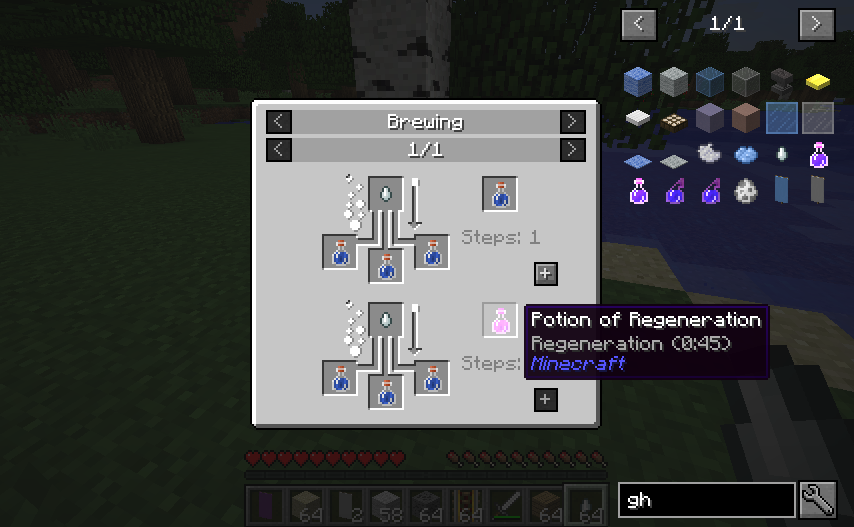
  • Potions
    Potions
  • Big Screen Support
    Big Screen Support
  • Recipe Completion
    Recipe Completion
  • Recipe Completion
    Recipe Completion
  • JEI Recipe GUI
    JEI Recipe GUI
  • jei-header
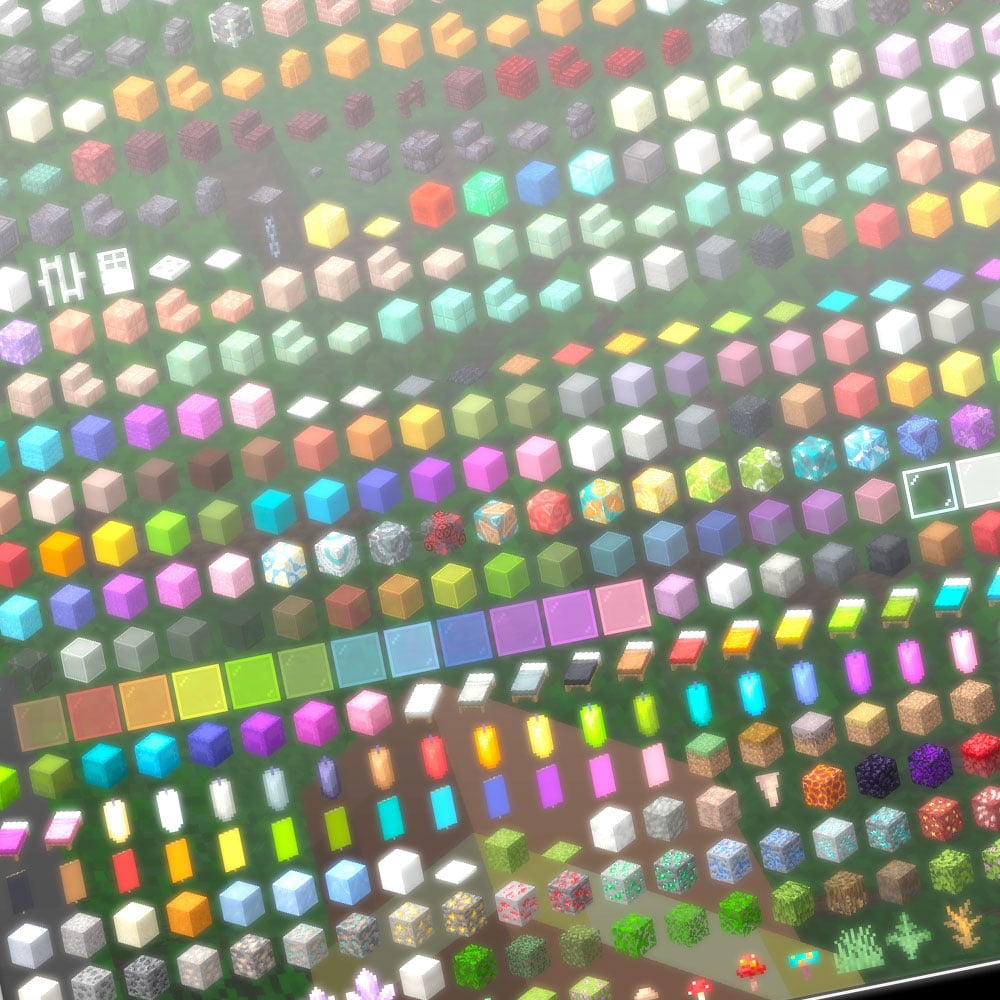
    jei-header Zoomed image of JEI viewed on a high resolution CRT monitor
  • Potions
    Potions
  • Itemlist Edit Mode
    Itemlist Edit Mode
  • Big Screen Support
    Big Screen Support
  • Screenshot 1: This is one of those mods you'll miss the very moment you stop using it!
    Screenshot 1: This is one of those mods you'll miss the very moment you stop using it!

Versions

Files

Relations

Project Relations

More like this

Similar Mods

Suggestions use data such as tags, dependencies, dependents, descriptions, titles, and more to rank how much they overlap with this mod.

On ModDex

Community snapshot

7
Ratings
0
Followers
3
In stacks

By the numbers

Statistics

659.8m
Total Downloads
CurseForge
596.9m
Modrinth
62.9m
Last Updated
CurseForge
Created
CurseForge
Modrinth
Last synced
When ModDex last fetched and imported data for this project from CurseForge or Modrinth. High-traffic and active projects are checked more often.
Next pipeline sync