
Community listing page, reviews here may not be monitored by the author.
KasHub


No reviews yet
Powerful in‑game scripting engine for Minecraft automation. VSCode‑style editor, 40+ high‑level commands, themes, debugging tools, and multi‑tasking — perfect for automating farms, utilities, and server‑side workflows.

Community voices
Reviews
No reviews yet. Be the first to review this project!
Get it on
Available Platforms
Compatibility
Supported Environments
Required on the client. Installing it on the server adds functionality.
About
Project Details
For authors
Embed Badge
If you're the author of this project, you can embed a live badge anywhere that supports HTML or Markdown. It updates automatically whenever ratings change.
Use HTML for any page that supports it, or Markdown for README files and Markdown-based descriptions.
Identifiers
Platform IDs
About
Description
🎮 Kashub – In‑Game Scripting Engine for Minecraft
In‑game scripting and automation framework with a built‑in VSCode‑style editor
Tired of repetitive tasks? Want to automate farming, building, or grinding? Kashub adds a powerful scripting layer to Minecraft with a beautiful built‑in code editor inspired by VSCode.
⚡ Why Kashub?
Unlike other automation mods that require external tools or complex setups, Kashub gives you everything in‑game:
- No external editors needed – Open the editor with
K - Easy to learn – KHScript with Lua/JavaScript‑inspired syntax
- Beautiful UI – 10+ professional editor themes
- Multiplayer‑proven – Used on real servers in real scenarios
- Open source – MIT License, fully transparent
🔥 Key Features
Built‑in Code Editor
- Syntax highlighting for KHScript
- Auto‑completion (Ctrl+Space)
- 10+ themes – Dracula, One Dark Pro, Tokyo Night, Cyberpunk, and more
- Search & script browser – Find and manage scripts quickly
- Keybind support – Launch scripts with hotkeys
Scripting Engine
- 44+ commands – Movement, interaction, basic combat logic, inventory, world utilities
- Event system – React to damage, ticks, chat, deaths and more
- Variables & logic –
if/else,for,while, simple control flow - Environment variables – e.g.
$PLAYER_HEALTH,$PLAYER_X,$PLAYER_Y,$PLAYER_Z
Developer Tools
- Logging system – Track script execution and debug output
- Task manager – Run multiple scripts at the same time
- Clear error handling – Helpful error messages instead of silent failures
🛡 Fair‑Play & Server Control
Kashub is designed to be server‑friendly:
- Planned server‑authoritative control (will be in update
v0.9.0-beta):- Server‑side config that can override client settings
- Ability to disable the editor on specific servers
- Ability to block specific commands / namespaces from running on the client
- The client respects server decisions and does not try to bypass them
This lets server owners decide how much automation is allowed on their server (or disable it entirely) while still letting players enjoy Kashub in singleplayer or private worlds.
📚 Quick Start
- Install Fabric 1.21.1 and Fabric API
- Drop Kashub into your
modsfolder - Launch Minecraft and press
Kto open the editor

- Write your first script:
// Auto-heal when low HP
onEvent onDamage {
  if ($PLAYER_HEALTH < 10) {
    eat golden_apple
    print "Emergency heal!"
  }
}
- Press F5 to run!
💡 Example Script
Auto‑Combat (PvE‑style)
// Auto-attack nearby mobs
onEvent onTick {
    if (nearestEntity zombie < 5) {
        attack entity zombie
    }
}
🎨 Customization

📚 In‑Game Docs

🛠 Technical Details
- Language: KHScript (custom scripting language)
- Commands: 44+ built‑in automation commands
- Loader: Fabric 1.21.1
- Dependencies: Fabric API
- License: MIT
⚠ Beta Notice
This is a BETA release:
- Core features are stable and usable
- Some edge cases may still exist
- Feedback and bug reports are very welcome
Please report issues on GitHub Issues.
🔗 Links
- GitHub: https://github.com/KasperStudios/Kashub
- Documentation: In‑game via the “Docs” button (all commands listed)
- Discord: KasHub Community
📜 License
MIT License – feel free to fork, contribute, and build ports for other loaders (with proper credit).
Made with ❤️ by KasperStudios
In‑game scripting and automation for power users and server owners
🎮 Kashub – In‑Game Scripting Engine for Minecraft
In‑game scripting and automation framework with a built‑in VSCode‑style editor
Tired of repetitive tasks? Want to automate farming, building, or grinding? Kashub adds a powerful scripting layer to Minecraft with a beautiful built‑in code editor inspired by VSCode.
⚡ Why Kashub?
Unlike other automation mods that require external tools or complex setups, Kashub gives you everything in‑game:
- No external editors needed – Open the editor with
K - Easy to learn – KHScript with Lua/JavaScript‑inspired syntax
- Beautiful UI – 10+ professional editor themes
- Multiplayer‑proven – Used on real servers in real scenarios
- Open source – MIT License, fully transparent
🔥 Key Features
Built‑in Code Editor
- Syntax highlighting for KHScript
- Auto‑completion (Ctrl+Space)
- 10+ themes – Dracula, One Dark Pro, Tokyo Night, Cyberpunk, and more
- Search & script browser – Find and manage scripts quickly
- Keybind support – Launch scripts with hotkeys
Scripting Engine
- 44+ commands – Movement, interaction, basic combat logic, inventory, world utilities
- Event system – React to damage, ticks, chat, deaths and more
- Variables & logic –
if/else,for,while, simple control flow - Environment variables – e.g.
$PLAYER_HEALTH,$PLAYER_X,$PLAYER_Y,$PLAYER_Z
Developer Tools
- Logging system – Track script execution and debug output
- Task manager – Run multiple scripts at the same time
- Clear error handling – Helpful error messages instead of silent failures
🛡 Fair‑Play & Server Control
Kashub is designed to be server‑friendly:
- Planned server‑authoritative control (will be in update
v0.9.0-beta):- Server‑side config that can override client settings
- Ability to disable the editor on specific servers
- Ability to block specific commands / namespaces from running on the client
- The client respects server decisions and does not try to bypass them
This lets server owners decide how much automation is allowed on their server (or disable it entirely) while still letting players enjoy Kashub in singleplayer or private worlds.
📚 Quick Start
- Install Fabric 1.21.1 and Fabric API
- Drop Kashub into your
modsfolder - Launch Minecraft and press
Kto open the editor
- Write your first script:
// Auto-heal when low HP
onEvent onDamage {
  if ($PLAYER_HEALTH < 10) {
    eat golden_apple
    print "Emergency heal!"
  }
}
- Press F5 to run!
💡 Example Scripts
Auto‑Farm
// Tree farm automation
loop 100 {
    lookAt nearest oak_log
    mine
    wait 500
}
Auto‑Combat (PvE‑style)
// Auto-attack nearby mobs
onEvent onTick {
    if (nearestEntity zombie < 5) {
        attack entity zombie
    }
}
Smart Mining
// Mine only diamond ore
scanner start diamond_ore
loop {
    if ($SCANNER_FOUND) {
        pathTo $SCANNER_X $SCANNER_Y $SCANNER_Z
        mine
    }
    wait 1000
}
🎨 Customization
📚 In‑Game Docs
🛠 Technical Details
- Language: KHScript (custom scripting language)
- Commands: 44+ built‑in automation commands
- Loader: Fabric 1.21.1
- Dependencies: Fabric API
- License: MIT
⚠ Beta Notice
This is a BETA release:
- Core features are stable and usable
- Some edge cases may still exist
- Feedback and bug reports are very welcome
Please report issues on GitHub Issues.
🔗 Links
- GitHub: https://github.com/KasperStudios/Kashub
- Documentation: In‑game via the “Docs” button (all commands listed)
- Discord: KasHub Community
📜 License
MIT License – feel free to fork, contribute, and build ports for other loaders (with proper credit).
Made with ❤️ by KasperStudios
In‑game scripting and automation for power users and server owners
Support
I develop KasHub on my own in my spare time. If this mod has saved you time, reduced your stress, or you simply enjoy using it, you can support the author to help bring more updates and new features:
Support development: https://donatello.to/kasperenok
You can report bugs, share ideas, and make reasonable suggestions for improvement via GitHub Issues or on our Discord server.
Screenshots
Gallery
-
 Script editor
 -
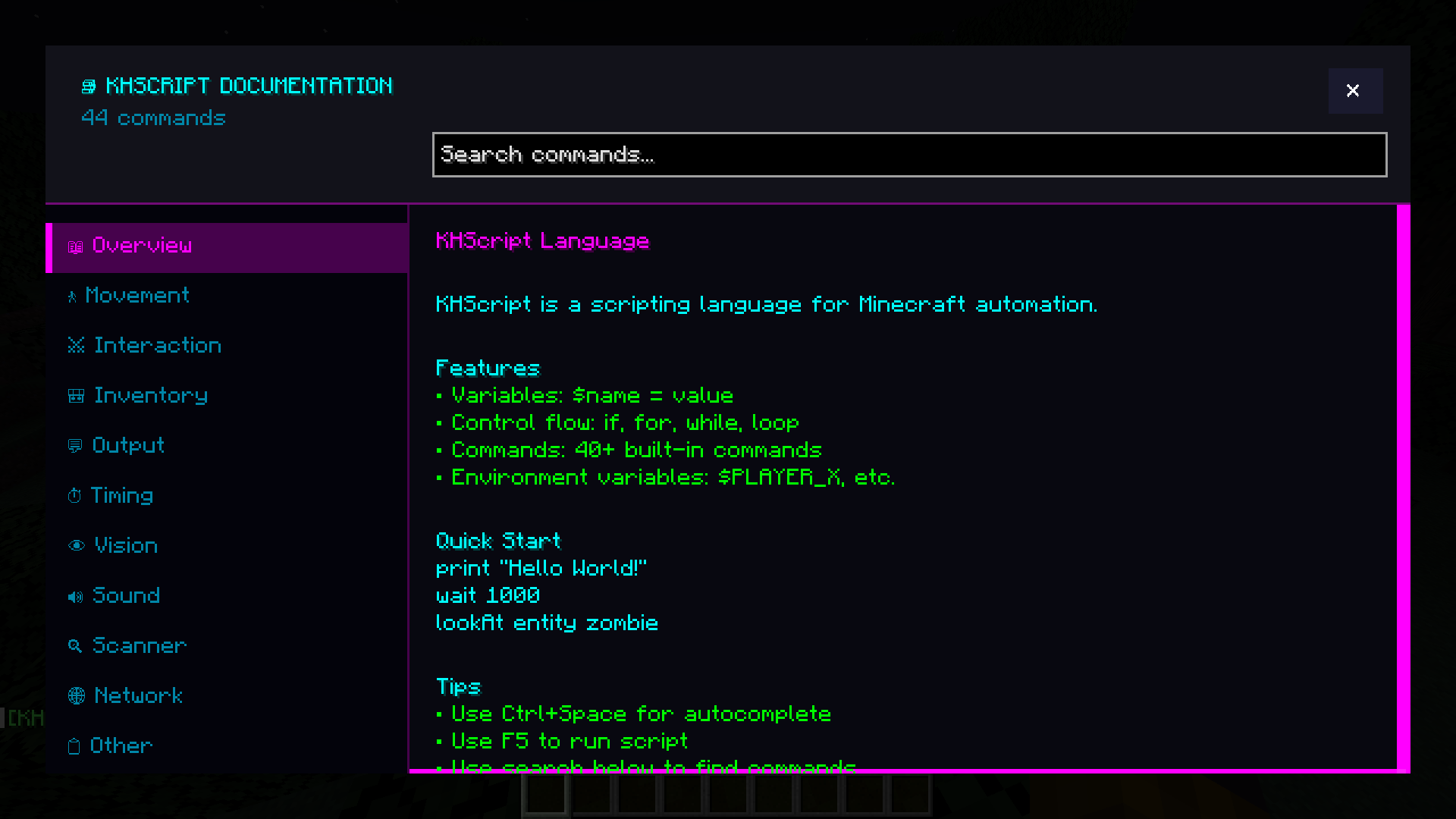 In-Game docs
 -
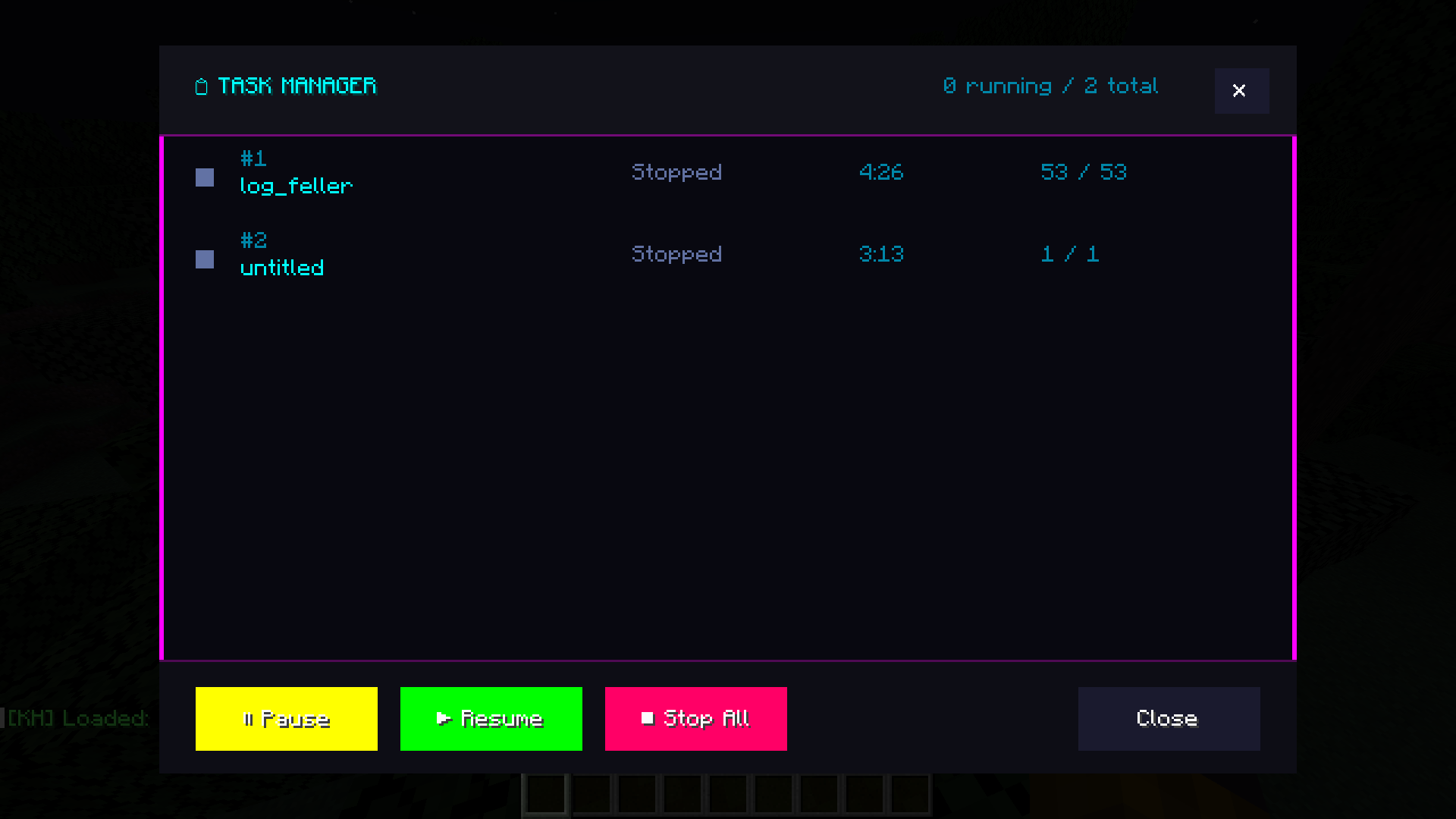 Task manager for scripts
 -
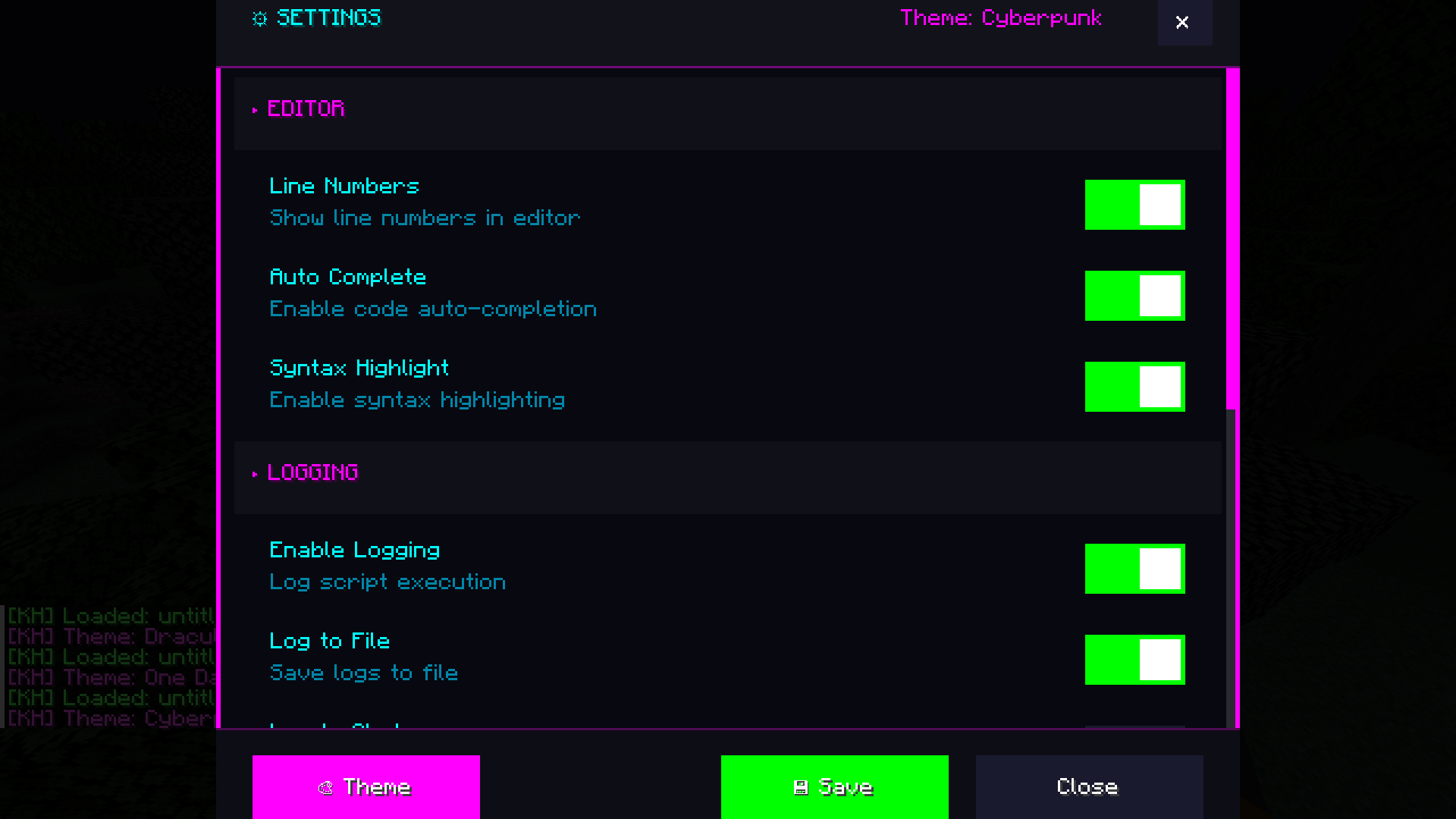 Settings and change theme
Versions
Files
Relations
Project Relations
More like this
Similar Mods
Suggestions use data such as tags, dependencies, dependents, descriptions, titles, and more to rank how much they overlap with this mod.
On ModDex
Community snapshot
By the numbers
Statistics
 (opens in a new tab)
Get it on
Available Platforms
On ModDex
Community snapshot
By the numbers