Community listing page, reviews here may not be monitored by the author.
Keymap


No reviews yet
Visually remap your keys
Community voices
Reviews
No reviews yet. Be the first to review this project!
Get it on
Available Platforms
Compatibility
Supported Environments
Runs entirely on the client. Works on vanilla servers.
About
Project Details
For authors
Embed Badge
If you're the author of this project, you can embed a live badge anywhere that supports HTML or Markdown. It updates automatically whenever ratings change.
Use HTML for any page that supports it, or Markdown for README files and Markdown-based descriptions.
Identifiers
Platform IDs
About
Description

Heads up!
Mod is currently on maintenance mode, most updates will only be minor bugfixes and patches as I am currently working on the third rewrite, no target date.
Also there will likely be a lack of testing for quilt due to time restrictions.
Latest News
0.8.0
Bugfixes and Language addition
Credits to:
Fix - keys not being saved after editing - SettingDust
Fix - dont slugify categories to allow cjk searching - SettingDust
Language - UK_UA - Eugene
Old News
0.7.0
Custom Config screen, lesser dependencies, much happy!
Added credits screen for contributors :D
Added Japanese key layout, thanks BlueSheep2804!
Added ZH_CN Language, thanks DarkCrystalll!
0.6.0
!! Key Combination support is here !!
▶️ You can now combine any single key with multiple modifier keys (ctrl, alt, shift)!
▶️ Combinations will still appear as part of the assigned actions tooltip for the virtual keys
▶️ Combinations will show up as a small yellow box inside the assigned key
▶️ You can still assign the modifier keys as you normally would
▶️ Actions cannot have the same keymap
- Added Dvorak and Colemak layouts
!!NOTE!!
Malilib support is current not available for these builds,
if you are looking for Malilib support then the latest builds that
supports it are those of versions 0.4.3 and below.
Stuff
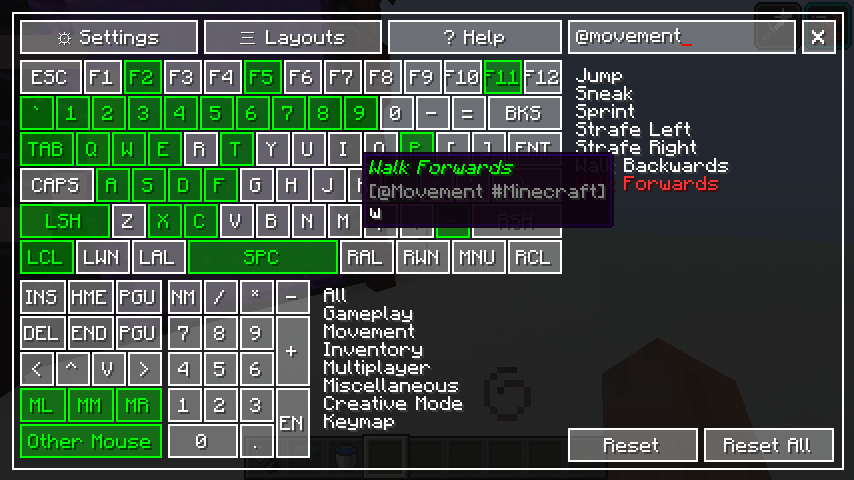
Press " ` " (grave accent key) to open ingame!


Required Mods
BUG!
Modpack?
Sure
Support

Keymap Rewrite
Visual key remapping mod for Minecraft




Heads up!
Currently not working w/ Quilt loader 0.18.x betas (0.17.x is still ok), I'm trying to find a proper solution, but in the meantime workaround mentioned Here should do. EDIT: all good
Overview
Latest news
0.7.0
- Custom Config screen, lesser dependencies, much happy!
- Added credits screen for contributors :D
- Added Japanese key layout, thanks BlueSheep2804!
- Added ZH_CN Language, thanks DarkCrystalll!
Important stuff
- Press the
Grave Accent/Backtick( ` ), or the key under the Escape key to show the mapper while playing CTRL+F: focus search box- Register all other mouse keys using the
Other Mousebutton by clicking directly on it - You can use
CTRL,SHIFTandALTas keybind modifiers - The modifier system does not block the default use of the modifier keys, that is to say;
- Pressing
CTRL+Qwhile walking, will make you sprint - Pressing
SHIFT+Wwill make you crouch ,but will not make you walk
- You can still assign modifier keys by themselves normally
- You cannot bind multiple keymaps to a single combination
- Pressing
Colors
| Color | Legend |
|---|---|
white |
Not Assigned |
green |
Assigned |
yellow |
Selected |
red |
Conflict |
small yellow box |
Modifier assigned |
Queries
| Format | Effect |
|---|---|
(sample text) |
Category |
@sample_text |
Category (slug) |
{sample text} |
Mod name |
#sample_text |
Mod name (slug) |
[sample text] |
Bound key |
$sample_text |
Bound key (slug) |
Screenshots

Support

Screenshots
Gallery
Versions
Files
Relations
Project Relations
More like this
Similar Mods
Suggestions use data such as tags, dependencies, dependents, descriptions, titles, and more to rank how much they overlap with this mod.
On ModDex
Community snapshot
By the numbers
Statistics
Want to reach Minecraft players?
We're looking for a server hosting partner to feature here and other parts of the site. Interested? Send us a message!
Get in touchGet it on
Available Platforms
On ModDex
Community snapshot
By the numbers