Community listing page, reviews here may not be monitored by the author.
Kuruma


No reviews yet
Realistic car physics and driving simulator — grip, weight transfer, suspension, drifting. Drive it, tune it mid-corner, race friends. Multiplayer racing, vehicle packs to add your own cars, wheel & gamepad support.
Community voices
Reviews
No reviews yet. Be the first to review this project!
Get it on
Available Platforms
Compatibility
Supported Environments
Must be installed on both the client and the server.
About
Project Details
For authors
Embed Badge
If you're the author of this project, you can embed a live badge anywhere that supports HTML or Markdown. It updates automatically whenever ratings change.
Use HTML for any page that supports it, or Markdown for README files and Markdown-based descriptions.
Identifiers
Platform IDs
About
Description
KurumaMod
Gran Turismo, in Minecraft.
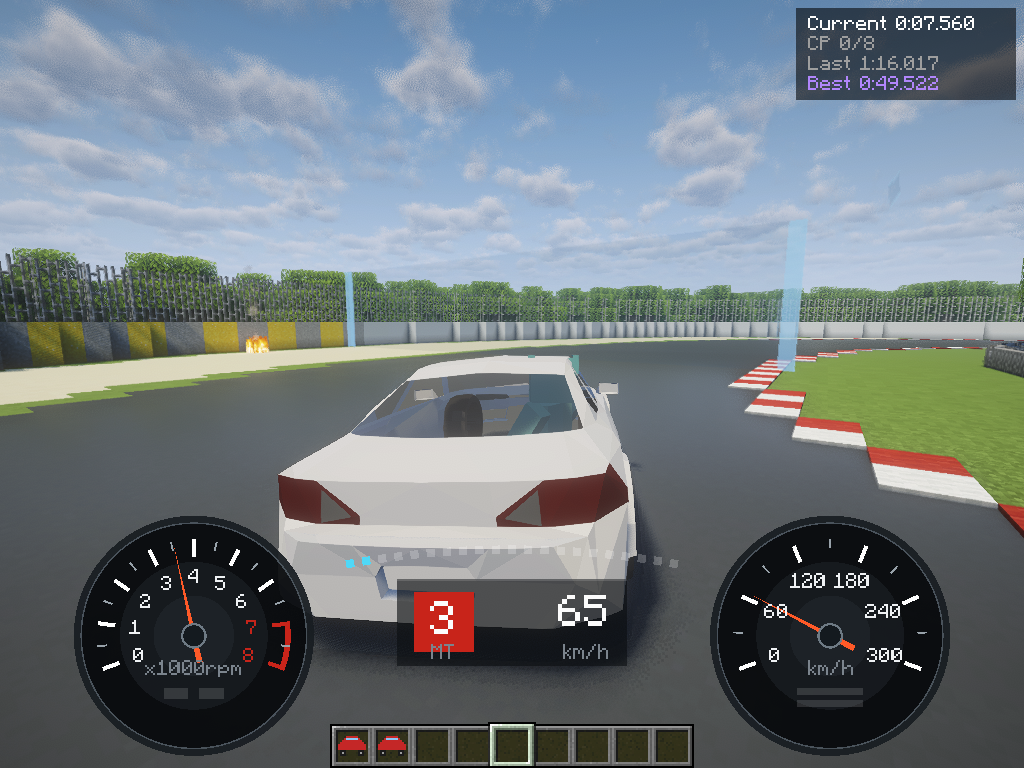
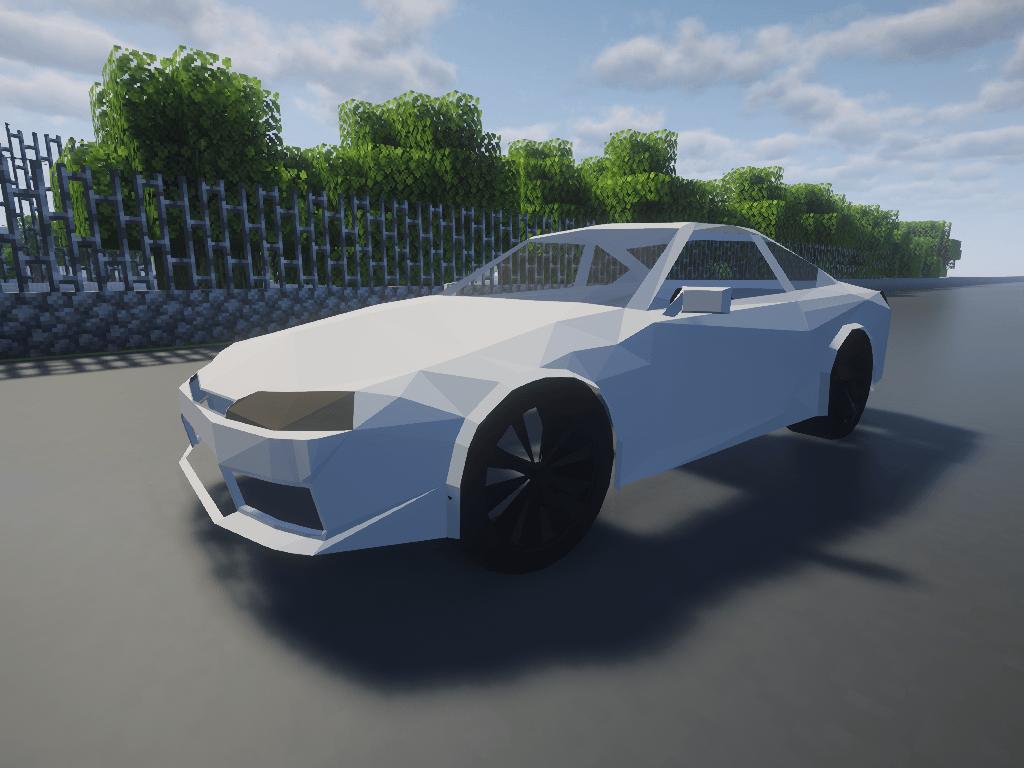
Forget boats on wheels. KurumaMod puts a real car in your world — one that dives when you brake, squats when you floor it, leans into a corner, and slides sideways in a cloud of tyre smoke when you get greedy with the throttle. Turn the key. Listen to it idle. Find a mountain road and go.
🚗 Car packs(Add-on):
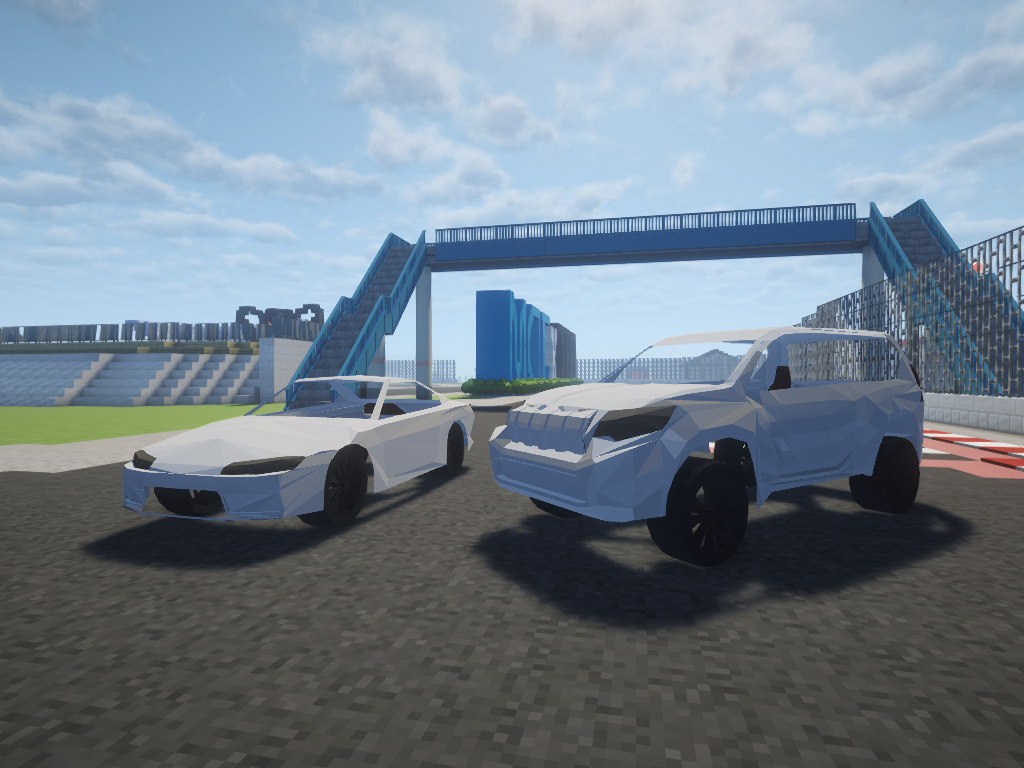
- Basic Car Pack (Land Cruiser Prado, a heavy off-road 4x4)
- Sample Car Pack (Template for making your own)
Join Discord to get the latest updates! Make sure to follow us on X, too.
Discord: https://discord.gg/SByTzMXmM
X.com: https://x.com/kurumamod
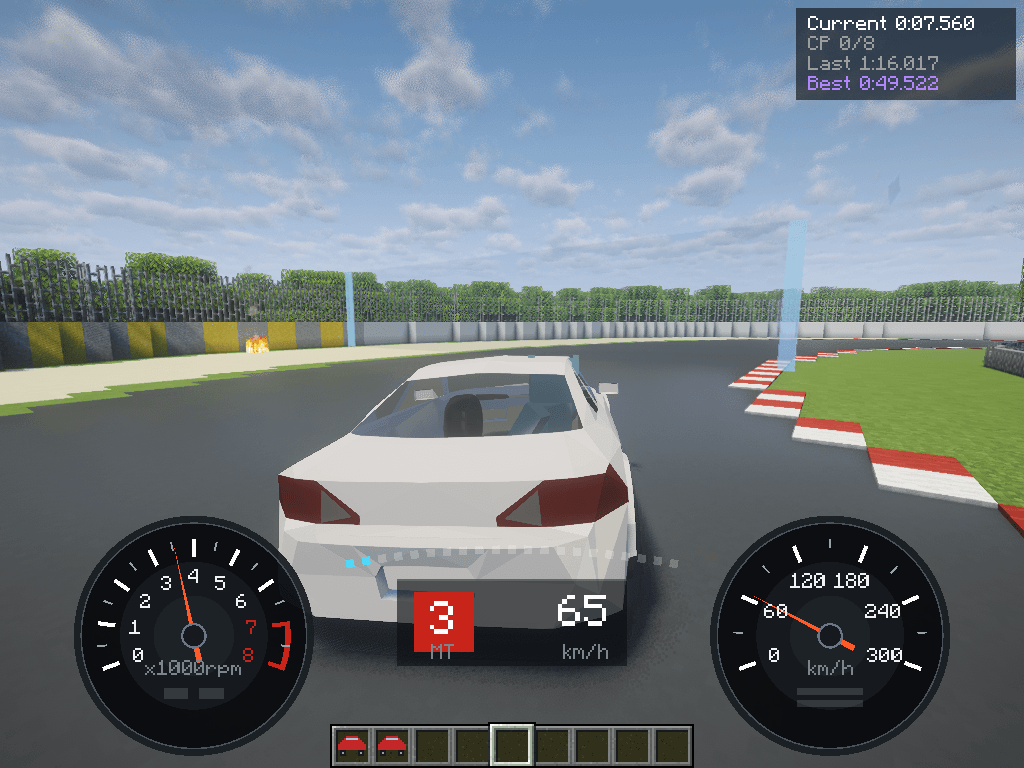
🏎️ It drives like a car
Every corner has real weight to it. Grip runs out gradually, not all at once — you'll feel the front push wide before it lets go, and catch the rear with a flick of countersteer. Get it right and a long sweeper becomes the best thing in the game.
Automatic if you just want to drive. Manual if you want to be the one shifting.
🔧 Tune it exactly how you like
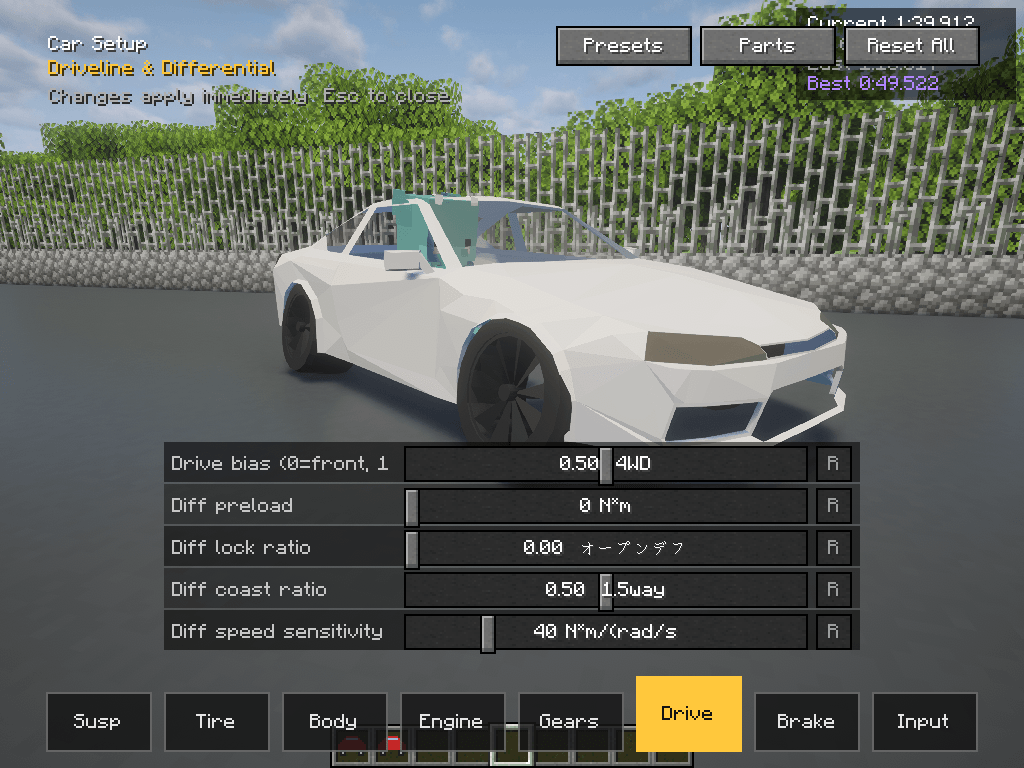
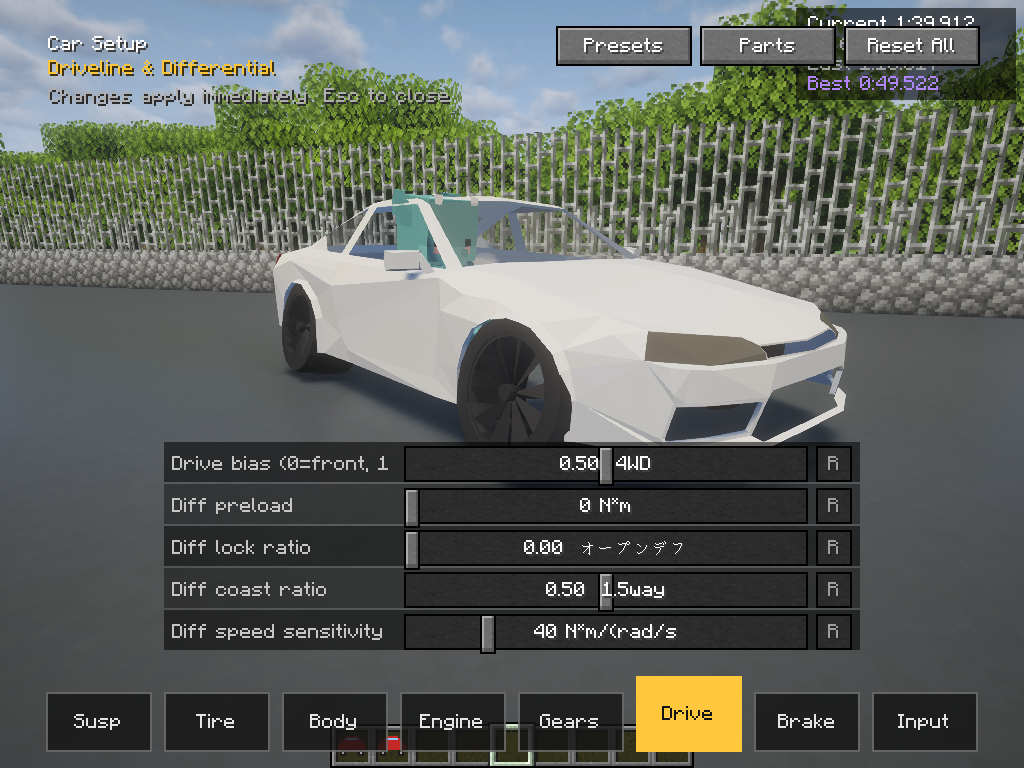
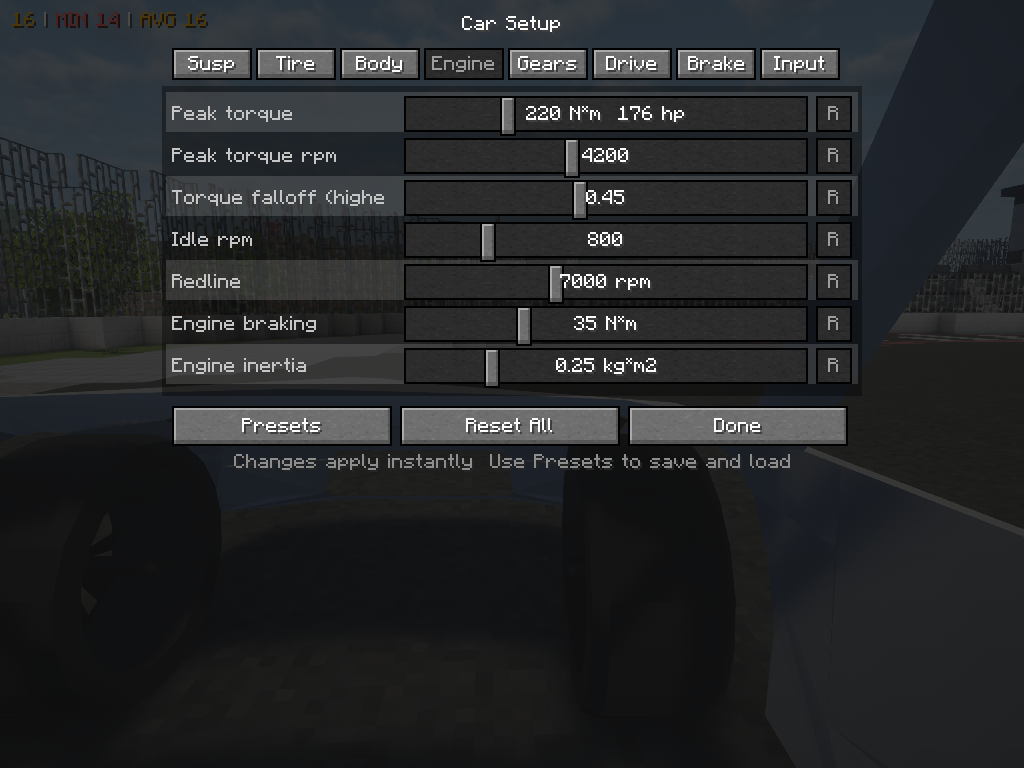
Hit G and the setup screen opens — right there, mid-drive. Springs, dampers, anti-roll bars, tyres, gear ratios, diff, brake balance, weight distribution. Move a slider and the very next corner feels different.
Build a track-day monster. Build a drift car. Save it as a preset and hand it to your friends.
🌧️ The road matters
Tarmac, dirt, gravel, sand, snow, ice — each one changes the car completely. Drop two wheels onto gravel mid-corner and you'll know about it. When it rains the road goes slick, and tunnels and bridges stay dry, so there's always somewhere to brake.
Roads from other mods work straight away.
🏁 Race your friends
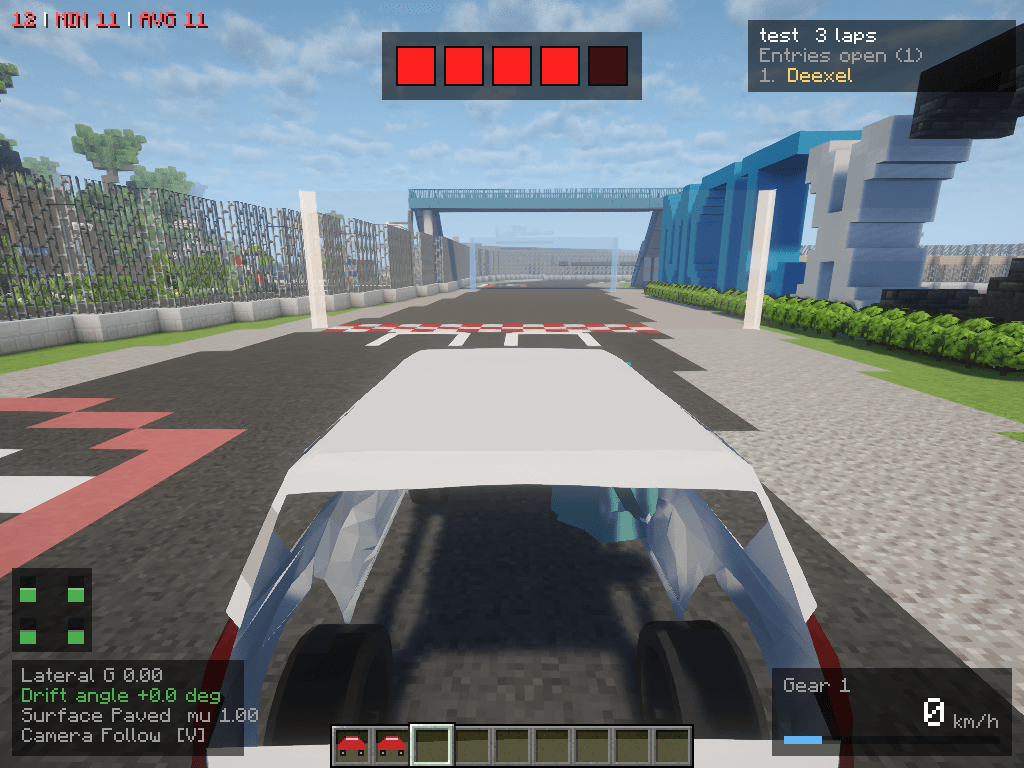
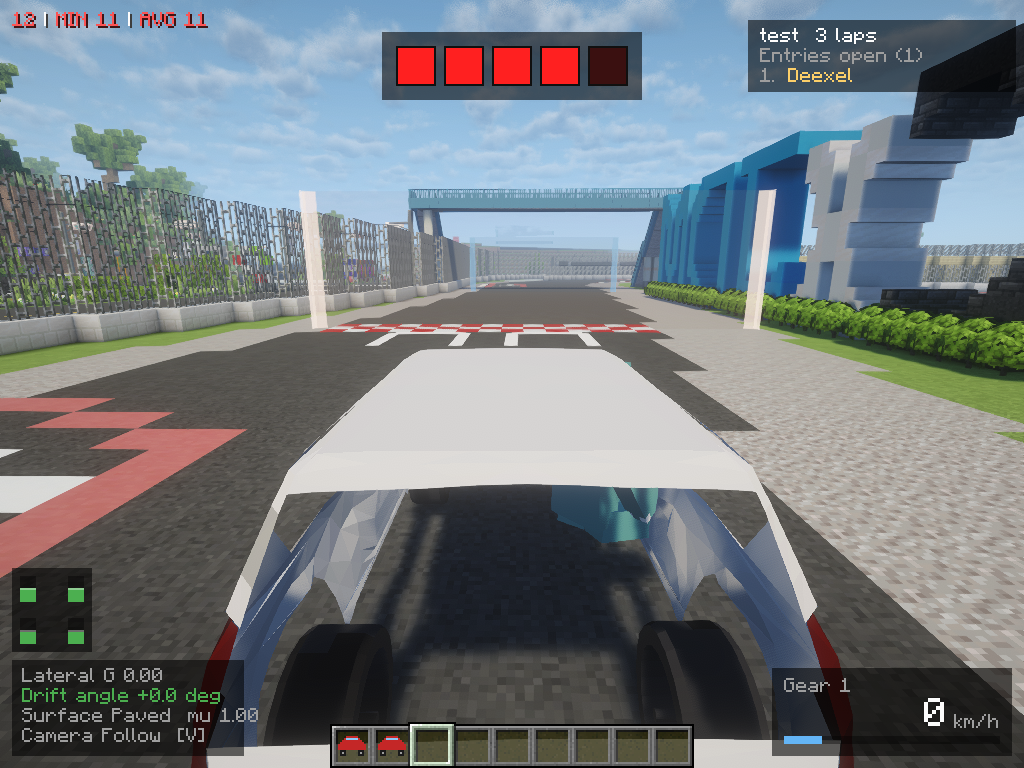
Set up a start line and checkpoints anywhere in the world, then race it properly — live standings, lap times, personal bests. Build a mountain touge, a city circuit, an airport runway sprint. Multiplayer, timed to the millisecond.
🎮 Wheel and gamepad ready
Full analog throttle, brake and steering. Plug it in, press J, wiggle the stick you want to bind. That's it.
🎧 Sound and spectacle
A proper exhaust note that climbs all the way to the redline. Road noise, wind, screeching tyres, the thud of a shift. Headlights carving through the night, brake lights flaring, dust kicking up off a gravel shoulder — and a camera that swings around to show the car sideways when you're really on it.
🚗 Add your own cars
A car pack is a single jar — drop it in mods/ and the cars are there. No coding, no scripts. Model it in Blender, tune it in-game, ship it.
Want cars without making them? Grab
Never opened Blender? The Vehicle Modeling Manual takes you through one whole car — where the origin goes, the object names that become lights, glass and working mirrors, the two export settings people always get wrong, and what to check when the car comes out the wrong size.
Basic Car Pack (Land Cruiser Prado, a heavy off-road 4x4) — Ready-to-drive cars, straight away.
And that same jar is the manual. Rename it to .zip and open it: the full how-to (English and Japanese), the JSON for both cars, the Blender sizing gauges, and a CurseForge page template are all in there. Copy it, swap the cars for yours, ship it — the sample pack is yours to use, no credit needed.
Controls
| Right-click with the car item | Place a car |
| Right-click the car | Get in (two seats — first in drives) |
| W / S | Throttle / brake |
| A / D | Steer |
| Space | Handbrake |
| R / F | Shift up / down (manual) |
| Shift | Get out |
| Shift + attack the car | Pick it up — the item keeps its setup and parts |
| G | Car setup (with Presets and Parts) |
| H | Mod menu (display and camera settings) |
| V | Camera follow |
| PageUp / PageDown | Camera distance |
| L | Headlights |
| J | Controller setup |
All rebindable in Options → Controls. A plain hit won't break a car — you need Shift, so one stray punch can't throw away a setup.
Settings
H — Mod menu
Opens over the game without pausing it, so you can see the change while you drive. Also reachable from Mods → KurumaMod → Config.
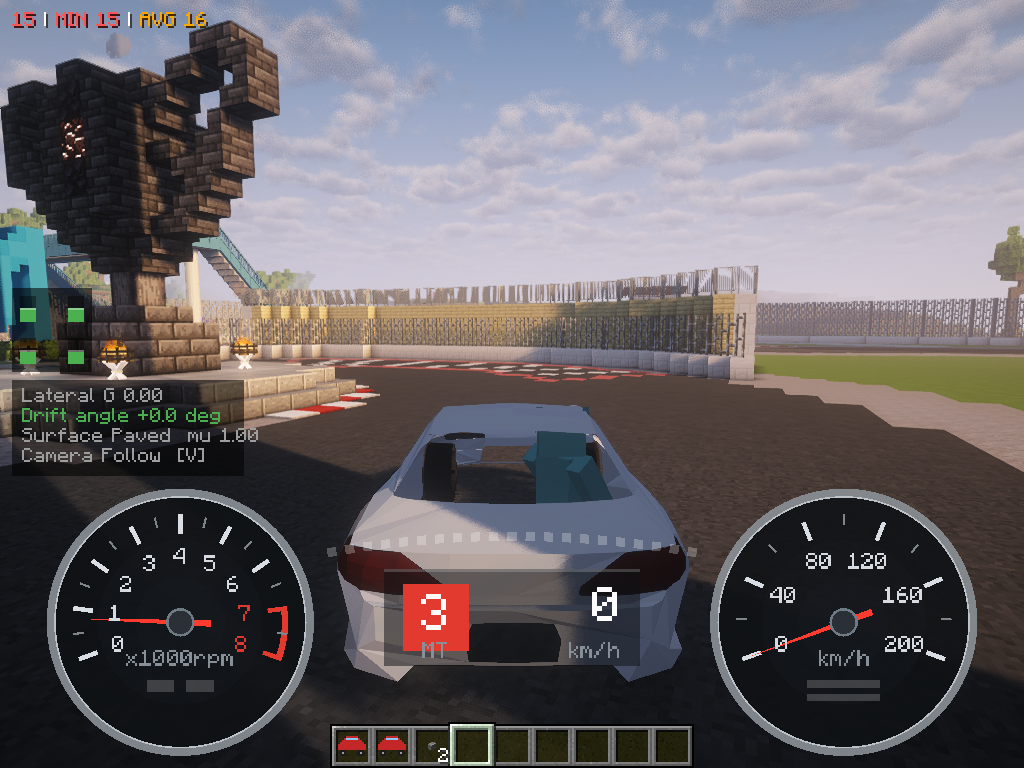
| Display | Control help · Telemetry · Speedometer and tachometer · Gauge size · Gauge opacity · Gauge colours (90s OEM / Modern) · Live mirrors (heavy — renders the world a second time) · Dust plumes · Dust density · Course gate display (full / posts only / hidden) |
| Camera | Chase camera distance · Chase camera height · Extra pull-back at speed · Speed FOV |
G — Car setup
Every slider, grouped in tabs: Suspension, Tires, Chassis, Engine, Gearbox, Driveline & Differential, Brakes & Resistance, Controls & Aids. Manual gearbox, ABS and traction control are in there too. Changed values turn yellow; each row has its own reset.
- Presets — save your setup and load it on any car. From chat too:
/kuruma preset save|load|delete <name>,/kuruma preset list - Parts — swap wheels, then set camber, offset and width. Drag to orbit the car, scroll to zoom (only while you're driving)
Server (config/kurumamod-common.toml)
| Default | ||
|---|---|---|
abandonedCarLifetimeSeconds |
600 | Removes cars nobody has sat in for this long. 0 keeps them forever |
carCollision |
true | Whether cars hit each other. OPs can flip it in game with /kuruma-admin collide true|false |
Racing
1. Build a course (OP)
A line is two points. Stand at one end and run /kuruma-admin point, walk to the other end and run it again.
- Mark the two ends of the start/finish line, face the way you'll race, and run
/kuruma-admin course create <name> - For each checkpoint, in order: mark its two ends, then
/kuruma-admin course checkpoint <name> - Set the default laps with
/kuruma-admin course laps <name> <1-99>(3 if you don't)
The direction you face is the only direction that counts, so nobody can farm laps by rocking back and forth over the line. Got it backwards? Face the right way and run /kuruma-admin course direction <name>. Running create again on the same name redraws the start line and clears its checkpoints and records. /kuruma-admin course list and /kuruma-admin course remove <name> do what they say.
2. Time attack (anyone)
No command needed. Drive across a start line and the clock starts. Each checkpoint shows your gap to your best lap, and your best is saved. /kuruma timeattack reset throws away a lap you've fluffed (so does getting out of the car).
3. Race (anyone can host)
- Host:
/kuruma race open <course> [laps] - Everyone else:
/kuruma race join(/kuruma race entrantsto see who's in) - Line up behind the start line. The host runs
/kuruma race startand the lights count down - The clock starts when you first cross the line. The race closes once everyone still in it has finished, and the results stay up for 15 seconds
Getting out of your car doesn't retire you — flip it back over and carry on. To drop out, use /kuruma race leave. The host or an OP can end it early with /kuruma race stop. Miss a checkpoint and that lap isn't counted; you'll be told why.
Records
/kuruma best |
Your best laps, with your theoretical best (best sectors combined) |
/kuruma best top <course> |
Top 10 for a course |
/kuruma best clear <course> / /kuruma best clear all |
Delete your own records |
/kuruma best clearall <course> |
Delete everyone's records for a course (OP) |
Requirements
- Minecraft 1.20.1 / Forge 47.4.22+
Videos and streams
Go ahead and use it in videos and streams — I'm looking forward to seeing how you drive it. Just put a link to this CurseForge page in the description of the video or stream. As long as the link is there, you don't need to ask.
Modpacks
Modpacks are welcome. Please add it as a CurseForge dependency rather than bundling the jar itself, so that players always get the latest version.
License
KurumaMod is free software under the GNU General Public License v3.0 only (GPL-3.0-only). The full text is in LICENSE.
Community
KurumaMod(日本語)
Minecraft で、グランツーリスモ。
ボートに車の皮をかぶせたものではありません。ブレーキで鼻が沈み、アクセルで尻が沈み、 コーナーでぐっと外へ傾き、踏みすぎればタイヤを鳴らして横を向く——本物の車が、あなたの ワールドを走ります。 エンジンをかけて、アイドリングを聞いて、山道へ。
🚗 カーパック(アドオン):
- ベーシックカーパック(Basic Car Pack) (ランドクルーザープラド, 重いオフロード4x4)
- サンプルカーパック(Sample Car Pack) (カーパック制作者向けテンプレート)
最新のアップデートを受け取るには、Discordに参加しましょう!Xもあるよ。
Discord: https://discord.gg/SByTzMXmM
X.com: https://x.com/kurumamod
🏎️ ちゃんと「運転」になる
コーナーひとつひとつに重さがあります。グリップは突然ゼロになるのではなく、じわりと失われて いく——フロントが外へ逃げていくのが分かるし、リアが出ればカウンターで抑えられる。 うまく決まったときの長い高速コーナーは、たぶんこの MOD でいちばん気持ちいい瞬間です。
ただ流したい日は AT。自分で操りたい日は MT。
🔧 好きなだけいじれる
G を押すと、走りながらセッティング画面が開きます。バネ、ダンパー、スタビ、タイヤ、ギア比、 デフ、ブレーキバランス、重量配分。スライダーを動かせば、次のコーナーからもう別の車です。
サーキット用に詰めるもよし、ドリフト仕様に振るもよし。プリセットとして保存して、友達に 渡せます。
🌧️ 路面で世界が変わる
舗装・土・砂利・砂・雪・氷。路面が変われば車はまったく別物になります。コーナーの途中で片側だけ 砂利に落としたら、その瞬間に分かります。雨が降れば路面は滑るようになり、トンネルや橋の下は 濡れないので、そこがブレーキングポイントになります。
他の道路 MOD の上でも、そのまま走れます。
🏁 友達とレースする
ワールドのどこにでもスタートラインとチェックポイントを置いて、本格的にレースできます。 リアルタイム順位表示、ラップタイム、自己ベスト。峠を作るのも、街中サーキットを作るのも、 滑走路で最高速を競うのも自由。マルチプレイ対応、計測はミリ秒単位。
🎮 ハンコン・パッド対応
アクセル・ブレーキ・ステアリングをフルアナログで。つないで J を押して、割り当てたい軸を 動かすだけ。設定完了です。
🎧 音と、絵
レッドラインまで気持ちよく吹け上がる排気音。ロードノイズ、風切り音、悲鳴を上げるタイヤ、 シフトの衝撃。夜を切り裂くヘッドライト、光るブレーキランプ、砂利を巻き上げる土煙。 そして本気で攻めているときは、カメラが回り込んで横を向いた車体を見せてくれます。
🚗 車は自分で足せる
カーパックは jar ひとつ。mods/ に入れるだけで車が増えます。 コードもスクリプトも不要。 Blender でモデルを作り、ゲーム内で味付けして、そのまま配布できます。
Blender を触ったことがなくても大丈夫。 車両モデル作成マニュアル が、 原点の合わせかたから、灯火・ガラス・実際に映るミラーになるオブジェクト名、 みんなが間違える書き出し設定、大きさがおかしいときの直しかたまで、1 台ぶんを通しで案内します。
作るのはあとで、まずは乗りたい方へ。
を入れれば、それだけで車が 1 台増えます。
そしてこの jar そのものが、カーパックの作り方の手引です。 拡張子を .zip に変えて開けば、 作り方の解説(日英)・2 台分の JSON・Blender 用の寸法ゲージ・CurseForge ページのひな型まで 入っています。丸ごとコピーして車を差し替えれば、それがあなたのカーパックです——見本は自由に使ってかまいません。 表示も許諾も不要です。
操作
| 車アイテムを右クリック | 車を出す |
| 車を右クリック | 乗る(2 人乗り。先に乗った方が運転) |
| W / S | アクセル / ブレーキ |
| A / D | ステアリング |
| スペース | サイドブレーキ |
| R / F | シフトアップ / ダウン(MT) |
| Shift | 降りる |
| Shift + 車を殴る | 回収する(セッティングとパーツはアイテムに残る) |
| G | セッティング画面(プリセット・パーツもここから) |
| H | MOD メニュー(表示とカメラの設定) |
| V | カメラ追従 |
| PageUp / PageDown | カメラ距離 |
| L | ヘッドライト |
| J | コントローラ設定 |
キーはすべて「設定 → 操作設定」で変更できます。素手で殴っただけでは車は壊れません。Shift を押しながらでないと回収できないので、うっかりの 1 発で作り込んだセッティングが消えることはありません。
設定
H — MOD メニュー
ゲームを止めずに走っている画面の上で開くので、変えた結果をその場で見ながら決められます。MOD 一覧の KurumaMod →「設定」からも開けます。
| 表示 | 操作ヘルプ・テレメトリ・速度計と回転計・メーターの大きさ・メーターの濃さ・メーターの配色(90 年代純正 / モダン)・ミラーに後方を映す(重い。世界をもう 1 回描くため)・土煙・土煙の量・コースのゲートの表示(フル / ポールのみ / 非表示) |
| カメラ | 追跡カメラの距離・追跡カメラの高さ・速度で引く量・速度で広がる視野 |
G — セッティング画面
諸元のスライダーがタブごとに並びます(サスペンション、タイヤ、車体、エンジン、変速機、駆動系・デフ、ブレーキ・走行抵抗、操作と補助)。MT / AT の切り替え、ABS、トラクションコントロールもこの中にあります。既定から変えた項目は黄色になり、1 項目ずつ戻せます。
- プリセット — セッティングを保存して、どの車にも読み込めます。チャットからも:
/kuruma preset save|load|delete <名前>、/kuruma preset list - パーツ — ホイールを履き替えて、キャンバー・オフセット・太さを調整。ドラッグで車を回し、ホイールで寄り引き(運転中のみ)
サーバー(config/kurumamod-common.toml)
| 既定 | ||
|---|---|---|
abandonedCarLifetimeSeconds |
600 | 誰も乗っていない車をこの秒数で消す。0 で消さない |
carCollision |
true | 車同士が当たるか。OP はゲーム内で /kuruma-admin collide true|false でも切り替えられる |
レース
1. コースを作る(OP)
線は端 2 点で決めます。片方の端に立って /kuruma-admin point、もう片方の端まで歩いてもう一度。
- スタート/ゴールラインの両端を打ち、走る向きを向いて
/kuruma-admin course create <名前> - チェックポイントを通る順に: 両端を打って
/kuruma-admin course checkpoint <名前> - 周回数の既定を
/kuruma-admin course laps <名前> <1-99>で決める(決めなければ 3)
向いていた方向に跨いだときだけ数えるので、ラインの上を行ったり来たりして周回を稼ぐことはできません。向きを間違えたら、正しい向きを向いて /kuruma-admin course direction <名前>。同じ名前で create をやり直すとスタートラインを引き直し、チェックポイントと記録は消えます。一覧は /kuruma-admin course list、削除は /kuruma-admin course remove <名前>。
2. タイムアタック(誰でも)
コマンドは要りません。車でスタートラインを跨げば計測が始まります。チェックポイントを通るたびにベストラップとの差が出て、ベストは保存されます。ミスした周は /kuruma timeattack reset で捨てられます(車から降りても取り消されます)。
3. レース(誰でも主催できる)
- 主催:
/kuruma race open <コース> [周回数] - 参加する人:
/kuruma race join(誰が入っているかは/kuruma race entrants) - スタートラインの手前に並び、主催が
/kuruma race start。シグナルがカウントダウンします - 計測は最初にラインを跨いだ瞬間から。残っている全員がゴールしたら締まり、リザルトが 15 秒出ます
車から降りても脱落にはなりません——ひっくり返した車を立て直して走り続けられます。抜けるときは /kuruma race leave。主催か OP は /kuruma race stop で途中で終わらせられます。チェックポイントを取りこぼした周は数えられず、その理由が画面に出ます。
記録
/kuruma best |
自分のベストラップと理論ベスト(区間ベストの合計) |
/kuruma best top <コース> |
そのコースの上位 10 人 |
/kuruma best clear <コース> / /kuruma best clear all |
自分の記録を消す |
/kuruma best clearall <コース> |
そのコースの全員の記録を消す(OP) |
動作環境
- Minecraft 1.20.1 / Forge 47.4.22+
動画・配信での利用について
動画や配信に使って問題ありません。 どんな走りをしてくれるのか楽しみにしています。 YouTube・配信:動画・LINE配信の概要欄に、この CurseForge ページのリンクを記載してください。 リンクを記載いただければ、許可は不要です。
モッドパックでの利用について
モッドパックへ含めることは歓迎です。jar 本体を同梱せず、CurseForge の参照(依存)として 追加していただけると、プレイヤーに常に最新版が届くので助かります。ライセンス上の条件では なく、お願いです。
ライセンス
KurumaMod は GNU General Public License v3.0 only(GPL-3.0-only)で公開している フリーソフトウェアです。全文は LICENSE(英語の原文が正本)。
コミュニティ
KurumaMod
Gran Turismo, in Minecraft.
Forget boats on wheels. KurumaMod puts a real car in your world — one that dives when you brake, squats when you floor it, leans into a corner, and slides sideways in a cloud of tyre smoke when you get greedy with the throttle. Turn the key. Listen to it idle. Find a mountain road and go.
🚗 Car packs(Add-on):
- Basic Car Pack (Land Cruiser Prado, a heavy off-road 4x4)
- Sample Car Pack
Join Discord to get the latest updates! Make sure to follow us on X, too.
Discord: https://discord.gg/SByTzMXmM
X.com: https://x.com/kurumamod
🏎️ It drives like a car
Every corner has real weight to it. Grip runs out gradually, not all at once — you'll feel the front push wide before it lets go, and catch the rear with a flick of countersteer. Get it right and a long sweeper becomes the best thing in the game.
Automatic if you just want to drive. Manual if you want to be the one shifting.
🔧 Tune it exactly how you like
Hit G and the setup screen opens — right there, mid-drive. Springs, dampers, anti-roll bars, tyres, gear ratios, diff, brake balance, weight distribution. Move a slider and the very next corner feels different.
Build a track-day monster. Build a drift car. Save it as a preset and hand it to your friends.
🌧️ The road matters
Tarmac, dirt, gravel, sand, snow, ice — each one changes the car completely. Drop two wheels onto gravel mid-corner and you'll know about it. When it rains the road goes slick, and tunnels and bridges stay dry, so there's always somewhere to brake.
Roads from other mods work straight away.
🏁 Race your friends
Set up a start line and checkpoints anywhere in the world, then race it properly — live standings, lap times, personal bests. Build a mountain touge, a city circuit, an airport runway sprint. Multiplayer, timed to the millisecond.
🎮 Wheel and gamepad ready
Full analog throttle, brake and steering. Plug it in, press J, wiggle the stick you want to bind. That's it.
🎧 Sound and spectacle
A proper exhaust note that climbs all the way to the redline. Road noise, wind, screeching tyres, the thud of a shift. Headlights carving through the night, brake lights flaring, dust kicking up off a gravel shoulder — and a camera that swings around to show the car sideways when you're really on it.
🚗 Add your own cars
A car pack is a single jar — drop it in mods/ and the cars are there. No coding, no scripts. Model it in Blender, tune it in-game, ship it.
Want cars without making them? Grab
Never opened Blender? The Vehicle Modeling Manual takes you through one whole car — where the origin goes, the object names that become lights, glass and working mirrors, the two export settings people always get wrong, and what to check when the car comes out the wrong size.
Basic Car Pack (Land Cruiser Prado, a heavy off-road 4x4) — Ready-to-drive cars, straight away.
And that same jar is the manual. Rename it to .zip and open it: the full how-to (English and Japanese), the JSON for both cars, the Blender sizing gauges, and a CurseForge/Modrinth page template are all in there. Copy it, swap the cars for yours, ship it — the sample pack is yours to use, no credit needed.
Controls
| Right-click with the car item | Place a car |
| Right-click the car | Get in (two seats — first in drives) |
| W / S | Throttle / brake |
| A / D | Steer |
| Space | Handbrake |
| R / F | Shift up / down (manual) |
| Shift | Get out |
| Shift + attack the car | Pick it up — the item keeps its setup and parts |
| G | Car setup (with Presets and Parts) |
| H | Mod menu (display and camera settings) |
| V | Camera follow |
| PageUp / PageDown | Camera distance |
| L | Headlights |
| J | Controller setup |
All rebindable in Options → Controls. A plain hit won't break a car — you need Shift, so one stray punch can't throw away a setup.
Settings
H — Mod menu
Opens over the game without pausing it, so you can see the change while you drive. Also reachable from Mods → KurumaMod → Config.
| Display | Control help · Telemetry · Speedometer and tachometer · Gauge size · Gauge opacity · Gauge colours (90s OEM / Modern) · Live mirrors (heavy — renders the world a second time) · Dust plumes · Dust density · Course gate display (full / posts only / hidden) |
| Camera | Chase camera distance · Chase camera height · Extra pull-back at speed · Speed FOV |
G — Car setup
Every slider, grouped in tabs: Suspension, Tires, Chassis, Engine, Gearbox, Driveline & Differential, Brakes & Resistance, Controls & Aids. Manual gearbox, ABS and traction control are in there too. Changed values turn yellow; each row has its own reset.
- Presets — save your setup and load it on any car. From chat too:
/kuruma preset save|load|delete <name>,/kuruma preset list - Parts — swap wheels, then set camber, offset and width. Drag to orbit the car, scroll to zoom (only while you're driving)
Server (config/kurumamod-common.toml)
| Default | ||
|---|---|---|
abandonedCarLifetimeSeconds |
600 | Removes cars nobody has sat in for this long. 0 keeps them forever |
carCollision |
true | Whether cars hit each other. OPs can flip it in game with /kuruma-admin collide true|false |
Racing
1. Build a course (OP)
A line is two points. Stand at one end and run /kuruma-admin point, walk to the other end and run it again.
- Mark the two ends of the start/finish line, face the way you'll race, and run
/kuruma-admin course create <name> - For each checkpoint, in order: mark its two ends, then
/kuruma-admin course checkpoint <name> - Set the default laps with
/kuruma-admin course laps <name> <1-99>(3 if you don't)
The direction you face is the only direction that counts, so nobody can farm laps by rocking back and forth over the line. Got it backwards? Face the right way and run /kuruma-admin course direction <name>. Running create again on the same name redraws the start line and clears its checkpoints and records. /kuruma-admin course list and /kuruma-admin course remove <name> do what they say.
2. Time attack (anyone)
No command needed. Drive across a start line and the clock starts. Each checkpoint shows your gap to your best lap, and your best is saved. /kuruma timeattack reset throws away a lap you've fluffed (so does getting out of the car).
3. Race (anyone can host)
- Host:
/kuruma race open <course> [laps] - Everyone else:
/kuruma race join(/kuruma race entrantsto see who's in) - Line up behind the start line. The host runs
/kuruma race startand the lights count down - The clock starts when you first cross the line. The race closes once everyone still in it has finished, and the results stay up for 15 seconds
Getting out of your car doesn't retire you — flip it back over and carry on. To drop out, use /kuruma race leave. The host or an OP can end it early with /kuruma race stop. Miss a checkpoint and that lap isn't counted; you'll be told why.
Records
/kuruma best |
Your best laps, with your theoretical best (best sectors combined) |
/kuruma best top <course> |
Top 10 for a course |
/kuruma best clear <course> / /kuruma best clear all |
Delete your own records |
/kuruma best clearall <course> |
Delete everyone's records for a course (OP) |
Requirements
- Minecraft 1.20.1 / Forge 47.4.22+
Videos and streams
Go ahead and use it in videos and streams — I'm looking forward to seeing how you drive it. Just put a link to this CurseForge/Modrinth page in the description of the video or stream. As long as the link is there, you don't need to ask.
Modpacks
Modpacks are welcome. Please add it as a CurseForge/Modrinth dependency rather than bundling the jar itself, so that players always get the latest version.
License
KurumaMod is free software under the GNU General Public License v3.0 only (GPL-3.0-only). The full text is in LICENSE.
Community
KurumaMod(日本語)
Minecraft で、グランツーリスモ。
ボートに車の皮をかぶせたものではありません。ブレーキで鼻が沈み、アクセルで尻が沈み、 コーナーでぐっと外へ傾き、踏みすぎればタイヤを鳴らして横を向く——本物の車が、あなたの ワールドを走ります。 エンジンをかけて、アイドリングを聞いて、山道へ。
🚗 カーパック(アドオン):
- ベーシックカーパック(Basic Car Pack) (ランドクルーザープラド, 重いオフロード4x4)
- サンプルカーパック(Sample Car Pack) (カーパック制作者向けテンプレート)
最新のアップデートを受け取るには、Discordに参加しましょう!Xもあるよ。
Discord: https://discord.gg/SByTzMXmM
X.com: https://x.com/kurumamod
🏎️ ちゃんと「運転」になる
コーナーひとつひとつに重さがあります。グリップは突然ゼロになるのではなく、じわりと失われて いく——フロントが外へ逃げていくのが分かるし、リアが出ればカウンターで抑えられる。 うまく決まったときの長い高速コーナーは、たぶんこの MOD でいちばん気持ちいい瞬間です。
ただ流したい日は AT。自分で操りたい日は MT。
🔧 好きなだけいじれる
G を押すと、走りながらセッティング画面が開きます。バネ、ダンパー、スタビ、タイヤ、ギア比、 デフ、ブレーキバランス、重量配分。スライダーを動かせば、次のコーナーからもう別の車です。
サーキット用に詰めるもよし、ドリフト仕様に振るもよし。プリセットとして保存して、友達に 渡せます。
🌧️ 路面で世界が変わる
舗装・土・砂利・砂・雪・氷。路面が変われば車はまったく別物になります。コーナーの途中で片側だけ 砂利に落としたら、その瞬間に分かります。雨が降れば路面は滑るようになり、トンネルや橋の下は 濡れないので、そこがブレーキングポイントになります。
他の道路 MOD の上でも、そのまま走れます。
🏁 友達とレースする
ワールドのどこにでもスタートラインとチェックポイントを置いて、本格的にレースできます。 リアルタイム順位表示、ラップタイム、自己ベスト。峠を作るのも、街中サーキットを作るのも、 滑走路で最高速を競うのも自由。マルチプレイ対応、計測はミリ秒単位。
🎮 ハンコン・パッド対応
アクセル・ブレーキ・ステアリングをフルアナログで。つないで J を押して、割り当てたい軸を 動かすだけ。設定完了です。
🎧 音と、絵
レッドラインまで気持ちよく吹け上がる排気音。ロードノイズ、風切り音、悲鳴を上げるタイヤ、 シフトの衝撃。夜を切り裂くヘッドライト、光るブレーキランプ、砂利を巻き上げる土煙。 そして本気で攻めているときは、カメラが回り込んで横を向いた車体を見せてくれます。
🚗 車は自分で足せる
カーパックは jar ひとつ。mods/ に入れるだけで車が増えます。 コードもスクリプトも不要。 Blender でモデルを作り、ゲーム内で味付けして、そのまま配布できます。
Blender を触ったことがなくても大丈夫。 車両モデル作成マニュアル が、 原点の合わせかたから、灯火・ガラス・実際に映るミラーになるオブジェクト名、 みんなが間違える書き出し設定、大きさがおかしいときの直しかたまで、1 台ぶんを通しで案内します。
作るのはあとで、まずは乗りたい方へ。
を入れれば、それだけで車が 1 台増えます。
そしてこの jar そのものが、カーパックの作り方の手引です。 拡張子を .zip に変えて開けば、 作り方の解説(日英)・2 台分の JSON・Blender 用の寸法ゲージ・CurseForge/Modrinth ページのひな型まで 入っています。丸ごとコピーして車を差し替えれば、それがあなたのカーパックです——見本は自由に使ってかまいません。 表示も許諾も不要です。
操作
| 車アイテムを右クリック | 車を出す |
| 車を右クリック | 乗る(2 人乗り。先に乗った方が運転) |
| W / S | アクセル / ブレーキ |
| A / D | ステアリング |
| スペース | サイドブレーキ |
| R / F | シフトアップ / ダウン(MT) |
| Shift | 降りる |
| Shift + 車を殴る | 回収する(セッティングとパーツはアイテムに残る) |
| G | セッティング画面(プリセット・パーツもここから) |
| H | MOD メニュー(表示とカメラの設定) |
| V | カメラ追従 |
| PageUp / PageDown | カメラ距離 |
| L | ヘッドライト |
| J | コントローラ設定 |
キーはすべて「設定 → 操作設定」で変更できます。素手で殴っただけでは車は壊れません。Shift を押しながらでないと回収できないので、うっかりの 1 発で作り込んだセッティングが消えることはありません。
設定
H — MOD メニュー
ゲームを止めずに走っている画面の上で開くので、変えた結果をその場で見ながら決められます。MOD 一覧の KurumaMod →「設定」からも開けます。
| 表示 | 操作ヘルプ・テレメトリ・速度計と回転計・メーターの大きさ・メーターの濃さ・メーターの配色(90 年代純正 / モダン)・ミラーに後方を映す(重い。世界をもう 1 回描くため)・土煙・土煙の量・コースのゲートの表示(フル / ポールのみ / 非表示) |
| カメラ | 追跡カメラの距離・追跡カメラの高さ・速度で引く量・速度で広がる視野 |
G — セッティング画面
諸元のスライダーがタブごとに並びます(サスペンション、タイヤ、車体、エンジン、変速機、駆動系・デフ、ブレーキ・走行抵抗、操作と補助)。MT / AT の切り替え、ABS、トラクションコントロールもこの中にあります。既定から変えた項目は黄色になり、1 項目ずつ戻せます。
- プリセット — セッティングを保存して、どの車にも読み込めます。チャットからも:
/kuruma preset save|load|delete <名前>、/kuruma preset list - パーツ — ホイールを履き替えて、キャンバー・オフセット・太さを調整。ドラッグで車を回し、ホイールで寄り引き(運転中のみ)
サーバー(config/kurumamod-common.toml)
| 既定 | ||
|---|---|---|
abandonedCarLifetimeSeconds |
600 | 誰も乗っていない車をこの秒数で消す。0 で消さない |
carCollision |
true | 車同士が当たるか。OP はゲーム内で /kuruma-admin collide true|false でも切り替えられる |
レース
1. コースを作る(OP)
線は端 2 点で決めます。片方の端に立って /kuruma-admin point、もう片方の端まで歩いてもう一度。
- スタート/ゴールラインの両端を打ち、走る向きを向いて
/kuruma-admin course create <名前> - チェックポイントを通る順に: 両端を打って
/kuruma-admin course checkpoint <名前> - 周回数の既定を
/kuruma-admin course laps <名前> <1-99>で決める(決めなければ 3)
向いていた方向に跨いだときだけ数えるので、ラインの上を行ったり来たりして周回を稼ぐことはできません。向きを間違えたら、正しい向きを向いて /kuruma-admin course direction <名前>。同じ名前で create をやり直すとスタートラインを引き直し、チェックポイントと記録は消えます。一覧は /kuruma-admin course list、削除は /kuruma-admin course remove <名前>。
2. タイムアタック(誰でも)
コマンドは要りません。車でスタートラインを跨げば計測が始まります。チェックポイントを通るたびにベストラップとの差が出て、ベストは保存されます。ミスした周は /kuruma timeattack reset で捨てられます(車から降りても取り消されます)。
3. レース(誰でも主催できる)
- 主催:
/kuruma race open <コース> [周回数] - 参加する人:
/kuruma race join(誰が入っているかは/kuruma race entrants) - スタートラインの手前に並び、主催が
/kuruma race start。シグナルがカウントダウンします - 計測は最初にラインを跨いだ瞬間から。残っている全員がゴールしたら締まり、リザルトが 15 秒出ます
車から降りても脱落にはなりません——ひっくり返した車を立て直して走り続けられます。抜けるときは /kuruma race leave。主催か OP は /kuruma race stop で途中で終わらせられます。チェックポイントを取りこぼした周は数えられず、その理由が画面に出ます。
記録
/kuruma best |
自分のベストラップと理論ベスト(区間ベストの合計) |
/kuruma best top <コース> |
そのコースの上位 10 人 |
/kuruma best clear <コース> / /kuruma best clear all |
自分の記録を消す |
/kuruma best clearall <コース> |
そのコースの全員の記録を消す(OP) |
動作環境
- Minecraft 1.20.1 / Forge 47.4.22+
動画・配信での利用について
動画や配信に使って問題ありません。 どんな走りをしてくれるのか楽しみにしています。 YouTube・配信:動画・LINE配信の概要欄に、この CurseForge/Modrinth ページのリンクを記載してください。 リンクを記載いただければ、許可は不要です。
モッドパックでの利用について
モッドパックへ含めることは歓迎です。jar 本体を同梱せず、CurseForge/Modrinth の参照(依存)として 追加していただけると、プレイヤーに常に最新版が届くので助かります。ライセンス上の条件では なく、お願いです。
ライセンス
KurumaMod は GNU General Public License v3.0 only(GPL-3.0-only)で公開している フリーソフトウェアです。全文は LICENSE(英語の原文が正本)。
コミュニティ
Screenshots
Gallery
-
2026-09-14_21.18.02.png 2026-09-14_21.18.02.png
-
 2026-09-14_21.21.25.png 2026-09-14_21.21.25.png
 -
2026-09-14_21.19.34.png 2026-09-14_21.19.34.png
-
race.png race.png
-
race
-
-
 setting
 -
 car
car -
 hub
hub -
Versions
Files
Relations
Project Relations
More like this
Similar Mods
Suggestions use data such as tags, dependencies, dependents, descriptions, titles, and more to rank how much they overlap with this mod.
On ModDex
Community snapshot
By the numbers
Statistics
Want to reach Minecraft players?
We're looking for a server hosting partner to feature here and other parts of the site. Interested? Send us a message!
Get in touchGet it on
Available Platforms
On ModDex
Community snapshot
By the numbers