
Community listing page, reviews here may not be monitored by the author.
LagLess: Server Optimizer

No reviews yet
A server-side utility mod designed to optimize performance and manage RAM efficiently through smart automated cleanups and manual commands.
Community voices
Reviews
No reviews yet. Be the first to review this project!
Get it on
Available Platforms
About
Project Details
For authors
Embed Badge
If you're the author of this project, you can embed a live badge anywhere that supports HTML or Markdown. It updates automatically whenever ratings change.
Use HTML for any page that supports it, or Markdown for README files and Markdown-based descriptions.
Identifiers
Platform IDs
Resources
External Links
About
Description
🚀 Lagless: Servers
Lagless: Servers is a lightweight, high-efficiency utility mod designed to optimize RAM usage and keep your Minecraft 1.20.1 server running smoothly. By intelligently monitoring memory consumption, it helps prevent lag spikes and crashes caused by memory exhaustion.
🌟 Key Features
Smart Automated Cleanup: The mod periodically checks your server's RAM usage. If it exceeds a predefined threshold, it automatically frees up memory and clears unneeded temporary objects.
Server-Side First: You only need to install this mod on your server. Players do not need to have it installed on their clients to join! (Note: It can also be used in single-player for local optimization).
Zero Lag Impact: The verification system is designed to be lightweight, running seamlessly in the background without freezing the main server thread.
📊 Performance Benchmarks:
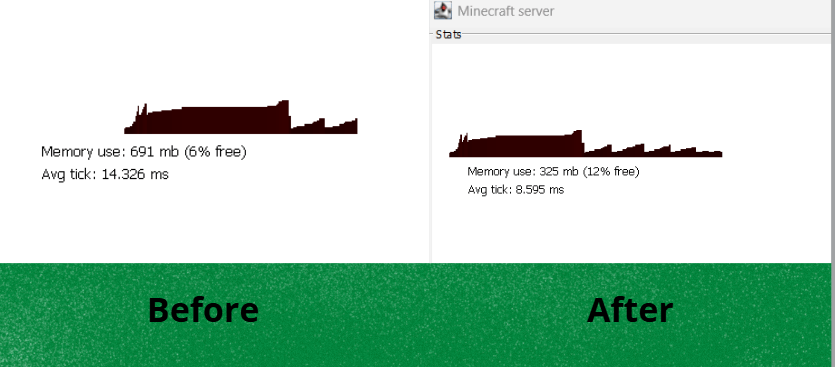
During local server tests (IntelliJ IDEA environment), the mod achieved a memory reduction of 366MB (6%). In other heavier scenarios, the cleanup process successfully freed up to 14% of the total RAM in use.
⚙️ Commands
/forcecleanup
Manually forces an immediate memory cleanup.
Displays exactly how much RAM was freed, along with the "Before" and "After" usage stats.
🔧 Configuration
The mod generates a lagless-server.toml file in your config folder, allowing you to fully customize its behavior:
autoCleanup (Default: true): Enable or disable the automatic memory management system.
cleanupInterval (Default: 300): How often (in seconds) the mod checks the RAM usage.
memoryThreshold (Default: 80): The RAM usage percentage that will trigger the automatic cleanup.
💡 Need a Client-Side mod? If you are looking for local FPS improvements instead of server management, I recommend using:
📦 Installation
Download the latest .jar file for Minecraft 1.20.1.
Drop it into your server's mods folder.
Start the server and enjoy a lag-free experience!
Screenshots
Gallery
Versions
Files
Relations
Project Relations
More like this
Similar Mods
Suggestions use data such as tags, dependencies, dependents, descriptions, titles, and more to rank how much they overlap with this mod.
On ModDex
Community snapshot
By the numbers
Statistics
Want to reach Minecraft players?
We're looking for a server hosting partner to feature here and other parts of the site. Interested? Send us a message!
Get in touchGet it on
Available Platforms
On ModDex
Community snapshot
By the numbers
Statistics
Resources