
Lightman's Currency:Claim Economy
No reviews yet
Land isn't free — and on your server, it shouldn't be either.
Includes systems for trading and managing economies.
Neoforge is a fork of the Minecraft Forge available for versions 1.20.1+ of Minecraft. Many Forge mods are compatible with Neoforge and vice versa.
Community voices
Reviews
Click once to include, again to exclude, again to clear
No reviews yet. Be the first to review this project!
Get it on
Available Platforms
Compatibility
Supported Environments
About
Project Details
For authors
Embed Badge
If you're the author of this project, you can embed a live badge anywhere that supports HTML or Markdown. It updates automatically whenever ratings change.
Use HTML for any page that supports it, or Markdown for README files and Markdown-based descriptions.
Identifiers
Platform IDs
About
Description

Lightman's Currency: Claim Economy
Land isn't free anymore. Lightman's Currency: Claim Economy wires Lightman's Currency directly into FTB Chunks and FTB Teams, so claiming territory, defending it, and going to war over it all cost real money out of a real team bank account.
Every team gets a linked bank account. Every claimed chunk has a price. Every protection you flip on has a visible, ongoing cost. And it's all backed by clean, redesigned in-game menus that show you exactly what you're paying for, before you pay it.
Minecraft: 1.21.1 · Loader: NeoForge · Side: Both (required on server and client)
At a glance
- 💰 Paid claiming — every chunk costs money, with configurable bulk pricing and refunds
- 🛡️ Priced protections — mob griefing, explosions, PvP, and interaction locks each add to upkeep
- ⚔️ Wars — declare war on rival teams; upkeep scales the deeper you're in
- 🎯 Bounties — put a price on a player or an enemy team, collected on the kill
- 🏆 Leaderboard & Pioneer Bonus — server-wide rankings and a one-time reward for the first-ever claim
- 📜 FTB Quests hooks — claim milestones can drive quests, with zero added dependency
- 🎨 Redesigned menus — three custom screens plus FTB Chunks map polish, all built for clarity
Features
Paid Chunk Claiming
- Claiming a chunk draws funds from the player's or team's bank account. The price is server-configurable.
- Unclaiming a chunk refunds a configurable percentage of the claim price.
- The first N chunks per team or player can be made free (configurable).
Two Chunk Types: Build and Land
Every claimed chunk is either a Build chunk or a Land chunk.
| Build chunk | Land chunk | |
|---|---|---|
| Purpose | Base, builds, infrastructure | Territory, borders, open land |
| Available protections | Mob griefing, explosions, PvP, block interact/edit, entity interact | Block interact and block edit only |
| Upkeep billing | Per chunk | Per group of N chunks (cheaper for large territories) |
| Switch | Alt + click/drag in the FTB Chunks map | Same |
Per-Chunk Player Permissions (FTB Chunks)
Each claimed chunk can now define player-specific access using the same protection categories as team protections:
- Block edit
- Block interact
- Entity interact
- PvP/attack
This system has no extra cost and does not affect upkeep pricing. It is a pure permission-management feature.
You can also set an All Players (Base) profile per chunk to define default permissions for non-team players, then add specific players as overrides.
Permission evaluation is additive:
effective_allow = all_players_base + specific_player_flags
Only team owners/officers can edit these permissions.
Team Bank Accounts
When an FTB party is created, Lightman's Currency: Claim Economy automatically creates a linked Lightman's Currency bank account for it. The account mirrors the team hierarchy at all times:
- Team owner → Account owner
- Officers → Account admins
- Members → Account members
The account cannot be deleted while the party is alive. When the party disbands, any remaining balance and chunk refunds are distributed to each member's personal account.
Joining a party dissolves your personal claims and refunds them to your personal account.
Protection Upkeep
Protecting your land is not free — protections must be paid for periodically (configurable; default: every hour).
Upkeep formula:
cost = base_protection_price × number_of_billable_chunks
Each active protection adds a per-chunk price to the base rate. Prices per protection are independently configurable.
If the account runs out of money:
- Protections are stripped one by one in a configurable priority order.
- Once the balance is restored, protections are automatically re-enabled in reverse order.
- Changing a protection setting that would make upkeep unaffordable is blocked at the UI — the toggle simply does not apply and an alert appears.
Changes to protections and force-loads are queued to the next upkeep period to prevent mid-period exploits.
Force-Load Upkeep
Enabling force-load on a chunk is free, but each force-loaded chunk adds a periodic charge on top of everything else.
War System (optional, server-configurable)
Teams with claimed chunks can declare war on each other. War raises upkeep costs:
- Incoming wars increase your upkeep exponentially:
base × Σ(l^i)for i incoming wars, where l is the configurable war cost multiplier. - Outgoing wars cost you the target team's base upkeep scaled by
l^n(where n is the ordinal of that war).
War declarations and endings are queued to the next upkeep period. If a team cannot pay full upkeep, outgoing wars are frozen until the balance is restored. The war system can be disabled entirely per server.
The War screen (accessible from Team Settings) shows active and pending wars, upkeep cost breakdowns, and target vulnerability indicators (unprotected block edit, explosions, PvP).
Server Flavor: Bounties, Leaderboard & Pioneer Bonus
A few lighter, competitive features on top of the core economy:
- Bounties — place a bounty on a specific player (
/lc_claim_economy bounty player) or on an enemy team (/lc_claim_economy bounty team), paid out in full to whoever lands the kill. Player bounties pay out on any PvP kill; team bounties only pay out if the killer's team is actually at war with the target, so it can't be cashed in by an unrelated kill. Money is escrowed the moment a bounty is placed, so it's never double-counted. - Server Leaderboard —
/lc_claim_economy leaderboard(orleaderboard land/leaderboard wealth) ranks the top 10 tracked teams by claimed chunks or bank balance. Read-only, no economic side effects. - Pioneer Bonus — the very first chunk ever claimed on a server pays out a one-time bonus (configurable, default 5 diamond coins) to whichever team claims it, announced server-wide. A permanent, non-repeatable bit of server history.
FTB Quests Integration (optional, zero dependency)
If you also run FTB Quests, claim-economy milestones (chunks claimed, wars declared/ended) can drive quest tasks, and quest rewards can pay directly into a team's bank account — with no hard or soft dependency added on either side. See FTB Quests Integration below for the full setup.
In-Game UI Extensions
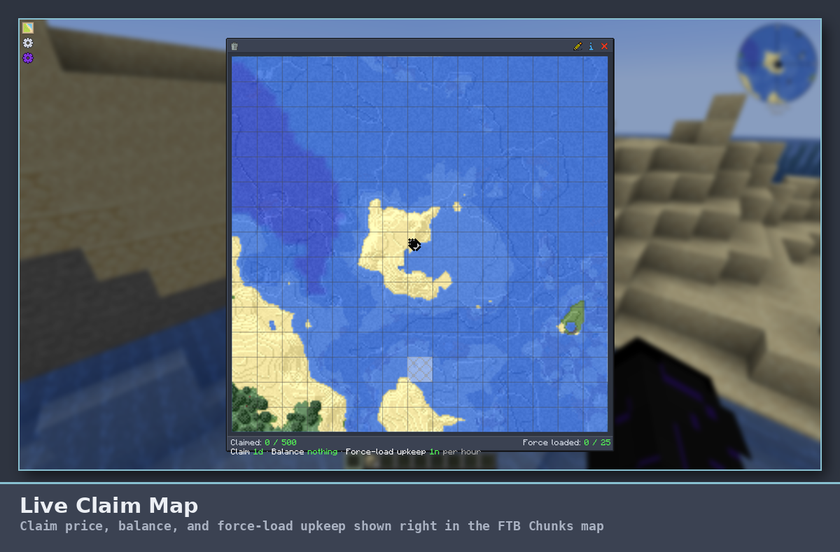
- Claim prices and your current balance are displayed directly in the FTB Chunks map UI.
- Protection prices are shown next to each toggle in the FTB Teams config screen.
- Pending state indicators show queued changes (e.g. "→ Ally pending").
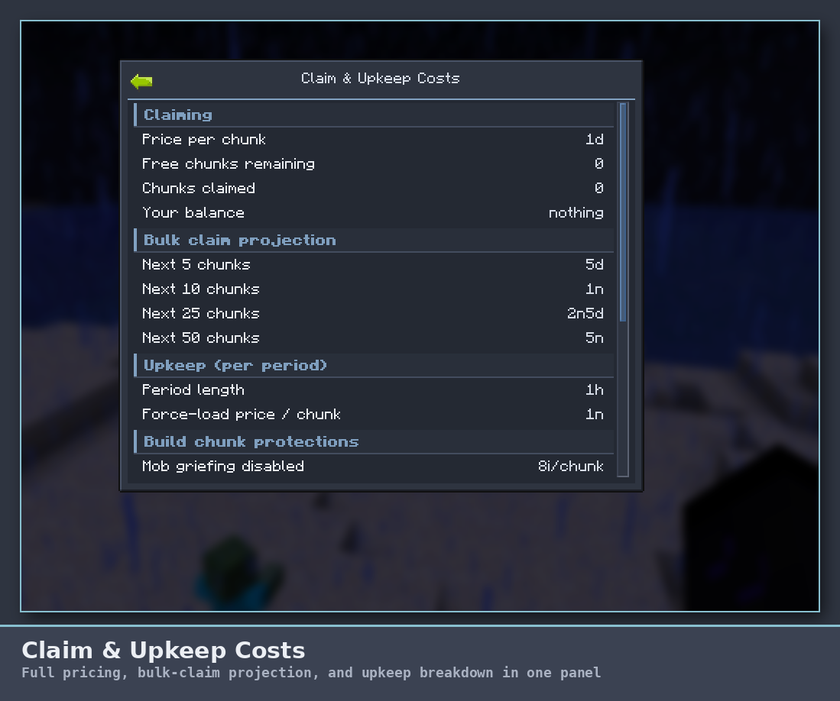
- A dedicated Claim Breakdown screen lays out claim pricing, a bulk-claim cost projection, and the full upkeep breakdown (protections, force-loads) in one clean, scannable panel.
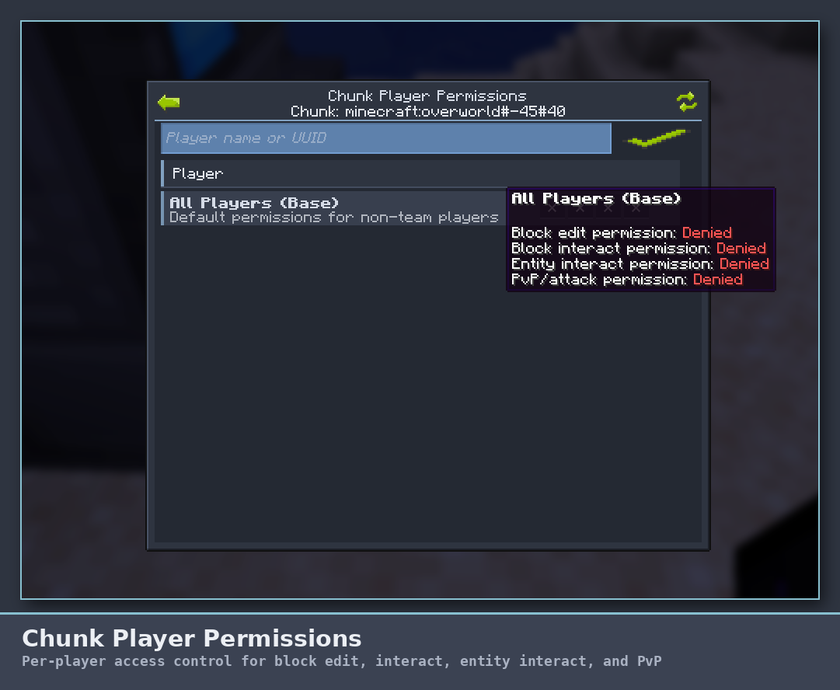
- The Chunk Player Permissions screen manages per-player access on a single claimed chunk, with colorblind-friendly ✓/✕ toggle indicators, hover tooltips on every column explaining what it controls, a full plain-language permission summary when you hover a player's name, and smooth hover animations throughout.
- The War screen shows incoming/outgoing wars, upkeep costs, and target vulnerability at a glance.
All three menus share a consistent, polished look — clear section headers, hover feedback, and accent colors that make it obvious what's active and what's costing you money.
Requirements
| Mod | Required |
|---|---|
| Lightman's Currency | ✅ |
| FTB Library | ✅ |
| FTB Teams | ✅ |
| FTB Chunks | ✅ |
| NeoForge 21.1.234+ | ✅ |
Installation
- Download Lightman's Currency: Claim Economy and place the
.jarin yourmods/folder. - Install all required mods listed above into the same
mods/folder. - Start the server (or single-player world). The mod generates its config file automatically on first launch.
- Configure the mod to your liking (see below).
Important: The mod must be installed on both the server and every client — it registers custom network payloads and client-side UI mixins.
Server Configuration
The config file is generated at:
world/serverconfig/lc_claim_economy-server.toml
Reload it by restarting the server or using /reload (some values apply immediately).
General settings
| Key | Default | Description |
|---|---|---|
claimPrice |
10000 |
Cost in copper units to claim one chunk (= 1 Diamond coin) |
freeChunks |
0 |
Number of free chunks each team/player gets before paying |
landChunkGroupSize |
5 |
Land chunks are billed once per this many chunks |
unclaimRefundRatio |
0.8 |
Fraction of claim price refunded on unclaim (0–1) |
forceLoadUpkeepPrice |
25 |
Upkeep cost per force-loaded chunk per period |
upkeepPeriodMinutes |
60 |
How often upkeep is charged (real-time minutes) |
Per-protection prices (added to upkeep per chunk)
| Key | Default | Triggers when… |
|---|---|---|
mobGriefProtectionPrice |
10 |
Allow Mob Griefing = false |
explosionProtectionPrice |
10 |
Allow Explosion Damage = false |
pvpDisablePrice |
5 |
Allow PvP Combat = false |
blockInteractProtectionPrice |
15 |
Block Interact Mode ≠ Public |
blockEditProtectionPrice |
15 |
Block Edit Mode ≠ Public |
entityInteractProtectionPrice |
15 |
Entity Interact Mode ≠ Public |
War settings
| Key | Default | Description |
|---|---|---|
warEnabled |
true |
Enable the war system |
warCostMultiplier |
2.0 |
Exponent l for incoming and outgoing war cost scaling |
Protection dismantle order
When upkeep cannot be paid, protections are dropped in the order defined by protectionDismantleOrderLand (land chunk protections, stripped first) and protectionDismantleOrderBuild (build chunk protections, stripped second). Use FTB property id paths without namespace.
Getting Started (In-Game Tutorial)
Step 1 — Get some money
Players need a Lightman's Currency bank account with a positive balance. Place an ATM or use your wallet to deposit money. As a server operator, you can give money directly:
/lcbank give players <playername> <amount>
Step 2 — Claim your first chunks
Open the FTB Chunks map (M by default). Click a chunk to claim it. The claim price is deducted from your bank account automatically. If you don't have enough, the claim is rejected with a chat message.
Unclaiming a chunk refunds part of the price (60% by default).
Step 3 — Switch chunks to Land (optional)
By default all claimed chunks are Build chunks. To mark some as Land chunks (cheaper upkeep, restricted protections), hold Alt and click or drag over chunks in the FTB Chunks map. A confirmation message appears in chat.
Land chunks use separate block interact and block edit protection settings, visible in the FTB Teams config under "Land Chunk Protection".
Step 3.5 — Configure per-player permissions per chunk (optional)
Open the FTB Chunks map and use Shift + middle-click on one of your claimed chunks to open Chunk Player Permissions.
In this screen you can:
- Set All Players (Base) permissions for that chunk.
- Add specific players by name or UUID.
- Toggle B / I / E / P permissions per player.
This applies only to that exact chunk and does not change team-wide protection settings.
Step 4 — Enable protections
Open your FTB Teams settings and navigate to the protection properties. Each protection shows its per-chunk price next to the toggle. Enable protections you want to pay for. If your balance is too low to afford the new upkeep, the change is blocked and reverted.
Protections take effect immediately; the upkeep for them will be charged at the next billing period.
Step 5 — Set up a party (for teams)
Create a party via FTB Teams. Lightman's Currency: Claim Economy automatically creates a linked bank account for the team. Fund the team account through any ATM (select the team account from the account list).
Only owners and officers can claim chunks, force-load them, or manage war for the team.
Step 6 — Force-loading chunks
In the FTB Chunks map, enable force-load on any of your claimed chunks as usual. There is no upfront cost, but each force-loaded chunk adds a charge to the next upkeep bill.
Step 7 — Monitor upkeep
When upkeep is charged, a chat message summarises the payment. Click [See more] in that message to view a full breakdown including which protections were active and what each cost.
Owners and officers can also run:
/upkeep details
to see the most recent breakdown at any time.
To see the order in which protections would be dropped if upkeep fails:
/upkeep priority
Step 8 — War (optional)
If the war system is enabled, open your FTB Teams settings and click the War button (visible to owners and officers). The war screen shows:
- Declared war on you — incoming wars and the upkeep penalty each adds.
- War you declared — your active outgoing wars and their costs.
- Declare war on — all eligible teams you can target.
Click a team row to declare war (pending until the next upkeep period) or to queue an end to an existing war. War costs are shown in the tooltips before confirming.
Declaring war increases your periodic upkeep. Make sure your team account can cover the new total before committing.
Commands
| Command | Who can use it | Description |
|---|---|---|
/upkeep details |
Team owners & officers | Show the latest upkeep cost breakdown |
/upkeep priority |
Team owners & officers | Show the protection dismantle order and current active costs |
/lc_claim_economy quest_deposit <amount> |
Permission level 2+ only | Deposits <amount> copper into the caller's bank account. Intended for use from an FTB Quests Command Reward — see FTB Quests Integration below. |
/lc_claim_economy leaderboard [land|wealth] |
Everyone | Shows the top 10 tracked teams by claimed chunks or bank balance |
/lc_claim_economy bounty player <player> <amount> |
Everyone | Places a bounty (in copper) on a player, paid to whoever kills them |
/lc_claim_economy bounty team <player> <amount> |
Everyone | Places a bounty on the target player's team, paid to whoever kills a member while at war with them |
/lc_claim_economy bounty list |
Everyone | Shows all currently active bounties |
FTB Quests Integration
This mod has no dependency on FTB Quests, hard or soft — but if you do have FTB Quests installed, you can wire claim-economy milestones into your questline using FTB Quests' own built-in task and reward types. No extra mods, no bespoke task/reward types to keep updated against FTB Quests' internals — just two small, stable hooks:
Tasks that trigger on claim-economy events
The mod silently grants a few internal, invisible advancements at key milestones (they have no display, so they never show a toast or appear in the vanilla advancements screen — they exist purely so other mods can detect them):
| Advancement ID | Fires when |
|---|---|
lc_claim_economy:claims/claimed_5, _10, _25, _50, _100, _250, _500 |
A team's total claimed chunk count reaches exactly that number |
lc_claim_economy:claims/pioneer |
A player claims the very first chunk ever claimed on the server (also pays the Pioneer Bonus — see above) |
lc_claim_economy:war/declared_war |
A player queues a war declaration against another team (takes effect next upkeep period) |
lc_claim_economy:war/war_ended |
A team's outgoing war is resolved and ends, granted to every online member of that team |
To use one: in the FTB Quests editor, add a Task to any quest, choose Advancement (or Observation) as the task type, and search/enter the advancement ID from the table above (e.g. lc_claim_economy:claims/claimed_25) as the target. The quest will complete automatically the moment a player/team hits that milestone.
These advancements are marked hidden and sit under an invisible internal root, so they never show a toast, never appear in the vanilla advancements screen, and never create a stray tab there — but they do have a real title/icon/description so they're properly searchable in FTB Quests' task picker.
Rewards that pay into the team bank account
Add a Command Reward to any quest with the command:
/lc_claim_economy quest_deposit 10000
(the number is copper — 10000 copper = 1 diamond coin at default coin values). In the reward's settings, set:
- Permission Level:
2(required — this command is gated so players can't just run it themselves for free money; FTB Quests' reward-level permission override is exactly the mechanism meant for this) - Run as Player: on, so the deposit lands in the completing player's own bank account (their team's shared account, if they're on an FTB party team)
FAQ
Q: Why was my protection disabled?
A: Your team's bank account did not have enough balance to pay upkeep. Top up the account and the protection will be re-enabled at the next billing cycle automatically.
Q: Can members claim chunks?
A: No. Only team owners and officers can claim, unclaim, or force-load chunks on behalf of the team.
Q: Can I grant one non-member access to only one chunk?
A: Yes. Open that chunk's player permissions screen and add the player there. You can also set a base rule for All Players on that single chunk.
Q: What happens when my party disbands?
A: All claimed chunks are unclaimed (with the configured refund), the remaining balance in the team account is distributed to members, and the team account is deleted.
Q: Can I disable the war system?
A: Yes. Set warEnabled = false in the server config. The war button disappears from the client UI automatically.
Q: Where is the config file?
A: world/serverconfig/lc_claim_economy-server.toml on a dedicated server, or saves/<world>/serverconfig/lc_claim_economy-server.toml in single-player.
Built for FTB modpacks that want claiming land, defending it, and fighting over it to actually mean something. Found a bug or have an idea? Feedback is always welcome.
Lightman's Currency: Claim Economy
Land isn't free anymore. Lightman's Currency: Claim Economy wires Lightman's Currency directly into FTB Chunks and FTB Teams, so claiming territory, defending it, and going to war over it all cost real money out of a real team bank account.
Every team gets a linked bank account. Every claimed chunk has a price. Every protection you flip on has a visible, ongoing cost. And it's all backed by clean, redesigned in-game menus that show you exactly what you're paying for, before you pay it.
Minecraft: 1.21.1 · Loader: NeoForge · Side: Both (required on server and client)
At a glance
- 💰 Paid claiming — every chunk costs money, with configurable bulk pricing and refunds
- 🛡️ Priced protections — mob griefing, explosions, PvP, and interaction locks each add to upkeep
- ⚔️ Wars — declare war on rival teams; upkeep scales the deeper you're in
- 🎯 Bounties — put a price on a player or an enemy team, collected on the kill
- 🏆 Leaderboard & Pioneer Bonus — server-wide rankings and a one-time reward for the first-ever claim
- 📜 FTB Quests hooks — claim milestones can drive quests, with zero added dependency
- 🎨 Redesigned menus — three custom screens plus FTB Chunks map polish, all built for clarity
Features
Paid Chunk Claiming
- Claiming a chunk draws funds from the player's or team's bank account. The price is server-configurable.
- Unclaiming a chunk refunds a configurable percentage of the claim price.
- The first N chunks per team or player can be made free (configurable).
Two Chunk Types: Build and Land
Every claimed chunk is either a Build chunk or a Land chunk.
| Build chunk | Land chunk | |
|---|---|---|
| Purpose | Base, builds, infrastructure | Territory, borders, open land |
| Available protections | Mob griefing, explosions, PvP, block interact/edit, entity interact | Block interact and block edit only |
| Upkeep billing | Per chunk | Per group of N chunks (cheaper for large territories) |
| Switch | Alt + click/drag in the FTB Chunks map | Same |
Per-Chunk Player Permissions (FTB Chunks)
Each claimed chunk can now define player-specific access using the same protection categories as team protections:
- Block edit
- Block interact
- Entity interact
- PvP/attack
This system has no extra cost and does not affect upkeep pricing. It is a pure permission-management feature.
You can also set an All Players (Base) profile per chunk to define default permissions for non-team players, then add specific players as overrides.
Permission evaluation is additive:
effective_allow = all_players_base + specific_player_flags
Only team owners/officers can edit these permissions.
Team Bank Accounts
When an FTB party is created, Lightman's Currency: Claim Economy automatically creates a linked Lightman's Currency bank account for it. The account mirrors the team hierarchy at all times:
- Team owner → Account owner
- Officers → Account admins
- Members → Account members
The account cannot be deleted while the party is alive. When the party disbands, any remaining balance and chunk refunds are distributed to each member's personal account.
Joining a party dissolves your personal claims and refunds them to your personal account.
Protection Upkeep
Protecting your land is not free — protections must be paid for periodically (configurable; default: every hour).
Upkeep formula:
cost = base_protection_price × number_of_billable_chunks
Each active protection adds a per-chunk price to the base rate. Prices per protection are independently configurable.
If the account runs out of money:
- Protections are stripped one by one in a configurable priority order.
- Once the balance is restored, protections are automatically re-enabled in reverse order.
- Changing a protection setting that would make upkeep unaffordable is blocked at the UI — the toggle simply does not apply and an alert appears.
Changes to protections and force-loads are queued to the next upkeep period to prevent mid-period exploits.
Force-Load Upkeep
Enabling force-load on a chunk is free, but each force-loaded chunk adds a periodic charge on top of everything else.
War System (optional, server-configurable)
Teams with claimed chunks can declare war on each other. War raises upkeep costs:
- Incoming wars increase your upkeep exponentially:
base × Σ(l^i)for i incoming wars, where l is the configurable war cost multiplier. - Outgoing wars cost you the target team's base upkeep scaled by
l^n(where n is the ordinal of that war).
War declarations and endings are queued to the next upkeep period. If a team cannot pay full upkeep, outgoing wars are frozen until the balance is restored. The war system can be disabled entirely per server.
The War screen (accessible from Team Settings) shows active and pending wars, upkeep cost breakdowns, and target vulnerability indicators (unprotected block edit, explosions, PvP).
Server Flavor: Bounties, Leaderboard & Pioneer Bonus
A few lighter, competitive features on top of the core economy:
- Bounties — place a bounty on a specific player (
/lc_claim_economy bounty player) or on an enemy team (/lc_claim_economy bounty team), paid out in full to whoever lands the kill. Player bounties pay out on any PvP kill; team bounties only pay out if the killer's team is actually at war with the target, so it can't be cashed in by an unrelated kill. Money is escrowed the moment a bounty is placed, so it's never double-counted. - Server Leaderboard —
/lc_claim_economy leaderboard(orleaderboard land/leaderboard wealth) ranks the top 10 tracked teams by claimed chunks or bank balance. Read-only, no economic side effects. - Pioneer Bonus — the very first chunk ever claimed on a server pays out a one-time bonus (configurable, default 5 diamond coins) to whichever team claims it, announced server-wide. A permanent, non-repeatable bit of server history.
FTB Quests Integration (optional, zero dependency)
If you also run FTB Quests, claim-economy milestones (chunks claimed, wars declared/ended) can drive quest tasks, and quest rewards can pay directly into a team's bank account — with no hard or soft dependency added on either side. See FTB Quests Integration below for the full setup.
In-Game UI Extensions
- Claim prices and your current balance are displayed directly in the FTB Chunks map UI.
- Protection prices are shown next to each toggle in the FTB Teams config screen.
- Pending state indicators show queued changes (e.g. "→ Ally pending").
- A dedicated Claim Breakdown screen lays out claim pricing, a bulk-claim cost projection, and the full upkeep breakdown (protections, force-loads) in one clean, scannable panel.
- The Chunk Player Permissions screen manages per-player access on a single claimed chunk, with colorblind-friendly ✓/✕ toggle indicators, hover tooltips on every column explaining what it controls, a full plain-language permission summary when you hover a player's name, and smooth hover animations throughout.
- The War screen shows incoming/outgoing wars, upkeep costs, and target vulnerability at a glance.
All three menus share a consistent, polished look — clear section headers, hover feedback, and accent colors that make it obvious what's active and what's costing you money.
Requirements
| Mod | Required |
|---|---|
| Lightman's Currency | ✅ |
| FTB Library | ✅ |
| FTB Teams | ✅ |
| FTB Chunks | ✅ |
| NeoForge 21.1.234+ | ✅ |
Installation
- Download Lightman's Currency: Claim Economy and place the
.jarin yourmods/folder. - Install all required mods listed above into the same
mods/folder. - Start the server (or single-player world). The mod generates its config file automatically on first launch.
- Configure the mod to your liking (see below).
Important: The mod must be installed on both the server and every client — it registers custom network payloads and client-side UI mixins.
Server Configuration
The config file is generated at:
world/serverconfig/lc_claim_economy-server.toml
Reload it by restarting the server or using /reload (some values apply immediately).
General settings
| Key | Default | Description |
|---|---|---|
claimPrice |
10000 |
Cost in copper units to claim one chunk (= 1 Diamond coin) |
freeChunks |
0 |
Number of free chunks each team/player gets before paying |
landChunkGroupSize |
5 |
Land chunks are billed once per this many chunks |
unclaimRefundRatio |
0.8 |
Fraction of claim price refunded on unclaim (0–1) |
forceLoadUpkeepPrice |
25 |
Upkeep cost per force-loaded chunk per period |
upkeepPeriodMinutes |
60 |
How often upkeep is charged (real-time minutes) |
Per-protection prices (added to upkeep per chunk)
| Key | Default | Triggers when… |
|---|---|---|
mobGriefProtectionPrice |
10 |
Allow Mob Griefing = false |
explosionProtectionPrice |
10 |
Allow Explosion Damage = false |
pvpDisablePrice |
5 |
Allow PvP Combat = false |
blockInteractProtectionPrice |
15 |
Block Interact Mode ≠ Public |
blockEditProtectionPrice |
15 |
Block Edit Mode ≠ Public |
entityInteractProtectionPrice |
15 |
Entity Interact Mode ≠ Public |
War settings
| Key | Default | Description |
|---|---|---|
warEnabled |
true |
Enable the war system |
warCostMultiplier |
2.0 |
Exponent l for incoming and outgoing war cost scaling |
Protection dismantle order
When upkeep cannot be paid, protections are dropped in the order defined by protectionDismantleOrderLand (land chunk protections, stripped first) and protectionDismantleOrderBuild (build chunk protections, stripped second). Use FTB property id paths without namespace.
Getting Started (In-Game Tutorial)
Step 1 — Get some money
Players need a Lightman's Currency bank account with a positive balance. Place an ATM or use your wallet to deposit money. As a server operator, you can give money directly:
/lcbank give players <playername> <amount>
Step 2 — Claim your first chunks
Open the FTB Chunks map (M by default). Click a chunk to claim it. The claim price is deducted from your bank account automatically. If you don't have enough, the claim is rejected with a chat message.
Unclaiming a chunk refunds part of the price (60% by default).
Step 3 — Switch chunks to Land (optional)
By default all claimed chunks are Build chunks. To mark some as Land chunks (cheaper upkeep, restricted protections), hold Alt and click or drag over chunks in the FTB Chunks map. A confirmation message appears in chat.
Land chunks use separate block interact and block edit protection settings, visible in the FTB Teams config under "Land Chunk Protection".
Step 3.5 — Configure per-player permissions per chunk (optional)
Open the FTB Chunks map and use Shift + middle-click on one of your claimed chunks to open Chunk Player Permissions.
In this screen you can:
- Set All Players (Base) permissions for that chunk.
- Add specific players by name or UUID.
- Toggle B / I / E / P permissions per player.
This applies only to that exact chunk and does not change team-wide protection settings.
Step 4 — Enable protections
Open your FTB Teams settings and navigate to the protection properties. Each protection shows its per-chunk price next to the toggle. Enable protections you want to pay for. If your balance is too low to afford the new upkeep, the change is blocked and reverted.
Protections take effect immediately; the upkeep for them will be charged at the next billing period.
Step 5 — Set up a party (for teams)
Create a party via FTB Teams. Lightman's Currency: Claim Economy automatically creates a linked bank account for the team. Fund the team account through any ATM (select the team account from the account list).
Only owners and officers can claim chunks, force-load them, or manage war for the team.
Step 6 — Force-loading chunks
In the FTB Chunks map, enable force-load on any of your claimed chunks as usual. There is no upfront cost, but each force-loaded chunk adds a charge to the next upkeep bill.
Step 7 — Monitor upkeep
When upkeep is charged, a chat message summarises the payment. Click [See more] in that message to view a full breakdown including which protections were active and what each cost.
Owners and officers can also run:
/upkeep details
to see the most recent breakdown at any time.
To see the order in which protections would be dropped if upkeep fails:
/upkeep priority
Step 8 — War (optional)
If the war system is enabled, open your FTB Teams settings and click the War button (visible to owners and officers). The war screen shows:
- Declared war on you — incoming wars and the upkeep penalty each adds.
- War you declared — your active outgoing wars and their costs.
- Declare war on — all eligible teams you can target.
Click a team row to declare war (pending until the next upkeep period) or to queue an end to an existing war. War costs are shown in the tooltips before confirming.
Declaring war increases your periodic upkeep. Make sure your team account can cover the new total before committing.
Commands
| Command | Who can use it | Description |
|---|---|---|
/upkeep details |
Team owners & officers | Show the latest upkeep cost breakdown |
/upkeep priority |
Team owners & officers | Show the protection dismantle order and current active costs |
/lc_claim_economy quest_deposit <amount> |
Permission level 2+ only | Deposits <amount> copper into the caller's bank account. Intended for use from an FTB Quests Command Reward — see FTB Quests Integration below. |
/lc_claim_economy leaderboard [land |
wealth] | Everyone |
/lc_claim_economy bounty player <player> <amount> |
Everyone | Places a bounty (in copper) on a player, paid to whoever kills them |
/lc_claim_economy bounty team <player> <amount> |
Everyone | Places a bounty on the target player's team, paid to whoever kills a member while at war with them |
/lc_claim_economy bounty list |
Everyone | Shows all currently active bounties |
FTB Quests Integration
This mod has no dependency on FTB Quests, hard or soft — but if you do have FTB Quests installed, you can wire claim-economy milestones into your questline using FTB Quests' own built-in task and reward types. No extra mods, no bespoke task/reward types to keep updated against FTB Quests' internals — just two small, stable hooks:
Tasks that trigger on claim-economy events
The mod silently grants a few internal, invisible advancements at key milestones (they have no display, so they never show a toast or appear in the vanilla advancements screen — they exist purely so other mods can detect them):
| Advancement ID | Fires when |
|---|---|
lc_claim_economy:claims/claimed_5, _10, _25, _50, _100, _250, _500 |
A team's total claimed chunk count reaches exactly that number |
lc_claim_economy:claims/pioneer |
A player claims the very first chunk ever claimed on the server (also pays the Pioneer Bonus — see above) |
lc_claim_economy:war/declared_war |
A player queues a war declaration against another team (takes effect next upkeep period) |
lc_claim_economy:war/war_ended |
A team's outgoing war is resolved and ends, granted to every online member of that team |
To use one: in the FTB Quests editor, add a Task to any quest, choose Advancement (or Observation) as the task type, and search/enter the advancement ID from the table above (e.g. lc_claim_economy:claims/claimed_25) as the target. The quest will complete automatically the moment a player/team hits that milestone.
These advancements are marked hidden and sit under an invisible internal root, so they never show a toast, never appear in the vanilla advancements screen, and never create a stray tab there — but they do have a real title/icon/description so they're properly searchable in FTB Quests' task picker.
Rewards that pay into the team bank account
Add a Command Reward to any quest with the command:
/lc_claim_economy quest_deposit 10000
(the number is copper — 10000 copper = 1 diamond coin at default coin values). In the reward's settings, set:
- Permission Level:
2(required — this command is gated so players can't just run it themselves for free money; FTB Quests' reward-level permission override is exactly the mechanism meant for this) - Run as Player: on, so the deposit lands in the completing player's own bank account (their team's shared account, if they're on an FTB party team)
FAQ
Q: Why was my protection disabled?
A: Your team's bank account did not have enough balance to pay upkeep. Top up the account and the protection will be re-enabled at the next billing cycle automatically.
Q: Can members claim chunks?
A: No. Only team owners and officers can claim, unclaim, or force-load chunks on behalf of the team.
Q: Can I grant one non-member access to only one chunk?
A: Yes. Open that chunk's player permissions screen and add the player there. You can also set a base rule for All Players on that single chunk.
Q: What happens when my party disbands?
A: All claimed chunks are unclaimed (with the configured refund), the remaining balance in the team account is distributed to members, and the team account is deleted.
Q: Can I disable the war system?
A: Yes. Set warEnabled = false in the server config. The war button disappears from the client UI automatically.
Q: Where is the config file?
A: world/serverconfig/lc_claim_economy-server.toml on a dedicated server, or saves/<world>/serverconfig/lc_claim_economy-server.toml in single-player.
Built for FTB modpacks that want claiming land, defending it, and fighting over it to actually mean something. Found a bug or have an idea? Feedback is always welcome.
Versions
Files
Relations
Project Relations
More like this
Similar Mods
Suggestions use data such as tags, dependencies, dependents, descriptions, titles, and more to rank how much they overlap with this mod.
On ModDex
Community snapshot
By the numbers
Statistics
Want to reach Minecraft players?
We're looking for a server hosting partner to feature here and other parts of the site. Interested? Send us a message!
Get in touchGet it on
Available Platforms
On ModDex
Community snapshot
By the numbers