
Community listing page, reviews here may not be monitored by the author.
Licensed to Craft - Profession Gated Crafting

No reviews yet
Grant players professions, then choose what everyone without one cannot craft, place, use or cast.
Community voices
Reviews
No reviews yet. Be the first to review this project!
Get it on
Available Platforms
About
Project Details
For authors
Embed Badge
If you're the author of this project, you can embed a live badge anywhere that supports HTML or Markdown. It updates automatically whenever ratings change.
Use HTML for any page that supports it, or Markdown for README files and Markdown-based descriptions.
Identifiers
Platform IDs
Resources
External Links
About
Description
Licensed to Craft - Profession Gated Crafting
Full guide: github.com/teamdemivfxfish-dev/licensed-to-craft-wiki
Versions: NeoForge 1.21.1. Install it on the server; the Professions screen is an optional extra for players.
Running on: The Warborn Realms SMP.
You choose the professions. You choose what they own. Your players earn their licence.
Licensed to Craft is a configuration mod. It ships no professions of its own, hardcodes no mod list, and knows nothing about your pack until you tell it. One JSON file defines any number of professions, with your ids, your names and your colours, and for each one you list what everybody without it cannot do.
Point it at Create, at Mekanism, at Ars Nouveau, at Farmer's Delight, at your own mod, at vanilla diamond gear. If the pack has it, you can gate it, whether that's a whole mod, one block, a wildcard, a tag or a whole class of item. Name it, and it's somebody's trade.
It also ships as a working example, not an empty file. The defaults are the four trades from our own server, the Warborn Realms: Blacksmith, Inventor, Freeholder and Arcanist, tied to Apotheosis, Create, MineColonies and Iron's Spells. Drop the mod in and it plays immediately. Delete the lot and write Miner, Cook, Engineer, Smuggler and Necromancer instead, and nothing in the mod cares.
New in 1.1: Players Buy Their Own Permits
Until now a profession only arrived when an admin or a quest ran /profession grant. Now players can choose one themselves.
- Tokens. You hand them out with one command:
/profession tokens add <player>. Put it on an FTB Quests reward, a CustomNPC dialog option, a shop, a command block, a vote reward. The mod never decides how tokens are earned, so the grind is yours to design. - Permits. A player spends tokens on a permit, and the permit is the profession. Each profession sets its own price, and any of them can be kept off the shelf so it's only ever granted.
- The Professions screen. Press O (or type
/profession). Every trade on your server is listed with its icon, and the one you pick is shown as a paper permit: what it lets you make, and what you can't touch without it, in plain sentences built from your config. Hold a profession and its permit carries a LICENSED stamp. - Changing your mind. If you allow it, players can give a profession up. It takes two clicks, so nobody loses their trade to a stray one, and you decide whether the tokens come back.
- Hooks. Every profession can run commands when it's bought or given up, so buying the Inventor permit can unlock the Inventor chapter of your questbook in the same moment.
Players who don't install the mod aren't left out: /profession gives them the same menu as clickable chat lines, with [Buy] and [Give up] buttons.
Setting (settings.permits) |
Does |
|---|---|
enabled |
Players can buy permits. Off means professions only come from /profession grant |
maxProfessions |
Most professions one player can buy. 0 for no limit. 1 makes it a real choice |
allowAbandon |
Players can give a profession up |
refundOnAbandon |
Giving it up returns the tokens |
tokenName, tokenNamePlural |
Call them writs, seals or licences if that suits your world |
tokenHint |
Shown to players who are short. Tell them where tokens come from |
New in 1.1: Edit It All In Game
Type /profession edit and the whole setup opens in one screen. No JSON, no command list to memorise, and changes save to the config the moment you make them.
- Mods. Every mod on your server in one list with a search box. Tick Craft, Place, Station or Use next to a mod and that whole mod is locked behind the profession. Coloured dots show which other professions already gate the same mod.
- Items. Lock single items, tags, categories, wildcards or exceptions. Start typing and pick from the suggestions, or hold the item and press Held item.
- Permit. Name, description, one of the sixteen Minecraft colours, the icon (hold an item and press Use held item), the price, and whether it's for sale at all.
- Server rules. Permits on or off, the most professions one player can buy, whether players may give one up, refunds, and what your tokens are called.
- New professions are one box and one button. Deleting one takes two clicks.
Swap Apotheosis for another smithing mod, add a sixth trade halfway through a season, rename your tokens to writs: it's all a few clicks, with no restart. The editor needs the mod on the admin's client. Everything it does can still be done with /profession gate and the JSON file.
Professions Are Data
config/warbornprofessions.json is the whole mod. It can be shipped inside a modpack, edited by hand, or edited live in game with commands.
{
  "id": "engineer",
  "name": "Engineer",
  "color": "aqua",
  "description": "Runs the steel mills and the power grid.",
  "icon": "mekanism:metallurgic_infuser",
  "cost": 1,
  "onBuy": ["ftbquests change_progress {player} complete 1A2B3C4D5E6F7A8B"],
  "craft": ["mekanism", "immersiveengineering", "!mekanism:*_ore"],
  "place": ["mekanism:metallurgic_infuser"],
  "interact": ["mekanism:metallurgic_infuser"],
  "use": [],
  "cast": []
}
That's a complete profession, permit and all. Add ten more if you want ten more.
The Five Gates
Every profession has five lists. Each says what a player without that profession cannot do.
| Gate | Blocks |
|---|---|
craft |
Crafting it. The result never appears in the slot, so no ingredients are lost |
place |
Placing the block |
interact |
Right-clicking the placed block. Building against it still works fine |
use |
Right-clicking with the held item |
cast |
Casting the spell (Iron's Spells & Spellbooks) |
Entries That Understand Your Modpack
A gate list isn't just a pile of ids to keep up to date forever:
| Entry | Matches |
|---|---|
create |
A mod id: everything from that mod |
apotheosis:reforging_table |
One exact block or item |
malum:spirit_* |
A wildcard |
#minecraft:planks |
An item or block tag |
@weapon |
A category, judged from the thing itself |
!toxony:glass_vial |
An exception, never gated whatever else matches |
Categories are the useful part. They read what something is rather than what it's called, so they keep working when a mod updates and adds forty new items: @gear, @weapon, @tool, @armor, @machine, @building, @block, @item, @food, @potion, @seed. So "only a Blacksmith makes weapons and armour, out of any mod at all" is two entries: @weapon and @armor.
Tip: gate lists match a mod's namespace, which isn't always its jar name. Some mods ship as a wrapper jar that registers nothing itself and hides the real content in mods nested inside it. Hover an item with F3+H on and gate the id you actually see.
A Monopoly on Making, Not a Wall
You can configure it into a brick wall if you want one, but the shipped setup follows a rule worth stealing. Most gating locks a mod away and quietly wrecks the pack around it. This draws the line at the workbench instead:
- You can't craft another profession's goods.
- You can use whatever you buy, loot or are given. Bought armour fits, a bought machine runs, a bought repair kit repairs.
- Their crafting stations stay theirs. That's the part a profession really owns.
- Breaking blocks is never gated. Anyone can mine, clear or salvage anything, whoever made it.
The result is a working economy instead of four players staring at a locked mod list.
The Safety Net
Gate a whole mod the naive way and you gate its building set with it. On our own server a player once chopped down a tree from a magic mod and found he couldn't craft the planks. That isn't gameplay, that's a bug wearing a rule as a costume.
So a bare mod id is deliberately the weakest kind of entry. It's softened by a global exemption list, neverGate, which by default exempts @building (any block with no block entity: planks, stone, bricks, glass, fences, decoration), @food and @seed, on every mod, automatically.
Anything more specific than a mod id beats the net, so an exact id, a wildcard, a tag or a category is gated regardless. That's how a station stays locked even when it looks like an ordinary block, while the planks stay free. If something's overlooked in either direction, you fix it live:
/profession nevergate add @potion
/profession gate add blacksmith craft mekanism:atomic_disassembler
/profession reload
Commands
For everyone
| Command | Does |
|---|---|
/profession |
Opens the Professions screen (or the chat menu without the mod) |
/profession buy <profession> |
Buy a permit with tokens |
/profession abandon <profession> |
Give a profession up |
/profession list |
What you hold, and your unspent tokens |
For admins, quests and NPCs (permission level 2, which FTB Quests rewards, CustomNPC dialogs and command blocks all run at)
| Command | Does |
|---|---|
/profession edit |
Opens the editor: lock mods and items, set prices, create and delete professions |
/profession tokens add <targets> [amount] |
Give tokens. One if you leave the amount off |
/profession tokens remove|set <targets> <amount> |
Take tokens, or set the balance |
/profession tokens get <player> |
Check a balance |
/profession grant|revoke <targets> <profession> |
Give or take a profession directly, ignoring price and limit |
/profession list <player> |
What a player holds |
/profession professions |
Every profession, what it gates and what its permit costs |
/profession reload |
Re-read the file, no restart |
/profession gate show|add|remove ... |
Read or edit a profession's lists |
/profession nevergate show|add|remove ... |
Edit the safety net |
The Shipped Example, In Full
Keep it, edit it, or delete it. This is what the file contains out of the box, each permit at 1 token:
| Profession | Owns | Stations kept exclusive |
|---|---|---|
| Blacksmith | Apotheosis, Toxony, Iron's Repair Kits | Salvaging, reforging, gem cutting and augmenting tables; alchemical forge, alembic, copper crucible, mortar and pestle |
| Inventor | Create and its addons | Mechanical crafter, millstone, crushing wheels, press, mixer, basin, saw, deployer, encased fan, blaze burner, spout, item drain, packager, schematicannon, physics assembler |
| Freeholder | MineColonies | Huts, quarries, supply camps, scepters |
| Arcanist | Iron's Spells and its addons, Malum's magic | Spirit altar, crucible, jars, catalyzer, runic and weaver benches, plinths, obelisks, pylons, totems. Every spell cast, too |
Two deliberate holes in it, both worth copying: Numismatics isn't gated, because it's the server currency and gating it would break everyone's shops; and Create machinery can still be placed and operated by anyone, so an Inventor can build a factory for a client and the client can run it.
Requirements
| Mod | Status |
|---|---|
| NeoForge 1.21.1 | Required |
| Iron's Spells & Spellbooks | Optional, only for the cast gate |
Install it on the server. That alone does all the gating, and players without the mod can join and use the chat menu. Players who install it too get the Professions screen. A client with the mod can still join servers that don't run it. No mixins.
Upgrading from 1.0.x: nothing to do. Existing professions and grants carry over, and a config without the new
permitsblock gets the defaults above. Add descriptions, icons and prices whenever you like.
One thing worth knowing: craft means the crafting grid. A mod's own machine recipes aren't crafting, so gate the machine itself under place and interact, which is exactly what the default station lists do.
Support the Mods
These mods are free and they stay free. If one of them runs on your server, you can back the next version, the next port, and the next mod at patreon.com/epicwarborn. Patrons get their name in the credits, a direct line to me for bugs, early builds, and a vote on what gets built next.
Give them a trade. Make them earn it.
Part of The Warborn Realm, by barunn
Screenshots
Gallery
-
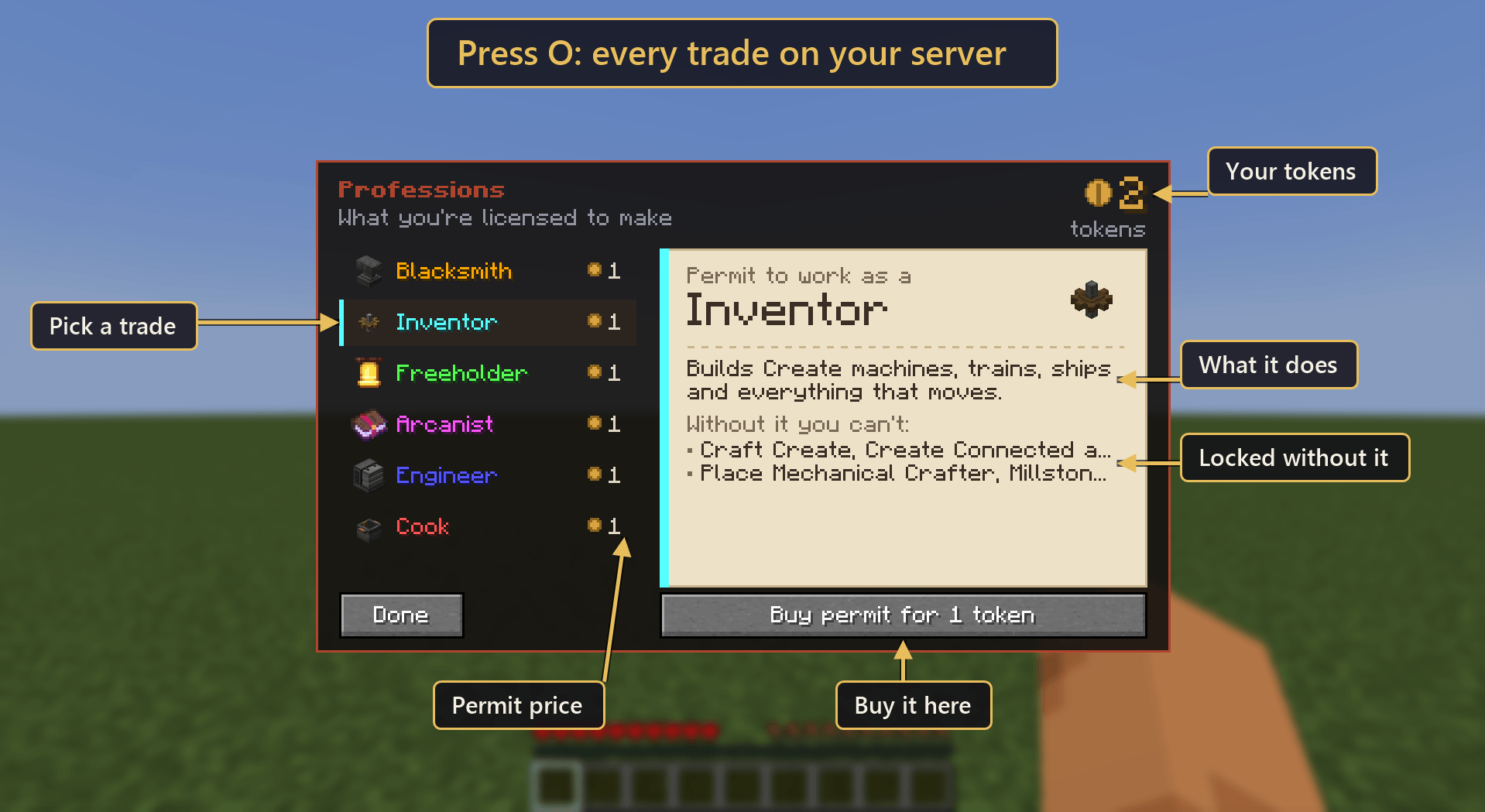 image-attachment_89afb34e-456f-42af-99b6-6b4556a60ebe.png
 -
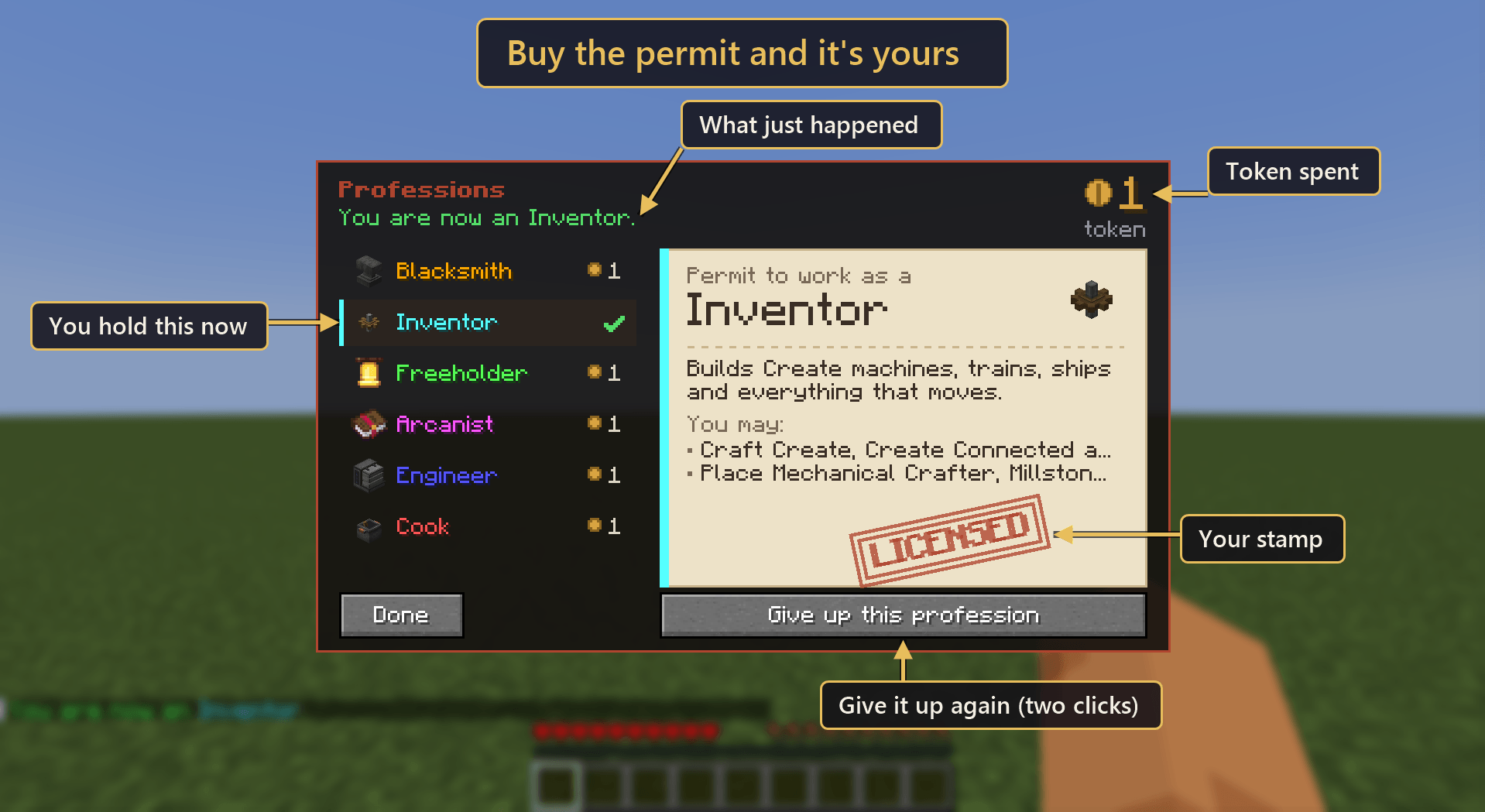 image-attachment_26970e8c-cb70-4e2e-9c5c-1f9bb3dd92bf.png
 -
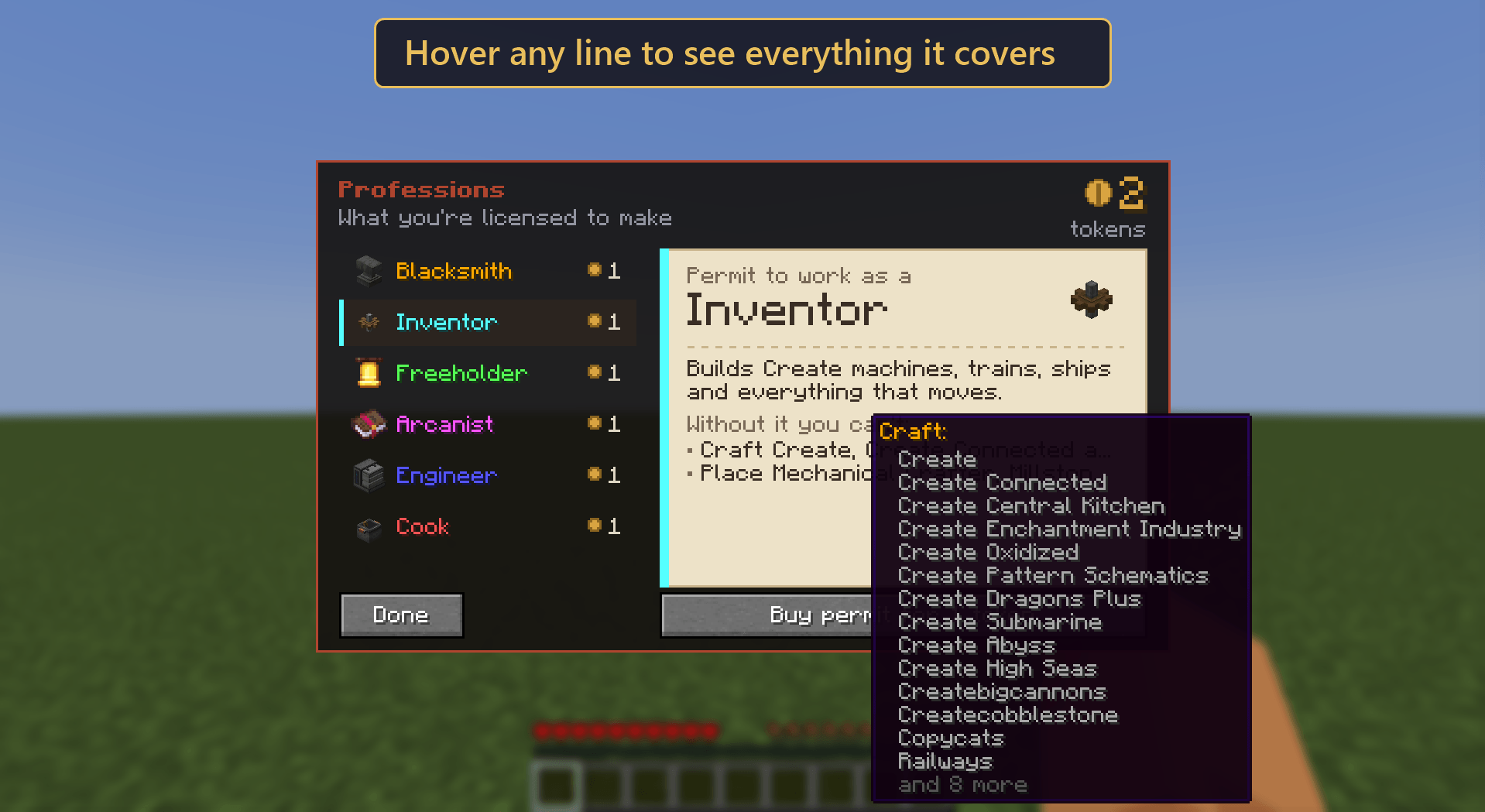 image-attachment_fda27c25-69ee-4885-9690-ad9de1ea1180.png
 -
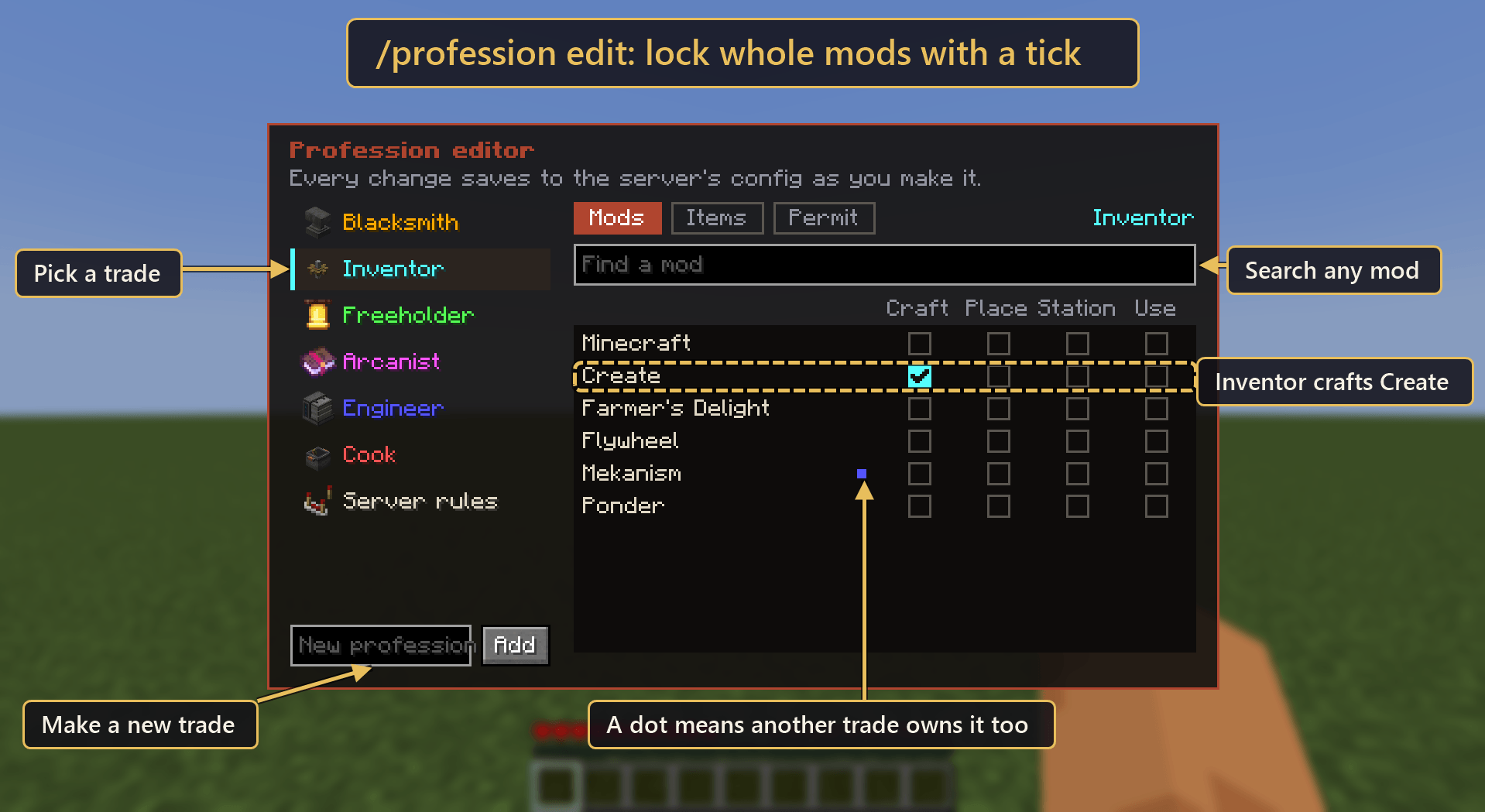 image-attachment_47180f32-873b-44be-a9a3-213f1eebf66b.png
 -
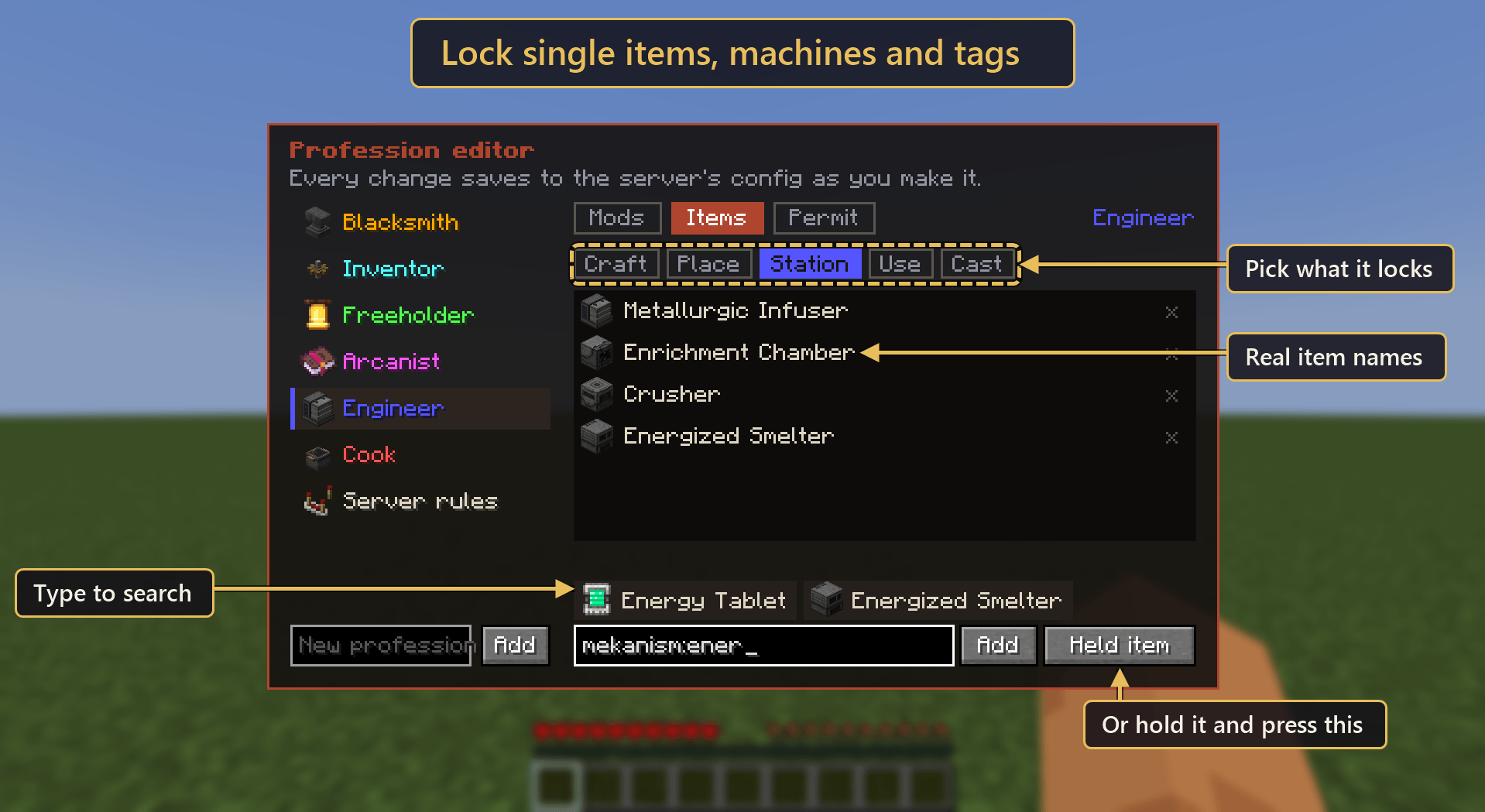 image-attachment_db68cb51-e32d-466c-99aa-e1f0e7a4b4da.png
 -
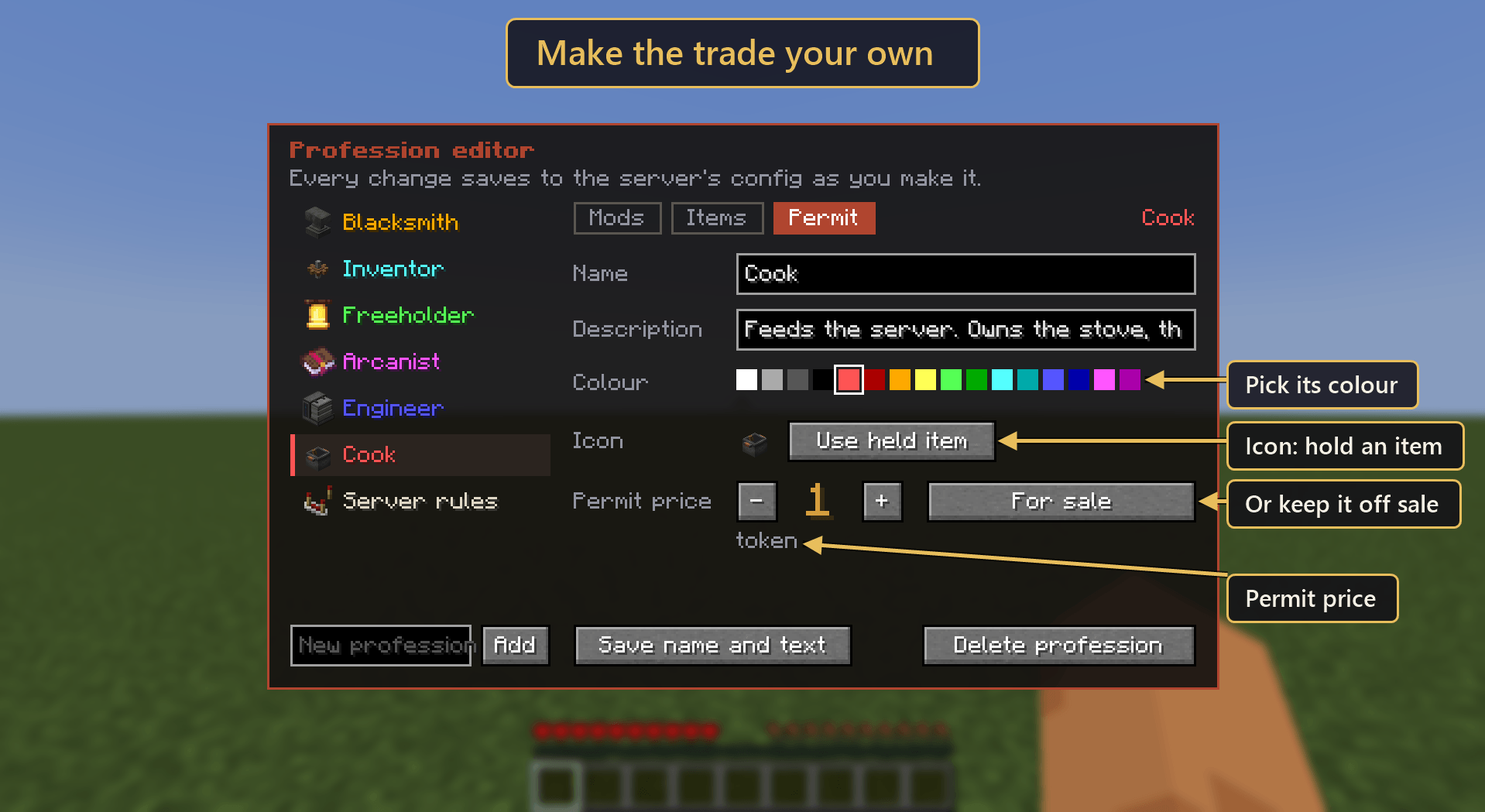 image-attachment_e9d55ba2-a161-4515-89c1-0f425b28afd8.png
 -
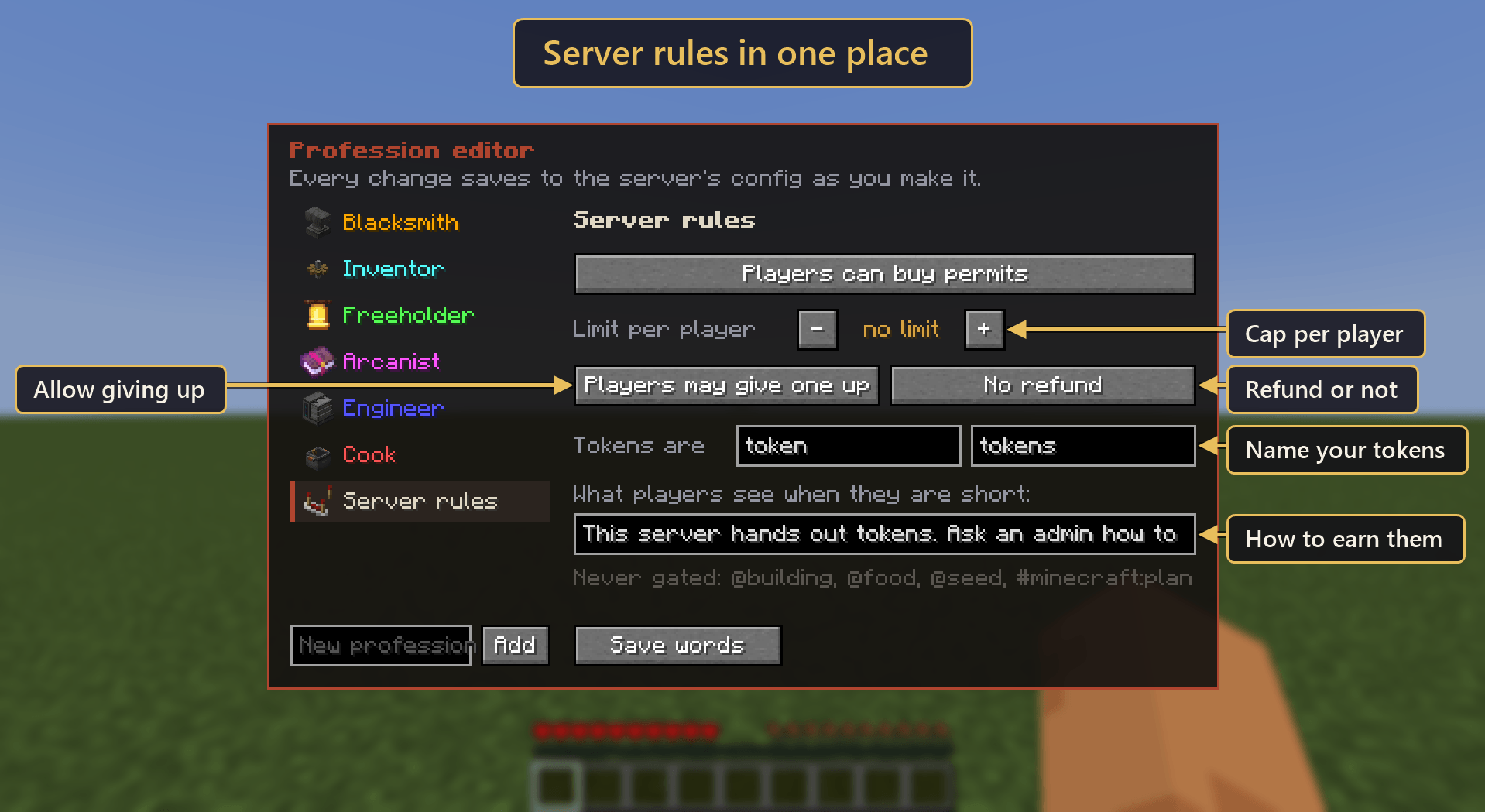 image-attachment_46c29294-f2fd-47fb-8f6f-8409b2ce62ed.png
 -
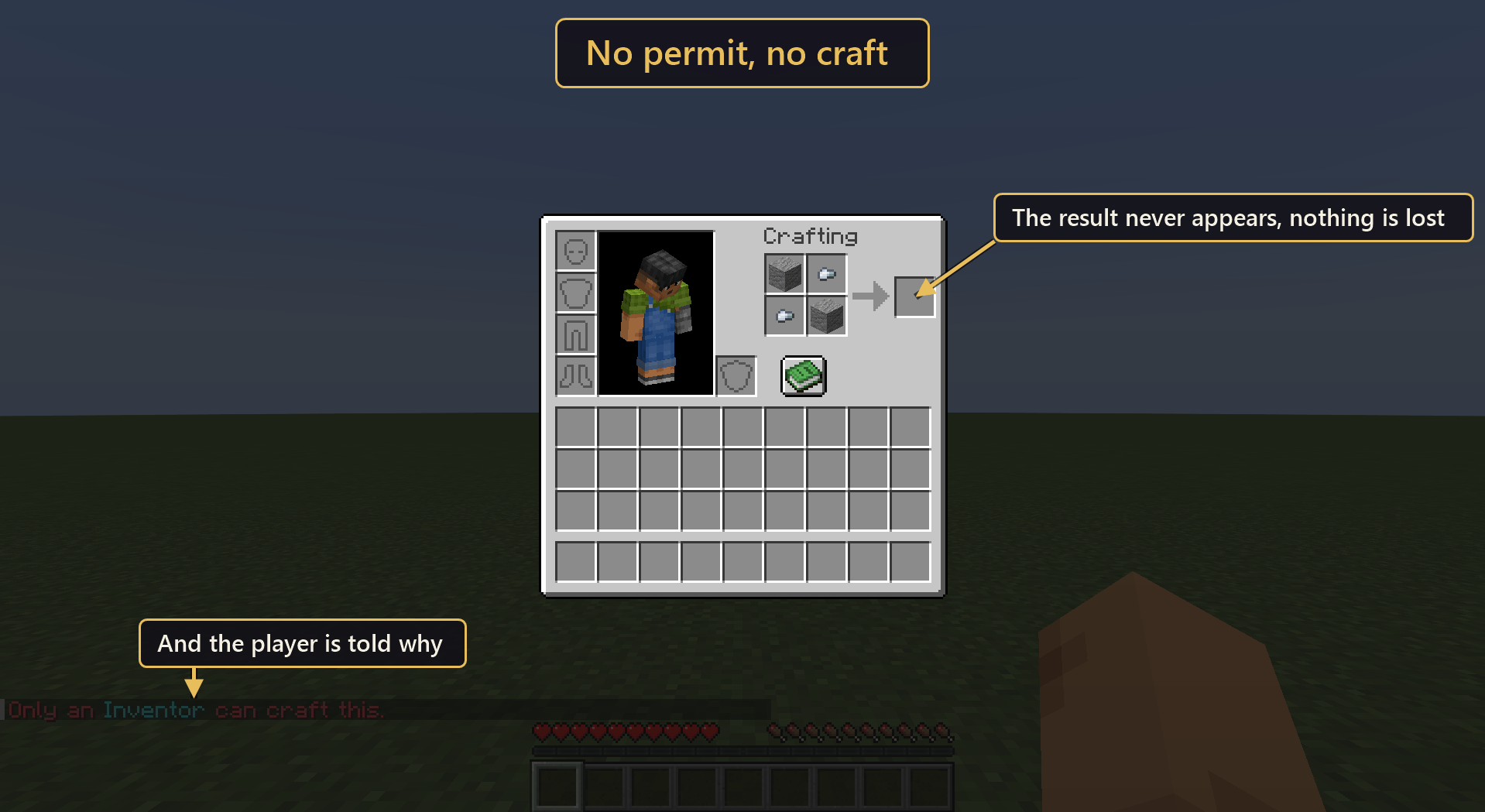 image-attachment_0479a6f6-9533-43de-a2ec-0f4f50601270.png
Versions
Files
Relations
Project Relations
More like this
Similar Mods
Suggestions use data such as tags, dependencies, dependents, descriptions, titles, and more to rank how much they overlap with this mod.
On ModDex
Community snapshot
By the numbers
Statistics
Want to reach Minecraft players?
We're looking for a server hosting partner to feature here and other parts of the site. Interested? Send us a message!
Get in touchGet it on
Available Platforms
On ModDex
Community snapshot
By the numbers
Statistics
Resources