Community listing page, reviews here may not be monitored by the author.
LivingNPC

No reviews yet
Give villagers their own routes. Place waypoints with the Route Stick, preview the path in the world, and pick a day, night or all-day schedule. Villagers loop the route and skip waypoints they can't reach.

Community voices
Reviews
No reviews yet. Be the first to review this project!
Get it on
Available Platforms
About
Project Details
For authors
Embed Badge
If you're the author of this project, you can embed a live badge anywhere that supports HTML or Markdown. It updates automatically whenever ratings change.
Use HTML for any page that supports it, or Markdown for README files and Markdown-based descriptions.
Identifiers
Platform IDs
Resources
External Links
About
Description

Give your villagers a daily route. Place waypoints with the Route Stick and a villager will walk between them in a loop, stopping to wander a little on the way so it still feels natural.
Good for village builds, shopkeepers, guards on patrol, or making a town feel alive.
Features
- Custom routes for each villager. Place waypoints on any block and the villager walks them in order, then loops back to the start.
- See the route in the world. Hold the Route Stick to see particles at each waypoint and a line along the path the villager actually walks.
- Day / Night schedule. Choose Always, Day Only or Night Only. Outside that time the villager lives its normal life and goes back to its own bed at night.
- Doesn't get stuck. If a waypoint can't be reached, the villager skips it after 10 seconds and tries again on the next loop. Unreachable waypoints are marked in the route preview.
- Easy to edit. Delete a single waypoint with the red X, or clear them all with one button.
- Saved with the villager. Routes survive restarts, remember their dimension, and disappear when the villager does.
- Multiplayer ready. Every player can edit a different villager at the same time.
How to use
1. Get a Route Stick
Find it in the Ingredients creative tab, or craft it:
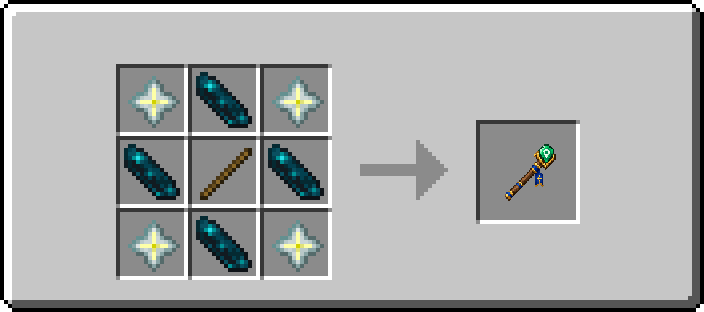
4× Nether Star, 4× Echo Shard, 1× Stick
2. Set up a route
- Hold the Route Stick and right-click a villager to open its route window.
- Press Create Waypoint. The window closes and waypoint mode is on.
- Right-click blocks along the path you want. Each click adds one waypoint.
- Right-click the villager again to see the list, change the schedule or stop placing waypoints.
A villager needs at least 2 waypoints to start walking. Up to 64 waypoints per villager.
Route window
- Create Waypoint / Stop: turn waypoint mode on or off
- Clear Waypoints: delete every waypoint of this villager
- Show Route / Hide Route: show or hide this villager's route while holding the Route Stick
- Schedule row (sun / moon icon): switch between Always → Day Only → Night Only
- Red X: delete that waypoint
Requirements
- Mod loader: Fabric (Loader 0.19.5+)
- Minecraft: 26.2 or 26.3 (download the file for your version)
- Required: Fabric API
- Java: 25+
Install on both the client and the server.
Updating from 1.0.1 (Minecraft 1.21.5)
Your routes are kept. Old waypoints are moved onto each villager automatically the first time that villager's area is loaded. Back up your world before updating.
FAQ
Can I use it in modpacks? Yes. LivingNPC is MIT licensed.
Does it work on 1.21.x or Forge/NeoForge? No. Only Fabric on Minecraft 26.2 and 26.3 for now.
Found a bug or have an idea?
Leave a comment on this page. Screenshots and your latest.log help a lot!
Screenshots
Gallery
-
logo.png logo.png
-
crafting-recipe.png crafting-recipe.png
Versions
Files
Relations
Project Relations
More like this
Similar Mods
Suggestions use data such as tags, dependencies, dependents, descriptions, titles, and more to rank how much they overlap with this mod.
On ModDex
Community snapshot
By the numbers
Statistics
 (opens in a new tab)
Get it on
Available Platforms
On ModDex
Community snapshot
By the numbers
Statistics
Resources