
Community listing page, reviews here may not be monitored by the author.
LT-BetterPVP


No reviews yet
Simple modification to add better animations and features to pvp in minecraft
Community voices
Reviews
No reviews yet. Be the first to review this project!
Get it on
Available Platforms
Compatibility
Supported Environments
Runs entirely on the client. Works on vanilla servers.
About
Project Details
For authors
Embed Badge
If you're the author of this project, you can embed a live badge anywhere that supports HTML or Markdown. It updates automatically whenever ratings change.
Use HTML for any page that supports it, or Markdown for README files and Markdown-based descriptions.
Identifiers
Platform IDs
About
Description
LT-BetterPVP - Minecraft Mod
📌 Description
LT-BetterPVP is a mod dedicated to PvP gameplay that enhances your experience with custom animations, improved aiming, and additional informational features. The mod introduces, among other things:
- Custom Sword Animation – Unique sword animations in various styles that make your swings look impressive.
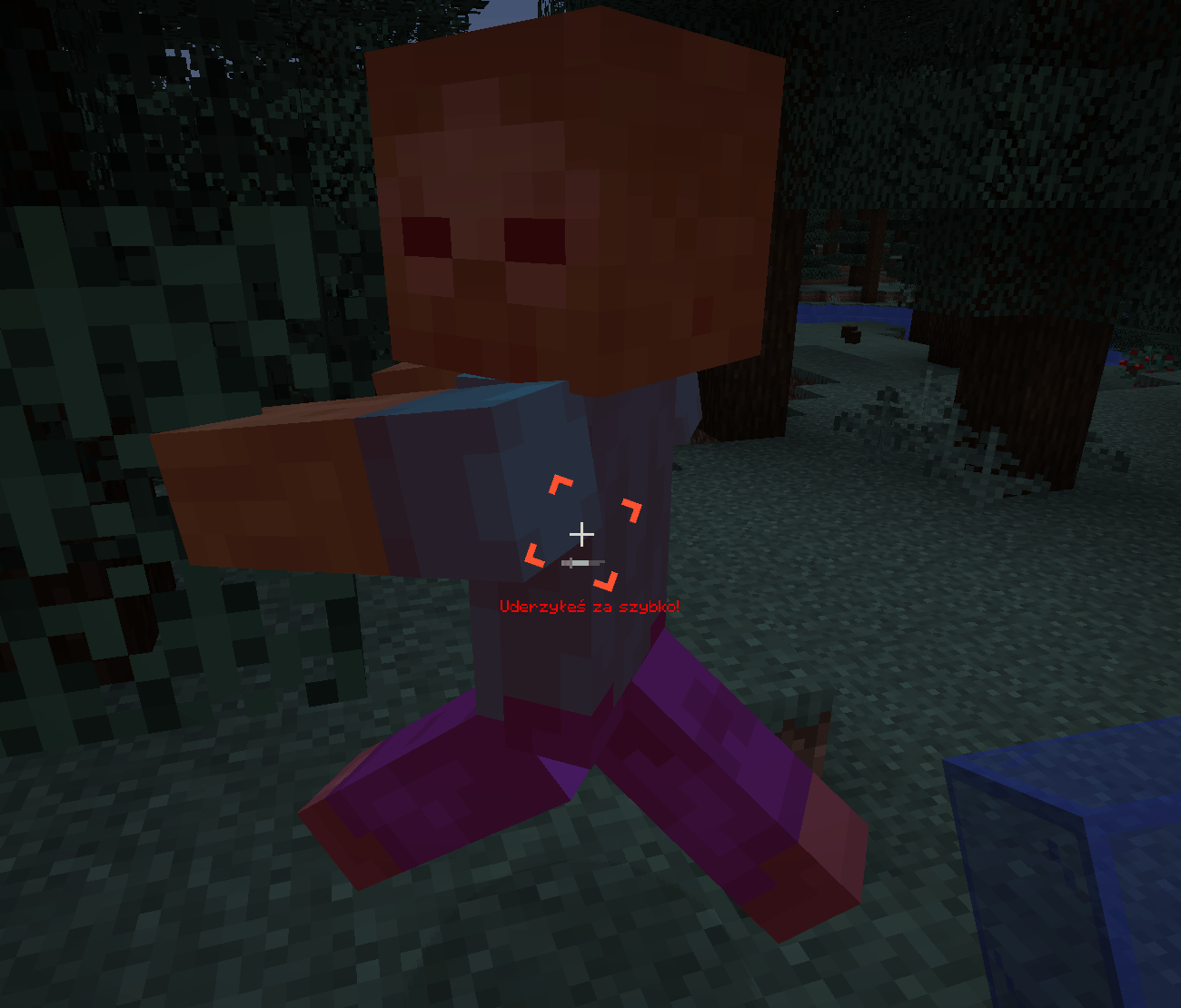
- Attack Delay Tutor – A system that warns you when an attack is executed too quickly (before the attack is fully charged). The warning is displayed under the crosshair as text (with the option to disable it) and a sound is played (also optionally).
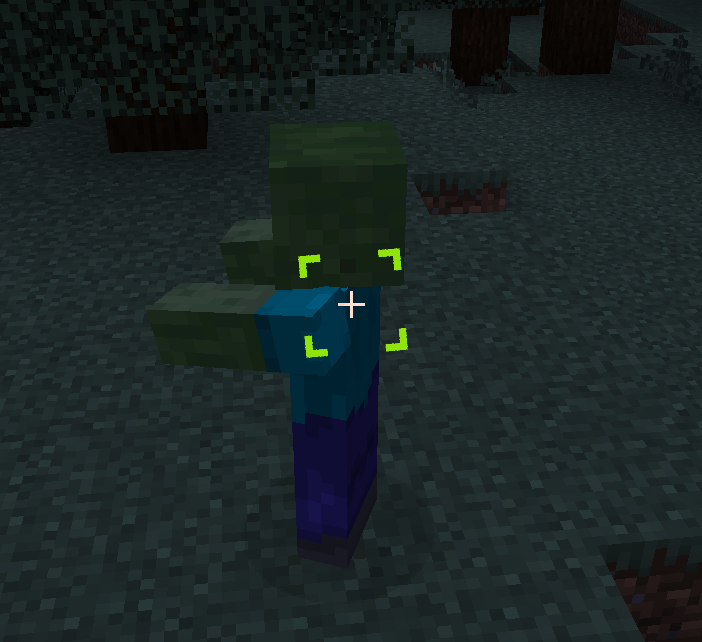
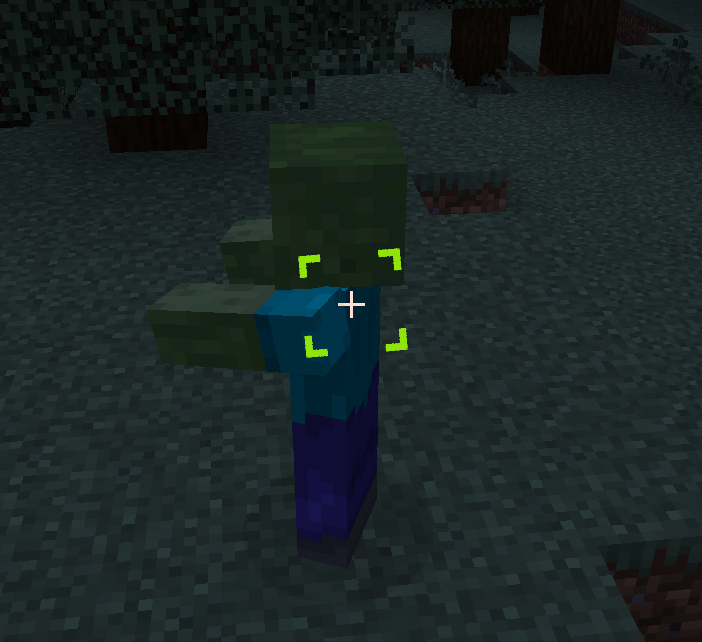
- Cursor ESP – Additional visual options to aid in aiming.
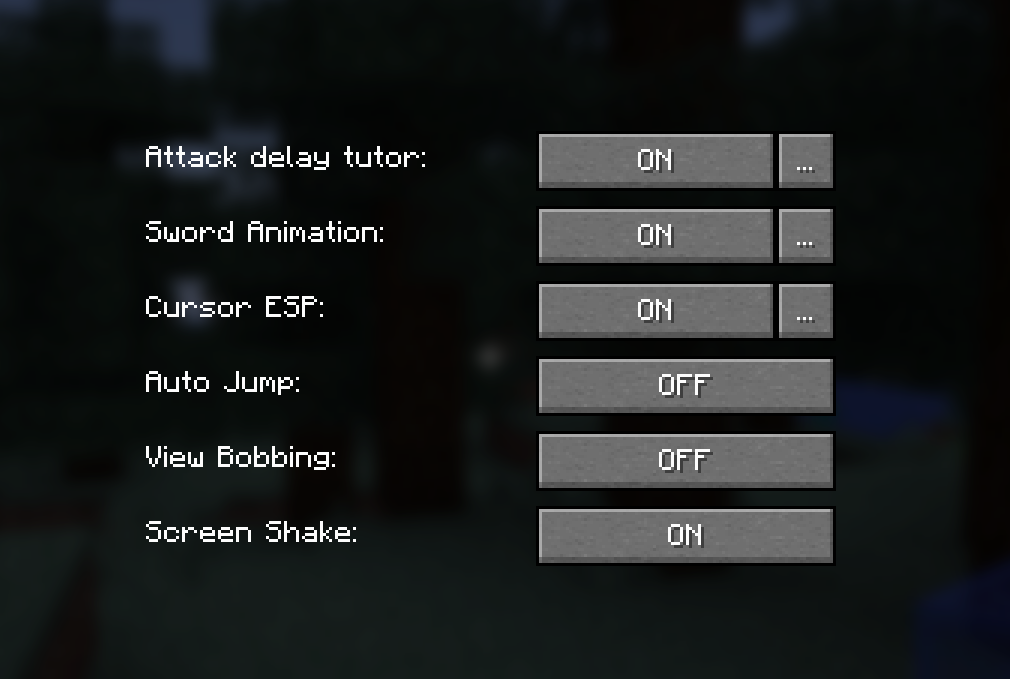
- Other Game Settings – Including Auto Jump, View Bobbing, Screen Shake, and Full Bright.
The mod automatically saves your settings to a configuration file, ensuring that your preferences persist between game sessions.
✨ Features
- Custom Sword Animation – Choose the animation style (BASIC_SWING, BASIC_CLAP, SWIPE_IN, SWIPE_OUT, NO_SWING).
- Attack Delay Tutor – Informs the player about attacking too quickly:
- Text: Displayed under the crosshair (can be enabled/disabled).
- Sound: Played when the attack is too fast (can be enabled/disabled).
- Cursor ESP – Visual options to improve aiming.
- Settings GUI – An intuitive graphical interface for editing all options.
- Command Support – Quick access to mod information and configuration through client-side commands.
- Automatic Saving – All changes are saved to a configuration file.
📜 Commands
| Command | Description |
|---|---|
/ltb |
Displays mod information and current settings |
/ltb settings |
Opens the mod settings GUI |
/ltb pomoc |
Displays a list of available commands |
/ltb config save |
Saves the current configuration |
/ltb config reload |
Loads the configuration from the file |
🔧 Installation
- Download the latest version of the mod from GitHub.
- Place the
.jarfile in themodsfolder in your Minecraft directory. - Launch the game and configure the mod according to your preferences!
🛠 Configuration
After the first launch, the mod generates a configuration file:
.minecraft/config/LT-Mods/LT-BetterPVP/ltbetterpvp-config.json
This file stores all the settings, including:
- Custom Sword Animation (style and offsets)
- Attack Delay Tutor (enabled/disabled, text and sound options)
- Cursor ESP
- Other game settings (Auto Jump, View Bobbing, Screen Shake, Full Bright)
🎉 Thank you for using LT-BetterPVP!
"Bierzcie i korzystajcie z tego wszyscy - to jest bowiem praca moja, która dla was została wykonana" ~LordTricker
LT-BetterPVP - Minecraft Mod
📌 Description
LT-BetterPVP is a mod dedicated to PvP gameplay that enhances your experience with custom animations, improved aiming, and additional informational features. The mod introduces, among other things:
- Custom Sword Animation – Unique sword animations in various styles that make your swings look impressive.
- Attack Delay Tutor – A system that warns you when an attack is executed too quickly (before the attack is fully charged). The warning is displayed under the crosshair as text (with the option to disable it) and a sound is played (also optionally).
- Cursor ESP – Additional visual options to aid in aiming.
- Other Game Settings – Including Auto Jump, View Bobbing, Screen Shake, and Full Bright.
The mod automatically saves your settings to a configuration file, ensuring that your preferences persist between game sessions.
✨ Features
- Custom Sword Animation – Choose the animation style (BASIC_SWING, BASIC_CLAP, SWIPE_IN, SWIPE_OUT, NO_SWING).
- Attack Delay Tutor – Informs the player about attacking too quickly:
- Text: Displayed under the crosshair (can be enabled/disabled).
- Sound: Played when the attack is too fast (can be enabled/disabled).
- Cursor ESP – Visual options to improve aiming.
- Settings GUI – An intuitive graphical interface for editing all options.
- Command Support – Quick access to mod information and configuration through client-side commands.
- Automatic Saving – All changes are saved to a configuration file.
🛠️ Available Versions
Available releases:
- 🟢 1.18.2 – Download from GitHub
- 🟢 1.19.2 – Download from GitHub
- 🟢 1.19.4 – Download from GitHub
- 🔷 1.21.1 – Download from GitHub
- 🔷 1.21.3 – Download from GitHub
- 🔷 1.21.4 – Download from GitHub
- 🔴 1.21.5 – Coming soon
🔷 – Latest updates and fixes
📜 Commands
| Command | Description |
|---|---|
/ltb |
Displays mod information and current settings |
/ltb settings |
Opens the mod settings GUI |
/ltb pomoc |
Displays a list of available commands |
/ltb config save |
Saves the current configuration |
/ltb config reload |
Loads the configuration from the file |
🔧 Installation
- Download the latest version of the mod from GitHub.
- Place the
.jarfile in themodsfolder in your Minecraft directory. - Launch the game and configure the mod according to your preferences!
🛠 Configuration
After the first launch, the mod generates a configuration file:
.minecraft/config/LT-Mods/LT-BetterPVP/ltbetterpvp-config.json
This file stores all the settings, including:
- Custom Sword Animation (style and offsets)
- Attack Delay Tutor (enabled/disabled, text and sound options)
- Cursor ESP
- Other game settings (Auto Jump, View Bobbing, Screen Shake, Full Bright)
👥 Authors
- LordTricker – Main mod creator
- Mr. GPT – Subject matter support 🤖
🎉 Thank you for using LT-BetterPVP!
"Bierzcie i korzystajcie z tego wszyscy - to jest bowiem praca moja, która dla was została wykonana" ~LordTricker
Screenshots
Gallery
-
 settings.webp settings.webp
 -
 indicator.png indicator.png
 -
 cursor.webp cursor.webp
-
 Cursor ESP
 -
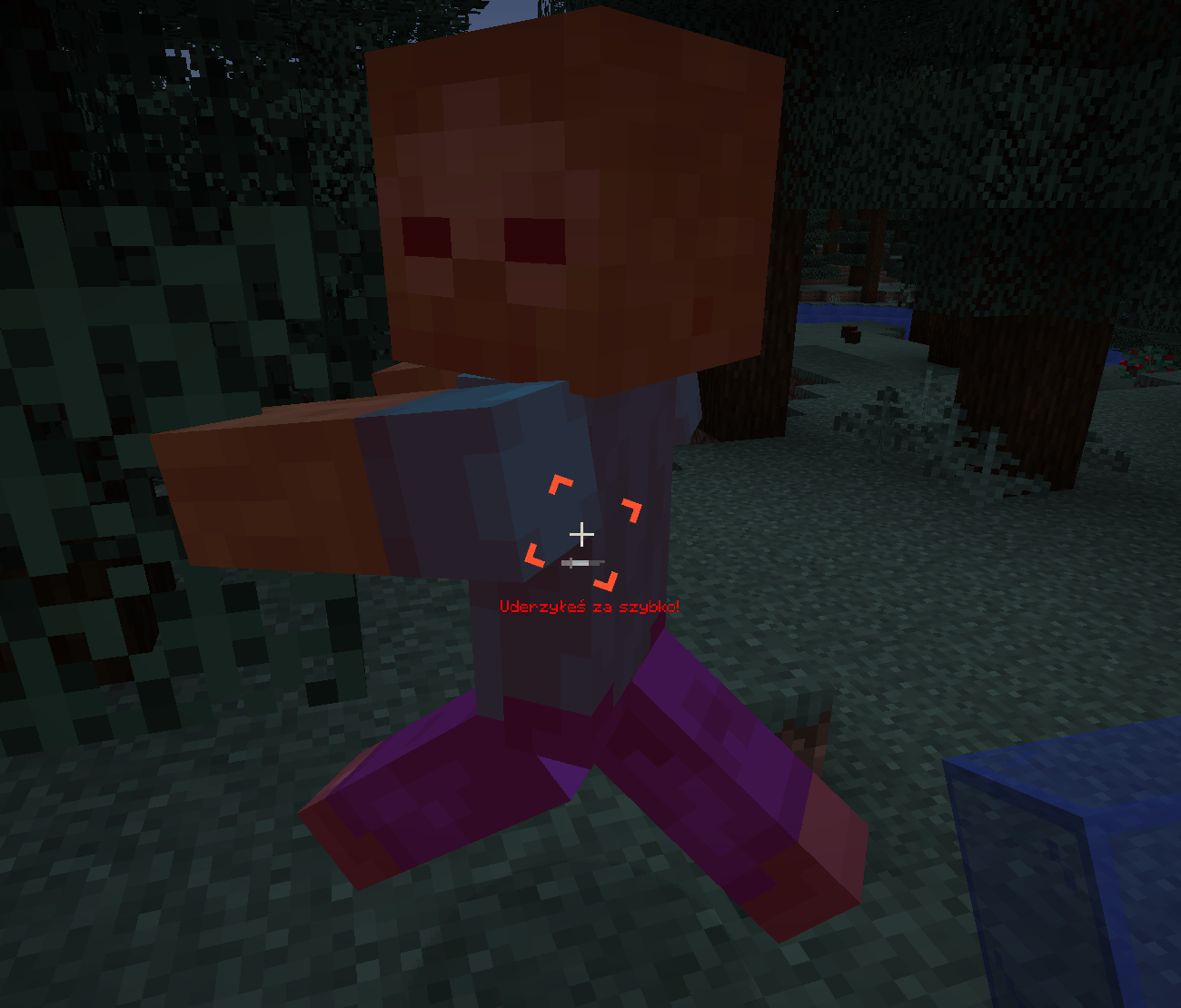 Fight tutor
 -
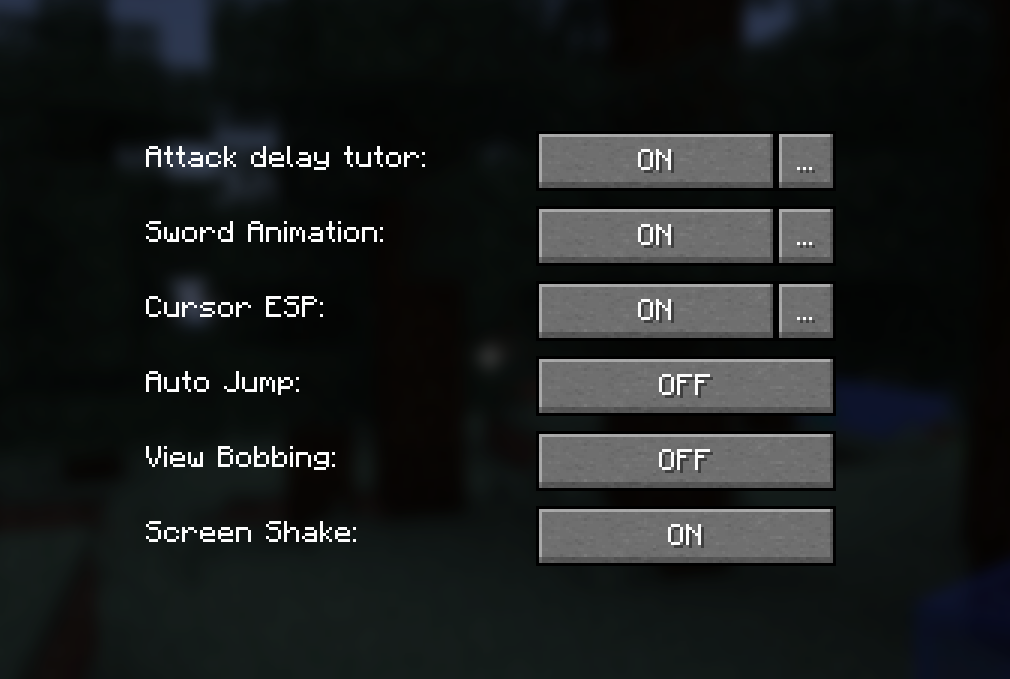 Mod settings
Versions
Files
Relations
Project Relations
More like this
Similar Mods
Suggestions use data such as tags, dependencies, dependents, descriptions, titles, and more to rank how much they overlap with this mod.
On ModDex
Community snapshot
By the numbers
Statistics
Want to reach Minecraft players?
We're looking for a server hosting partner to feature here and other parts of the site. Interested? Send us a message!
Get in touchGet it on
Available Platforms
On ModDex
Community snapshot
By the numbers