
Community listing page, reviews may not be monitored by the author.
Lucky Block Cobblemon


No reviews yet
This mod adds Lucky Blocks to Cobblemon, with 100% configurable events via JSON.

Community voices
Reviews
No reviews yet. Be the first to review this project!
Get it on
Available Platforms
Compatibility
Supported Environments
Must be installed on both the client and the server.
About
Project Details
For authors
Embed Badge
If you're the author of this project, you can embed a live badge anywhere that supports HTML or Markdown. It updates automatically whenever ratings change.
Use HTML for any page that supports it, or Markdown for README files and Markdown-based descriptions.
Identifiers
Platform IDs
About
Description

Get 25% off your Minecraft server with Shockbyte! Ready to start an epic adventure with your friends? Just click here or on the banner and use promo code “COBBLEKANTO”, plus you’ll be helping us keep improving the mod and developing future projects!
LuckyBlock Cobblemon
Adds Lucky Blocks that spawn random Cobblemon, items, or special structures. Break and discover!
Perfect for Survival Gamemode!
The mod implements a distinctive survival progression system: as in-game days advance, the Cobblemon levels in the events increase, keeping the experience consistently challenging and engaging. (This is the default option, but you can adjust it in the config file.)
Main Features & Highlights

Find exclusive Lucky Block structures scattered across your world or craft your own Lucky Blocks (regular and legendary).
You can also discover naturally spawned Lucky Blocks throughout new chunks as you explore!
Experience full integration with the Cobblemon universe, earning themed items, rare Cobblemons, and even special structures — all easily customizable through simple JSON files.
Features
- 100% customizable event pools: Easily edit or add events (drops, Pokémon, Cobblemon items, or structures) directly through the JSON in the /config/luckblockcobblemon/ folder.
- Craftable Lucky Blocks: Both the regular and legendary versions can be crafted.
- Configurable shiny chance system: Set the shiny Pokémon chance directly in the JSON.
- Advanced level progression: Choose between three ways to define the Pokémon level:
> Fixed range (minLevel/maxLevel)
> Scaling based on world days (timeLeveling) - Default option - /time set 0 (reset the scaling)
> Weighted probability distribution (levelWeighting)
- Multi-Pokémon events: Spawn multiple Cobblemons in a single event, if you wish.
- Weighted structure generation: Events can generate different structures, each with its own weight/chance in the pool.
- Configurable Break Event in Creative Gamemode: Define whether Lucky Blocks can be activated when broken in creative mode (breakCreative).
- Instant config reload: Use a command to reload all Lucky Block configs without restarting the game/server.
- Multiplayer-ready, easy to update and expand.
How does it work in practice?
Break a Lucky Block and a random event happens according to your configured pool. You can get anything from simple drops to structure generation, Cobblemon item drops, or Pokémon spawns with shiny chance. Pokémon levels can be fixed, based on world time, or weighted by chance, as you decide in the files: luckpocket_config.json (Standard Lucky Block)
luckyblock_legendary.json (Legendary Lucky Block)
lvlconfig_types.json (only defines level logic for specific types; the Cobblemons themselves are defined in each event file)
Customize everything by editing the JSON files in /config/luckblockcobblemon/. Attention: Always use the correct Pokémon names as per Cobblemon, without underscores (example: nidoranm). The handler already normalizes most formats, but it's always recommended to check accepted names in the Cobblemon mod.
Example configuration
To set the level and which Cobblemons can appear when breaking a standard Lucky Block, open luckpocket_config.json and set it up like this:
{ "type": "random_cobblemonp",
"species": ["pikachu", "bulbasaur"],
"minLevel": 5,
"maxLevel": 15,
"chance": 10.0
}
In this example, any Cobblemon chosen in this event will spawn between level 5 and level 15.
You can apply this pattern in luckpocket_config.json and luckyblock_legendary.json. The lvlconfig_types.json file only sets the level logic, while Cobblemons are defined in each event’s JSON file. If you want a fixed level, just set "minLevel" and "maxLevel" to the same value.
Installation
Requirements:
Minecraft 1.21.1
Fabric Loader 0.16.13+
Cobblemon 1.6.0+
Fabric API
How to install:
Place the mod .jar in the mods/ folder.
Start Minecraft to generate the config files.
Customize pools, events, and chances in the JSON files.
(Optional but recommended) Use model datapacks to enhance the visual variety of Cobblemon! See suggestions below.
Main Commands
Reload configs:
/luckyblock reload
Instantly reloads all Lucky Block configs.
Locate Lucky Block structures:
/locate structure luckblockcobblemon:luckblockrandom1
/locate structure luckblockcobblemon:luckblockrandom2
/locate structure luckblockcobblemon:luckblockrandom3
/locate structure luckblockcobblemon:luckblockrandom4
/luckyblocklocate [range]
Use these to quickly find the mod’s special structures.
Locked Tier Lucky Blocks:
/luckyblockgive <target> <type> <tier> [amount]
Gives locked-tier Lucky Blocks directly to players. These blocks keep their fixed Pokémon level range based on the selected tier.
Available types:
default, fire, water, grass, ground, fly, steel, eletric, fairy
Default aliases:
default, normal, base, pocket
These commands require admin/operator permission.
Extra Recommendation – Model Datapacks
For an even richer and more immersive experience, we recommend using custom model datapacks to expand the variety of Cobblemon and items.
Check the Cobblemon community on Discord or sites like Modrinth to find and download model packs, increasing the number of Cobblemons with unique models!
FAQ
Can I create my own Lucky Block Cobblemon?
> No, the mod allows you to change pools/events for existing Lucky Blocks, but not add new types.How do I change Cobblemon levels?
> Edit the config files according to the event type.Why doesn’t my event work?
> Make sure the JSON is correct and the Cobblemon name matches Cobblemon IDs (no underscores).Does it work on Forge?
> No, only for Fabric.Can I create content or a modpack with this mod?
> Yes! You’re absolutely welcome to create content or a modpack using this mod. We love seeing the community get creative!

Get 25% off your Minecraft server with Shockbyte! Use promo code COBBLEKANTO and get ready to start an epic adventure with your friends!
Lucky Block Cobblemon is not affiliated with Cobblemon nor Minecraft.
Minecraft is a trademark of Mojang Synergies AB | Cobblemon is a trademark of CobbledStudios
Get 25% off your Minecraft server with Shockbyte! Ready to start an epic adventure with your friends? Just click here or on the banner and use promo code “COBBLEKANTO”, plus you’ll be helping us keep improving the mod and developing future projects!
LuckyBlock Cobblemon
Adds Lucky Blocks that spawn random Cobblemon, items, or special structures. Break and discover!
Perfect for Survival Gamemode!
The mod implements a distinctive survival progression system: as in-game days advance, the Cobblemon levels in the events increase, keeping the experience consistently challenging and engaging. (This is the default option, but you can adjust it in the config file.)
Main Features & Highlights
Find exclusive Lucky Block structures scattered across your world or craft your own Lucky Blocks (regular and legendary).
You can also discover naturally spawned Lucky Blocks throughout new chunks as you explore!
Experience full integration with the Cobblemon universe, earning themed items, rare Cobblemons, and even special structures — all easily customizable through simple JSON files.
Features
-
100% customizable event pools: Easily edit or add events (drops, Pokémon, Cobblemon items, or structures) directly through the JSON in the /config/luckblockcobblemon/ folder.
-
Craftable Lucky Blocks: Both the regular and legendary versions can be crafted.
-
Configurable shiny chance system: Set the shiny Pokémon chance directly in the JSON.
-
Advanced level progression: Choose between three ways to define the Pokémon level:
Fixed range (minLevel/maxLevel)
Scaling based on world days (timeLeveling) - Default option - /time set 0 (reset the scaling)
Weighted probability distribution (levelWeighting)
-
Multi-Pokémon events: Spawn multiple Cobblemons in a single event, if you wish.
-
Weighted structure generation: Events can generate different structures, each with its own weight/chance in the pool.
-
Configurable Break Event in Creative Gamemode: Define whether Lucky Blocks can be activated when broken in creative mode (breakCreative).
-
Instant config reload: Use a command to reload all Lucky Block configs without restarting the game/server.
-
Multiplayer-ready, easy to update and expand.
How does it work in practice?
Break a Lucky Block and a random event happens according to your configured pool. You can get anything from simple drops to structure generation, Cobblemon item drops, or Pokémon spawns with shiny chance. Pokémon levels can be fixed, based on world time, or weighted by chance, as you decide in the files: luckpocket_config.json (Standard Lucky Block)
luckyblock_legendary.json (Legendary Lucky Block)
lvlconfig_types.json (only defines level logic for specific types; the Cobblemons themselves are defined in each event file)
Customize everything by editing the JSON files in /config/luckblockcobblemon/. Attention: Always use the correct Pokémon names as per Cobblemon, without underscores (example: nidoranm). The handler already normalizes most formats, but it's always recommended to check accepted names in the Cobblemon mod.
Example configuration
To set the level and which Cobblemons can appear when breaking a standard Lucky Block, open luckpocket_config.json and set it up like this:
{ "type": "random_cobblemonp",
"species": ["pikachu", "bulbasaur"],
"minLevel": 5,
"maxLevel": 15,
"chance": 10.0
}
In this example, any Cobblemon chosen in this event will spawn between level 5 and level 15.
You can apply this pattern in luckpocket_config.json and luckyblock_legendary.json.
The lvlconfig_types.json file only sets the level logic, while Cobblemons are defined in each event’s JSON file.
If you want a fixed level, just set "minLevel" and "maxLevel" to the same value.
Installation
Requirements:
Minecraft 1.21.1
Fabric Loader 0.16.13+
Cobblemon 1.6.0+
Fabric API
How to install:
Place the mod .jar in the mods/ folder.
Start Minecraft to generate the config files.
Customize pools, events, and chances in the JSON files.
(Optional but recommended) Use model datapacks to enhance the visual variety of Cobblemon! See suggestions below.
Main Commands
Reload configs:
/luckyblock reload
Instantly reloads all Lucky Block configs.
Locate Lucky Block structures:
/locate structure luckblockcobblemon:luckblockrandom1
/locate structure luckblockcobblemon:luckblockrandom2
/locate structure luckblockcobblemon:luckblockrandom3
/locate structure luckblockcobblemon:luckblockrandom4
/luckyblocklocate [range]
Use these to quickly find the mod’s special structures.
Locked Tier Lucky Blocks:
/luckyblockgive <target> <type> <tier> [amount]
Gives locked-tier Lucky Blocks directly to players. These blocks keep their fixed Pokémon level range based on the selected tier.
Available types:
default, fire, water, grass, ground, fly, steel, eletric, fairy
Default aliases:
default, normal, base, pocket
Examples:
/luckyblockgive @s default 3 5
/luckyblockgive Steve fire 4 2
/luckyblockgive @a water 2 10
These commands require admin/operator permission.
Extra Recommendation – Model Datapacks
For an even richer and more immersive experience, we recommend using custom model datapacks to expand the variety of Cobblemon and items. Check the Cobblemon community on Discord or sites like Modrinth to find and download model packs, increasing the number of Cobblemons with unique models!
FAQ
-
Can I create my own Lucky Block Cobblemon?
No, the mod allows you to change pools/events for existing Lucky Blocks, but not add new types.
-
How do I change Cobblemon levels?
Edit the config files according to the event type.
-
Why doesn’t my event work?
Make sure the JSON is correct and the Cobblemon name matches Cobblemon IDs (no underscores).
-
Does it work on Forge?
No, only for Fabric.
-
Can I create content or a modpack with this mod?
Yes! You’re absolutely welcome to create content or a modpack using this mod. We love seeing the community get creative!
Get 25% off your Minecraft server with Shockbyte! Use promo code COBBLEKANTO and get ready to start an epic adventure with your friends!
Lucky Block Cobblemon is not affiliated with Cobblemon nor Minecraft.
Minecraft is a trademark of Mojang Synergies AB | Cobblemon is a trademark of CobbledStudios
Screenshots
Gallery
-
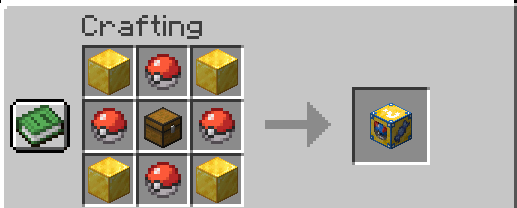 Crafting Lucky Block Cobblemon Recipe for crafting a basic Cobblemon Lucky Block
 -
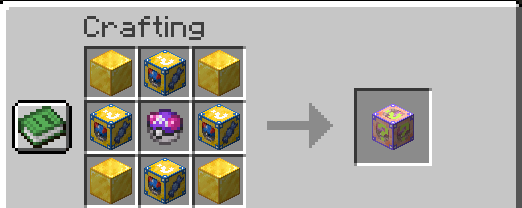 Crafting Lucky Block Cobblemon Legendary Recipe for crafting a Legendary Cobblemon Lucky Block
 -
 All Lucky Block Cobblemon These are all types of blocks that you will find in your journey!
 -
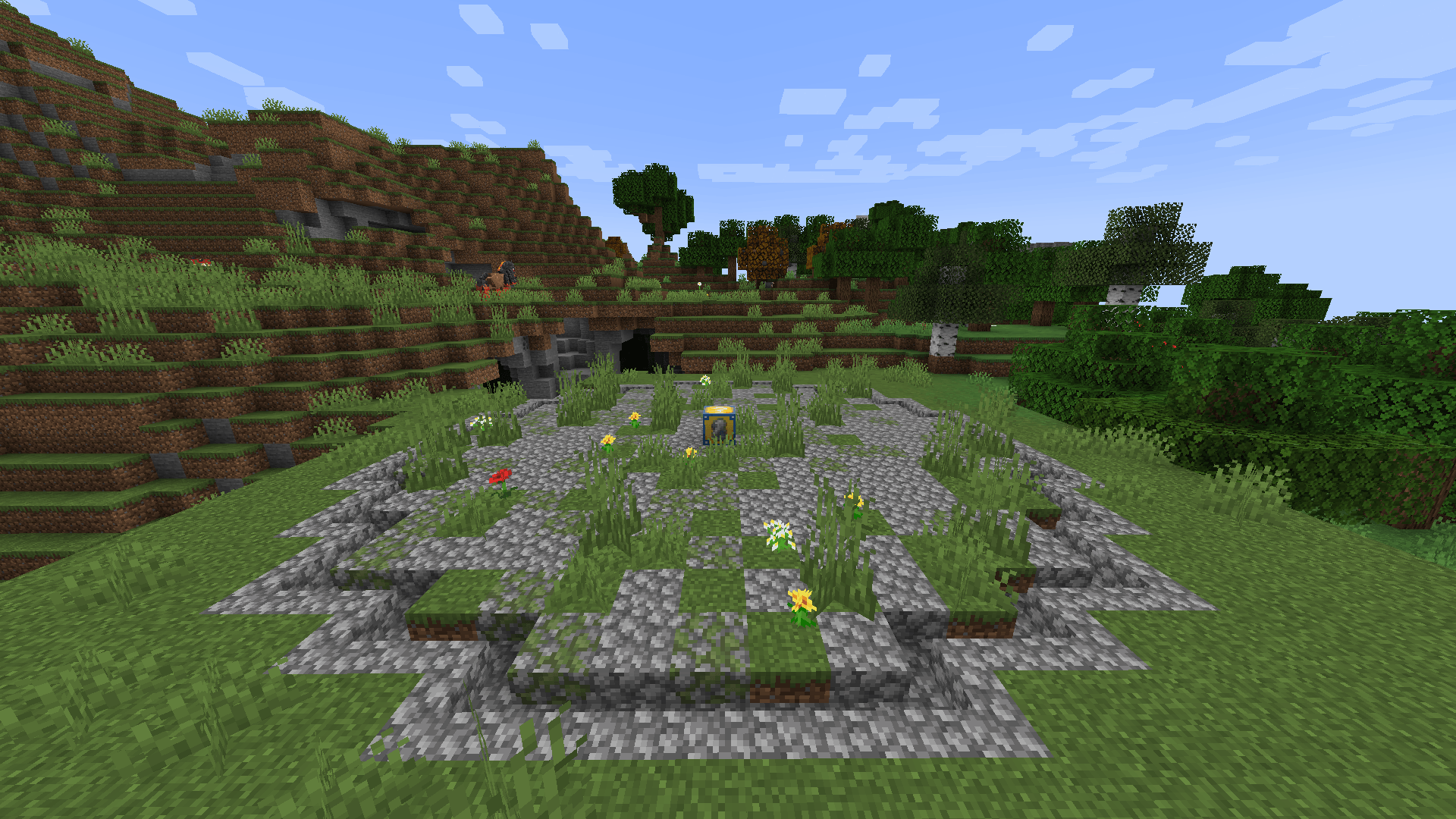 Lost Lucky Altar One of the randomly generated structures that can be found in any biome!
 -
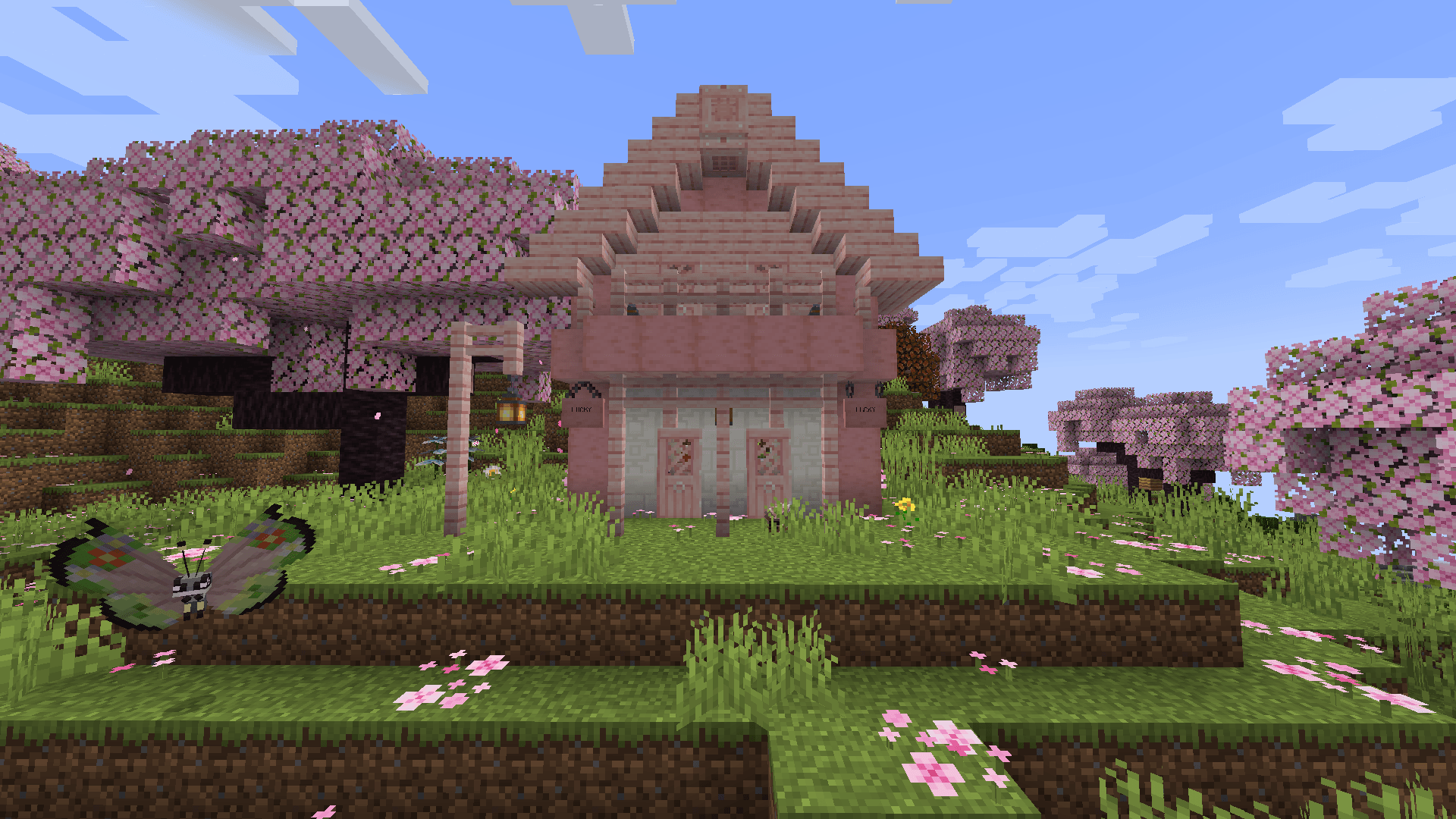 Cherry House A little house that contains a random amount of treasure inside!
 -
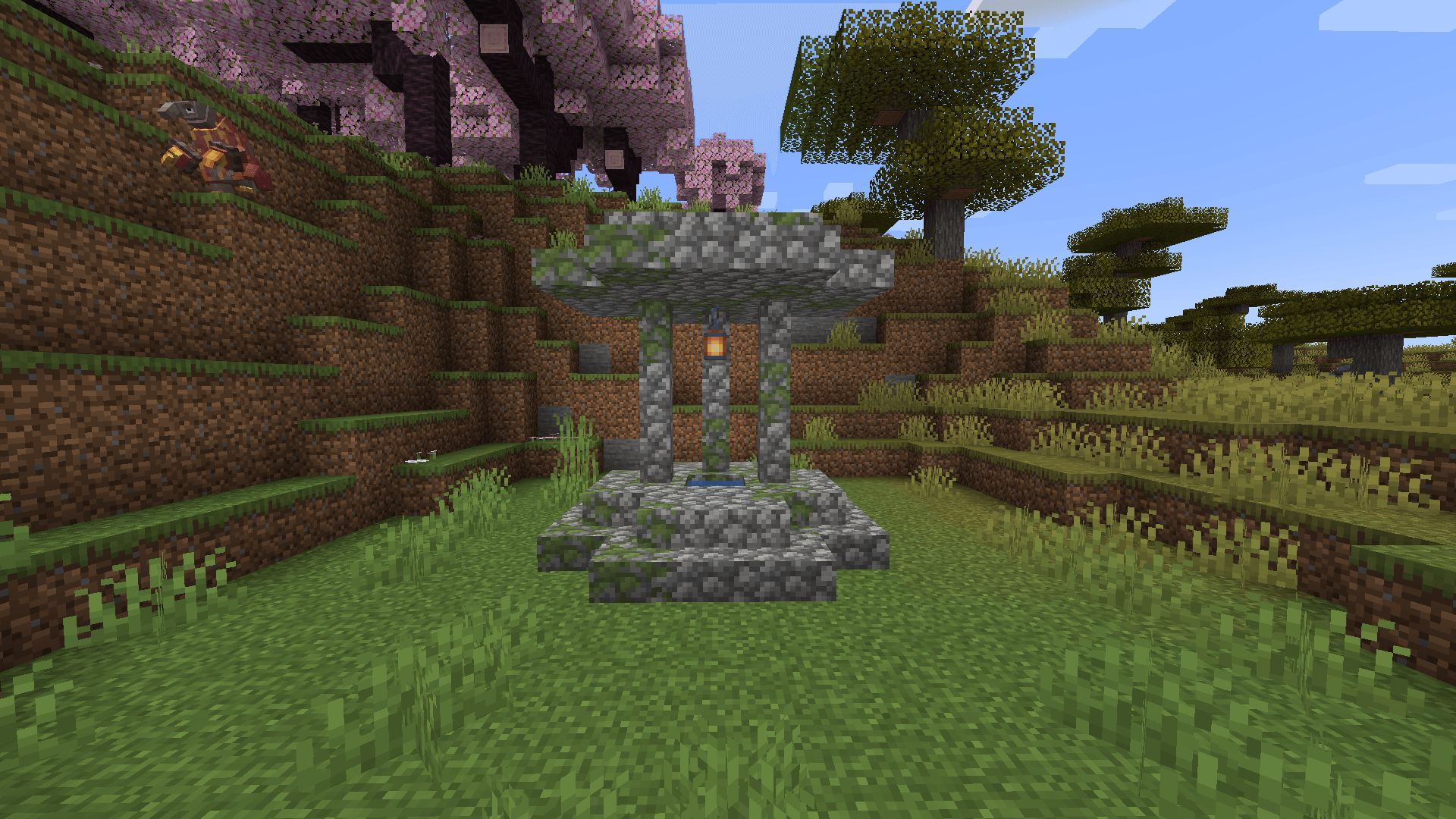 Lucky Well Maybe there's something at the bottom?
 -
 Lootball Shelter Perfect for any Trainer to rest and claim their lucky treasures!
 -
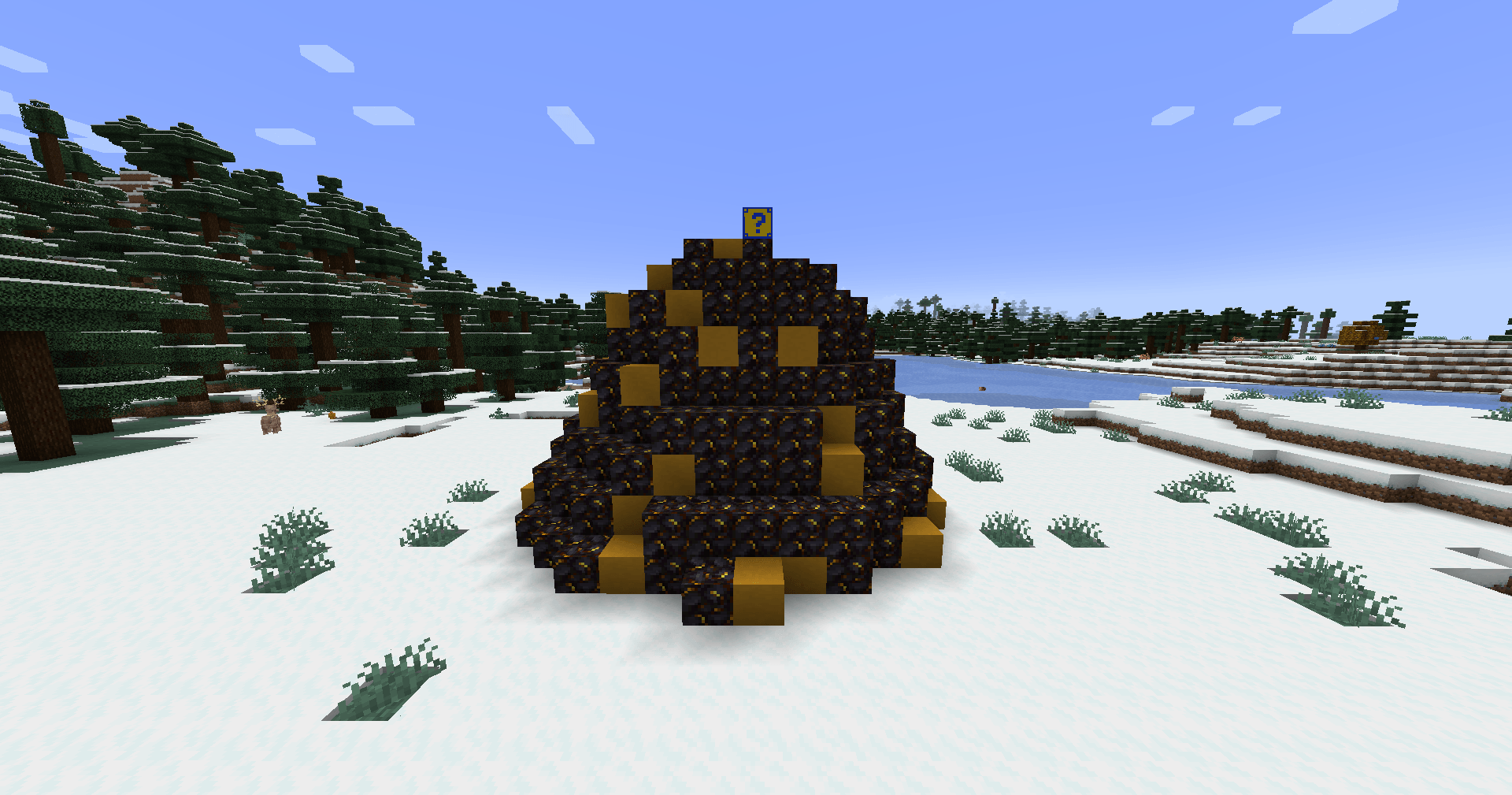 Structure Event One of the available events is the spawning of a structure defined by Cobblemon/item type. This GIF is an example of the Eletric and Dark Type structure.
-
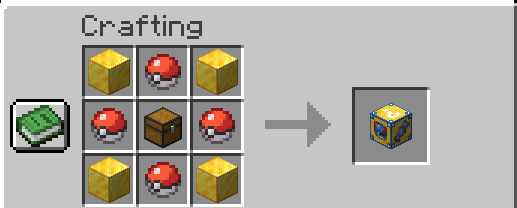 Crafting Lucky Block Cobblemon Recipe for crafting a basic Cobblemon Lucky Block
 -
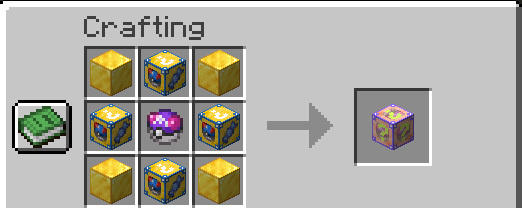 Crafting Lucky Block Cobblemon Legendary Recipe for crafting a Legendary Cobblemon Lucky Block
 -
 All Lucky Block Cobblemon These are all types of blocks that you will find in your journey!
 -
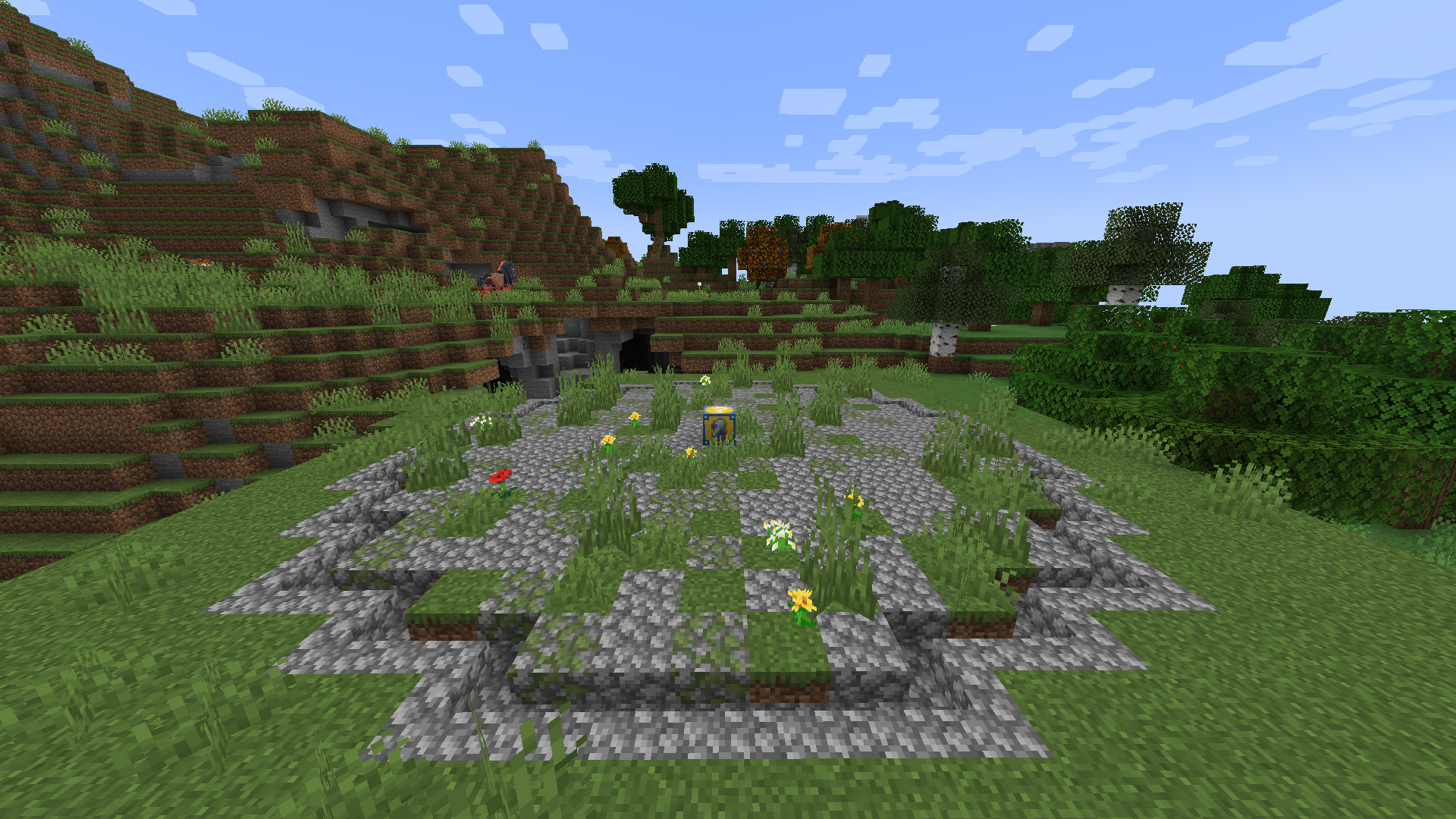 Lost Lucky Altar One of the randomly generated structures that can be found in any biome!
 -
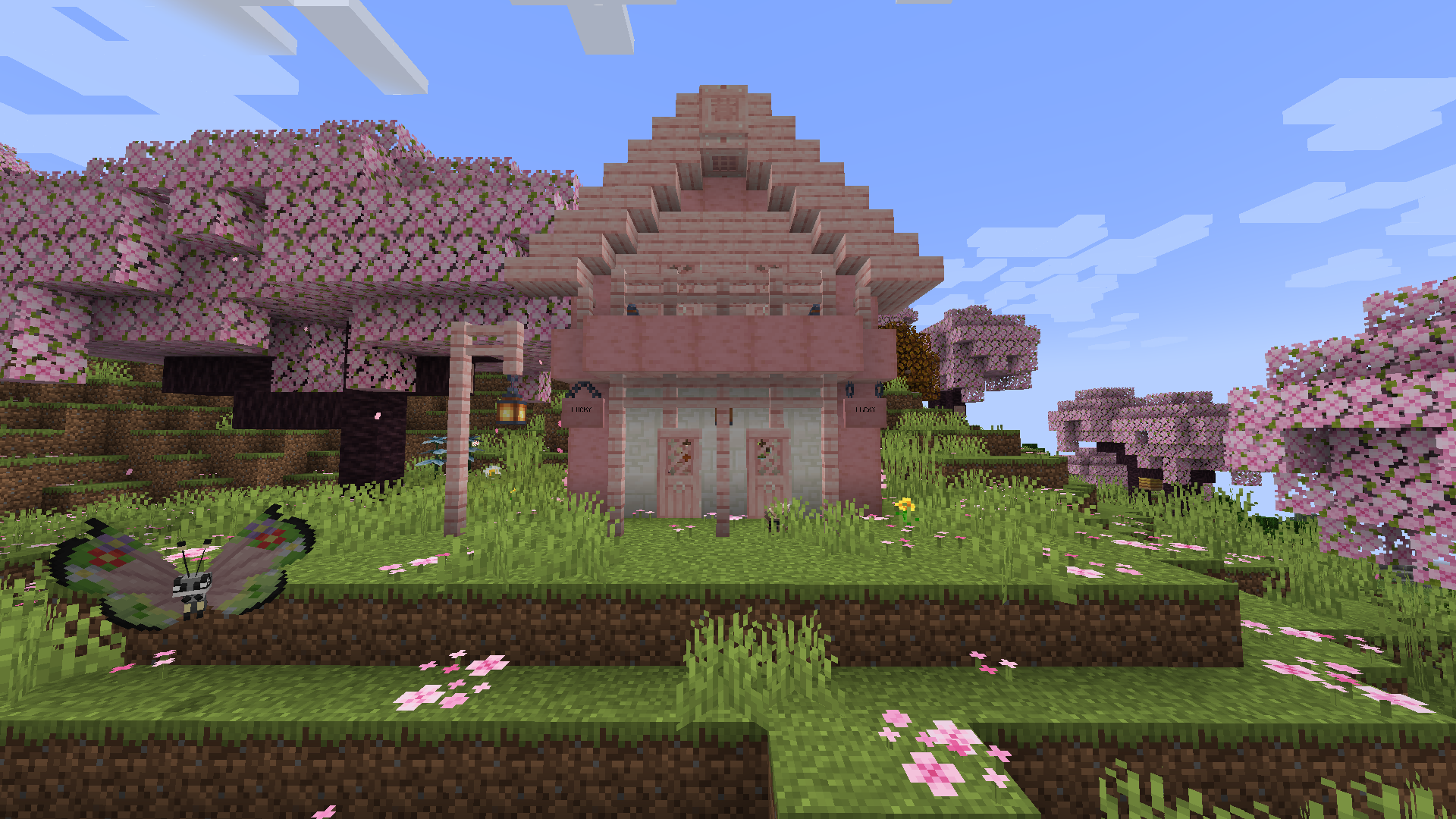 Cherry House A little house that contains a random amount of treasure inside!
 -
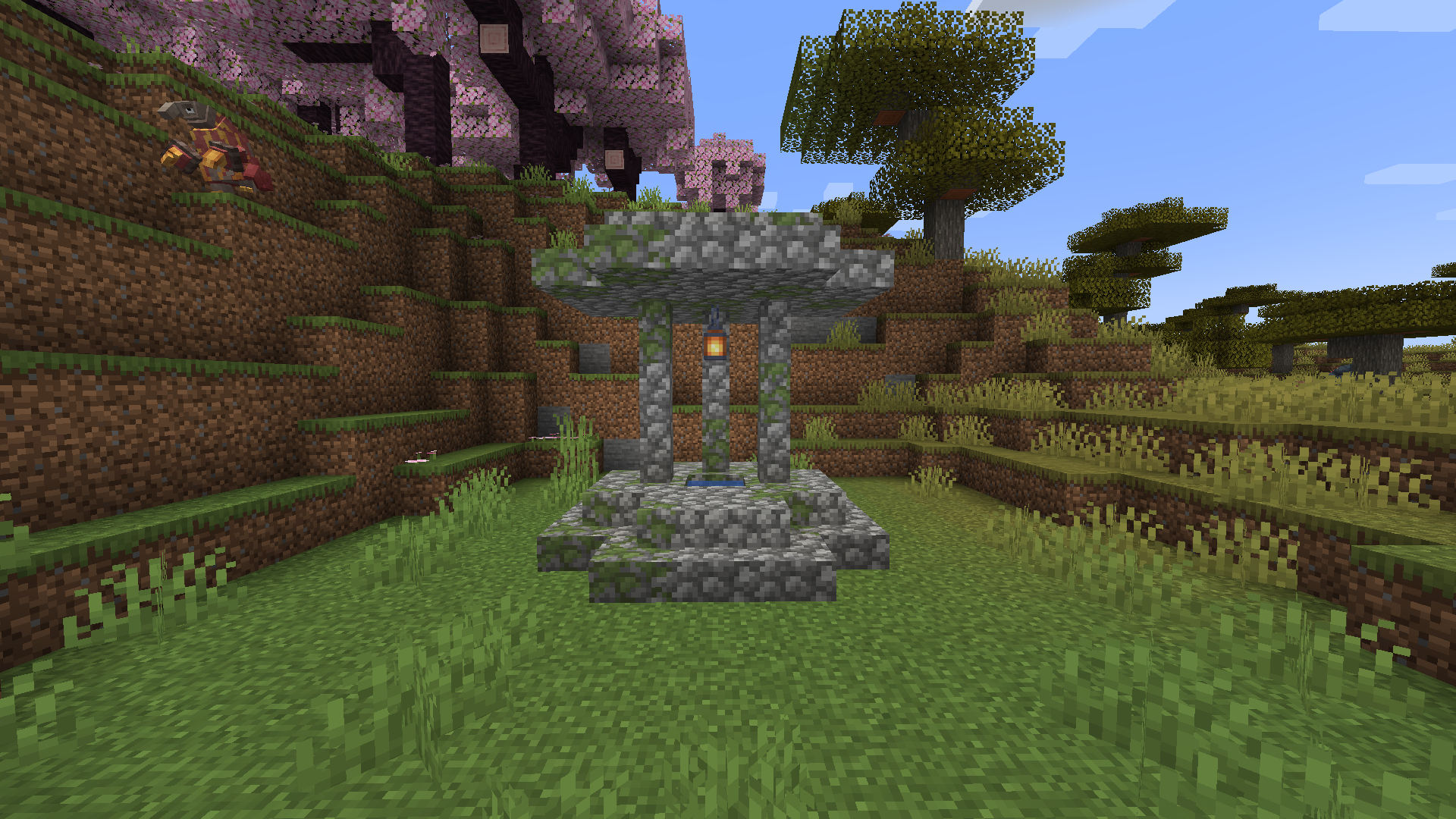 Lucky Well Maybe there's something at the bottom?
 -
 Lootball Shelter Perfect for any Trainer to rest and claim their lucky treasures!
 -
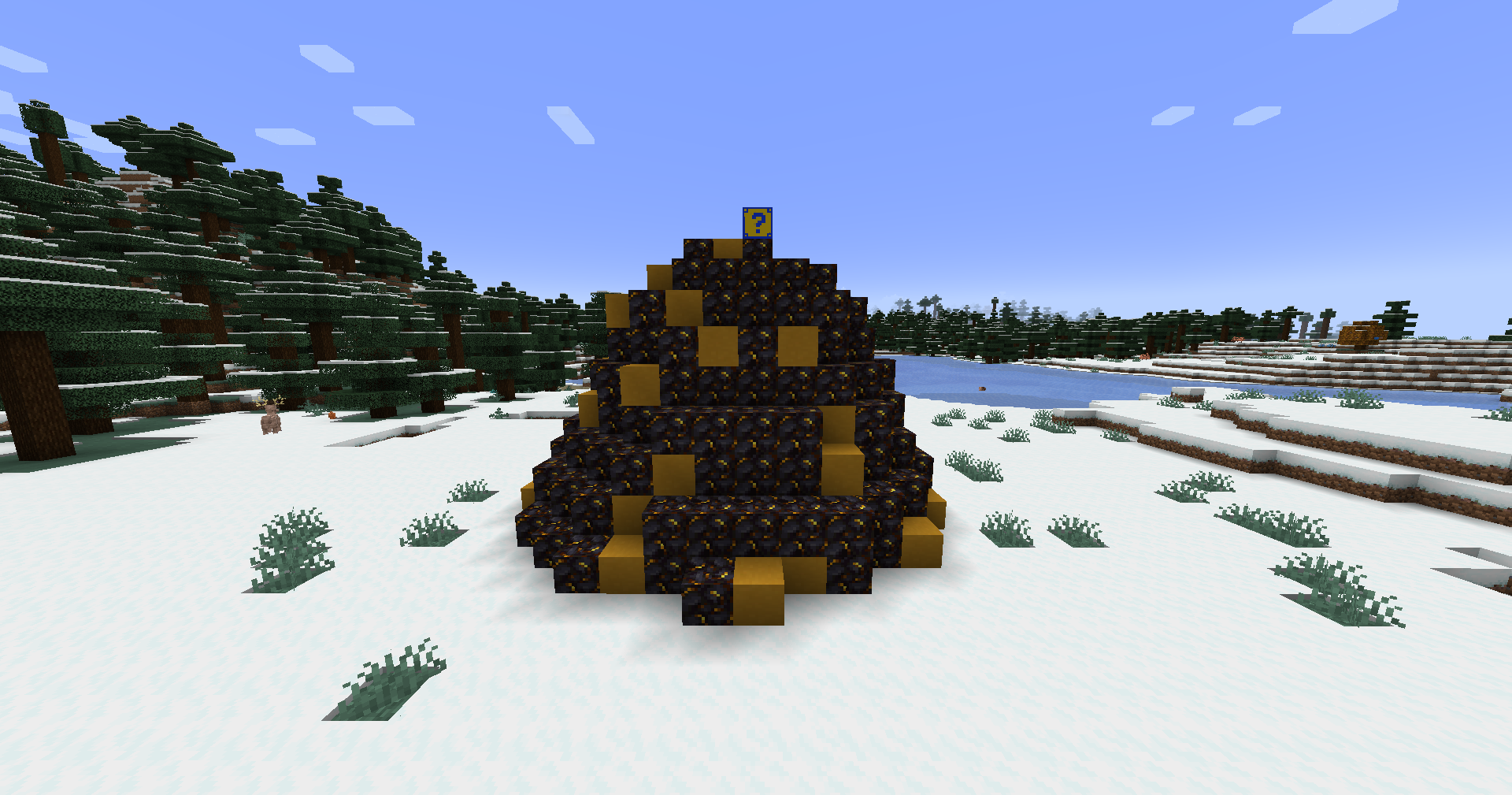 Structure Event One of the available events is the spawning of a structure defined by Cobblemon/item type. This GIF is an example of the Eletric and Dark Type structure.
Versions
Files
Relations
Project Relations
More like this
Similar Mods
Suggestions use data such as tags, dependencies, dependents, descriptions, titles, and more to rank how much they overlap with this mod.
On ModDex
Community snapshot
By the numbers
Statistics

Get it on
Available Platforms
On ModDex
Community snapshot
By the numbers