
Community listing page, reviews here may not be monitored by the author.
CobbleBlocks - Cobblemon Lucky Blocks

No reviews yet
Craft and break lucky CobbleBlock tiers to spawn random Cobblemon.
Community voices
Reviews
No reviews yet. Be the first to review this project!
Get it on
Available Platforms
About
Project Details
For authors
Embed Badge
If you're the author of this project, you can embed a live badge anywhere that supports HTML or Markdown. It updates automatically whenever ratings change.
Use HTML for any page that supports it, or Markdown for README files and Markdown-based descriptions.
Identifiers
Platform IDs
Resources
External Links
About
Description
CobbleBlocks
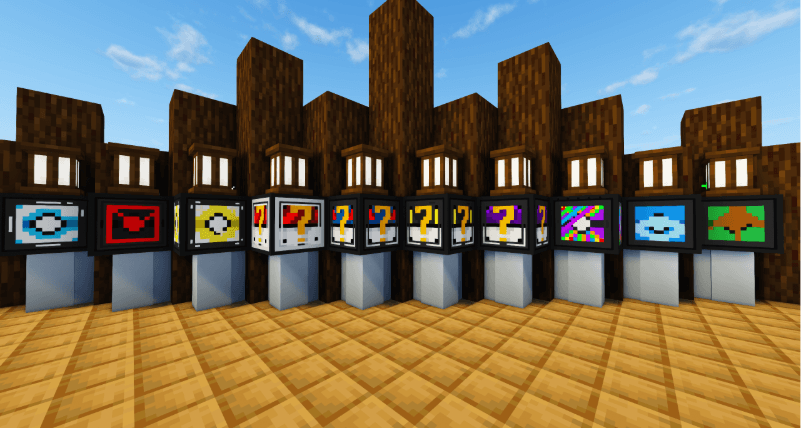
CobbleBlocks adds craftable lucky-style blocks to Minecraft that spawn random Cobblemon when broken.
Each CobbleBlock has its own reward pool, theme, and crafting progression. Some blocks focus on stronger encounters, while others focus on types, biomes, fossils, babies, starters, shiny encounters, bosses, or complete chaos.
Features
CobbleBlocks adds a large collection of craftable blocks, including the main tiered blocks, themed type blocks, biome blocks, and special blocks.
The main progression blocks are Basic CobbleBlock, Great CobbleBlock, Ultra CobbleBlock, and Master's CobbleBlock. These work as the core tier system, with higher tiers having access to stronger or rarer encounters.
The themed blocks include Fire, Water, Grass, Electric, Ghost, Dragon, Forest, Ocean, Cave, and Nether CobbleBlocks. These are designed around specific encounter styles instead of just being stronger versions of the same block.
The special blocks include Shiny, Starter, Fossil, Baby, Boss, Evolution, Tiny, and Chaotic CobbleBlocks. These blocks are made for more specific rewards, rare moments, or unpredictable outcomes.
CobbleBlocks also adds fragments and keys for crafting progression, rare chest loot, trap outcomes, improved opening sounds, stronger reveal particles, and configurable spawn pools.
Requirements
CobbleBlocks requires Fabric Loader, Fabric API, and Cobblemon.
The mod is built for Minecraft 1.21.1.
How to Use
Craft a CobbleBlock, place it down, and break it. A Cobblemon will spawn based on the block type.
Higher-tier CobbleBlocks can have better pools, while themed CobbleBlocks focus on specific types or categories.
Fire CobbleBlocks focus on fire-themed encounters. Fossil CobbleBlocks focus on ancient encounters. Baby CobbleBlocks focus on smaller early encounters. Shiny CobbleBlocks always spawn a shiny encounter. Chaotic CobbleBlocks are completely unpredictable.
Current Blocks
CobbleBlocks currently includes Basic, Great, Ultra, Master's, Shiny, Starter, Fossil, Baby, Boss, Evolution, Tiny, Chaotic, Fire, Water, Grass, Electric, Ghost, Dragon, Forest, Ocean, Cave, and Nether.
The main tier blocks are Basic, Great, Ultra, and Master's. These are the core progression blocks.
The special blocks are Shiny, Starter, Fossil, Baby, Boss, Evolution, Tiny, and Chaotic. These are made for more specific encounter types or rare moments.
The themed blocks are Fire, Water, Grass, Electric, Ghost, Dragon, Forest, Ocean, Cave, and Nether. These focus on type or biome-inspired encounters.
Crafting
CobbleBlocks are crafted using fragments, keys, and themed ingredients.
Fragments are used as the base crafting material. Keys help control the tier or strength of the block. Themed ingredients decide what kind of CobbleBlock you are crafting.
Fire CobbleBlocks use fire-themed ingredients. Ocean CobbleBlocks use ocean-themed ingredients. Fossil CobbleBlocks use ancient or fossil-themed ingredients. Shiny CobbleBlocks require rarer materials and an Ultra Ball. Chaotic CobbleBlocks use mixed materials and have unpredictable results.
Because there are now many different blocks, the full recipes are best viewed in-game using the Minecraft recipe book or a recipe viewer mod such as EMI, REI, or JEI.
Notes
This mod is designed for Cobblemon-themed survival, servers, and challenge packs.
The base Cobblemon mod does not have models for every Cobblemon. I recommend using a modpack such as Cobbleverse for the best results.
How to Configure Cobblemon Pools
CobbleBlocks lets you customize which Cobblemon can appear from each block type.
When the mod is first loaded, it creates a config file here:
config/cobbleblocks_pokemon_pools.json
This file controls the Cobblemon spawn pools for each CobbleBlock.
The main tier pools are basic, rare, epic, and legendary.
The basic pool controls what can spawn from Basic CobbleBlocks. The rare pool controls what can spawn from Great CobbleBlocks. The epic pool controls what can spawn from Ultra CobbleBlocks. The legendary pool controls what can spawn from Master's CobbleBlocks.
The newer themed blocks also use their own pools, such as starter, fossil, baby, boss, evolution, tiny, fire, water, grass, electric, ghost, dragon, forest, ocean, cave, and nether.
Example Pool Config
{
  "basic": [
    "caterpie",
    "pidgey",
    "bidoof"
  ],
  "rare": [
    "eevee",
    "riolu",
    "ralts"
  ],
  "epic": [
    "lucario",
    "gardevoir",
    "dragonite"
  ],
  "legendary": [
    "mewtwo",
    "rayquaza",
    "lugia"
  ]
}
Important Notes
Use Cobblemon species names in lowercase.
Use underscores for names that need them, such as mr_mime or nidoran_f.
Some species use special Cobblemon IDs, so make sure the name exists in your installed Cobblemon version.
Do not leave a pool empty unless you want that block type to spawn nothing.
If you make a JSON formatting mistake, the file may fail to load correctly.
After editing the config, restart the game or server for changes to apply.
How Spawning Works
When a player breaks a CobbleBlock, the mod randomly picks one Cobblemon from that block's pool.
For example, if your Basic pool contains:
"basic": [
  "caterpie",
  "pidgey",
  "bidoof"
]
Then breaking a Basic CobbleBlock can spawn either caterpie, pidgey, or bidoof.
Each entry has an equal chance unless you add the same Cobblemon more than once.
Weighted Chances
You can make one Cobblemon more common by listing it multiple times.
Example:
"basic": [
  "bidoof",
  "bidoof",
  "bidoof",
  "pidgey",
  "caterpie"
]
In this example, bidoof is more likely to spawn because it appears three times in the pool.
Server Owners
Server owners can customize the pools to fit their server economy, progression, or challenge style.
Common Cobblemon can be placed in the Basic pool. Starter Cobblemon or rarer early-game choices can be placed in the Rare pool. Strong final evolutions can be placed in the Epic pool. Legendary or mythical Cobblemon can be placed in the Legendary pool.
Server owners can also make Shiny CobbleBlocks harder to obtain through recipes or loot settings, lower trap chances for casual servers, or increase trap chances for challenge packs.
After editing the config, restart the server for the changes to apply.
Screenshots
Gallery
Versions
Files
Relations
Project Relations
More like this
Similar Mods
Suggestions use data such as tags, dependencies, dependents, descriptions, titles, and more to rank how much they overlap with this mod.
- Cobblemon Map Kit
- Radical Cobblemon Trainers
- Cobblemon Poképedia: Cobblepedia
- Cobblemon Info for REI / EMI / JEI
- Cobblemon: Max Repel
- Cobblemon PokeNav
- Cobblemon Alatia's Fakemon Pack
- CobblemonTrainers (Discontinued)
- Cobblemon: PokeMarks
- Overgrown's Cobblemon: Darkrai
- Cobblemon Trials Edition
- Create Slugma
On ModDex
Community snapshot
By the numbers
Statistics
Want to reach Minecraft players?
We're looking for a server hosting partner to feature here and other parts of the site. Interested? Send us a message!
Get in touchGet it on
Available Platforms
On ModDex
Community snapshot
By the numbers
Statistics
Resources