
Community listing page, reviews here may not be monitored by the author.
Magnet Blocks

No reviews yet
Minecraft mod that adds blocks of magnets as on the mineshild 4 server
Community voices
Reviews
No reviews yet. Be the first to review this project!
Get it on
Available Platforms
Compatibility
Supported Environments
Must be installed on both the client and the server.
About
Project Details
For authors
Embed Badge
If you're the author of this project, you can embed a live badge anywhere that supports HTML or Markdown. It updates automatically whenever ratings change.
Use HTML for any page that supports it, or Markdown for README files and Markdown-based descriptions.
Identifiers
Platform IDs
About
Description
English
Magnet Blocks is a mod that adds magnet mechanics from the "Mineshield 4" Minecraft server (a Russian-language YouTube server).
Mod Mechanics
- Dual Polarity: Each magnet has two modes: Attraction and Repulsion.
- Redstone Control: Apply a redstone signal to the magnet to completely disable it.
- Polarity Switching: To change a magnet's polarity, simply right-click it with an Iron Axe. (Yes, it's not the same as on MSh4, but the problem is that implementing the mechanic of changing polarity via lightning strike on a lightning rod is difficult).
- Specific Target Attraction: The magnet does not affect everything randomly. It chooses specific targets:
- Players: Only if they are wearing magnetic armor (Iron, Netherite) and/or are holding a magnetic item in their main or off-hand.
- Other Entities: Attracts Ender Pearls, Iron Golems, Anvils (in the form of falling blocks), and mobs with equipped armor (iron/netherite) and/or attractable items
- Magnet Network: The true power is revealed when magnets are combined. If magnet blocks are placed next to each other, they form a single network.
- Unified Control: Any action applied to one magnet in the network (disabling with redstone or changing polarity) is instantly propagated to all connected magnets.
- Magnetic Storms: Occasionally, magnetic storms will occur in the world. They affect the polarity, strength, and radius of magnets. After the storm ends, all magnets return to their previous state.
- Storm Management: You can turn off, create, and remove storms.
- The /magnet Command: Using this command, you can manage "phantom" magnets. Create, delete, modify, etc. You can also manage storms.
- Whitelist: You can whitelist the player's nickname and he will always be attracted to the magnet.
- Temperature: depending on the temperature of the magnet (the lower the temperature, the stronger the magnet), the strength of the magnet varies
- The hum: magnets emit a hum indicating the work and strength of the magnet
Русский
Magnet Blocks - это мод добавляющий механику магнитов с майнкрафт сервера ютуберов "Майншилд 4" (сервер русскоязычный)
Механики мода
- Двойная полярность: Каждый магнит имеет два режима: Притяжение и Отталкивание.
- Управление редстоуном: Подайте на магнит редстоун-сигнал, чтобы полностью отключить его.
- Смена полярности: Чтобы изменить полярность магнита, просто нажмите по нему ПКМ с Железным топором. (да, не как на мш4, но проблема в том что реализовать механику при попадании в магнит молнии через громоотвод сложно)
- Притяжение определённых целей: Магнит воздействует не на все подряд. Он выбирает конкретные цели
- Игроки: Только если на них надета магнитная броня (железная, незеритовая) и/или в основной или второй руке находится магнитный предмет
- Другие сущности: Притягивает Эндер-жемчуг, Железных големов, наковален (в виде падающих блоков) и мобов с экиперованой броней (железо/незерит) и/или притягивающимися предметами
- Сеть магнитов: Истинная сила раскрывается при объединении магнитов. Если поставить блоки магнитов рядом, они образуют единую сеть.
- Единое управление: Любое действие, примененное к одному магниту в сети (отключение редстоуном или смена полярности), мгновенно распространяется на все соединенные магниты.
- Магнитные штормы: Иногда в мире будут магнитные штормы, они влияют на полярность, силу и радиус магнита, после завершения шторма все магниты вернутся в прежний вид
- Управление штормами: вы можете выключать, создовать и убирать штормы
- Команда /magnet: с помощью этой команды вы можете управлять "фантомными" магнитами. Создавать, удалять, изменять и тд. Также можно управлять штормами
- Белый список: вы можете вписать в белый список ник игрока и он будет приятгиватся к магниту всегда
- Температура: в зависимости от температуры магнита (чем меньше - тем сильнее магнит) сила магнита меняется
- Гул: магниты издают гул обозначающий работу и силу магнита
Screenshots
Gallery
-
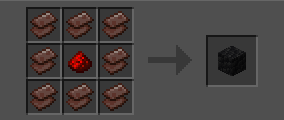 Craft
Craft -
 render
Versions
Files
Relations
Project Relations
More like this
Similar Mods
Suggestions use data such as tags, dependencies, dependents, descriptions, titles, and more to rank how much they overlap with this mod.
On ModDex
Community snapshot
By the numbers
Statistics

Want to reach Minecraft players?
We're looking for a server hosting partner to feature here and other parts of the site. Interested? Send us a message!
Get in touchGet it on
Available Platforms
On ModDex
Community snapshot
By the numbers