Community listing page, reviews here may not be monitored by the author.
Mobile Networks


No reviews yet
This mod disables vanilla chat to add phones, and different antennas that you can create your own mobile network area to chat with people, as in vanilla chat but using the phone and your mobile network.
Community voices
Reviews
No reviews yet. Be the first to review this project!
Get it on
Available Platforms
Compatibility
Supported Environments
Must be installed on both the client and the server.
About
Project Details
For authors
Embed Badge
If you're the author of this project, you can embed a live badge anywhere that supports HTML or Markdown. It updates automatically whenever ratings change.
Use HTML for any page that supports it, or Markdown for README files and Markdown-based descriptions.
Identifiers
Platform IDs
Resources
External Links
About
Description
Mobile Networks
Bring your world's communications to a mobile phone: build antennas, create networks, send messages and call other players whenever you have coverage.
Mobile Networks is designed for survival and roleplay servers where communication is part of the gameplay itself. Distance from antennas, available signal strength and each player's plan determine when you can send messages or maintain a call.
Phone and calls
-
Phone app showing the list of online players, their names and their phone numbers.
-
Voice calls between two players, with answer and decline controls, a call timer, microphone mute and a hang-up button.
-
Multiple simultaneous and independent calls: each pair can only hear the person they are speaking to.
-
No proximity voice chat or external voice groups outside calls. Unless you are in an answered call, the server blocks voice communication.
-
Semi-transparent call view centred on the left side of the screen, allowing you to keep moving, building and playing.
-
Incoming and outgoing ringtones, voicemail, and notifications for ended calls or lost signal.
-
Missed-call notifications, even if you were not carrying your phone when someone called you.
Networks and coverage
Build copper, iron or diamond antennas and manage their networks through the Server block. Antennas made from better materials have a greater range and can share networks through mesh connections.
Signal strength changes depending on distance and the surrounding environment: 5G+, 5G, 4G+, 4G, LTE, 3G, H+, H, 2G, E+ and E. Outside normal coverage, you may have no service at all or only access to the mod's emergency and SOS system.
Players do not need to be connected to the same network to call each other: both players need access to an allowed network with normal coverage and available call time.
Administration
-
A unique phone number for each player, automatically generated with nine digits and saved between sessions.
-
Phone numbers can be edited from the Server block, using between one and nine digits, with duplicate numbers prevented.
-
Individual message and call-minute limits, renewed together according to the Minecraft day.
-
Messages and calls are unlimited by default.
-
Warning when five minutes or less of call time remain, with the call automatically ending when either participant runs out of available time.
-
Management of names, permissions and networks; globally delete a network by confirming with
delete.
Interface and performance
The phone keeps its vertical orientation and uses scaling equivalent to GUI Scale 2, regardless of Minecraft's interface size. Messages automatically wrap across multiple lines, and their backgrounds correctly accommodate player names.
Version 3.1.0 enables a call performance mode by default: rate-limited coverage checks, terrain queries that do not load chunks, bounded sampling, reduced work per tick and batched phone rendering. Voice transport remains separate from world and coverage checks.
Requirements and installation
-
Minecraft Java 1.21.1.
-
NeoForge 21.1.229 or a later version compatible with 1.21.1.
-
Java 21.
-
Simple Voice Chat for NeoForge is a required dependency; tested version: 1.21.1-2.6.22.
Install Mobile Networks and Simple Voice Chat on both the server and every client. This is not a plugin for Paper, Spigot or Bukkit.
Voice communication uses a single UDP port, 24454 by default, for all calls. It is configured in config/voicechat/voicechat-server.properties and must be allowed through your firewall and router or hosting provider. Minecraft's own server port does not change. The Phone app also provides access to microphone and audio output settings.
Normal text chat is replaced by the phone's messaging system. When updating, make a backup of your world and make sure there is only one Mobile Networks JAR inside each mods folder.
Mobile Networks
Bring your world's communications to a mobile phone: build antennas, create networks, send messages and call other players whenever you have coverage.
Mobile Networks is designed for survival and roleplay servers where communication is part of the gameplay itself. Distance from antennas, available signal strength and each player's plan determine when you can send messages or maintain a call.
Phone and calls
- Phone app showing the list of online players, their names and their phone numbers.
- Voice calls between two players, with answer and decline controls, a call timer, microphone mute and a hang-up button.
- Multiple simultaneous and independent calls: each pair can only hear the person they are speaking to.
- No proximity voice chat or external voice groups outside calls. Unless you are in an answered call, the server blocks voice communication.
- Semi-transparent call view centred on the left side of the screen, allowing you to keep moving, building and playing.
- Incoming and outgoing ringtones, voicemail, and notifications for ended calls or lost signal.
- Missed-call notifications, even if you were not carrying your phone when someone called you.
Networks and coverage
Build copper, iron or diamond antennas and manage their networks through the Server block. Antennas made from better materials have a greater range and can share networks through mesh connections.
Signal strength changes depending on distance and the surrounding environment: 5G+, 5G, 4G+, 4G, LTE, 3G, H+, H, 2G, E+ and E. Outside normal coverage, you may have no service at all or only access to the mod's emergency and SOS system.
Players do not need to be connected to the same network to call each other: both players need access to an allowed network with normal coverage and available call time.
Administration
- A unique phone number for each player, automatically generated with nine digits and saved between sessions.
- Phone numbers can be edited from the Server block, using between one and nine digits, with duplicate numbers prevented.
- Individual message and call-minute limits, renewed together according to the Minecraft day.
- Messages and calls are unlimited by default.
- Warning when five minutes or less of call time remain, with the call automatically ending when either participant runs out of available time.
- Management of names, permissions and networks; globally delete a network by confirming with
delete.
Interface and performance
The phone keeps its vertical orientation and uses scaling equivalent to GUI Scale 2, regardless of Minecraft's interface size. Messages automatically wrap across multiple lines, and their backgrounds correctly accommodate player names.
Version 3.1.0 enables a call performance mode by default: rate-limited coverage checks, terrain queries that do not load chunks, bounded sampling, reduced work per tick and batched phone rendering. Voice transport remains separate from world and coverage checks.
Requirements and installation
- Minecraft Java 1.21.1.
- NeoForge 21.1.229 or a later version compatible with 1.21.1.
- Java 21.
- Simple Voice Chat for NeoForge is a required dependency; tested version: 1.21.1-2.6.22.
Install Mobile Networks and Simple Voice Chat on both the server and every client. This is not a plugin for Paper, Spigot or Bukkit.
Voice communication uses a single UDP port, 24454 by default, for all calls. It is configured in config/voicechat/voicechat-server.properties and must be allowed through your firewall and router or hosting provider. Minecraft's own server port does not change. The Phone app also provides access to microphone and audio output settings.
Normal text chat is replaced by the phone's messaging system. When updating, make a backup of your world and make sure there is only one Mobile Networks JAR inside each mods folder.
VoiceChat Tutorial: Playit.gg
Check this video: Click here
VoiceChat Tutorial: Aternos
Check this video: Click here
Screenshots
Gallery
-
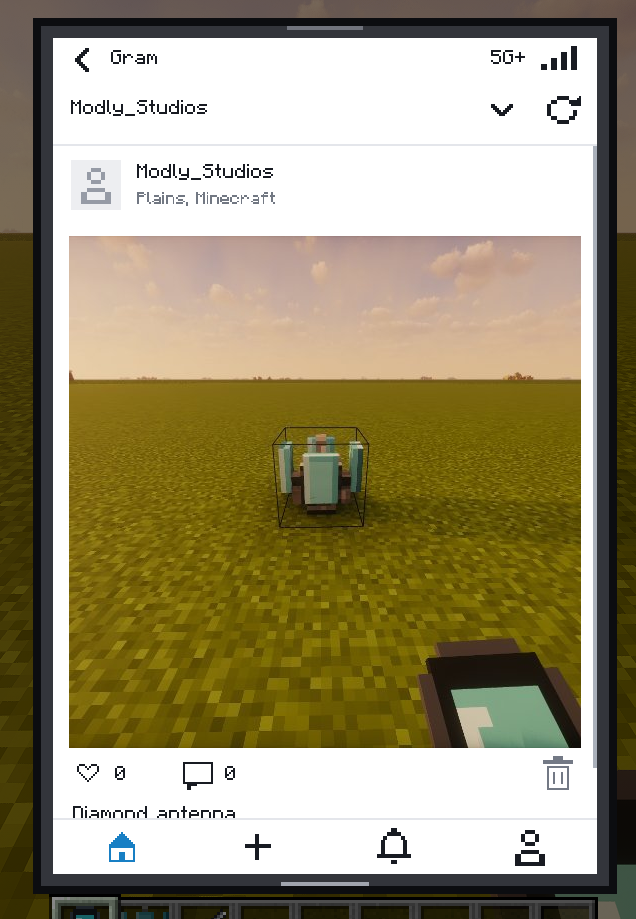 Gram's feed preview Available from Release 3.2.0
 -
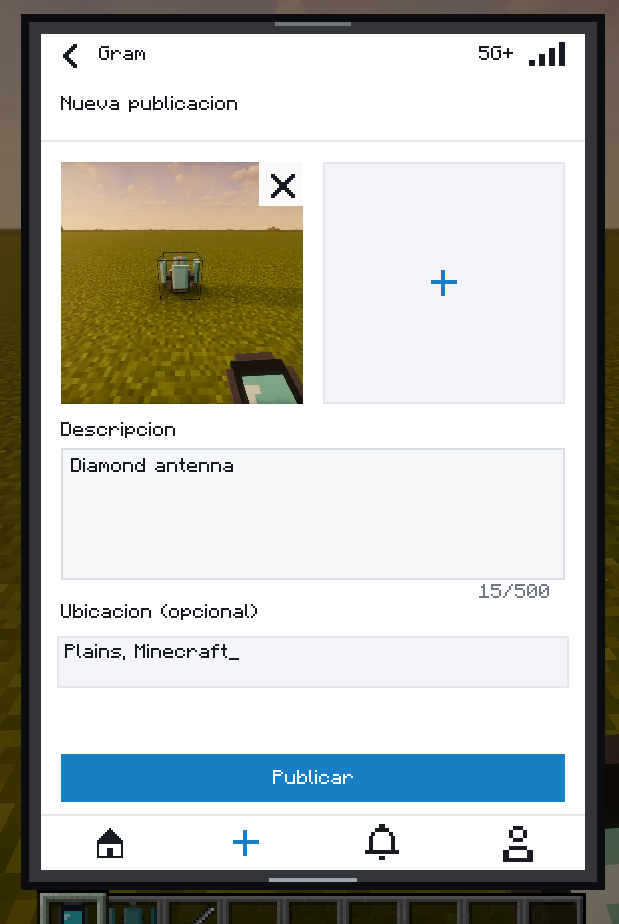 Gram publish menu Available from Release 3.2.0
 -
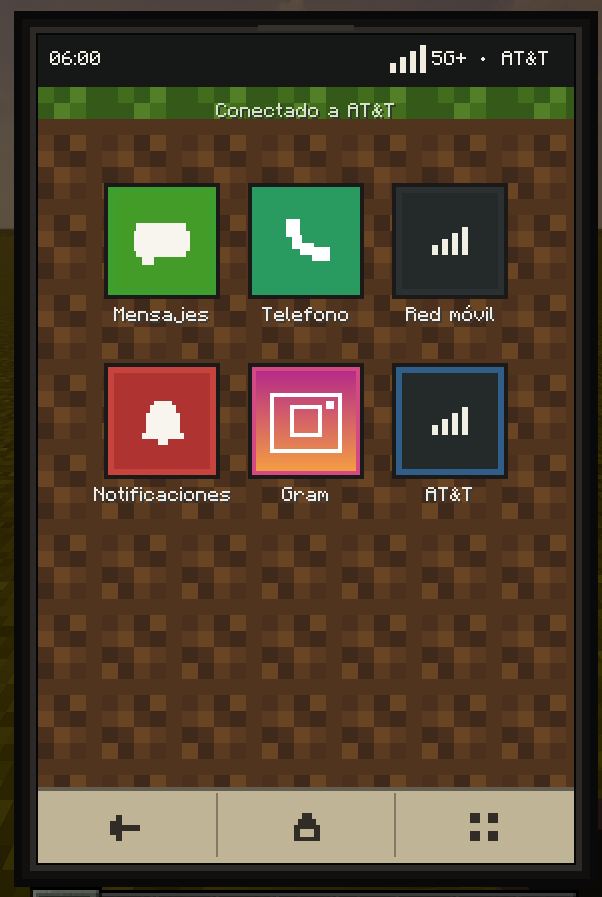 Phone GUI New phone GUI from 3.2.0
 -
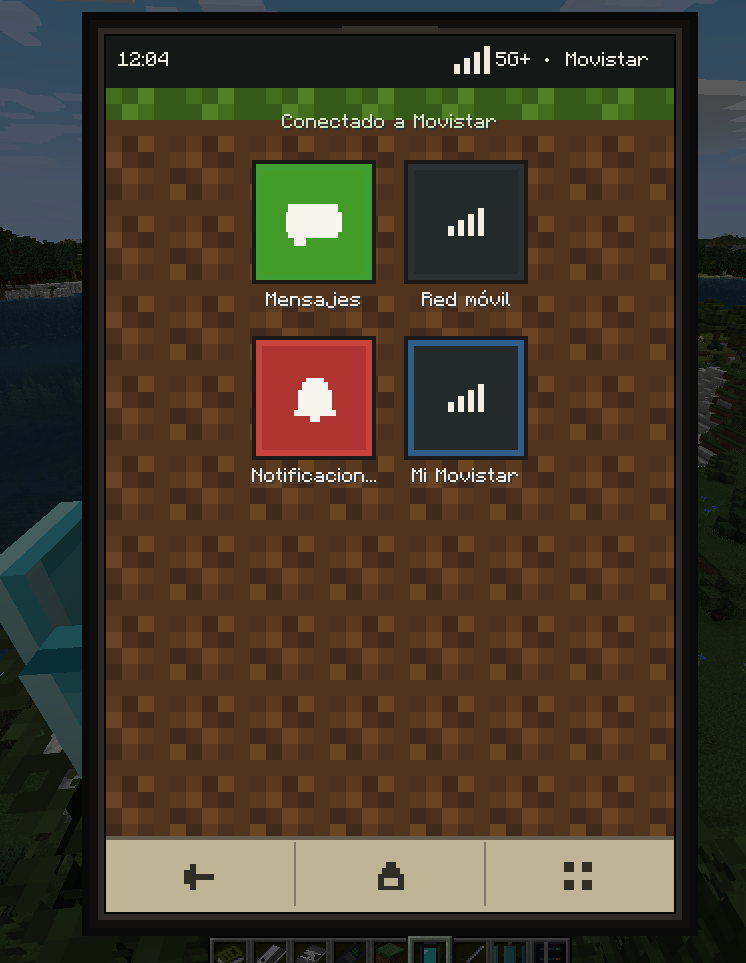 Check your network You can check if you are connected to a network by looking at the top of the main screen of your phone.
 -
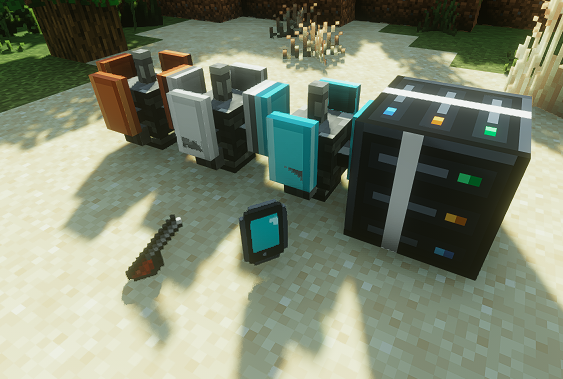 Items Those are all items in this mod.
 -
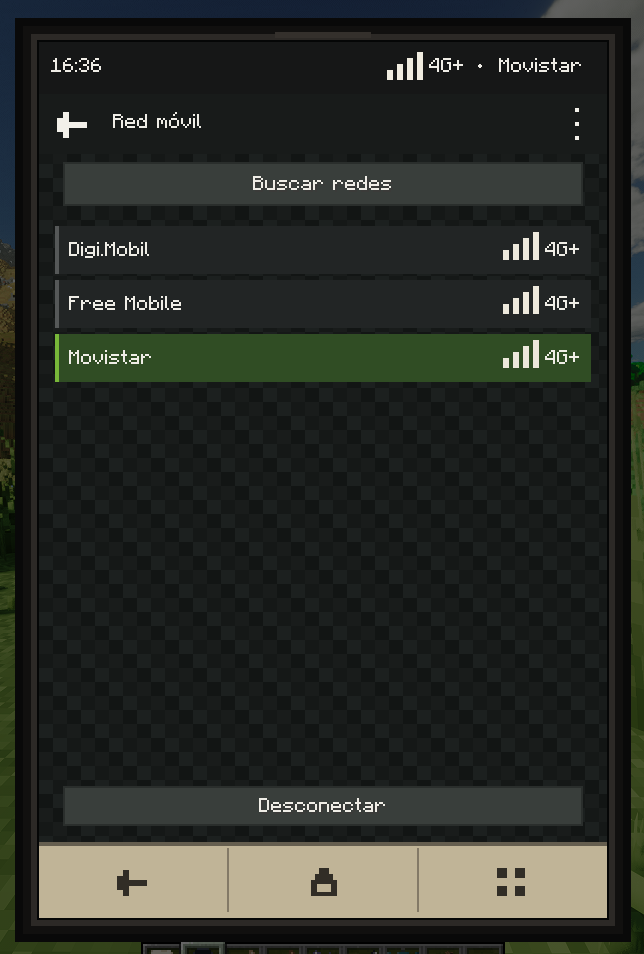 Network Selector The screen where you can choose the connection and which intensity does the network has. The further you go, the more weak is the internet connection.
 -
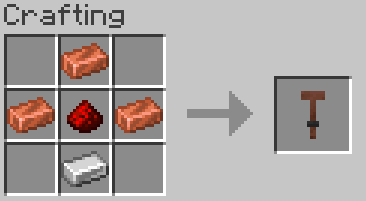 Copper Antenna crafting
 -
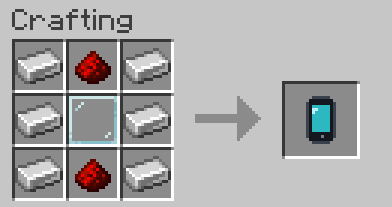 Phone crafting
 -
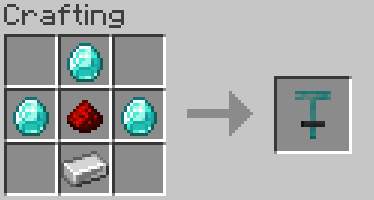 Diamond Antenna crafting
 -
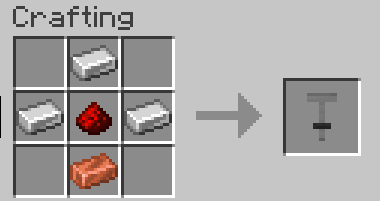 Iron Antenna crafting
 -
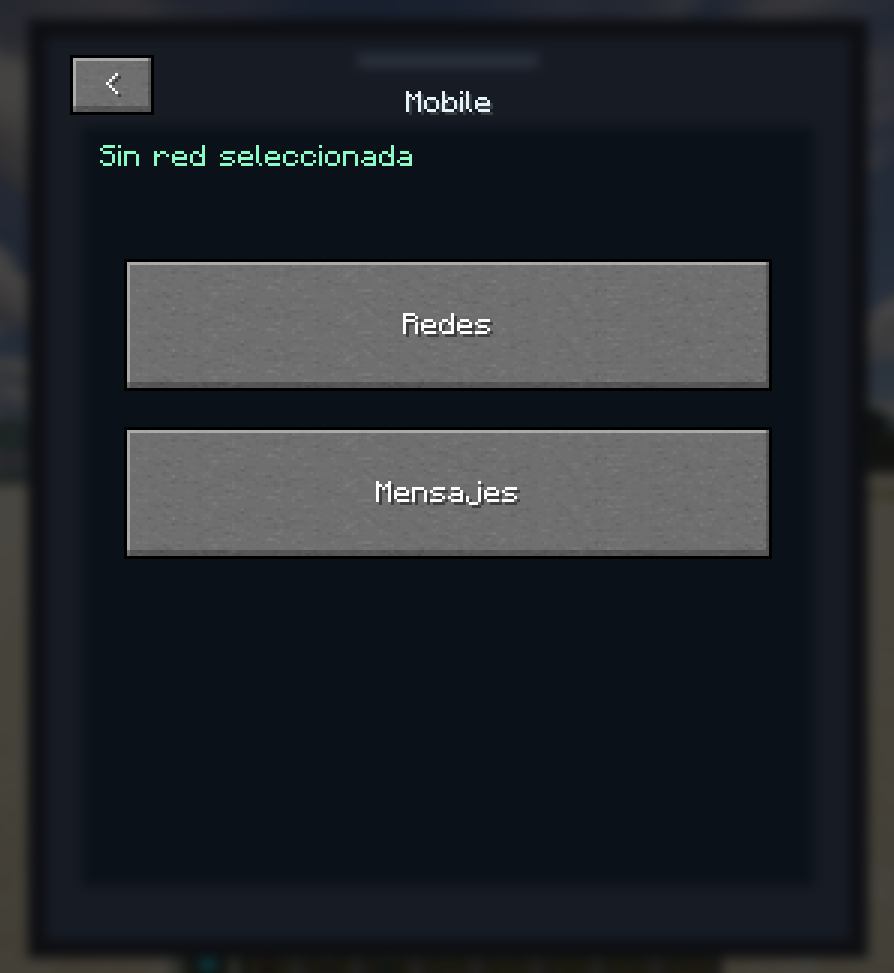 Phone GUI Main phone screen with no service. You can choose "Networks", where you will be able to choose to which network you actually want to connect to, and Messages, where you can chat if you are connected to internet and use a global chat.
 -
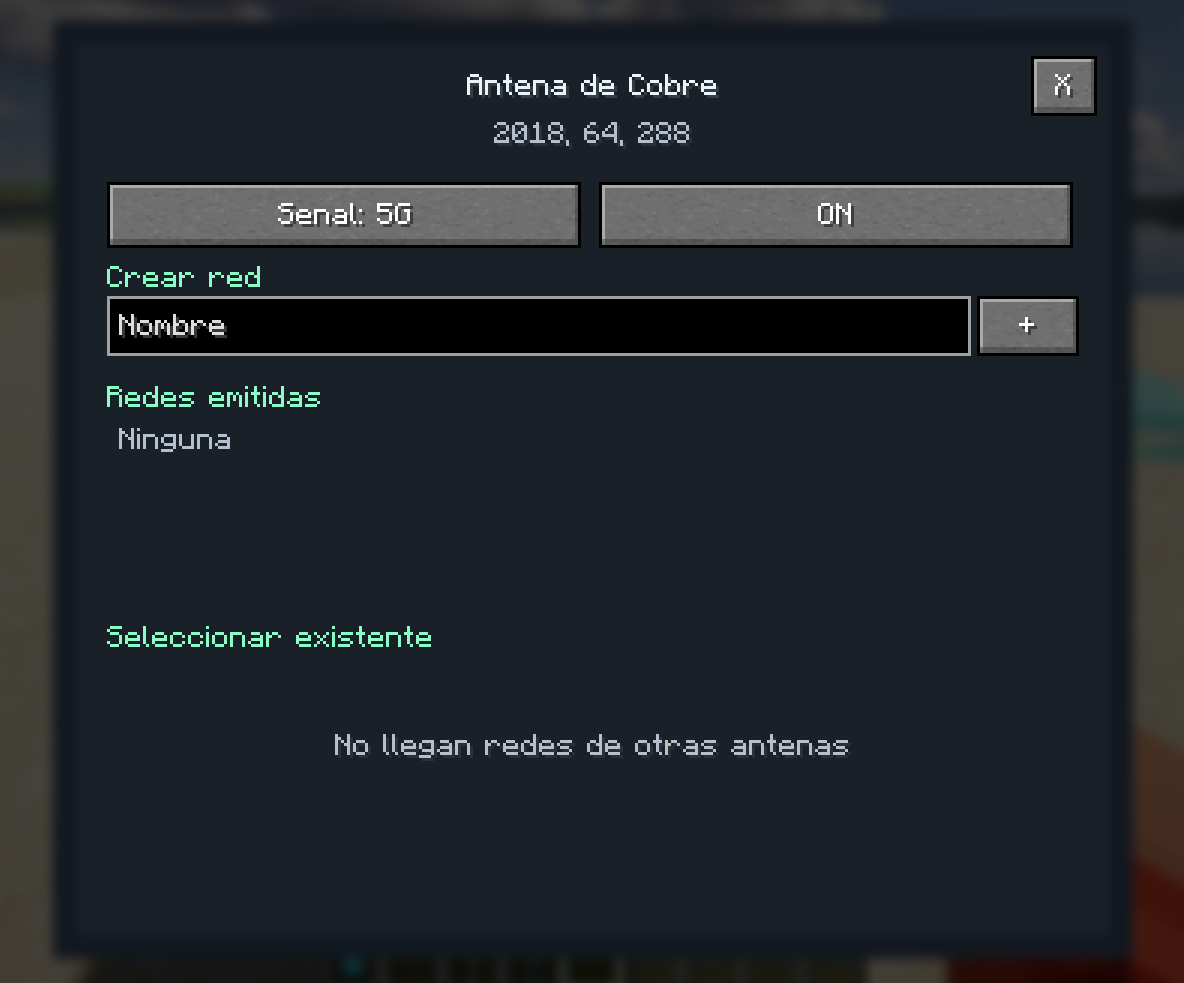 Copper Antenna GUI GUI where you can create your network or link the antenna to an existing one
 -
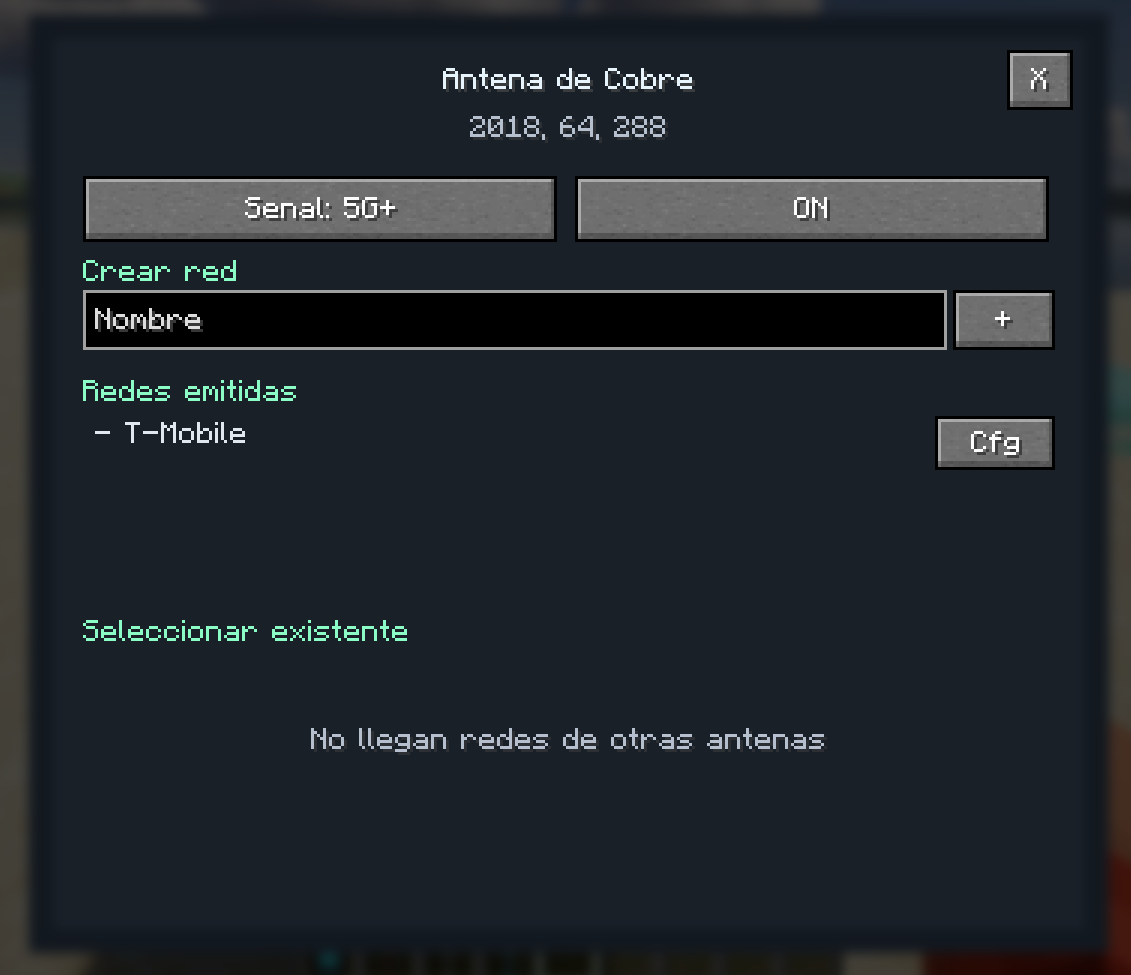 Example of created network After putting the name of the network and click to the + button, the antenna will start providing internet to your device. You can choose your internet speed (5G+, 5G, 4G+, 4G, LTE, 3G, 2G, E+) and this antenna will provide internet with these modes.
Versions
Files
Relations
Project Relations
More like this
Similar Mods
Suggestions use data such as tags, dependencies, dependents, descriptions, titles, and more to rank how much they overlap with this mod.
On ModDex
Community snapshot
By the numbers
Statistics
Want to reach Minecraft players?
We're looking for a server hosting partner to feature here and other parts of the site. Interested? Send us a message!
Get in touchGet it on
Available Platforms
On ModDex
Community snapshot
By the numbers
Statistics
Resources