
Community listing page, reviews here may not be monitored by the author.
Mogrul Economy


No reviews yet
A simple server-side economy mod with trade, shops and mob rewards!
Community voices
Reviews
No reviews yet. Be the first to review this project!
Get it on
Available Platforms
Compatibility
Supported Environments
Runs entirely on the server. Also works in singleplayer.
About
Project Details
For authors
Embed Badge
If you're the author of this project, you can embed a live badge anywhere that supports HTML or Markdown. It updates automatically whenever ratings change.
Use HTML for any page that supports it, or Markdown for README files and Markdown-based descriptions.
Identifiers
Platform IDs
About
Description
Description
A simple server-side configurable economy system with mob rewarding, trading and bounty components for those running public/private Forge servers without plugin capability. This project was made for that reason, a lack of standalone quality economy mods for forge MC 1.20.1, where components aren't present.
I have a SteamPunk / DieselPunk Lore SMP!
You can apply to join at: https://mogrul.com/discord
Commands
Currency component:
The main component of the mod, allowing a player to see their currency, see player's currency and send currency to another player - OP player being able to set currency and remove currency from a player.
Member commands (Level 0):
- /currency - Shows the commanding player's currency.
- /currency <target> - Shows the targetting player's currency.
- /currency send <target> <amouunt> - Send currency to a player.
OP commands (Level 4):
- /currency remove <target> <amount> - Removes a player's currency by an amount.
- /currency set <target> <amount> - Sets a player's currency by an amount.

Trade component:
A secondary component of the mod, allowing a player to initialise a trade with another player from an item held in their hand, accepting, denying and cancelling trades is handle in-chat so player's don't have to type out a small command just to cancel a trade.
Member commands (Level 0):
- /trade <amount> <target> <price> - Initialise a trade with a player from a item held in hand.


Mob rewards component:
A secondary component of the mod, allowing player's to receive a reward for killing a mob - OP's can set a reward for a mob and when a player kills that mob type the player is rewarded by a set amount.
OP commands (Level 4):
- /mobrewards set <mob> <amount> - Sets a reward for a mob.
- /mobrewards remove <mob> - Removes a reward for a mob.
Bounty component
A secondary component of the mod, allowing a player to set or add onto a bounty of a player, when the player is killed by another player, the killing player gets the reward of the bounty and the bounty is removed. OP's having the ability to remove a bounty from a player.
Member commands (Level 0):
- /bounty add <target> <price> - Sets/adds a bounty to a player.
OP commands (Level 4):
- /bounty remove <target> - Removes a player's bounty.
Shops component
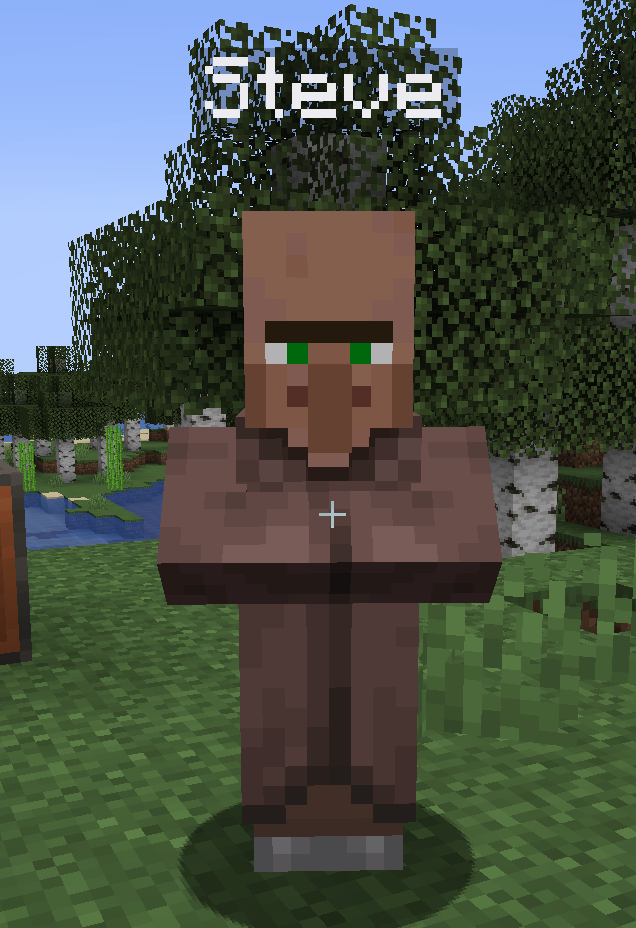
A brand new secondary component of the mod, this allows server ops to create villager shops! Simply create the shop and a villager spawns, a player can right click the shop to buy an item set when the shop was created, as well as a price and an amount to buy!
OP commands (Level 4):
- /shops create <entityName> <sellingItem> <amountPerTrade> <pricePerTrade> - Creates a villager entity to sell items to players.
- /shops remove - Removes the shop that you're looking at.

Configuration
The configuration file of this mod can be found in your server's configuration folder, named "mogruleconomy-common.toml" - here you can set the command names, currency name, symbols ect as well as disabling secondary components of the mod.
[Currency]
	#Command to use when using the currency component in-game.
	currencyCommandName = "currency"
	#Name to use for singular currency. Example: (Pound)
	currencyNameSingular = "Pound"
	#Name to use for plural currency. Example: (Pounds)
	currencyNamePlural = "Pounds"
	#Symbol to use for the currency.
	currencySymbol = "£"
	#Default starting currency for new players
	# Default: 100
	# Range: > 0
	startingCurrency = 100

[MobRewards]
	#Whether the mob rewards component should be anabled.
	mobRewardsEnabled = true
	#Command to use when using the mob reward component in-game.
	mobRewardsCommandName = "mobreward"

[Trade]
	#Whether the trade component should be enabled.
	tradeEnabled = true
	#Command to use when using the trade component in-game.
	tradeCommandName = "trade"

[Shops]
	#Whether the shop component should be enabled.
	shopsEnabled = true
	#Command to use when using the shops component in-game.
	shopsCommandName = "shops"
Data Handling
An updated version deserves more respect! No longer are you required to use a secondary .jar file because we've moved over from databases! Information is now stored in seperate .json files, easily accessible and editable from your server's root directory.
Description
A simple server-side configurable economy system with mob rewarding, trading and bounty components for those running public/private Forge servers without plugin capability. This project was made for that reason, a lack of standalone quality economy mods for (forge 0.1-1.20.1) (NeoForge 0.3-1.21.1), where components aren't present.
I have an SteamPunk / DieselPunk Lore SMP!
You can apply to join at: Discord
Commands
Currency component:
The main component of the mod, allowing a player to see their currency, see player's currency and send currency to another player - OP player being able to set currency and remove currency from a player.
Member commands (Level 0):
- /currency - Shows the commanding player's currency.
- /currency - Shows the targetting player's currency.
- /currency send - Send currency to a player.
OP commands (Level 4):
- /currency remove - Removes a player's currency by an amount.
- /currency set - Sets a player's currency by an amount.
Trade component:
A secondary component of the mod, allowing a player to initialise a trade with another player from an item held in their hand, accepting, denying and cancelling trades is handle in-chat so player's don't have to type out a small command just to cancel a trade.
Member commands (Level 0):
- /trade - Initialise a trade with a player from a item held in hand.
Mob rewards component:
A secondary component of the mod, allowing player's to receive a reward for killing a mob - OP's can set a reward for a mob and when a player kills that mob type the player is rewarded by a set amount.
OP commands (Level 4):
- /mobrewards set - Sets a reward for a mob.
- /mobrewards remove - Removes a reward for a mob.
Bounty component:
A secondary component of the mod, allowing a player to set or add onto a bounty of a player, when the player is killed by another player, the killing player gets the reward of the bounty and the bounty is removed. OP's having the ability to remove a bounty from a player.
Member commands (Level 0):
- /bounty add - Sets/adds a bounty to a player.
OP commands (Level 4):
- /bounty remove - Removes a player's bounty.
Shop component:
A secondary component of the mod, allowing an admin to create shops - a player right clicks the villager and they buy an item!
- /shops create <entityName> <sellingItem> <amountPerTrade> <pricePerTrade> - Creates a villager entity to sell items to players.
- /shops remove - Removes a shop that you're looking at.
Configuration
The configuration file of this mod can be found in your server's configuration folder, named "mogruleconomy-common.toml" - here you can set the command names, currency name, symbols ect as well as disabling secondary components of the mod.
[Currency]
#Command to use when using the currency component in-game.
currencyCommandName = "currency"
#Name to use for singular currency. Example: (Pound)
currencyNameSingular = "Pound"
#Name to use for plural currency. Example: (Pounds)
currencyNamePlural = "Pounds"
#Symbol to use for the currency.
currencySymbol = "£"
#Default starting currency for new players
# Default: 100
# Range: > 0
startingCurrency = 100
[MobRewards]
#Whether the mob rewards component should be anabled.
mobRewardsEnabled = true
#Command to use when using the mob reward component in-game.
mobRewardsCommandName = "mobreward"
[Trade]
#Whether the trade component should be enabled.
tradeEnabled = true
#Command to use when using the trade component in-game.
tradeCommandName = "trade"
[Shops]
#Whether the shop component should be enabled.
shopsEnabled = true
#Command to use when using the shops component in-game.
shopsCommandName = "shops"
Data Handling
The data handling has been moved over to .json files, getting rid of dependencies and making it so much easier for you to edit them!
Screenshots
Gallery
-
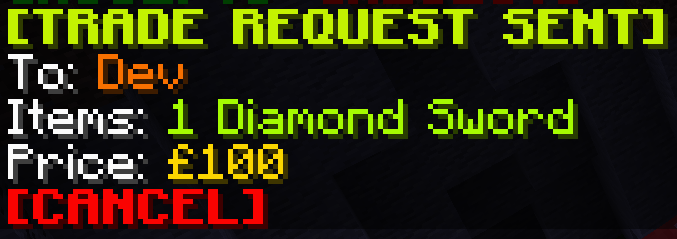 trade_sent_example.png trade_sent_example.png
 -
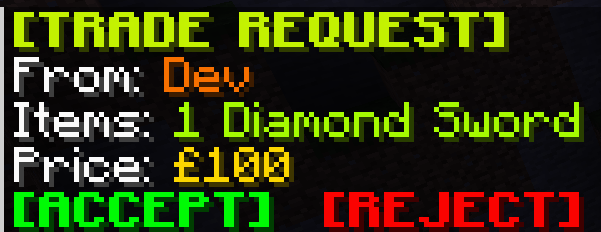 trade_request_example.png trade_request_example.png
-
-

-
 Trade request example
 -
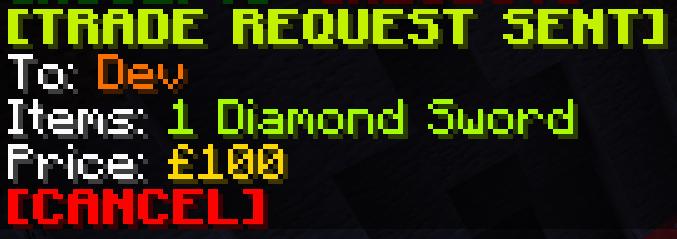 Trade sent example
Versions
Files
Relations
Project Relations
More like this
Similar Mods
Suggestions use data such as tags, dependencies, dependents, descriptions, titles, and more to rank how much they overlap with this mod.
On ModDex
Community snapshot
By the numbers
Statistics
Want to reach Minecraft players?
We're looking for a server hosting partner to feature here and other parts of the site. Interested? Send us a message!
Get in touchGet it on
Available Platforms
On ModDex
Community snapshot
By the numbers