
Community listing page, reviews here may not be monitored by the author.
Mojang Dev Tools


No reviews yet
Mod to unlock the built-in Mojang development tools, providing the user with an easy to use menu.
Community voices
Reviews
No reviews yet. Be the first to review this project!
Get it on
Available Platforms
Compatibility
Supported Environments
The author has not specified where this runs.
About
Project Details
For authors
Embed Badge
If you're the author of this project, you can embed a live badge anywhere that supports HTML or Markdown. It updates automatically whenever ratings change.
Use HTML for any page that supports it, or Markdown for README files and Markdown-based descriptions.
Identifiers
Platform IDs
About
Description
Mojang Dev Tools

Unlocks all hidden developer features normally only available inside Mojang's IDE — with an in-game config menu to toggle each flag individually. ALL TOOLS EXIST IN OFFICIALLY RELEASED MOJANG BINARIES, THIS MOD SIMPLY ENABLES THE FLAGS
Sets SharedConstants.IS_RUNNING_IN_IDE = true and MC_DEBUG_HOTKEYS=true at class-load time, enabling debug overlays, internal commands, and dev-mode keybinds that are shipped in the game but never exposed in production.
Requirements
- Minecraft 26.1.2
- Fabric Loader 0.19.2 or later
Key Features
Debug Keybinds (F3 held)
| Hotkey | Action |
|---|---|
| F3 + Z | Custom debug renderer menu |
| F3 + F6 | Mojang internal debug options menu |
| F3 + E | Chunk section path debug overlay |
| F3 + F | Toggle fog rendering |
| F3 + L | Toggle smart culling |
| F3 + O | Frustum culling octree overlay |
| F3 + U | Freeze/capture frustum at current position |
| F3 + V | Chunk section visibility overlay |
| F3 + W | Wireframe rendering mode |
Note: F3+F with this mod enabled toggles fog instead of cycling render distance — this is the dev-mode override.
Renderer Overlays
Toggle any of these in-game via F3 + F6:
- Pathfinding route overlay
- Block neighbor update overlay
- Structure bounding box overlay
- Mob brain & memory overlay
- AI goal selector overlay
- Point of interest (POI) overlay
- Bee hive/path overlay
- Raid state overlay
- Village section overlay
- Entity hitbox overlay (integrated server)
- Block collision shape overlay
- Sculk catalyst spread overlay
- Breeze mob debug overlay
- Experimental redstone wire update order overlay
World Generation Debug
- Cave carver volume overlay
- Ore vein bounds and type overlay
- Aquifer cell boundary overlay
- Per-chunk feature placement count heatmap
- Large dripstone cluster overlay
- Disable individual world gen passes (fluids, aquifers, surface, carvers, structures, features, ore veins, blending, retrogeneration)
Gameplay & QOL Flags
- All villager trade tiers unlocked immediately
- Ignore mob cap on integrated server
- Open worlds from incompatible versions
- Allow simulation distance below the normal minimum
- Keep jigsaw blocks after structure generation
- Structure edit mode
- Save structures as SNBT text files
- Per-tick timing monitor
- Show all sound subtitles
- Suppress outbound Mojang telemetry
- Cursor position in F3 overlay
- Suppress all world saves (world reverts on exit)
Internal Server Commands
Unlocked when IS_RUNNING_IN_IDE is active:
/raid— Force-start/stop raids, set omen level, spawn raid captains, toggle raider glow/debugpath to <x> <y> <z>— Visualize pathfinding routes in-world/debugmobspawning at <x> <y> <z>— Diagnose mob spawning per category/warden_spawn_tracker— Read/write warden warning levels for nearby players/spawn_armor_trims— Spawn all armor trim combinations on armor stands/serverpack push/pop— Push/pop server resource packs to clients without restarting/chase— Sync camera between two game instances (Mojang QA tool)
Mojang Dev Tools
Unlocks all hidden developer features normally only available inside Mojang's IDE — with an in-game config menu to toggle each flag individually. ALL TOOLS EXIST IN OFFICIALLY RELEASED MOJANG BINARIES, THIS MOD SIMPLY ENABLES THE FLAGS
Sets SharedConstants.IS_RUNNING_IN_IDE = true and MC_DEBUG_HOTKEYS=true at class-load time, enabling debug overlays, internal commands, and dev-mode keybinds that are shipped in the game but never exposed in production.
Requirements
- Minecraft 26.1.2
- Fabric Loader 0.19.2 or later
Key Features
Debug Keybinds (F3 held)
| Hotkey | Action |
|---|---|
| F3 + Z | Custom debug renderer menu |
| F3 + F6 | Mojang internal debug options menu |
| F3 + E | Chunk section path debug overlay |
| F3 + F | Toggle fog rendering |
| F3 + L | Toggle smart culling |
| F3 + O | Frustum culling octree overlay |
| F3 + U | Freeze/capture frustum at current position |
| F3 + V | Chunk section visibility overlay |
| F3 + W | Wireframe rendering mode |
Note: F3+F with this mod enabled toggles fog instead of cycling render distance — this is the dev-mode override.
Renderer Overlays
Toggle any of these in-game via F3 + F6:
- Pathfinding route overlay
- Block neighbor update overlay
- Structure bounding box overlay
- Mob brain & memory overlay
- AI goal selector overlay
- Point of interest (POI) overlay
- Bee hive/path overlay
- Raid state overlay
- Village section overlay
- Entity hitbox overlay (integrated server)
- Block collision shape overlay
- Sculk catalyst spread overlay
- Breeze mob debug overlay
- Experimental redstone wire update order overlay
World Generation Debug
- Cave carver volume overlay
- Ore vein bounds and type overlay
- Aquifer cell boundary overlay
- Per-chunk feature placement count heatmap
- Large dripstone cluster overlay
- Disable individual world gen passes (fluids, aquifers, surface, carvers, structures, features, ore veins, blending, retrogeneration)
Gameplay & QOL Flags
- All villager trade tiers unlocked immediately
- Ignore mob cap on integrated server
- Open worlds from incompatible versions
- Allow simulation distance below the normal minimum
- Keep jigsaw blocks after structure generation
- Structure edit mode
- Save structures as SNBT text files
- Per-tick timing monitor
- Show all sound subtitles
- Suppress outbound Mojang telemetry
- Cursor position in F3 overlay
- Suppress all world saves (world reverts on exit)
Internal Server Commands
Unlocked when IS_RUNNING_IN_IDE is active:
/raid— Force-start/stop raids, set omen level, spawn raid captains, toggle raider glow/debugpath to <x> <y> <z>— Visualize pathfinding routes in-world/debugmobspawning at <x> <y> <z>— Diagnose mob spawning per category/warden_spawn_tracker— Read/write warden warning levels for nearby players/spawn_armor_trims— Spawn all armor trim combinations on armor stands/serverpack push/pop— Push/pop server resource packs to clients without restarting/chase— Sync camera between two game instances (Mojang QA tool)
Screenshots
Gallery
-
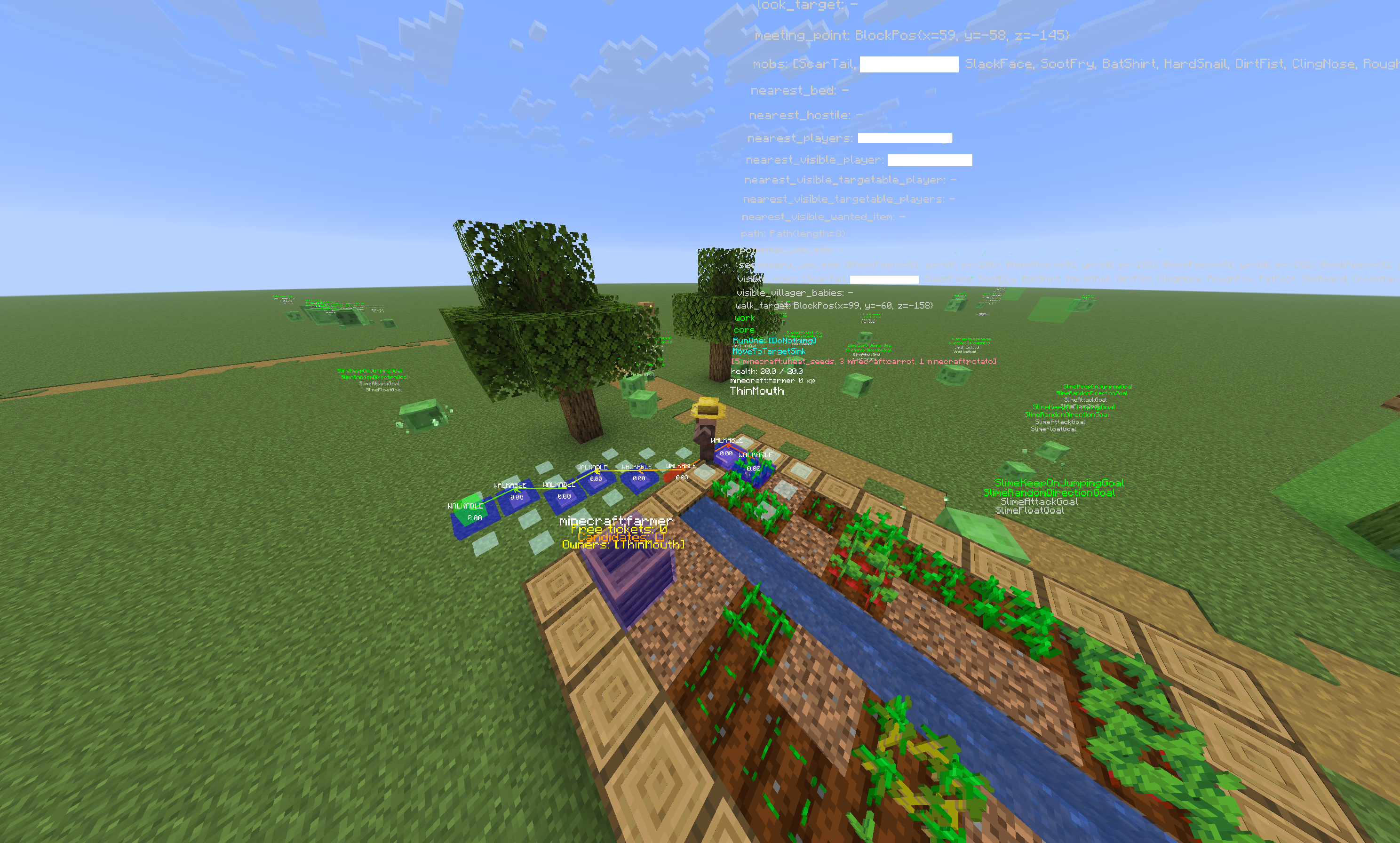 Example of Mob Brain and Villager Pathing debug
Versions
Files
Relations
Project Relations
More like this
Similar Mods
Suggestions use data such as tags, dependencies, dependents, descriptions, titles, and more to rank how much they overlap with this mod.
On ModDex
Community snapshot
By the numbers
Statistics
Want to reach Minecraft players?
We're looking for a server hosting partner to feature here and other parts of the site. Interested? Send us a message!
Get in touchGet it on
Available Platforms
On ModDex
Community snapshot
By the numbers