Community listing page, reviews here may not be monitored by the author.
Multiworld (Fabric & Forge)


No reviews yet
Multiverse alternative for Fabric & Forge!
Community voices
Reviews
No reviews yet. Be the first to review this project!
Get it on
Available Platforms
Compatibility
Supported Environments
Required on the server. Installing it on the client adds functionality.
About
Project Details
For authors
Embed Badge
If you're the author of this project, you can embed a live badge anywhere that supports HTML or Markdown. It updates automatically whenever ratings change.
Use HTML for any page that supports it, or Markdown for README files and Markdown-based descriptions.
Identifiers
Platform IDs
About
Description


Adds support for teleporting & creating multiple worlds.
A multiverse alternative for Fabric.


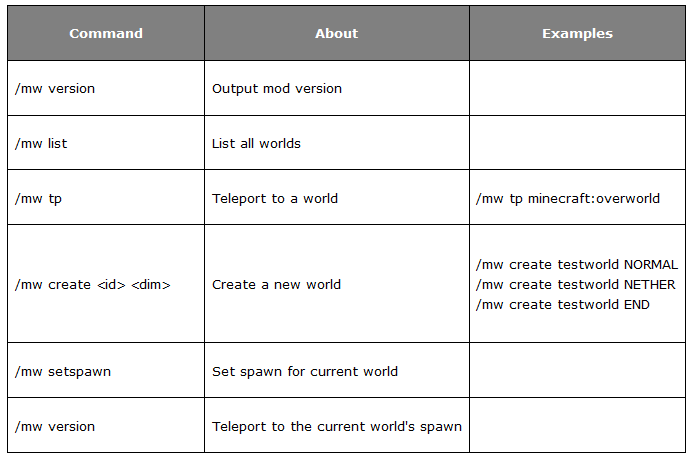
Command Usage:
| Command | About | Examples |
|---|---|---|
| /mw version | Output mod version | |
| /mw list | List all worlds | |
| /mw tp | Teleport to a world | /mw tp minecraft:overworld |
| /mw create |
Create a new world <small> (Optional seed & generator)</small> |
/mw create testwork NORMAL /mw create world NORMAL -g=FLAT -s=1234 |
| /mw setspawn | Set spawn for current world | |
| /mw spawn | Teleport to world's spawn |
Permissions
(Multiworld supports either LuckPerms or CyberPerms)
- /mw multiworld.cmd
- /mw tp multiworld.tp
- /mw spawn multiworld.spawn
- /mw setspawn multiworld.setspawn
- /mw create multiworld.create
- /mw delete console only
Coming Soon!- Custom Portal support

Note: Multiworld makes use of the Fantasy library by NucleoidMC for creation of runtime worlds.


Adds support for teleporting & creating multiple worlds. Supports Fabric, Forge, & NeoForge.
Active Versions: 26.1, 1.21.11, 1.21.1, 1.20.1
Features
- Create multiple worlds with different generators, types, & seeds.
- Easily teleport between worlds with commands
- Custom Nether Portals (New!)
- And more.
On Fabric 1.21+, Multiworld Portal support requires iCommonLib (version #98 or higher)

Command Usage:
- Output mod version:
/mv version - List all worlds:
/mw list - Create world:
/mw create <id> <dim> [-g=GENERATOR -s=SEED]- Example:
/mw create testworld NORMAL - Example:
/mw create testworld NETHER - Example:
/mw create testworld END - Example:
/mw create testworld NORMAL -g=FLAT -s=1234
- Teleport to world:
/mw tp <id>- Example:
/mw tp minecraft:overworld - Example (Console):
/mw tp overworld Player52
- Example:
- Set a Gamerule:
- Example:
/mw gamerule doDaylightCycle false
- Example:
- Set a worlds difficulty:
- Example:
/mw difficulty EASY
- Example:
- Delete a world (Console Only)
/mw delete <id>
- Example:
Permissions
Multiworld supports mods that support fabric-permissions-api-v0 such as LuckPerms or SimplePerms/CyberPerms.
The permission multiworld.admin or being /op-ed grants access to every command.
Command & Permission:
- /mw -
multiworld.cmd - /mw tp -
multiworld.tp - /mw spawn -
multiworld.spawn - /mw setspawn -
multiworld.setspawn - /mw create -
multiworld.create - /mw gamerule -
multiworld.gamerule - /mw difficulty -
multiworld.difficulty - /mw delete - Console-only command
Note: multiworld.cmd for the base /mw command is also required for all sub-commands.
Coming soon
/mw deletecommand/mw load/unloadCustom generator support.added in 1.9- Custom Portal support.
World Storage Location
Multiworld uses the Vanilla world save path for worlds. Added worlds will be saved in the main overworld's dimension folder world\dimensions\id\path.
FAQ
- Crash: "Multiworld 1.21.x requires Minecraft 1.xx": The version uploaded to Modrinth is a jar-in-jar bundle, unless interrupted by other mod crashes, fabric-loader will load.
Related Mods
- Multiworld Inventories - Per World Inventory support.
- MultiWorld Positions by yarg119.
- Multi World Borders for <= 1.21.8 by Potatoboy.
- Quantum alternative multi-world mod by Unreal852
Note: Multiworld makes use of the Fantasy library by NucleoidMC for creation of worlds.
Screenshots
Gallery
-
 forge-btn
 -
 for
for -
 Command list
-
 Create Command Syntax
Versions
Files
Relations
Project Relations
More like this
Similar Mods
Suggestions use data such as tags, dependencies, dependents, descriptions, titles, and more to rank how much they overlap with this mod.
On ModDex
Community snapshot
By the numbers
Statistics
Want to reach Minecraft players?
We're looking for a server hosting partner to feature here and other parts of the site. Interested? Send us a message!
Get in touchGet it on
Available Platforms
On ModDex
Community snapshot
By the numbers