
Community listing page, reviews here may not be monitored by the author.
Nicknames+

No reviews yet
Interactive menu for player customization: custom nick colors, styles, title particles, and dynamic auras.
Community voices
Reviews
No reviews yet. Be the first to review this project!
Get it on
Available Platforms
About
Project Details
For authors
Embed Badge
If you're the author of this project, you can embed a live badge anywhere that supports HTML or Markdown. It updates automatically whenever ratings change.
Use HTML for any page that supports it, or Markdown for README files and Markdown-based descriptions.
Identifiers
Platform IDs
Resources
External Links
About
Description
Nicknames+
Interactive player customization datapack for Minecraft.
Nicknames+ adds an intuitive in-game menu that allows players to fully customize their appearance and name styling without complex commands.
Key Features
- Interactive GUI Menu: Clean and simple interface to manage all your settings.
- Name Customization: Choose custom nick colors and visual text styles.
- Auras & Particles: Toggle cosmetic body auras and particle effects around your player.
- Toggle Options: Easily remove or reset any applied effects at any time.
Installation
- Download the
.ziparchive. - Place it into your world's
datapacksfolder:
%appdata%\.minecraft\saves\<your_world>\datapacks - Enter your world and run
/reload.
Credits
- Developer: rombzi
- License: See
LICENSE.txtfor details.
Screenshots
Gallery
-
 Particle Trail & Aura Preview Demonstration of the custom particle aura following the player as they move.
 -
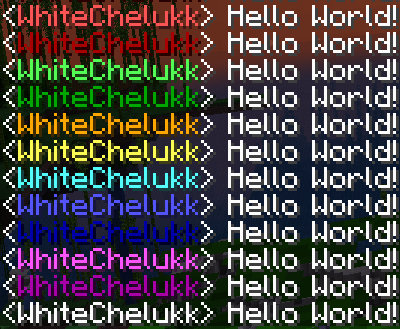 Custom Nickname Colors Showcase of available custom nickname colors in the chat.
 -
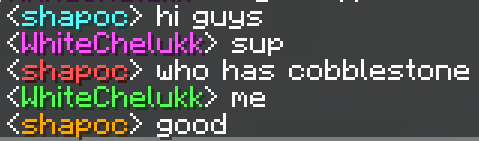 Multiplayer Chat Showcase Demonstration of custom colors working for multiple players in multiplayer.
Versions
Files
Relations
Project Relations
More like this
Similar Mods
Suggestions use data such as tags, dependencies, dependents, descriptions, titles, and more to rank how much they overlap with this mod.
On ModDex
Community snapshot
By the numbers
Statistics

Want to reach Minecraft players?
We're looking for a server hosting partner to feature here and other parts of the site. Interested? Send us a message!
Get in touchGet it on
Available Platforms
On ModDex
Community snapshot
By the numbers
Statistics
Resources