Community listing page, reviews here may not be monitored by the author.
NightVisuals FullBright


No reviews yet
This modification adds FullBright - you'll forget about darkness forever!
Community voices
Reviews
No reviews yet. Be the first to review this project!
Get it on
Available Platforms
Compatibility
Supported Environments
Runs entirely on the client. Works on vanilla servers.
About
Project Details
For authors
Embed Badge
If you're the author of this project, you can embed a live badge anywhere that supports HTML or Markdown. It updates automatically whenever ratings change.
Use HTML for any page that supports it, or Markdown for README files and Markdown-based descriptions.
Identifiers
Platform IDs
Resources
External Links
About
Description
EN:
NightVisuals FullBright is a modification that removes all darkness from the game, making every block fully illuminated regardless of light level. The mod is designed for players who want maximum visibility in caves, at night, and in dark areas without placing torches.
Core Features
Instant Full Brightness: All blocks are rendered at maximum light level. Caves, the Nether, the End, and nighttime are fully visible without any light sources.
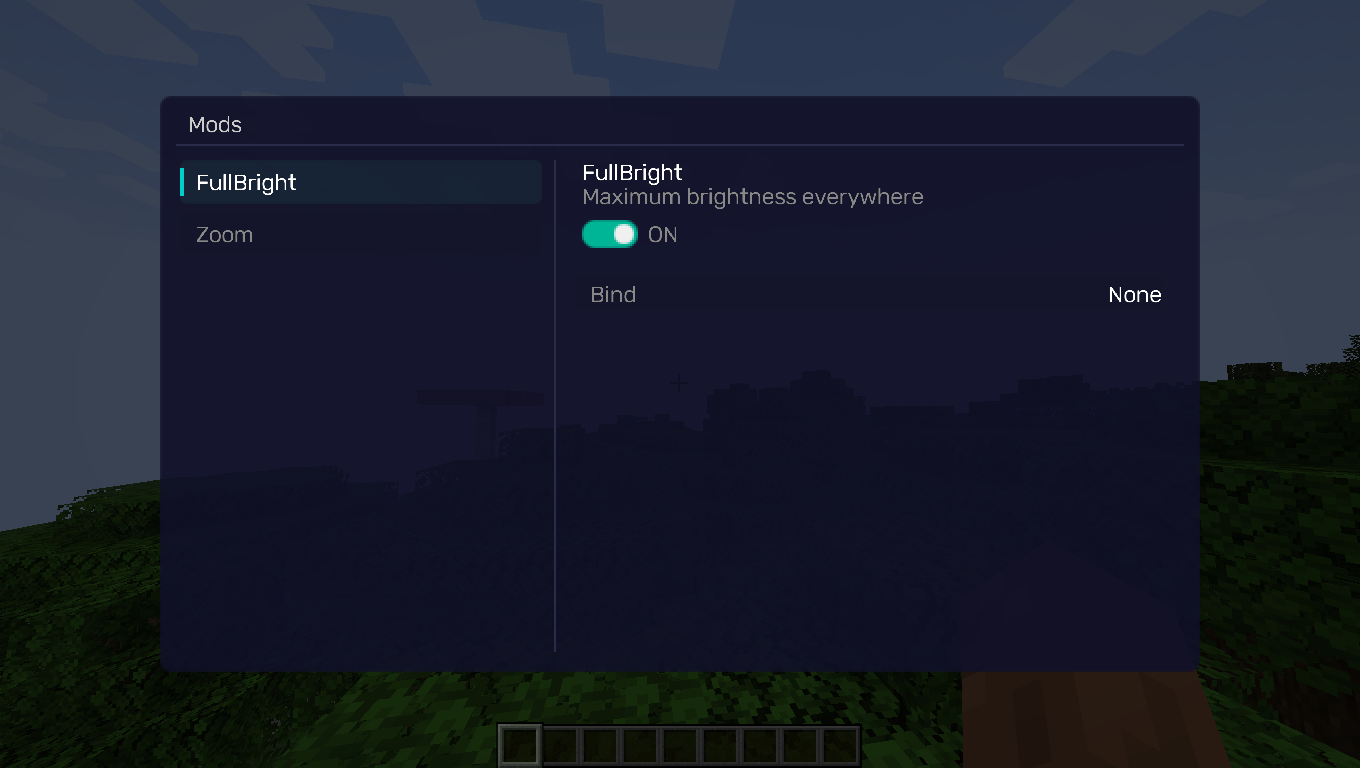
Toggle On/Off: Easily enable or disable FullBright through the NightVisuals in-game GUI menu. No need to restart the game or edit config files.
Zero Performance Impact: The mod works by overriding the lightmap framebuffer — no additional rendering passes, no FPS drops.
No Torch Spam: Explore freely without wasting inventory space on torches or other light sources.
Configuration
FullBright has no additional settings — it's either on or off. Toggle it through the NightVisuals GUI (default key: RShift).
Installation
- Install a compatible version of the mod loader (Fabric API).
- Install NightVisuals GUI (required dependency).
- Place the downloaded FullBright mod file into the mods folder.
- Launch the game.
RU:
NightVisuals FullBright — это модификация, полностью убирающая темноту из игры. Все блоки отображаются с максимальным уровнем освещения вне зависимости от реального уровня света. Мод создан для игроков, которым нужна максимальная видимость в пещерах, ночью и в тёмных зонах без необходимости расставлять факелы.
Основной функционал
Мгновенная полная яркость: Все блоки рендерятся на максимальном уровне освещения. Пещеры, Незер, Энд и ночное время полностью видимы без каких-либо источников света.
Включение/Выключение: Легко включайте и отключайте FullBright через внутриигровое меню NightVisuals GUI. Не нужно перезапускать игру или редактировать конфиги.
Нулевое влияние на производительность: Мод работает через перезапись lightmap framebuffer — никаких дополнительных проходов рендеринга, никаких просадок FPS.
Без спама факелами: Исследуйте свободно, не тратя место в инвентаре на факелы и другие источники света.
Настройка
FullBright не имеет дополнительных настроек — он либо включён, либо выключен. Переключается через NightVisuals GUI (клавиша по умолчанию: RShift).
Установка
- Установите совместимую версию загрузчика модов (Fabric API).
- Установите NightVisuals GUI (обязательная зависимость).
- Поместите скачанный файл мода FullBright в папку mods.
- Запустите игру.
REQUIREMENTS NightVisuals GUI
EN:
NightVisuals FullBright is a modification that removes all darkness from the game, making every block fully illuminated regardless of light level. The mod is designed for players who want maximum visibility in caves, at night, and in dark areas without placing torches.
Core Features
Instant Full Brightness: All blocks are rendered at maximum light level. Caves, the Nether, the End, and nighttime are fully visible without any light sources.
Toggle On/Off: Easily enable or disable FullBright through the NightVisuals in-game GUI menu. No need to restart the game or edit config files.
Zero Performance Impact: The mod works by overriding the lightmap framebuffer — no additional rendering passes, no FPS drops.
No Torch Spam: Explore freely without wasting inventory space on torches or other light sources.
Configuration
FullBright has no additional settings — it's either on or off. Toggle it through the NightVisuals GUI (default key: RShift).
Installation
- Install a compatible version of the mod loader (Fabric API).
- Install NightVisuals GUI (required dependency).
- Place the downloaded FullBright mod file into the mods folder.
- Launch the game.
RU:
NightVisuals FullBright — это модификация, полностью убирающая темноту из игры. Все блоки отображаются с максимальным уровнем освещения вне зависимости от реального уровня света. Мод создан для игроков, которым нужна максимальная видимость в пещерах, ночью и в тёмных зонах без необходимости расставлять факелы.
Основной функционал
Мгновенная полная яркость: Все блоки рендерятся на максимальном уровне освещения. Пещеры, Незер, Энд и ночное время полностью видимы без каких-либо источников света.
Включение/Выключение: Легко включайте и отключайте FullBright через внутриигровое меню NightVisuals GUI. Не нужно перезапускать игру или редактировать конфиги.
Нулевое влияние на производительность: Мод работает через перезапись lightmap framebuffer — никаких дополнительных проходов рендеринга, никаких просадок FPS.
Без спама факелами: Исследуйте свободно, не тратя место в инвентаре на факелы и другие источники света.
Настройка
FullBright не имеет дополнительных настроек — он либо включён, либо выключен. Переключается через NightVisuals GUI (клавиша по умолчанию: RShift).
Установка
- Установите совместимую версию загрузчика модов (Fabric API).
- Установите NightVisuals GUI (обязательная зависимость).
- Поместите скачанный файл мода FullBright в папку mods.
- Запустите игру.
Screenshots
Gallery
-
 GUI GUI
Versions
Files
Relations
Project Relations
More like this
Similar Mods
Suggestions use data such as tags, dependencies, dependents, descriptions, titles, and more to rank how much they overlap with this mod.
On ModDex
Community snapshot
By the numbers
Statistics
Want to reach Minecraft players?
We're looking for a server hosting partner to feature here and other parts of the site. Interested? Send us a message!
Get in touchGet it on
Available Platforms
On ModDex
Community snapshot
By the numbers
Statistics
Resources