
Community listing page, reviews here may not be monitored by the author.
NightVisuals ItemPhysics


No reviews yet
Gives dropped items realistic 3D physics, making them lay flat on the ground.
Community voices
Reviews
No reviews yet. Be the first to review this project!
Get it on
Available Platforms
Compatibility
Supported Environments
Runs entirely on the client. Works on vanilla servers.
About
Project Details
For authors
Embed Badge
If you're the author of this project, you can embed a live badge anywhere that supports HTML or Markdown. It updates automatically whenever ratings change.
Use HTML for any page that supports it, or Markdown for README files and Markdown-based descriptions.
Identifiers
Platform IDs
Resources
External Links
About
Description
EN:
NightVisuals ItemPhysics is a visual modification that overhauls the vanilla item drop rendering. Instead of floating and spinning in the air as flat 2D sprites, items gain realistic 3D-like rotation and lay flat directly on the ground blocks.
Core Features
- Realistic Drop Physics: Dropped items rotate realistically based on momentum and rest flat on the ground surface.
- Toggle On/Off: Easily switch between vanilla rendering and custom physics through the NightVisuals in-game GUI menu.
- Purely Client-Side: Modifies only how entities are rendered on your screen — 100% safe for multiplayer servers and anti-cheat friendly.
- Zero Performance Impact: Optimized matrix transformations within the entity rendering pipeline ensure zero impact on your framerate.
Realistic Item Drop Physics: 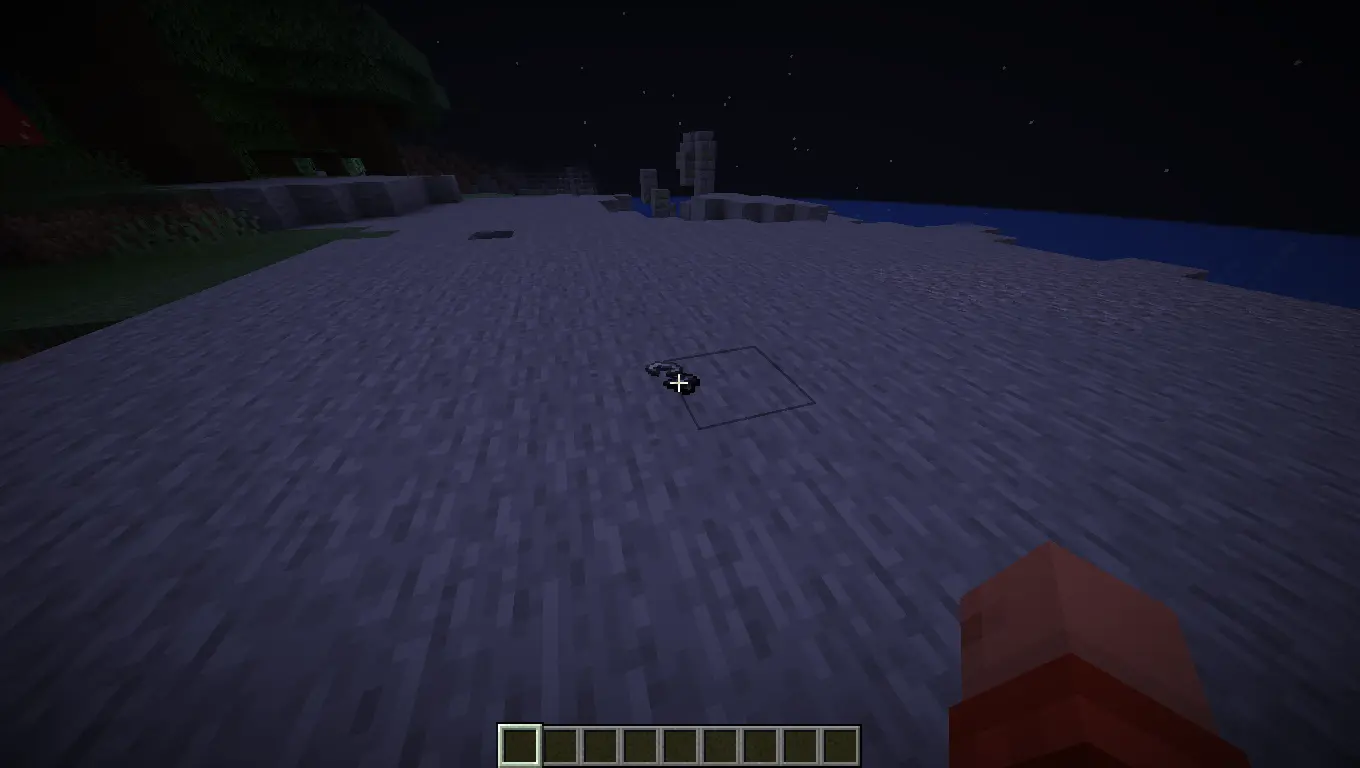
Configuration
ItemPhysics toggles via the NightVisuals GUI (default key: RShift). No separate config files required.
Installation
- Install Fabric Loader and Fabric API.
- Install NightVisuals GUI (required dependency).
- Place the downloaded ItemPhysics mod
.jarfile into yourmodsfolder. - Launch the game.
RU:
NightVisuals ItemPhysics — это визуальная модификация, которая полностью перерабатывает ванильное отображение выброшенных предметов. Вместо того чтобы левитировать и крутиться в воздухе как плоские 2D-спрайты, предметы приобретают реалистичное вращение и ложатся плашмя прямо на поверхность блоков.
Основной функционал
- Реалистичная физика дропа: Выброшенные предметы вращаются с учётом инерции и аккуратно падают на землю, принимая горизонтальное положение.
- Включение/Выключение: Удобное переключение между ванильным рендером и кастомной физикой через внутриигровое меню NightVisuals GUI.
- Исключительно клиентская часть: Изменяет только отрисовку сущностей на твоём экране — абсолютно безопасно для мультиплеера и любых античитов.
- Нулевое влияние на FPS: Оптимизированные матричные трансформации внутри пайплайна рендеринга сущностей гарантируют полное отсутствие просадок производительности.
Реалистичная физика дропа предметов:
Настройка
ItemPhysics переключается через NightVisuals GUI (клавиша по умолчанию: RShift). Дополнительных конфигов нет.
Установка
- Установите Fabric Loader и Fabric API.
- Установите NightVisuals GUI (обязательная зависимость).
- Поместите скачанный файл мода ItemPhysics в папку
mods. - Запустите игру.
REQUIREMENTS NightVisuals GUI
EN:
NightVisuals ItemPhysics is a visual modification that overhauls the vanilla item drop rendering. Instead of floating and spinning in the air as flat 2D sprites, items gain realistic 3D-like rotation and lay flat directly on the ground blocks.
Core Features
- Realistic Drop Physics: Dropped items rotate realistically based on momentum and rest flat on the ground surface.
- Toggle On/Off: Easily switch between vanilla rendering and custom physics through the NightVisuals in-game GUI menu.
- Purely Client-Side: Modifies only how entities are rendered on your screen — 100% safe for multiplayer servers and anti-cheat friendly.
- Zero Performance Impact: Optimized matrix transformations within the entity rendering pipeline ensure zero impact on your framerate.
Realistic Item Drop Physics:
Configuration
ItemPhysics toggles via the NightVisuals GUI (default key: RShift). No separate config files required.
Installation
- Install Fabric Loader and Fabric API.
- Install NightVisuals GUI (required dependency).
- Place the downloaded ItemPhysics mod
.jarfile into yourmodsfolder. - Launch the game.
RU:
NightVisuals ItemPhysics — это визуальная модификация, которая полностью перерабатывает ванильное отображение выброшенных предметов. Вместо того чтобы левитировать и крутиться в воздухе как плоские 2D-спрайты, предметы приобретают реалистичное вращение и ложатся плашмя прямо на поверхность блоков.
Основной функционал
- Реалистичная физика дропа: Выброшенные предметы вращаются с учётом инерции и аккуратно падают на землю, принимая горизонтальное положение.
- Включение/Выключение: Удобное переключение между ванильным рендером и кастомной физикой через внутриигровое меню NightVisuals GUI.
- Исключительно клиентская часть: Изменяет только отрисовку сущностей на твоём экране — абсолютно безопасно для мультиплеера и любых античитов.
- Нулевое влияние на FPS: Оптимизированные матричные трансформации внутри пайплайна рендеринга сущностей гарантируют полное отсутствие просадок производительности.
Реалистичная физика дропа предметов:
Настройка
ItemPhysics переключается через NightVisuals GUI (клавиша по умолчанию: RShift). Дополнительных конфигов нет.
Установка
- Установите Fabric Loader и Fabric API.
- Установите NightVisuals GUI (обязательная зависимость).
- Поместите скачанный файл мода ItemPhysics в папку
mods. - Запустите игру.
Screenshots
Gallery
-
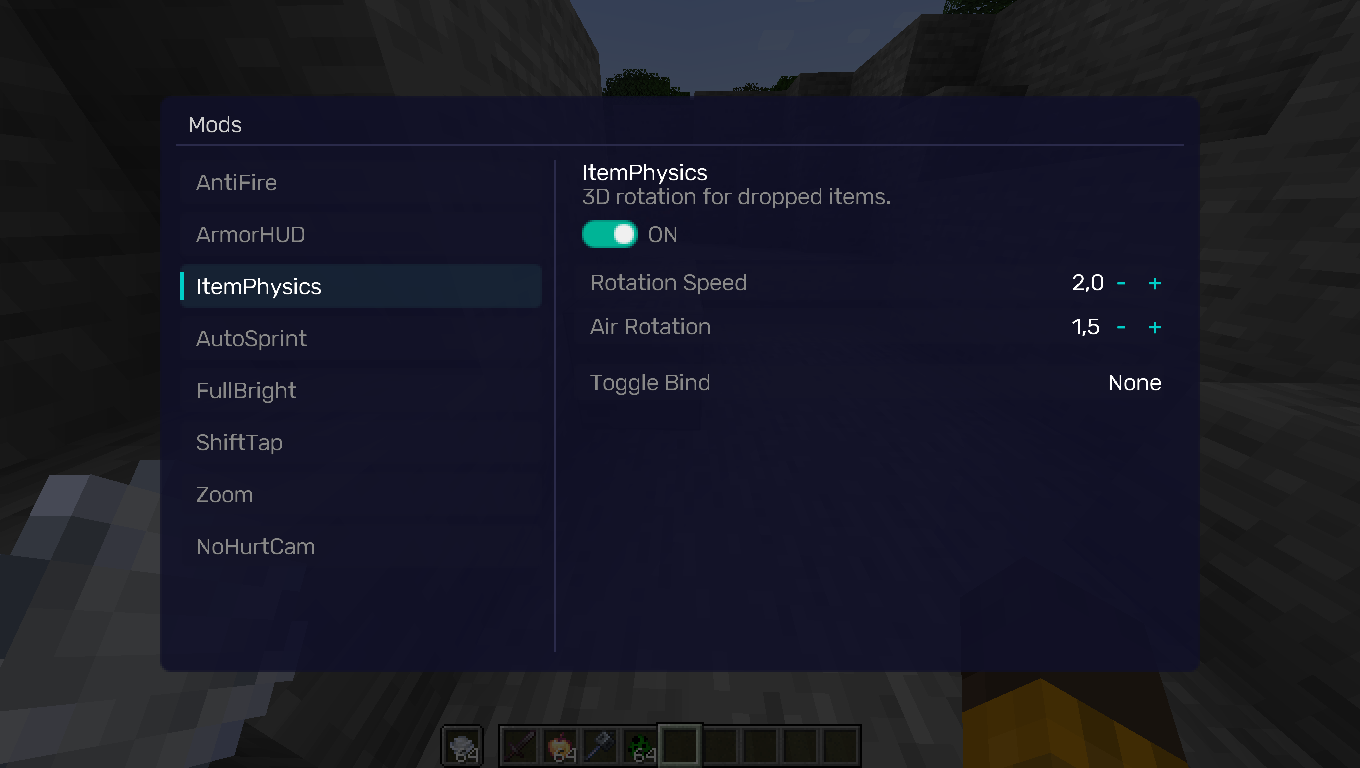 GUI GUI
Versions
Files
Relations
Project Relations
More like this
Similar Mods
Suggestions use data such as tags, dependencies, dependents, descriptions, titles, and more to rank how much they overlap with this mod.
On ModDex
Community snapshot
By the numbers
Statistics
Want to reach Minecraft players?
We're looking for a server hosting partner to feature here and other parts of the site. Interested? Send us a message!
Get in touchGet it on
Available Platforms
On ModDex
Community snapshot
By the numbers
Statistics
Resources