
Community listing page, reviews here may not be monitored by the author.
NightVisuals Zoom


No reviews yet
The modification includes a convenient Zoom.
Community voices
Reviews
No reviews yet. Be the first to review this project!
Get it on
Available Platforms
Compatibility
Supported Environments
Runs entirely on the client. Works on vanilla servers.
About
Project Details
For authors
Embed Badge
If you're the author of this project, you can embed a live badge anywhere that supports HTML or Markdown. It updates automatically whenever ratings change.
Use HTML for any page that supports it, or Markdown for README files and Markdown-based descriptions.
Identifiers
Platform IDs
Resources
External Links
About
Description
EN:
NightVisuals Zoom is a modification that adds a customizable zoom feature to the game. The mod is optimized for improved viewing convenience and offers flexible configuration options tailored to individual player preferences.
Core Features
Hold-to-Activate: Zoom only works while the assigned key is held down. Upon releasing the button, the camera instantly returns to its default state.
Keybinding: Full integration with the game's standard controls menu. You can assign any convenient key or mouse button to activate the zoom.
Zoom Factor (Magnification Level): A slider to adjust the zoom strength. Allows you to set anything from a slight magnification for better overview to a strong zoom for detailed inspection of distant objects.
Zoom Speed: Transition dynamics adjustment. Change the animation time for zooming in and out — from an instant snap to a smooth transition.
Configuration
All parameters can be changed through the configuration file or the in-game settings menu:
Key Assignment: Go to control settings, find the NightVisuals category, and assign your key.
Zoom Factor: Set the magnification coefficient (e.g., from 2.0 to 10.0).
Zoom Speed: Adjust the smoothness value to achieve a comfortable visual effect.
Installation
- Install a compatible version of the mod loader (Fabric API).
- Place the downloaded mod file into the mods folder.
- Launch the game.
RU:
NightVisuals Zoom — это модификация, добавляющая в игру настраиваемую функцию масштабирования (зума). Мод оптимизирован для повышения удобства обзора и предлагает гибкие параметры конфигурации под индивидуальные предпочтения игрока.
Основной функционал
Активация по зажатию: Масштабирование работает исключительно во время удержания назначенной клавиши. При отпускании кнопки камера мгновенно возвращается в исходное состояние.
Привязка клавиш: Полная интеграция в стандартное меню управления игры. Вы можете назначить любую удобную клавишу или кнопку мыши для активации зума.
Zoom Factor (Кратность приближения): Ползунок регулировки силы масштабирования. Позволяет настроить как незначительное приближение для улучшения обзора, так и сильное увеличение для детального осмотра удаленных объектов.
Скорость зума: Настройка динамики перехода. Доступно изменение времени анимации приближения и отдаления — от мгновенной смены кадра до плавного перехода.
Настройка
Все параметры изменяются через конфигурационный файл или внутриигровое меню настроек:
Назначение кнопки: Перейдите в настройки управления, найдите категорию NightVisuals и укажите клавишу.
Zoom Factor: Установите коэффициент кратности (например, от 2.0 до 10.0).
Скорость зума: Отрегулируйте значение плавности для достижения комфортного визуального эффекта.
Установка
- Установите совместимую версию загрузчика модов (Fabric API).
- Поместите скачанный файл модификации в папку mods.
- Запустите игру.
REQUIREMENTS NightVisuals GUI
EN:
NightVisuals Zoom is a modification that adds a customizable zoom feature to the game. The mod is optimized for improved viewing convenience and offers flexible configuration options tailored to individual player preferences.
Core Features
Hold-to-Activate: Zoom only works while the assigned key is held down. Upon releasing the button, the camera instantly returns to its default state.
Keybinding: Full integration with the game's standard controls menu. You can assign any convenient key or mouse button to activate the zoom.
Zoom Factor (Magnification Level): A slider to adjust the zoom strength. Allows you to set anything from a slight magnification for better overview to a strong zoom for detailed inspection of distant objects.
Zoom Speed: Transition dynamics adjustment. Change the animation time for zooming in and out — from an instant snap to a smooth transition.
Configuration
All parameters can be changed through the configuration file or the in-game settings menu:
Key Assignment: Go to control settings, find the NightVisuals category, and assign your key.
Zoom Factor: Set the magnification coefficient (e.g., from 2.0 to 10.0).
Zoom Speed: Adjust the smoothness value to achieve a comfortable visual effect.
Installation
- Install a compatible version of the mod loader (Fabric API).
- Place the downloaded mod file into the mods folder.
- Launch the game.
RU:
NightVisuals Zoom — это модификация, добавляющая в игру настраиваемую функцию масштабирования (зума). Мод оптимизирован для повышения удобства обзора и предлагает гибкие параметры конфигурации под индивидуальные предпочтения игрока.
Основной функционал
Активация по зажатию: Масштабирование работает исключительно во время удержания назначенной клавиши. При отпускании кнопки камера мгновенно возвращается в исходное состояние.
Привязка клавиш: Полная интеграция в стандартное меню управления игры. Вы можете назначить любую удобную клавишу или кнопку мыши для активации зума.
Zoom Factor (Кратность приближения): Ползунок регулировки силы масштабирования. Позволяет настроить как незначительное приближение для улучшения обзора, так и сильное увеличение для детального осмотра удаленных объектов.
Скорость зума: Настройка динамики перехода. Доступно изменение времени анимации приближения и отдаления — от мгновенной смены кадра до плавного перехода.
Настройка
Все параметры изменяются через конфигурационный файл или внутриигровое меню настроек:
Назначение кнопки: Перейдите в настройки управления, найдите категорию NightVisuals и укажите клавишу.
Zoom Factor: Установите коэффициент кратности (например, от 2.0 до 10.0).
Скорость зума: Отрегулируйте значение плавности для достижения комфортного визуального эффекта.
Установка
- Установите совместимую версию загрузчика модов (Fabric API).
- Поместите скачанный файл модификации в папку mods.
- Запустите игру.
Screenshots
Gallery
-
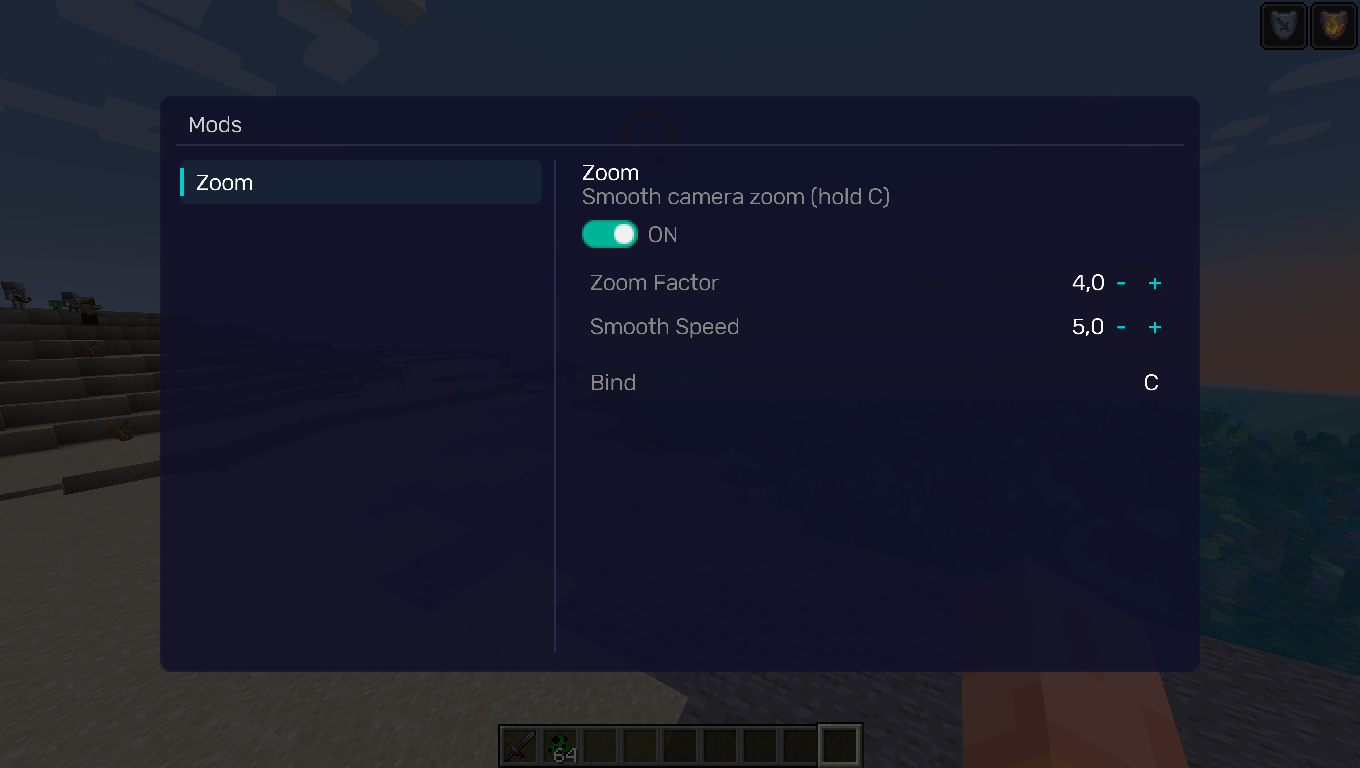 GUI GUI
Versions
Files
Relations
Project Relations
More like this
Similar Mods
Suggestions use data such as tags, dependencies, dependents, descriptions, titles, and more to rank how much they overlap with this mod.
On ModDex
Community snapshot
By the numbers
Statistics
Want to reach Minecraft players?
We're looking for a server hosting partner to feature here and other parts of the site. Interested? Send us a message!
Get in touchGet it on
Available Platforms
On ModDex
Community snapshot
By the numbers
Statistics
Resources