Community listing page, reviews here may not be monitored by the author.
OptiFrames


No reviews yet
A lightweight, client-side Fabric mod that optimizes large map display rendering and significantly improves FPS in demanding situations
Community voices
Reviews
No reviews yet. Be the first to review this project!
Get it on
Available Platforms
Compatibility
Supported Environments
Runs entirely on the client. Works on vanilla servers.
About
Project Details
For authors
Embed Badge
If you're the author of this project, you can embed a live badge anywhere that supports HTML or Markdown. It updates automatically whenever ratings change.
Use HTML for any page that supports it, or Markdown for README files and Markdown-based descriptions.
Identifiers
Platform IDs
Resources
External Links
About
Description
OptiFrames
A lightweight, client-side Fabric mod that makes large map displays render cleaner and smoother without changing their appearance.
Performance Test with 40x40 and 70x70 map
Test are made with Sodium but you can expect same gain without it.

Why use OptiFrames?
- Optimized rendering: hides redundant borders between adjacent maps.
- Texture Atlas: all map textures are packed into a shared atlas, drastically reducing GPU draw calls.
- FPS boost: expect up to 9x FPS increase with large maps.
- Map decoration support: player markers, banners, and other map icons still render correctly.
- Lightweight: designed to work well alongside Sodium and Iris.
Installation
- Download the latest
optiframes-<version>.jarfrom the Modrinth/Curseforge page. - Place the JAR in your
modsfolder. - Start Minecraft using a Fabric profile.
Configuration
You can configure the mod with Mod Menu:
- Enable/Disable Optiframes entirely.
- Frame Render Type — choose between vanilla and optimized frame model rendering.
- Frame borders — toggle frame border rendering for extra performance.
- Back Face Rendering — toggle rendering of item frames back face.
- Atlas size — choose the atlas texture size, Bigger = more maps per draw call. Default 4096 works great for most setups.
Compatibility
- Client-side only — safe to use on any server.
- Works well with Sodium and Iris.
- Tested on every available version.
Troubleshooting
- Mod not appearing in Mod Menu: confirm the JAR is in
modsand you launched the Fabric profile. - Crashes: please attach
latest.logand anycrash-reportswhen opening an issue.
OptiFrames
A lightweight, client-side Fabric mod that makes large map displays render cleaner and smoother without changing their appearance.
Performance Test with 40x40 and 70x70 map
Test are made with Sodium but you can expect same gain without it.
Why use OptiFrames?
- Optimized rendering: hides redundant borders between adjacent maps.
- Texture Atlas: all map textures are packed into a shared atlas, drastically reducing GPU draw calls.
- FPS boost: expect up to 9x FPS increase with large maps.
- Map decoration support: player markers, banners, and other map icons still render correctly.
- Lightweight: designed to work well alongside Sodium and Iris.
Installation
- Download the latest
optiframes-<version>.jarfrom the Modrinth/Curseforge page. - Place the JAR in your
modsfolder. - Start Minecraft using a Fabric profile.
Configuration
You can configure the mod with Mod Menu:
- Enable/Disable Optiframes entirely.
- Frame Render Type — choose between vanilla and optimized frame model rendering.
- Frame borders — toggle frame border rendering for extra performance.
- Back Face Rendering — toggle rendering of item frames back face.
- Atlas size — choose the atlas texture size, Bigger = more maps per draw call. Default 4096 works great for most setups.
Compatibility
- Client-side only — safe to use on any server.
- Works well with Sodium and Iris.
- Tested on every available version.
Troubleshooting
- Mod not appearing in Mod Menu: confirm the JAR is in
modsand you launched the Fabric profile. - Crashes: please attach
latest.logand anycrash-reportswhen opening an issue.
Screenshots
Gallery
-
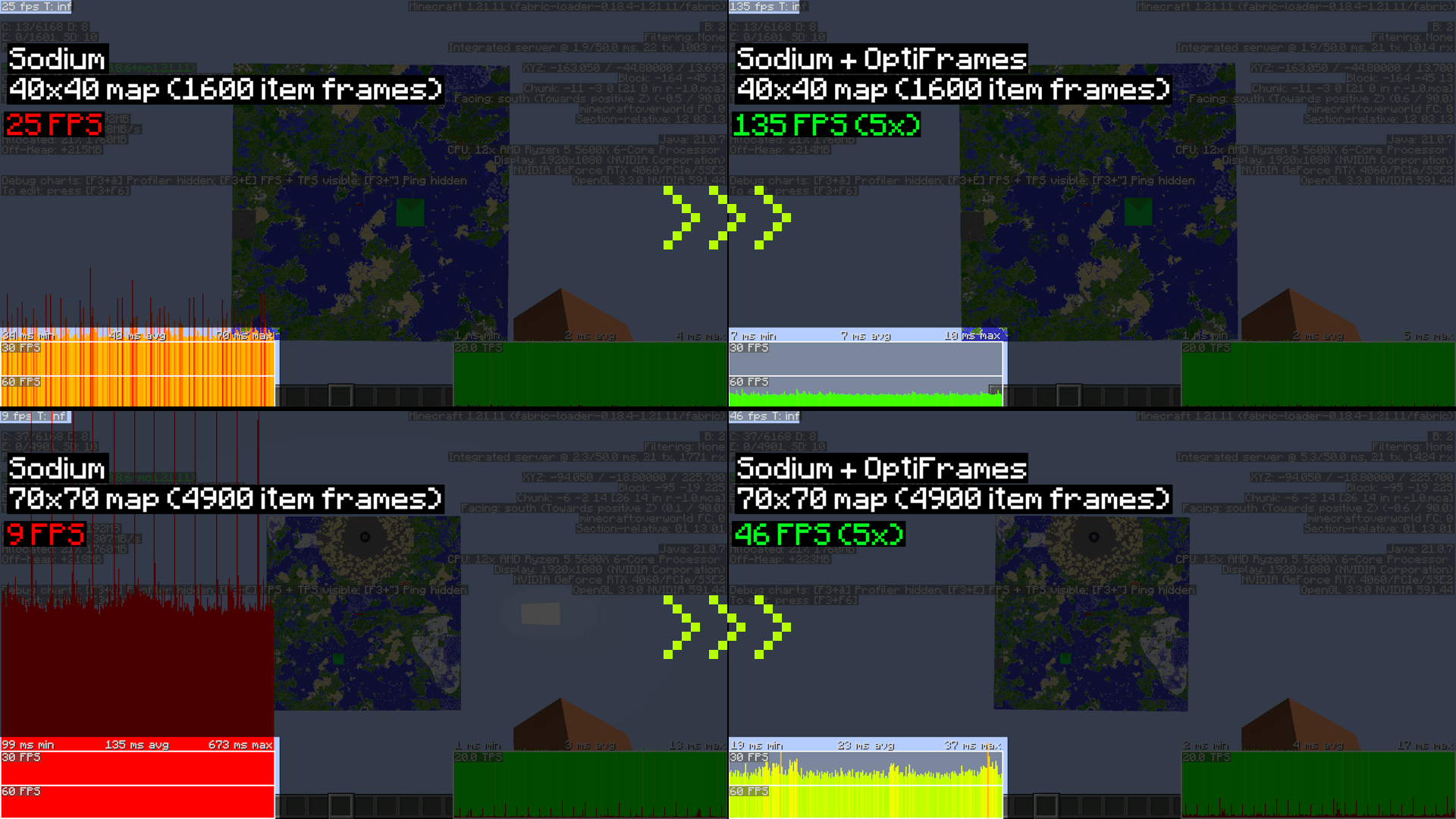 Performance Comparison Performance comparison with and without OptiFrames. I'm rendering 40x40 and 70x70 map display (1600 and 4900 item frames) for this test. Sodium is used but expect same FPS gain even without it.
-
Performance Comparison Performance comparison with and without OptiFrames. I'm rendering 40x40 and 70x70 map display (1600 and 4900 item frames) for this test. Sodium is used but expect same FPS gain even without it.
Versions
Files
Relations
Project Relations
More like this
Similar Mods
Suggestions use data such as tags, dependencies, dependents, descriptions, titles, and more to rank how much they overlap with this mod.
On ModDex
Community snapshot
By the numbers
Statistics
Want to reach Minecraft players?
We're looking for a server hosting partner to feature here and other parts of the site. Interested? Send us a message!
Get in touchGet it on
Available Platforms
On ModDex
Community snapshot
By the numbers
Statistics
Resources