
Community listing page, reviews here may not be monitored by the author.
OptimizeMod


No reviews yet
Reduces server lag by throttling distant entity ticks, suspending mob AI, and limiting particles.
Community voices
Reviews
No reviews yet. Be the first to review this project!
Get it on
Available Platforms
Compatibility
Supported Environments
Install on the client or the server; either alone gives full functionality.
About
Project Details
For authors
Embed Badge
If you're the author of this project, you can embed a live badge anywhere that supports HTML or Markdown. It updates automatically whenever ratings change.
Use HTML for any page that supports it, or Markdown for README files and Markdown-based descriptions.
Identifiers
Platform IDs
Resources
External Links
About
Description
⚡ OptimizeMod
Reduce lag. Sleep distant mobs. Boost FPS. No config needed.
OptimizeMod is a lightweight Fabric optimization mod designed for large modpacks and heavily modded servers. It intelligently reduces CPU and GPU load by throttling entities and AI that no player is watching — because why waste resources on mobs nobody can see?
🚀 What does it do?
🧠 Smart Entity Tick Reduction
Entities far from players don't need to run at full speed. OptimizeMod automatically slows down their processing based on distance:
| Distance from player | Tick rate |
|---|---|
| 0 – 48 blocks | Normal (20/s) |
| 48 – 96 blocks | Reduced (10/s) |
| 96+ blocks | Minimal (5/s) |
💤 Mob AI Sleep
Pathfinding and combat AI are among the most expensive operations on a server. Mobs that no player is near simply stop thinking — they stand still until someone gets close again.
| Distance from player | AI behavior |
|---|---|
| 0 – 32 blocks | Full AI |
| 32 – 48 blocks | AI updated every 2 ticks |
| 48+ blocks | AI fully suspended |
✨ Particle Limiter (Client-side)
Large modpacks often add dozens of new particle effects. OptimizeMod caps active particles at 4,000 simultaneously, preventing sudden FPS drops from particle-heavy mods.
📈 Performance Impact
The more entities and mods you have, the bigger the gain. On a server with 300+ mobs spread across the world, you can expect:
- 30–60% reduction in entity-related CPU usage
- Smoother TPS on heavily loaded servers
- Fewer FPS drops on the client from particles
🔧 Compatibility
OptimizeMod is designed to complement other optimization mods, not replace them:
| Mod | Compatibility |
|---|---|
| ✅ Sodium | Full |
| ✅ Lithium | Full |
| ✅ Krypton | Full |
| ✅ FerriteCore | Full |
| ✅ Most content mods | Full |
⚠️ Mobs at long distances will stand still (intentional — this is the source of the performance gain). Hostile mobs still despawn normally per vanilla rules.
🔬 How It Works (Technical)
OptimizeMod uses three Fabric Mixins that intercept core Minecraft methods at runtime:
EntityTickMixin
- Target:
LivingEntity.tickMovement() - Injection:
@InjectatHEADwithcancellable = true - Calls
ServerWorld.getClosestPlayer()every tick to find the nearest player - If no player is within 96 blocks → cancels the tick 3 out of every 4 calls (
world.getTime() % 4) - If player is between 48–96 blocks → cancels every second tick (
world.getTime() % 2) - Players (
PlayerEntity) are always excluded from throttling
MobEntityAIMixin
- Target:
LivingEntity.tickNewAi() - Injection:
@InjectatHEADwithcancellable = true - Same distance check as above
- If no player is within 48 blocks → AI goal update is fully cancelled (no pathfinding, no combat calculations)
- Between 32–48 blocks → AI cancelled every other tick
- Also resets
despawnCounterto 0 via@Shadowto prevent unintended despawning of passive mobs
ParticleManagerMixin
- Target:
ParticleManager.addParticle() - Injection:
@InjectatHEADwithcancellable = true - Maintains an internal counter per
ParticleManagerinstance - Cancels particle creation once the counter exceeds 4,000, returning
null - Counter resets automatically to prevent permanent particle blocking
All three mixins operate purely through method injection with no reflection, no ASM bytecode manipulation beyond what Mixin provides, and no thread-unsafe operations.
📦 Installation
- Install Fabric Loader for Minecraft 1.21.1
- Install Fabric API
- Drop
OptimizeMod.jarinto yourmods/folder - Launch and enjoy the extra performance!
📋 Requirements
- Minecraft 1.21.1
- Fabric Loader 0.16+
- Fabric API
- Java 21+
Made with ❤️ for the modded Minecraft community. Small mod, big difference.
OptimizeMod
Keep distant simulation quiet so active gameplay gets more CPU time.
OptimizeMod is a lightweight Fabric optimization mod for Minecraft 1.21.1. Its goal is simple: reduce work on entities and effects that players are not actively interacting with.
What OptimizeMod changes
1. Distance-based movement tick throttling (EntityTickMixin)
Hook: LivingEntity.tickMovement()
- Players are excluded.
- If no player is found within sleep distance (
96blocks by default), non-player living entities skip movement ticks (ENTITY_TICK_SKIP = 4by default). - If a player is present but farther than reduce distance (
48blocks), movement updates are throttled (roughly every other tick).
2. Distance-based AI throttling (MobEntityAIMixin)
Hook: LivingEntity.tickNewAi() (for MobEntity)
- If no player is found within reduce distance (
48blocks), AI updates are cancelled for that tick. - In mid-distance ranges, AI updates are partially throttled (every other tick).
- While throttled/cancelled,
despawnCounteris reset to avoid unwanted despawn side effects.
3. Particle throughput cap (ParticleManagerMixin, client)
Hook: ParticleManager.addParticle(...)
- Particle creation is capped with a local counter (
MAX_PARTICLES_LIMIT = 4000). - Excess particle spawn requests are dropped when the cap is exceeded.
- Intended to reduce client stutter from extreme particle bursts.
Important accuracy notes
- OptimizeMod does not guarantee fixed FPS/TPS/MSPT improvements.
- Real impact depends on mob density, player spread, chunk activity, modpack composition, JVM/runtime settings, and test scenario.
- Behavior changes for distant mobs/entities are intentional by design.
Reproducible evaluation (recommended)
To validate impact on your setup, compare baseline vs. OptimizeMod with identical conditions:
- Same Java version, JVM args, mod list, seed, and config.
- Same scenario and duration (recommended: 20-30 minutes per run).
- At least 3 baseline runs + 3 OptimizeMod runs.
- Collect comparable metrics:
- p50/p95 MSPT (
sparkor equivalent) - CPU usage (process/system)
- FPS/frame-time (client tests)
- Compare distributions (median/p95), not one-off spikes.
Installation
- Install Fabric Loader for Minecraft 1.21.1
- Install Fabric API
- Place the OptimizeMod jar in
mods/
Compatibility
- Designed to complement other optimization mods.
- As with any mixin-based mod, test your exact modpack before production deployment.
Screenshots
Gallery
-
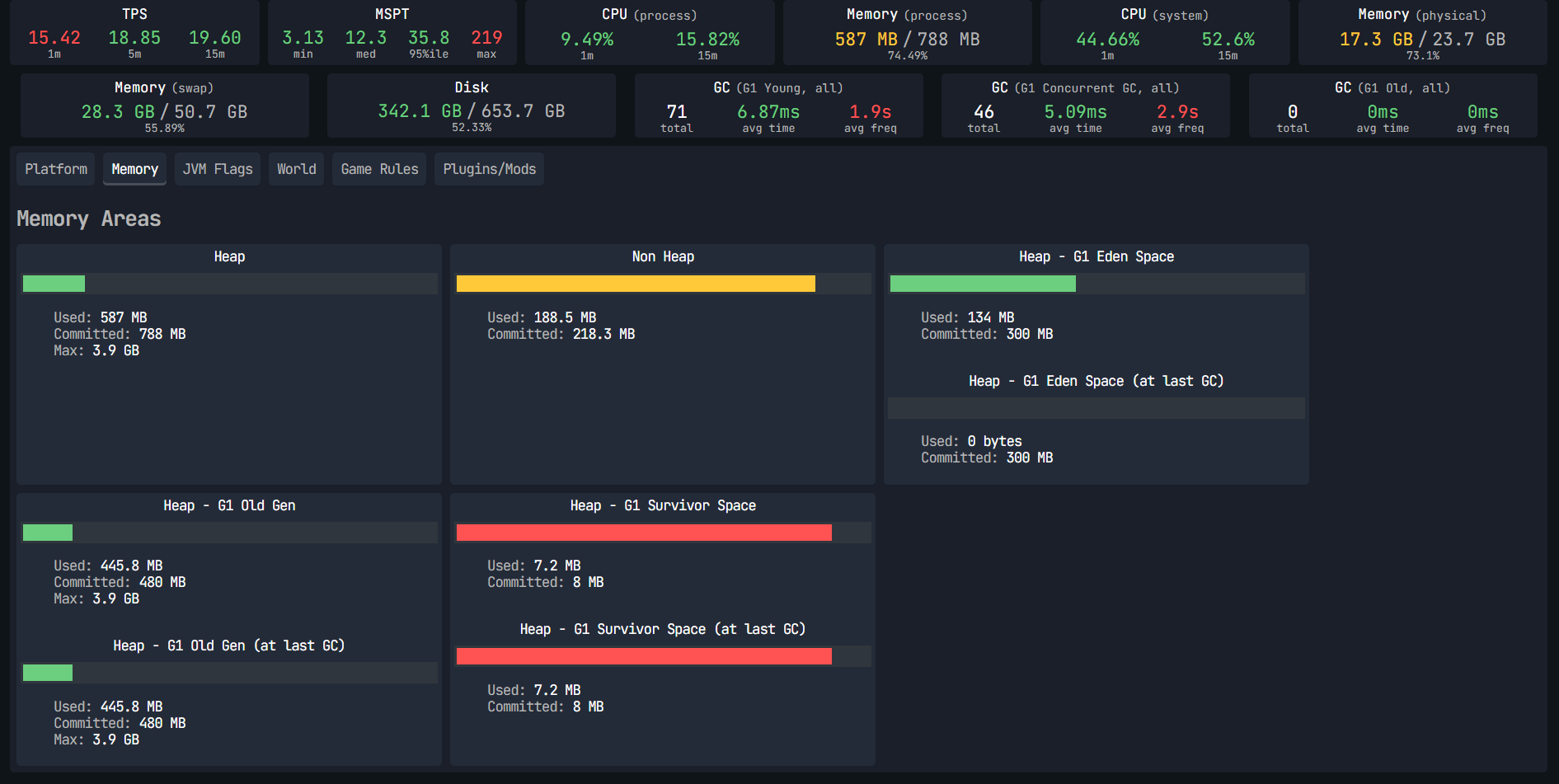 Report Spark Without Mod Report Spark Without Mod
 -
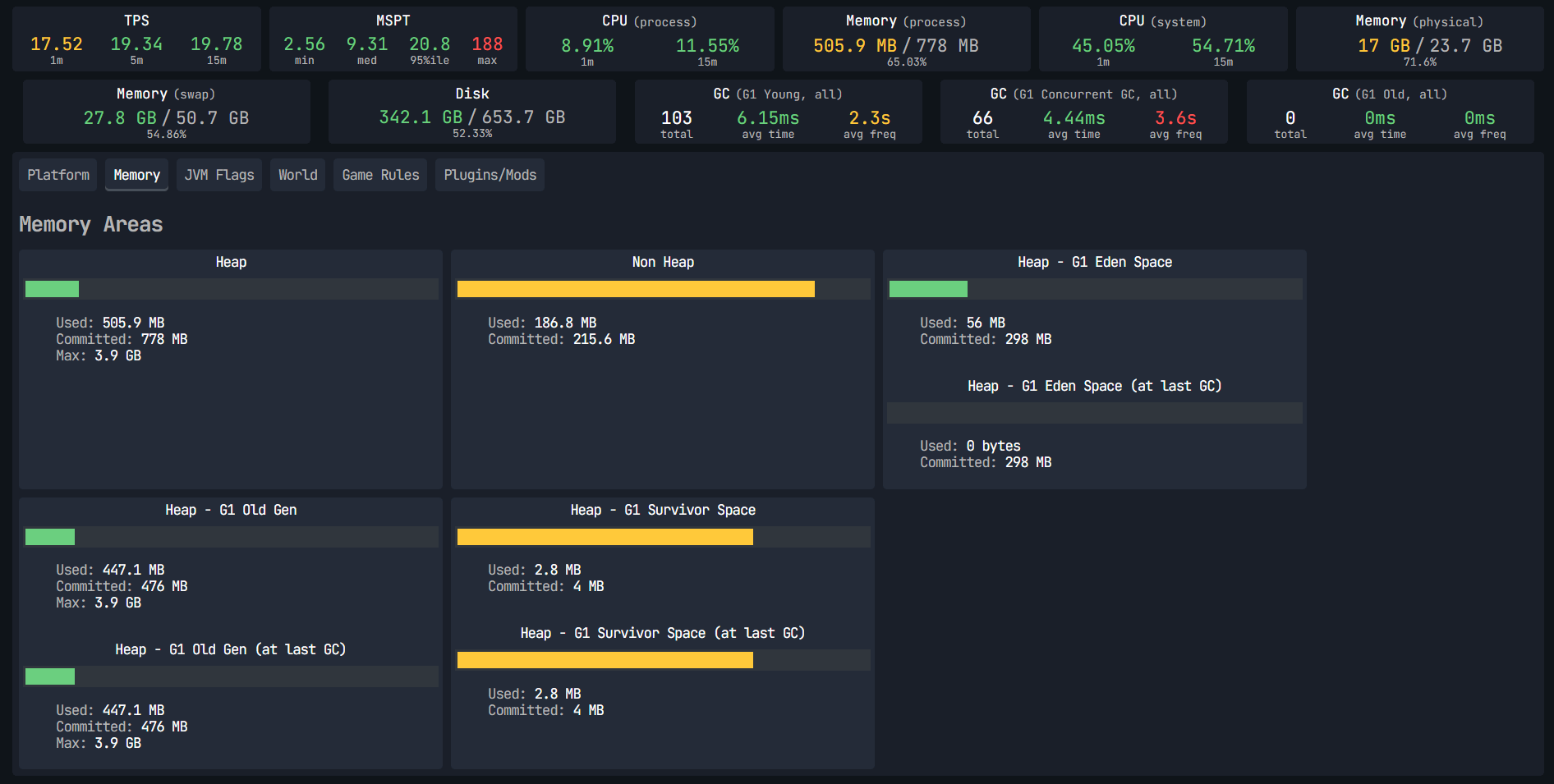 Report Spark With Mod Report Spark With Mod
-
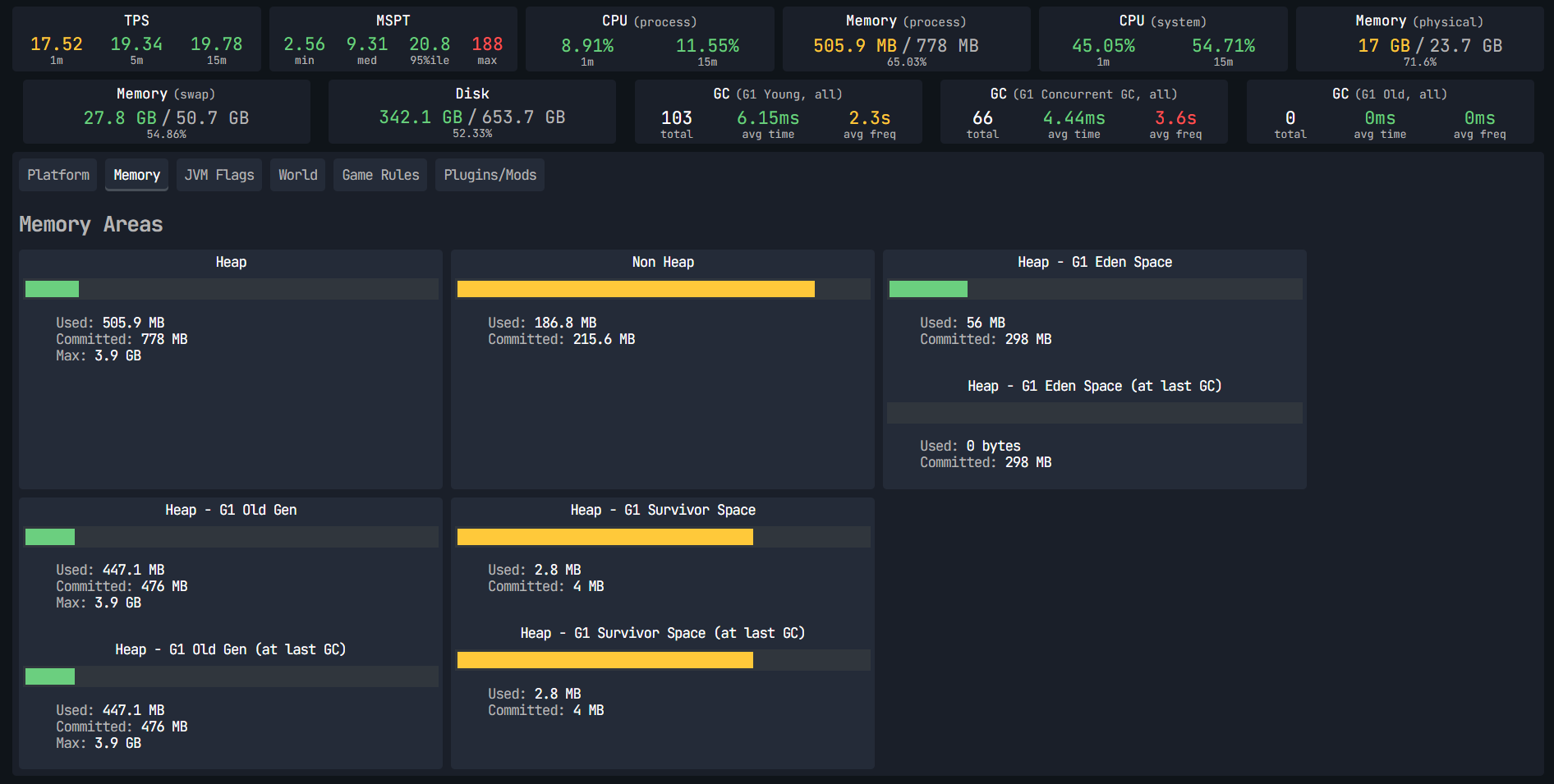 With Mod Report Spark With OptimizeMod
 -
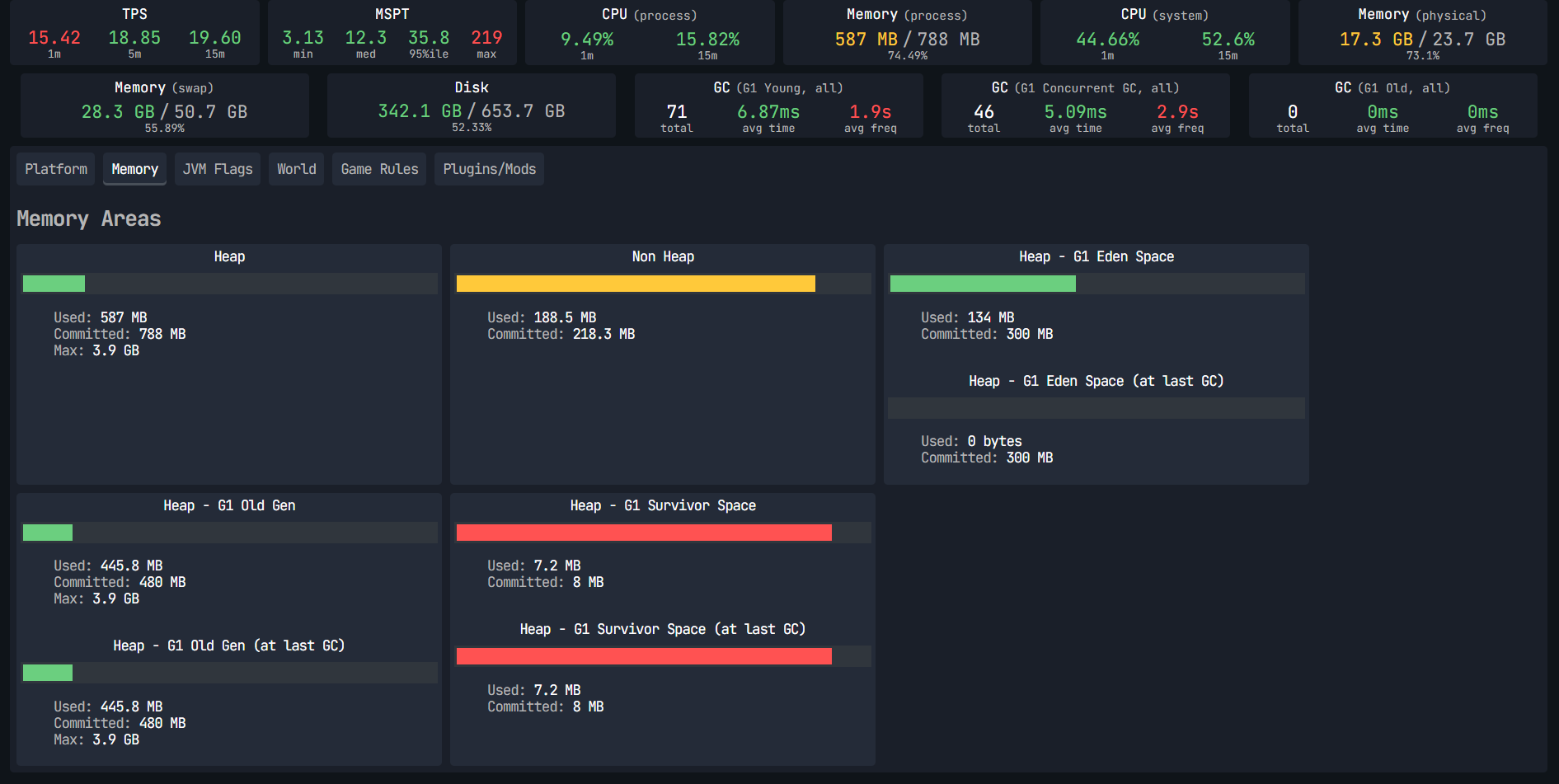 Without Mod Report Spark Without OptimizeMod
Versions
Files
Relations
Project Relations
More like this
Similar Mods
Suggestions use data such as tags, dependencies, dependents, descriptions, titles, and more to rank how much they overlap with this mod.
On ModDex
Community snapshot
By the numbers
Statistics
Want to reach Minecraft players?
We're looking for a server hosting partner to feature here and other parts of the site. Interested? Send us a message!
Get in touchGet it on
Available Platforms
On ModDex
Community snapshot
By the numbers
Statistics
Resources