Community listing page, reviews here may not be monitored by the author.
Pack Profiles

No reviews yet
Save, switch and manage profiles of enabled resource packs. Click a profile, toggle packs, apply.
Community voices
Reviews
No reviews yet. Be the first to review this project!
Get it on
Available Platforms
About
Project Details
For authors
Embed Badge
If you're the author of this project, you can embed a live badge anywhere that supports HTML or Markdown. It updates automatically whenever ratings change.
Use HTML for any page that supports it, or Markdown for README files and Markdown-based descriptions.
Identifiers
Platform IDs
Resources
External Links
About
Description
Packed Profiles
Profiles for your resource packs on Minecraft 1.20.1 (Fabric). Stop manually re-enabling the same packs every time — save your setups and switch with one click.
Features
- Click a profile to edit it — every available resource pack is shown as a toggle button, no more fiddling with the vanilla arrow buttons.
- Instant saving — toggling a pack updates the profile immediately.
- "Apply & Done" activates the profile's selection and reloads the packs.
- Create, delete and rename profiles from the profile screen.
- Profiles are stored as readable JSON in
config/packedprofiles/resourcepacks/. - A "Profiles" button is added to the top right of Options → Resource Packs.
Installation
- Install Fabric Loader 0.15.6 or newer and Fabric API for 1.20.1.
- Put the jar into your
modsfolder. - Open Options → Resource Packs and click "Profiles".
Usage
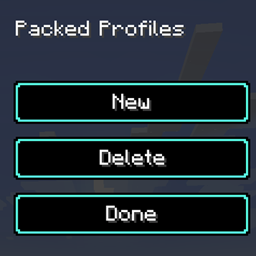
- New creates an empty profile and opens the editor — toggle the packs you want.
- Click a profile to edit it, or to change its name.
- Apply & Done switches to the profile's pack selection (packs are reloaded).
- Delete removes the last edited profile.
Notes
- Client-side only. Currently resource packs are supported; data packs are planned.
- Inspired by Packed Packs (MIT, fishstiz); this is a reduced-scope re-implementation for 1.20.1.
- Licensed under MIT. Source code: <DEIN-GITHUB-LINK>
Screenshots
Gallery
Versions
Files
Relations
Project Relations
More like this
Similar Mods
Suggestions use data such as tags, dependencies, dependents, descriptions, titles, and more to rank how much they overlap with this mod.
On ModDex
Community snapshot
By the numbers
Statistics
Want to reach Minecraft players?
We're looking for a server hosting partner to feature here and other parts of the site. Interested? Send us a message!
Get in touchGet it on
Available Platforms
On ModDex
Community snapshot
By the numbers
Statistics
Resources